
iOS 两个tableview的 瀑布流
iOS 两个tableview的 瀑布流
1. [代码]Objective-C
//
// DocViewController.m
// getrightbutton
//
// Created by 隋文涛 on 12-12-9.
// Copyright (c) 2012年 隋文涛. All rights reserved.
//
#import "DocViewController.h"
#define heightofimage(image) image.size.height*150.0/image.size.width
@interface DocViewController ()
{
NSMutableArray *arrdata;
NSMutableArray *arrdata1;
NSMutableArray *arrdata2;
NSMutableArray *arrdata1_1;
NSMutableArray *arrdata2_1;
float he1,he2;
}
@property (weak, nonatomic) IBOutlet UITableView *tableview01;
@property (weak, nonatomic) IBOutlet UITableView *tableview02;
@end
@implementation DocViewController
@synthesize tableview01,tableview02;
- (void)viewDidLoad
{
[super viewDidLoad];
// Do any additional setup after loading the view, typically from a nib.
[[NSNotificationCenter defaultCenter] addObserver:self selector:@selector(Backhome) name:@"Back" object:nil];
he1 = 0.0;
he2 = 0.0;
arrdata1 = [[NSMutableArray alloc] initWithCapacity:1];
arrdata2 = [[NSMutableArray alloc] initWithCapacity:1];
arrdata1_1 = [[NSMutableArray alloc] initWithCapacity:1];
arrdata2_1 = [[NSMutableArray alloc] initWithCapacity:1];
for (int i = 1; i < 11; i++) {
UIImage *image = [UIImage imageNamed:[NSString stringWithFormat:@"%d.jpeg",i]];
float hecu = image.size.height*150.0/image.size.width;
if (he2 >= he1) {
he1 = he1 + hecu;
NSArray *arr = [[NSArray alloc] initWithObjects:[NSString stringWithFormat:@"%d",i],[NSString stringWithFormat:@"%f",hecu], nil];
// [arrdata1_1 addObject:[NSString stringWithFormat:@"%d",i]];
// [arrdata1_1 addObject:[NSString stringWithFormat:@"%f",hecu]];
[arrdata1 addObject:arr];
}else{
he2 = he2 + hecu;
NSArray *arr = [[NSArray alloc] initWithObjects:[NSString stringWithFormat:@"%d",i],[NSString stringWithFormat:@"%f",hecu], nil];
[arrdata2 addObject:arr];
}
NSLog(@"%f(h1 = %f,,,,h2 = %f)",hecu,he1,he2);
}
tableview01.showsVerticalScrollIndicator = NO;
tableview02.showsVerticalScrollIndicator = NO;
NSLog(@"%@+++++++%@",arrdata1,arrdata2);
}
- (NSInteger)tableView:(UITableView *)tableView numberOfRowsInSection:(NSInteger)section{
// return 100;
if (tableView == tableview01) {
return [arrdata1 count];
}else{
return [arrdata2 count];
}
return 0;
}
- (UITableViewCell *)tableView:(UITableView *)tableView cellForRowAtIndexPath:(NSIndexPath *)indexPath{
NSInteger row = indexPath.row;
if (tableView == tableview01) {
// tableview02
// [tableview02 setContentOffset:tableview01.contentOffset];
static NSString *id1 = @"sd1";
UITableViewCell *cell = [tableView dequeueReusableCellWithIdentifier:id1];
if (cell == nil) {http://www.huiyi8.com/vi/
NSArray *nib = [[NSBundle mainBundle] loadNibNamed:@"CellView" owner:self options:nil];
if (nib > 0) {
cell = _ccell;
}
}
UIImage *image = [UIImage imageNamed:[NSString stringWithFormat:@"%d.jpeg",[[[arrdata1 objectAtIndex:row] objectAtIndex:0] integerValue]]];
UIImageView *imageview = (UIImageView *)[cell viewWithTag:101];
[imageview setImage:image];vi模版大全
CGRect rect = imageview.frame;
rect.size.height = [[[arrdata1 objectAtIndex:row] objectAtIndex:1] floatValue];
imageview.frame = rect;
return cell;
}else{
// [tableview01 setContentOffset:tableview02.contentOffset];
static NSString *id = @"sd";
UITableViewCell *cell = [tableView dequeueReusableCellWithIdentifier:id];
if (cell == nil) {
NSArray *nib = [[NSBundle mainBundle] loadNibNamed:@"CellView" owner:self options:nil];
if (nib > 0) {
cell = _ccell;
}
}
UIImage *image = [UIImage imageNamed:[NSString stringWithFormat:@"%d.jpeg",[[[arrdata2 objectAtIndex:row] objectAtIndex:0] integerValue]]];
UIImageView *imageview = (UIImageView *)[cell viewWithTag:101];
[imageview setImage:image];
CGRect rect = imageview.frame;
rect.size.height = [[[arrdata2 objectAtIndex:row] objectAtIndex:1] floatValue];
imageview.frame = rect;
return cell;
}
return nil;
}
- (float)tableView:(UITableView *)tableView heightForRowAtIndexPath:(NSIndexPath *)indexPath{
NSInteger row = indexPath.row;
if (tableView == tableview01) {
return [[[arrdata1 objectAtIndex:row] objectAtIndex:1] floatValue] +10;
}else{
return [[[arrdata2 objectAtIndex:row] objectAtIndex:1] floatValue] +10;
}
return 0.0;
}
- (void)tableView:(UITableView *)tableView didSelectRowAtIndexPath:(NSIndexPath *)indexPath{
DocwebViewController *controller = [[DocwebViewController alloc] init];
[self presentModalViewController:controller animated:YES];
}
- (void)Backhome{
[self dismissModalViewControllerAnimated:YES];
}
- (void)scrollViewDidScroll:(UIScrollView *)scrollView{
if (scrollView == tableview01) {
[tableview02 setContentOffset:tableview01.contentOffset];
}else{
[tableview01 setContentOffset:tableview02.contentOffset];
}
}
- (void)didReceiveMemoryWarning
{
[super didReceiveMemoryWarning];
// Dispose of any resources that can be recreated.
}
@end
效果图: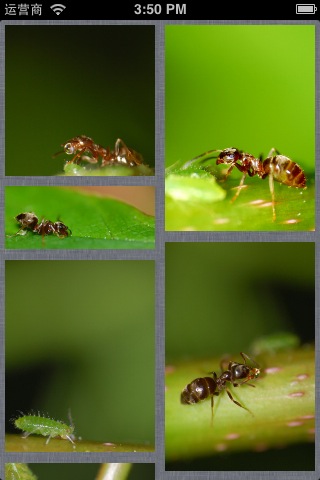
iOS 两个tableview的 瀑布流的更多相关文章
- iOS 使用两个tableview的瀑布流
代码 悦德财富:https://www.yuedecaifu.com 1 2 3 4 5 6 7 8 9 10 11 12 13 14 15 16 17 18 19 20 21 22 23 24 25 ...
- iOS教你轻松打造瀑布流Layout
前言 : 在写这篇文章之前, 先祝贺自己, 属于我的GitHub终于来了. 这也是我的GitHub的第一份代码, 以下文章的代码均可以在Demo clone或下载. 欢迎大家给予意见. 觉得写得不错的 ...
- iOS GZWaterfall任何形式的瀑布流
概述 使用UICollectionView可以布局各种各样的瀑布流,下面我写了几种不同布局的瀑布流样式 详细 代码下载:http://www.demodashi.com/demo/11018.html ...
- ios 两个 TableView 之间的联动, TableView 与 CollectionView 之间的联动
两个 TableView 之间的联动, TableView 与 CollectionView 之间的联动 这是一个创建于 359 天前的主题,其中的信息可能已经有所发展或是发生改变. [联动] :两个 ...
- iOS瀑布流实现(Swift)
这段时间突然想到一个很久之前用到的知识-瀑布流,本来想用一个简单的方法,发现自己走入了歧途,最终只能狠下心来重写UICollectionViewFlowLayout.下面我将用两种方法实现瀑布流,以及 ...
- IOS 瀑布流
本篇博客应该算的上CollectionView的高级应用了,从iOS开发之窥探UICollectionViewController(一)到今天的(五),可谓是由浅入深的窥探了一下UICollectio ...
- IOS 瀑布流UICollectionView实现
IOS 瀑布流UICollectionView实现 在实现瀑布流之前先来看看瀑布流的雏形(此方法的雏形 UICollectionView) 对于UICollectionView我们有几点注意事项 它和 ...
- iOS横向瀑布流的封装
前段时间, 做一个羡慕, 需要使用到瀑布流! 说道瀑布流, 或许大家都不陌生, 瀑布流的实现也有很多种! 从scrollView 到 tableView 书写的瀑布流, 然后再到2012年iOS6 苹 ...
- iOS 瀑布流之栅格布局
代码地址如下:http://www.demodashi.com/demo/14760.html 一 .效果预览 二.确定需求 由下面的需求示意图可知模块的最小单位是正方形,边长是屏幕宽除去边距间隔后的 ...
随机推荐
- 用Java做一个跳一跳辅助
Java跳一跳辅助 首先..让大家看下效果: 由于是闲着没事写的.也懒得看OpenCV的API了. 要用到的工具如下: adb+jdk 把adb添加到环境变量里就行.很简单. 全部代码如下.就这么多. ...
- 1004 Counting Leaves
A family hierarchy is usually presented by a pedigree tree. Your job is to count those family member ...
- U-boot for Tiny4412
我的开发板型号: Tiny4412ADK + S700 4GB Flash 1. Build uboot a) 安装好toolchain (arm-linux-gcc-4.5.1-v6-vfp-201 ...
- 使用和不使用navigationbar分别处理显示和返回页面
不使用navigationbar的情况下 AnnounceViewController *pushView = [[AnnounceViewController alloc]init];pushVie ...
- Android 震动 和 停止 代码
<span style="font-size:18px;">MainActivity.java</span> package com.Utils.vibra ...
- 2.【nuxt起步】-初始化创建nuxt项目
1. 脚手架初始化: vue init nuxt-community/starter-template NuxtMyms 2.输入项目相关信息 3.切换到项目目录下 安装依赖 Cd nuxtmyms ...
- ItelliJ IDEA开发工具使用—创建一个web项目
转 http://blog.csdn.net/wangyang1354/article/details/50452806 最近想用IDEA编辑器开发,但是平时都用MyEclipse和eclipse ...
- python(33)- 模块与包
一 模块 1 什么是模块? 一个模块就是一个包含了python定义和声明的文件,文件名就是模块名字加上.py的后缀. 2 为何要使用模块? 如果你退出python解释器然后重新进入,那么你之前定义的函 ...
- initializer_list、初始化列表、列表初始化
什么是列表初始化 使用一个花括号来初始化变量,表现形式如下: std::vector<int>a{1,2,3,4,5}; 或者 std::vector<int>a = {1,2 ...
- caffe学习--Lenet5的应用和原理、实现----ubuntu16.04.2+caffe+mnist+train+test
Lenet5的应用和原理.实现 ----------------------------------------------ubuntu16.04.2------------------------- ...