
spring-springMVC-MyBatis整合配置文件
web.xml
<?xml version="1.0" encoding="UTF-8"?>

<web-app xmlns="http://xmlns.jcp.org/xml/ns/javaee"

         xmlns:xsi="http://www.w3.org/2001/XMLSchema-instance"

         xsi:schemaLocation="http://xmlns.jcp.org/xml/ns/javaee http://xmlns.jcp.org/xml/ns/javaee/web-app_3_1.xsd"

         version="3.1">

    <welcome-file-list>

        <welcome-file>/index.jsp</welcome-file>

    </welcome-file-list>

    <error-page>

        <error-code>404</error-code>

        <location>/WEB-INF/jsp/error.jsp</location>

    </error-page>

    <!-- spring 容器和监听器 -->

    <context-param>

        <param-name>contextConfigLocation</param-name>

        <param-value>classpath:applicationContext.xml</param-value>

    </context-param>

    <listener>

        <listener-class>org.springframework.web.context.ContextLoaderListener</listener-class>

    </listener>

    <!-- spring mvc 前端控制器 -->

    <servlet>

        <servlet-name>springmvc</servlet-name>

        <servlet-class>org.springframework.web.servlet.DispatcherServlet</servlet-class>

        <!--  ContextConfigLocation配置加载配置文件、适配器、处理映射 -->

        <init-param>

            <param-name>contextConfigLocation</param-name>

            <param-value>classpath:application_spring_mvc.xml</param-value>

        </init-param>

        <load-on-startup>1</load-on-startup>

    </servlet>

    <servlet-mapping>

        <servlet-name>springmvc</servlet-name>

        <url-pattern>/</url-pattern>

    </servlet-mapping>

    <!--  character filter  -->

    <filter>

        <filter-name>CharacterEncodingFilter</filter-name>

        <filter-class>org.springframework.web.filter.CharacterEncodingFilter</filter-class>

        <init-param>

            <param-name>encoding</param-name>

            <param-value>UTF-8</param-value>

        </init-param>

    </filter>

    <filter-mapping>

        <filter-name>CharacterEncodingFilter</filter-name>

        <url-pattern>/*</url-pattern>

    </filter-mapping>

</web-app>
apllication-spring-mvc.xml
<?xml version="1.0" encoding="UTF-8"?>

<beans

        xmlns="http://www.springframework.org/schema/beans"

        xmlns:xsi="http://www.w3.org/2001/XMLSchema-instance"

        xmlns:tx="http://www.springframework.org/schema/tx"

        xmlns:context="http://www.springframework.org/schema/context"

        xmlns:mvc="http://www.springframework.org/schema/mvc"

        xsi:schemaLocation="http://www.springframework.org/schema/beans

        http://www.springframework.org/schema/beans/spring-beans-4.0.xsd

        http://www.springframework.org/schema/tx

        http://www.springframework.org/schema/tx/spring-tx-4.0.xsd

        http://www.springframework.org/schema/context

        http://www.springframework.org/schema/context/spring-context-4.0.xsd

        http://www.springframework.org/schema/mvc

        http://www.springframework.org/schema/mvc/spring-mvc-4.0.xsd">

    <context:component-scan base-package="com.nyan"/>

    <mvc:annotation-driven/>

    <!-- 視圖解析器-->

    <bean class="org.springframework.web.servlet.view.InternalResourceViewResolver">

        <property name="prefix" value="/WEB-INF/jsp/"/>

        <property name="suffix" value=".jsp"/>

        <property name="viewClass" value="org.springframework.web.servlet.view.JstlView"/>

    </bean>

    <!-- 对静态资源的访问 -->

    <mvc:resources mapping="/images/**" location="/WEB-INF/images" cache-period="31556926"/>

    <!--配置文件上传数据解析器

    <bean id="multipartResolver" class="org.springframework.web.multipart.MultipartResolver">

        <property name="maxUploadSize">

            <value>924880</value>

        </property>

    </bean>

    -->

</beans>
applicationContext-*.xml
applicationContext-*.xml包括三个配置文件,分别对应数据层控制、业务逻辑service控制和事务的控制。
也可以同时配置在applicationContext.xml文件上
applicationContext-dao.xml
<?xml version="1.0" encoding="UTF-8"?>

<beans

        xmlns="http://www.springframework.org/schema/beans"

        xmlns:xsi="http://www.w3.org/2001/XMLSchema-instance"

        xmlns:tx="http://www.springframework.org/schema/tx"

        xmlns:context="http://www.springframework.org/schema/context"

        xmlns:mvc="http://www.springframework.org/schema/mvc"

        xsi:schemaLocation="http://www.springframework.org/schema/beans

        http://www.springframework.org/schema/beans/spring-beans-4.0.xsd

        http://www.springframework.org/schema/tx

        http://www.springframework.org/schema/tx/spring-tx-4.0.xsd

        http://www.springframework.org/schema/context

        http://www.springframework.org/schema/context/spring-context-4.0.xsd

        http://www.springframework.org/schema/mvc

        http://www.springframework.org/schema/mvc/spring-mvc-4.0.xsd">

    <!--  加载数据库资源文件dataSource -->

    <context:property-placeholder location="jdbc.properties"/>

    <bean id="dataSource" class="org.apache.commons.dbcp.BasicDataSource" destroy-method="close">

        <property name="driverClassName" value="${jdbc.driver}"/>

        <property name="url" value="${jdbc.url}"/>

        <property name="username" value="${jdbc.username}"/>

        <property name="password" value="${jdbc.password}"/>

    </bean>

    <!--  Spring&&MyBatis(持久层框架)整合sessionFactory -->

    <bean id="sqlSessionFactory" class="org.mybatis.spring.SqlSessionFactoryBean">

        <property name="dataSource" ref="dataSource"/>

        <property name="configLocation" value="classpath:SqlMapConfig.xml"/>

    </bean>

    <!-- 配置mapper扫描器Mapping files -->

    <bean class="org.mybatis.spring.mapper.MapperScannerConfigurer">

        <!-- 扫描包路径,如果需要扫描多个包中间用半角逗号隔开 -->

        <property name="basePackage" value="com.nyan.domain"/>

        <property name="sqlSessionFactoryBeanName" value="sqlSessionFactory"/>

    </bean>

</beans>
applicationContext-service.xml
定义controller层、Service层、dao层类
applicationContext-transation.xml
<?xml version="1.0" encoding="UTF-8"?>

<beans

        xmlns="http://www.springframework.org/schema/beans"

        xmlns:xsi="http://www.w3.org/2001/XMLSchema-instance"

        xmlns:tx="http://www.springframework.org/schema/tx"

        xmlns:context="http://www.springframework.org/schema/context"

        xmlns:mvc="http://www.springframework.org/schema/mvc"

        xmlns:aop="http://www.springframework.org/schema/aop"

        xsi:schemaLocation="http://www.springframework.org/schema/beans

        http://www.springframework.org/schema/beans/spring-beans-4.0.xsd

        http://www.springframework.org/schema/tx

        http://www.springframework.org/schema/tx/spring-tx-4.0.xsd

        http://www.springframework.org/schema/context

        http://www.springframework.org/schema/context/spring-context-4.0.xsd

        http://www.springframework.org/schema/mvc

        http://www.springframework.org/schema/mvc/spring-mvc-4.0.xsd

        http://www.springframework.org/schema/aop

        http://www.springframework.org/schema/mvc/spring-aop-4.0.xsd">

    <!-- 事务管理器  -->

    <bean id="transationManger" class="org.springframework.jdbc.datasource.DataSourceTransactionManager">

        <property name="dataSource" ref="dataSource"/>

    </bean>

    <!-- 配置通知,事务控制  -->

    <tx:advice id="txAdvice" transaction-manager="transationManger">

        <!--  传播行为 -->

        <tx:attributes>

            <tx:method name="save*" propagation="REQUIRED"/>

            <tx:method name="insert*" propagation="REQUIRED"/>

            <tx:method name="update*" propagation="REQUIRED"/>

            <tx:method name="delete*" propagation="REQUIRED"/>

            <tx:method name="find*" propagation="SUPPORTS" read-only="true"/>

            <tx:method name="select*" propagation="SUPPORTS" read-only="true"/>

        </tx:attributes>

    </tx:advice>

    <!-- AOP 切面

    <aop:config>

        <aop:advisor advice-ref="txAdvice" pointcut="execution(com.nyan.service.impl.*.*(..))"/>

    </aop:config>

    -->

</beans>
MyBaties配置
<?xml version="1.0" encoding="UTF-8"?>

<!DOCTYPE configuration

        PUBLIC "-//mybatis.org//DTD Config 3.0//EN"

        "http://mybatis.org/dtd/mybatis-3-config.dtd">

<configuration>

    <!-- 将数据库连接数据抽取到属性文件中方便测试 -->

    <!-- <properties resource="/WEB-INF/classes/jdbc.properties"></properties> -->

    <!-- 别名的定义 -->

    <typeAliases>

        <!-- 批量定义别名 ,指定包名,自动扫描包中的类,别名即为类名,首字母大小写无所谓-->

        <package name="com.nyan.domain"/>

    </typeAliases>

    <!-- 数据库连接用数据库连接池 -->

    <mappers>

        <!-- 通过扫描包的方式来进行批量加载映射文件 -->

        <package name="com.nyan.domain"/>

    </mappers>

</configuration>
ORM映射文件:
<?xml version="1.0" encoding="UTF-8" ?>

<!DOCTYPE mapper PUBLIC "-//mybatis.org//DTD Mapper 3.0//EN" "http://mybatis.org/dtd/mybatis-3-mapper.dtd" >

<mapper namespace="/" >

</mapper>
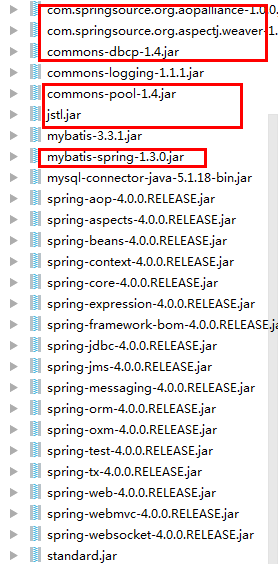
spring-springMVC-MyBatis整合配置文件的更多相关文章
- Spring+springmvc+Mybatis整合案例 annotation版(myeclipse)详细版
Spring+springmvc+Mybatis整合案例 Version:annotation版 文档结构图: 从底层开始做起: 01.配置web.xml文件 <?xml version=&qu ...
- Spring+springmvc+Mybatis整合案例 xml配置版(myeclipse)详细版
Spring+springmvc+Mybatis整合案例 Version:xml版(myeclipse) 文档结构图: 从底层开始做起: 01.配置web.xml文件 <?xml version ...
- 框架篇:Spring+SpringMVC+Mybatis整合开发
前言: 前面我已搭建过ssh框架(http://www.cnblogs.com/xrog/p/6359706.html),然而mybatis表示不服啊. Mybatis:"我抗议!" ...
- ssm之spring+springmvc+mybatis整合初探
1.基本目录如下 2.首先是向lib中加入相应的jar包 3.然后在web.xml中加入配置,使spring和springmvc配置文件起作用. <?xml version="1. ...
- Spring+SpringMVC+MyBatis整合基础篇(三)搭建步骤
作者:13GitHub:https://github.com/ZHENFENG13版权声明:本文为原创文章,未经允许不得转载. 框架介绍 Spring SpringMVC MyBatis easyUI ...
- Spring+SpringMVC+MyBatis整合(山东数漫江湖)
Spring+SpringMVC+MyBatis(SSM)在我们项目中是经常用到的,这篇文章主要讲解使用Intellij IDEA整合SSM,具体环境如下: 数据库:MySQL5.7 依赖管理:Mav ...
- Spring+SpringMVC+MyBatis整合教程
1.基本概念 1.1.Spring Spring是一个开源框架,Spring是于2003 年兴起的一个轻量级的Java 开发框架,由Rod Johnson 在其著作Expert One-On-One ...
- Spring+SpringMvc+Mybatis整合注意事项
1.web.xml代码如下 <?xml version="1.0" encoding="UTF-8"?> <web-app xmlns:xsi ...
- Spring+SpringMVC+MyBatis整合进阶篇(四)RESTful实战(前端代码修改)
前言 前文<RESTful API实战笔记(接口设计及Java后端实现)>中介绍了RESTful中后端开发的实现,主要是接口地址修改和返回数据的格式及规范的修改,本文则简单介绍一下,RES ...
- Spring+SpringMVC+MyBatis整合(easyUI、AdminLte3)
实战篇(付费教程) 花了几天的时间,做了一个网站小 Demo,最终效果也与此网站类似.以下是这次实战项目的 Demo 演示. 登录页: 富文本编辑页: 图片上传: 退出登录: SSM 搭建精美实用的管 ...
随机推荐
- 本地虚拟机LNMP环境安装
首先上传源码包到linux中(本人上传到根目录中),随意上传能找到即可 一.配置YUM源(如果已经配好就不许要重新配置) 挂载光驱要挂载到/mnt下 Mount /dev/cdrom /mnt ...
- ajax Form提交与Payload提交
后端处理前端提交的数据时,既可以使用Form解析,也可以使用JSON解析Payload字符串. Form解析可以直接从Request对象中获取请求参数,这样对象转换与处理相对容易,但在大片JSON数据 ...
- Unity 游戏对象消失 enable,destroy与active的区别
gameObject.SetActive(false):是否在场景中停用该物体,停用后Hierarchy窗口呈灰色,用Find函数也找不到.如果该物体有子物体,要用SetActive Recursir ...
- ios __block typeof 编译错误解决
type specifier missing a parameter list without types is only allowed in a function definition 解决: 工 ...
- linux 常用的17个性能指标
1.Average load:Average number of processes simultaneously in Ready state during the last minute. 上 ...
- double,long double及各变量数组内存开销
IEEE754浮点数的表示方法.C语言里对float类型数据的表示范围为-3.4*10^38-+3.4*10^38.double为-1.7*10^-308~1.7*10^308,long double ...
- 九度OJ 1209:最小邮票数 (遍历)
时间限制:1 秒 内存限制:32 兆 特殊判题:否 提交:2252 解决:741 题目描述: 有若干张邮票,要求从中选取最少的邮票张数凑成一个给定的总值. 如,有1分,3分,3分,3分,4分五 ...
- MySQL 练习 答案
表关系 二.操作表 1.自行创建测试数据 2.查询“生物”课程比“物理”课程成绩高的所有学生的学号: 3.查询平均成绩大于60分的同学的学号和平均成绩: 4.查询所有同学的学号.姓名.选课数.总成绩: ...
- sublime 快捷键,左菜单乱码
sublime 快捷键安装 packagecontrol https://packagecontrol.io/installation#st3 import urllib.request,os,has ...
- mysql 大数据 查询方面的测试
---方法1: 直接使用数据库提供的SQL语句---语句样式: MySQL中,可用如下方法: SELECT * FROM 表名称 LIMIT M,N---适应场景: 适用于数据量较少的情况(元组百/千 ...