
asp.net mvc上传头像加剪裁功能介绍
正好项目用到上传+剪裁功能,发上来便于以后使用。
我不能告诉你们其实是从博客园扒的前台代码,哈哈。
前端是jquery+fineuploader+jquery.Jcrop
后台是asp.net mvc 4
核心的js调用代码是crop.js和helper文件夹下的ImgHandler.cs
效果图
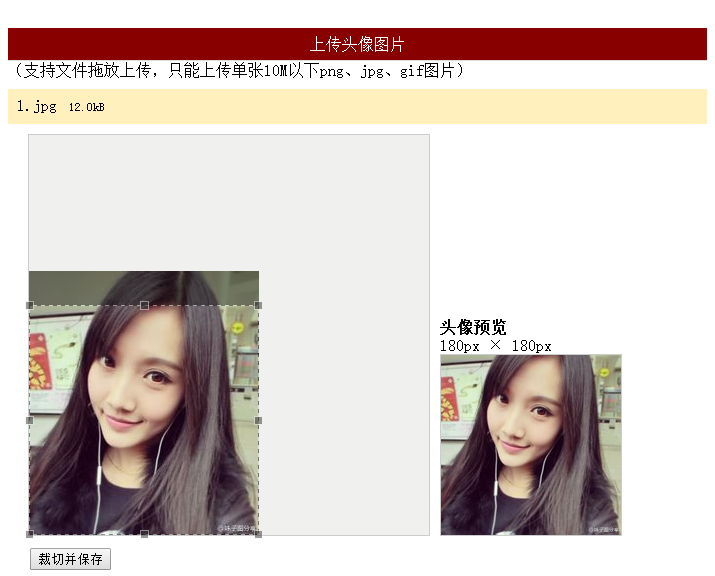
前台代码
<link href="~/Content/fineuploader.css" rel="stylesheet" />

<link href="~/Content/jquery.Jcrop.min.css" rel="stylesheet" />

<link href="~/Content/crop.min.css" rel="stylesheet" />

<script src="~/Scripts/jquery-1.8.2.min.js"></script>

<script src="~/Scripts/jquery.fineuploader-3.1.min.js"></script>

<script src="~/Scripts/jquery.Jcrop.min.js"></script>

<script src="~/Scripts/crop.js"></script>

<div id="jquery-wrapped-fine-uploader"></div>

    <div id="message"></div>

    <div id="crop_wrap">

        <div id="crop_holder">

            <div id="crop_area" class="border">

                <img id="crop_image" alt="" src="" class="preview-image" style="display: none" />

            </div>

            <div id="preview_area">

                <div id="preview_title">当前头像</div>

                <div id="preview_large_text" class="preview-text">180px × 180px</div>

                <div id="preview_large_wrap" class="border">

                    <img id="preview_large"  alt="" src="@ViewBag.Path" class="preview-image" style=""/></div>

            </div>

        </div>

        <div id="crop_operation" style="display: none;">

            <form id="form_crop" action="/home/index" method="post">

                <input type="hidden" name="x" id="x">

                <input type="hidden" name="y" id="y">

                <input type="hidden" name="w" id="w">

                <input type="hidden" name="h" id="h">

                <input type="hidden" name="imgsrc" id="imgsrc">

                <input id="crop_operation_submit" type="submit" value="裁切并保存" /><span id="crop_operation_msg" style="display: none" class="green"></span>

            </form>

        </div>

        <div id="croped_message" class="green"></div>

    </div>
后台代码
        public ActionResult Index()

        {

            return View();

        }

        /// <summary>

        /// 保存缩略图

        /// </summary>

        /// <param name="form"></param>

        /// <returns></returns>

        [HttpPost]

        public ActionResult Index(FormCollection form)

        {

            int x = Convert.ToInt32(form["x"]);

            int y = Convert.ToInt32(form["y"]);

            int w = Convert.ToInt32(form["w"]);

            int h = Convert.ToInt32(form["h"]);

            string imgsrc = form["imgsrc"].Substring(0, form["imgsrc"].LastIndexOf("?"));

            string path = ImgHandler.CutAvatar(imgsrc, x, y, w, h);

            //保存Path


            ViewBag.Path = path;

            return View();

        }

        /// <summary>

        /// 上传头像

        /// </summary>

        /// <param name="qqfile"></param>

        /// <returns></returns>

        [HttpPost]

        public ActionResult ProcessUpload(string qqfile)

        {

            try

            {

                string uploadFolder = "/Upload/original/" + DateTime.Now.ToString("yyyyMM") + "/";

                string imgName = DateTime.Now.ToString("ddHHmmssff");

                string imgType = qqfile.Substring(qqfile.LastIndexOf("."));

                string uploadPath = "";

                uploadPath = Server.MapPath(uploadFolder);

                if (!Directory.Exists(uploadPath))

                {

                    Directory.CreateDirectory(uploadPath);

                }

                using (var inputStream = Request.InputStream)

                {

                    using (var flieStream = new FileStream(uploadPath + imgName + imgType, FileMode.Create))

                    {

                        inputStream.CopyTo(flieStream);

                    }

                }

                return Json(new { success = true, message = uploadFolder + imgName + imgType });

            }

            catch (Exception e)

            {

                return Json(new { fail = true, message = e.Message });

            }

        }
asp.net mvc上传头像加剪裁功能介绍的更多相关文章
- asp.net mvc上传头像加剪裁功能
原文:asp.net mvc上传头像加剪裁功能 正好项目用到上传+剪裁功能,发上来便于以后使用. 我不能告诉你们其实是从博客园扒的前台代码,哈哈. 前端是jquery+fineuploader+jqu ...
- mvc上传头像加剪裁功能
asp.net mvc上传头像加剪裁功能 正好项目用到上传+剪裁功能,发上来便于以后使用. 我不能告诉你们其实是从博客园扒的前台代码,哈哈. 前端是jquery+fineuploader+jquery ...
- .net mvc 上传头像
我用的是mvc5 开发环境vs2017 [仅供参考] [视图代码] <div > <img src="@path" alt="@att.Count&q ...
- asp.net MVC 上传文件 System.Web.HttpException: 超过了最大请求长度
APS.NET MVC 上传文件出现 System.Web.HttpException: 超过了最大请求长度 这个问题 原因是 默认最大上传文件大小为4096,而我提交的文件太大了. 解决方案:修改 ...
- ASP.NET MVC上传文件----uploadify的使用
课程设计需要实现上传文件模块,本来ASP.NET是有内置的控件,但是ASP.NET MVC没有,所以就有两种方法:自定义和采用第三方插件.由于时间的关系,故采用第三方插件:uploadify. upl ...
- ASP.NET MVC上传文件
最近参考网络资料,学习了ASP.NET MVC如何上传文件.最基本的,没有用jQuery等技术. 1.定义Model public class TestModel { [Displ ...
- ASP.NET MVC 上传大文件时404
前一段时间会员的上传组件改用FLASH的swfupload来上传,既能很友好的显示上传进度,又能完全满足大文件的上传. 后来服务器升级到windows 2008,改为IIS7后,上传文件一旦超过30M ...
- asp.net mvc 上传文件
转至:http://www.cnblogs.com/fonour/p/ajaxFileUpload.html 0.下载 http://files.cnblogs.com/files/fonour/aj ...
- Asp.net mvc上传多张图片后台存储
前台页面通过<file name="img">标签数组上传图片,后台根据Request.Files["img"]来接收前台上传的图片. 1 Syst ...
随机推荐
- Windows Phone-框架结构和启动过程
上一篇文章介绍了Windows Phone的开发环境和一个简单的Windows Phone程序的演示和结构,这一篇文章要深入一点,介绍Windows Phone的框架结构和程序启动的过程. 一 Win ...
- shell修改文件名(一)
假如文件名是:time_filename.txt 改成filename_time.txt.例如20111111_me.txt改成me_201111111.txt要如何修改? #! /bin/sh fo ...
- select poll使用
select poll使用 2.1. 怎样管理多个连接?“我想同一时候监控一个以上的文件描写叙述符(fd)/连接(connection)/流(stream),应该怎么办?” 使用 select ...
- Spring – ${} is not working in @Value--转载
原文:http://www.mkyong.com/spring/spring-is-not-working-in-value/ By mkyong | February 4, 2015 | Last ...
- 关于SWT中的Label类和Text类
Label类的继承关系图 Label是SWT中最简单的界面组件,给出他的一个实例如下: public class Label1 { public static void main(String[] a ...
- 关于Git的暂存区这个概念的理解.
Git中的暂存区成为stage或者是index.可以理解成一个"提交任务".Git暂存区是Git最成功的设计之一,但是也是最难理解的. 暂存区是一个介于工作区和版本库的中间状态.当 ...
- 关于JSP异常的处理
jsp中错误处理页面-isErrorPage="true" 举例说明:mustBeError.jsp <%@ page contentType="text/html ...
- 关于async和await的一些误区实例详解
转载自 http://www.jb51.net/article/53399.htm 这篇文章主要介绍了关于async和await的一些误区实例详解,有助于更加深入的理解C#程序设计,需要的朋友可以参考 ...
- TortoiseGit记住用户名和密码
1.将项目从服务器Clone下来 2.然后在Repository上右键,打开设置 3.选择凭证 4.为当前Repository创建一个凭证,然后确定退出即可 5.然后再pull下,会直接提示你输入密码 ...
- linux+asp.net core+nginx四层负载均衡
Linux Disibutaion:Ubuntu 16.04.1 LTS Web Server:Nginx.Kestrel 关于如何在linux中部署asp.net core我这里不再详细介绍,可以参 ...