原文链接:http://www.aspsnippets.com/Green/Articles/ASPNet-Report-Viewer-control-Tutorial-with-example.aspx
Database
Here I am making use of Microsoft’s Northwind Database. You can download it from here
 
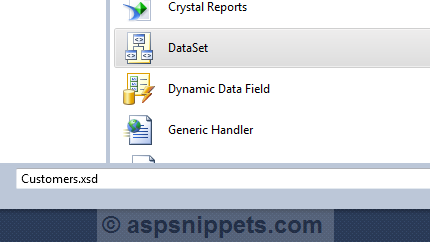
1. Add Typed DataSet to the ASP.Net Website
Since I am using disconnected Crystal Reports we will make use of Typed DataSet to populate the Crystal Reports with data from database.


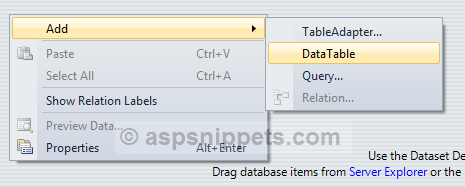
2. Adding DataTable to the Typed DataSet
Our next step would be to add a DataTable to the Type DataSet.


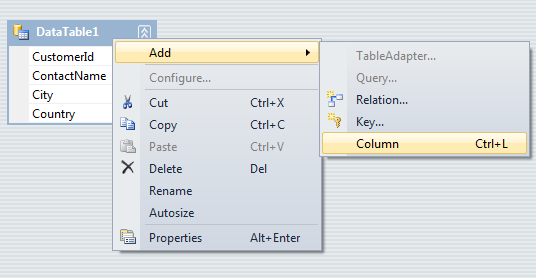
3. Adding Columns or fields to DataTable
In the DataTable we need to specify the column names that we want to display in the Crystal Report.
 
Note: The Column Names of the DataTable must exactly match with the actual Database Table column names.

By default all the columns are of String Data Type but you can also change the data type as per your need.
 
4. Adding the RDLC Report
Using the Add New Item option in Visual Studio you need to add new RDLC Report. I am making use of Report Wizard so that it make easier to configure the Report.

 
5. Choose the DataSet
Now we need to choose the DataSet that will act as the DataSource for the RDLC Report. Thus we need to select the Customers DataSet that we have created earlier.

 
6. Choose the Fields to be displayed in the RDLC Report
Next we need to choose the fields we need to display, we need to simply drag and drop each fields into the Values Box as shown in the screenshot below

 
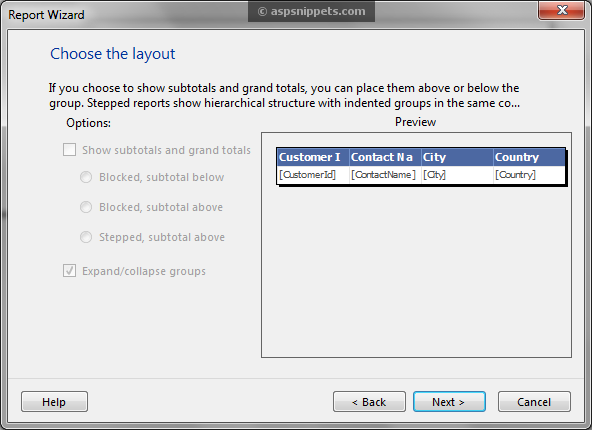
7. Choose the Layout
The next dialog will ask us to choose the layout, we can simply skip it as of now as this is a simple Report with no calculations involved.

 
8. Choose the Style
Finally we need to choose the style, i.e. color and theme of the Report.

 
Once you press Finish button on the above step, the Report is ready and is displayed in the Visual Studio as shown below

 
9. Adding Report Viewer to the page
In order to display the Report we will need to add ReportViewer control to the page from the Toolbox. The ReportViewer controls requires ScriptManager on the page.

 
Once you add the ReportViewer control to the page, your page must look as below
<%@ Register Assembly="Microsoft.ReportViewer.WebForms, Version=10.0.0.0, Culture=neutral, PublicKeyToken=b03f5f7f11d50a3a"
    Namespace="Microsoft.Reporting.WebForms" TagPrefix="rsweb" %>
 
<!DOCTYPE html PUBLIC "-//W3C//DTD XHTML 1.0 Transitional//EN" "http://www.w3.org/TR/xhtml1/DTD/xhtml1-transitional.dtd">
<html xmlns="http://www.w3.org/1999/xhtml">
<head runat="server">
    <title></title>
</head>
<body>
    <form id="form1" runat="server">
    <asp:ScriptManager ID="ScriptManager1" runat="server">
    </asp:ScriptManager>
    <rsweb:ReportViewer ID="ReportViewer1" runat="server" Width="600">
    </rsweb:ReportViewer>
    </form>
</body>
</html>
 
 
10. Populating the RDLC Report from Database
Below is the code to populate the RDLC Report from database. The first statement notifies the ReportViewer control that the Report is of type Local Report.
Then the path of the Report is supplied to the ReportViewer, after that the Customers DataSet is populated with records from the Customers Table is set as ReportSource to the Report.
C#
Namespaces
using System.Data;
using System.Configuration;
using System.Data.SqlClient;
using Microsoft.Reporting.WebForms;
 
protected void Page_Load(object sender, EventArgs e)
{
    if (!IsPostBack)
    {
        ReportViewer1.ProcessingMode = ProcessingMode.Local;
        ReportViewer1.LocalReport.ReportPath = Server.MapPath("~/Report.rdlc");
        Customers dsCustomers = GetData("select top 20 * from customers");
        ReportDataSource datasource = new ReportDataSource("Customers", dsCustomers.Tables[0]);
        ReportViewer1.LocalReport.DataSources.Clear();
        ReportViewer1.LocalReport.DataSources.Add(datasource);
    }
}
 
private Customers GetData(string query)
{
    string conString = ConfigurationManager.ConnectionStrings["constr"].ConnectionString;
    SqlCommand cmd = new SqlCommand(query);
    using (SqlConnection con = new SqlConnection(conString))
    {
        using (SqlDataAdapter sda = new SqlDataAdapter())
        {
            cmd.Connection = con;
 
            sda.SelectCommand = cmd;
            using (Customers dsCustomers = new Customers())
            {
                sda.Fill(dsCustomers, "DataTable1");
                return dsCustomers;
            }
        }
    }
}
 
VB.Net
Namespaces
Imports System.Data
Imports System.Configuration
Imports System.Data.SqlClient
Imports Microsoft.Reporting.WebForms
 
Protected Sub Page_Load(sender As Object, e As EventArgs) Handles Me.Load
    If Not IsPostBack Then
        ReportViewer1.ProcessingMode = ProcessingMode.Local
        ReportViewer1.LocalReport.ReportPath = Server.MapPath("~/Report.rdlc")
        Dim dsCustomers As Customers = GetData("select top 20 * from customers")
        Dim datasource As New ReportDataSource("Customers", dsCustomers.Tables(0))
        ReportViewer1.LocalReport.DataSources.Clear()
        ReportViewer1.LocalReport.DataSources.Add(datasource)
    End If
End Sub
 
Private Function GetData(query As String) As Customers
    Dim conString As String = ConfigurationManager.ConnectionStrings("constr").ConnectionString
    Dim cmd As New SqlCommand(query)
    Using con As New SqlConnection(conString)
        Using sda As New SqlDataAdapter()
            cmd.Connection = con
 
            sda.SelectCommand = cmd
            Using dsCustomers As New Customers()
                sda.Fill(dsCustomers, "DataTable1")
                Return dsCustomers
            End Using
        End Using
    End Using
End Function


Demo
 
Downloads


[转] Asp.net Report Viewer 简单实例的更多相关文章

  1. Asp.Net读取服务器EXE文件的方法!(超简单实例)

    Asp.Net读取服务器EXE文件的方法!(超简单实例) Process process = new Process(); process.StartInfo.FileName = "d:\ ...

  2. 简单实例一步一步帮你搞清楚MVC3中的路由以及区域

    我们都知道MVC 3 程序的所有请求都是先经过路由解析然后分配到特定的Controller 以及 Action 中的,为什么这些知识讲完了Controller Action Model 后再讲呢?这个 ...

  3. resteasy简单实例

    1.建一个maven web项目 新建一个maven项目,next,第一个框不要勾选 选择maven-archetype-webapp,建一个web项目 键入项目组织id与项目id 一般此时搭建的只是 ...

  4. SignalR代理对象异常:Uncaught TypeError: Cannot read property 'client' of undefined 推出的结论 SignalR 简单示例 通过三个DEMO学会SignalR的三种实现方式 SignalR推送框架两个项目永久连接通讯使用 SignalR 集线器简单实例2 用SignalR创建实时永久长连接异步网络应用程序

    SignalR代理对象异常:Uncaught TypeError: Cannot read property 'client' of undefined 推出的结论   异常汇总:http://www ...

  5. 关于操作 ASP.NET Web API的实例

    WCF的野心造成了它的庞大复杂,HTTP的单纯造就了它的简单优美.为了实现分布式Web应用,我们不得不将两者凑合在一起 —— WCF服务以HTTP绑定宿主于IIS. 于是有了让人晕头转向的配置.让人郁 ...

  6. Web Services调用存储过程简单实例

    转:http://www.cnblogs.com/jasenkin/archive/2010/03/02/1676634.html Web Services 主要利用 HTTP 和 SOAP 协议使商 ...

  7. Hibernate(二)__简单实例入门

    首先我们进一步理解什么是对象关系映射模型? 它将对数据库中数据的处理转化为对对象的处理.如下图所示: 入门简单实例: hiberante 可以用在 j2se 项目,也可以用在 j2ee (web项目中 ...

  8. 最新 Eclipse IDE下的Spring框架配置及简单实例

    前段时间开始着手学习Spring框架,又是买书又是看视频找教程的,可是鲜有介绍如何配置Spring+Eclipse的方法,现在将我的成功经验分享给大家. 本文的一些源代码来源于码农教程:http:// ...

  9. 修改js confirm alert 提示框文字的简单实例

    修改js confirm alert 提示框文字的简单实例: <!DOCTYPE html> <html> <head lang="en"> & ...

随机推荐

  1. eclipse 下找不到或无法加载主类的解决办法[转]

    转自:http://blog.sina.com.cn/s/blog_7ebc46500101gtff.html 有时候 Eclipse 会发神经,好端端的 project 就这么编译不了了,连 Hel ...

  2. Sublime key bindings使用

    开启vi mode后,可以使用很多的VI快捷方式,所以我的sublime已经不是单纯的st了,st的VI模式不完全支持所有的快捷键.我们来看一段官网的key bindings示例: { "k ...

  3. Codeforces Bubble Cup 8 - Finals [Online Mirror] B. Bribes lca

    题目链接: http://codeforces.com/contest/575/problem/B 题解: 把链u,v拆成u,lca(u,v)和v,lca(u,v)(v,lca(u,v)是倒过来的). ...

  4. 【C++基础】构造函数

    说说你对构造函数的理解? 构造函数:对象创建时,利用特定的值构造对象(不是构造类),将对象初始化(保证数据成员有初始值),是类的一个public 函数 ①   与类同名 ②   无返回值 ③   声明 ...

  5. MATERIALIZED VIEW

    Oracle的实体化视图提供了强大的功能,可以用在不同的环境中,实体化视图和表一样可以直接进行查询.实体化视图可以基于分区表,实体化视图本身也可以分区. 主要用于预先计算并保存表连接或聚集等耗时较多的 ...

  6. 源代码管理工具TFS2013安装与使用【转载】

    本文来源:博客园:http://www.cnblogs.com/suxinlcq/p/3956930.html 作者:suxin 最近公司新开发一个项目要用微软的TFS2013进行项目的源代码管理,以 ...

  7. GOOGLE搜索秘籍完全公开

    一,GOOGLE简介 Google(www.google.com)是一个搜索引擎,由两个斯坦福大学博士生Larry Page与Sergey Brin于1998年9月发明,Google Inc. 于19 ...

  8. POJ2503Babelfish

    http://poj.org/problem?id=2503 这个题一开始是想用字典树,发现太麻烦..... #include<cstdio> #include<cstring> ...

  9. Java 连接SQLite数据库

    下载jar包: http://www.sqlite.com.cn/Upfiles/source/sqlitejdbc-v033-nested.tgz public class TestSQLite { ...

  10. 李洪强iOS开发之keychain的使用

    通常情况下,我们用NSUserDefaults存储数据信息,但是对于一些私密信息,比如密码.证书等等,就需要使用更为安全的keychain了.keychain里保存的信息不会因App被删除而丢失,在用 ...