
Android实例-调用系统APP(XE10+小米2)
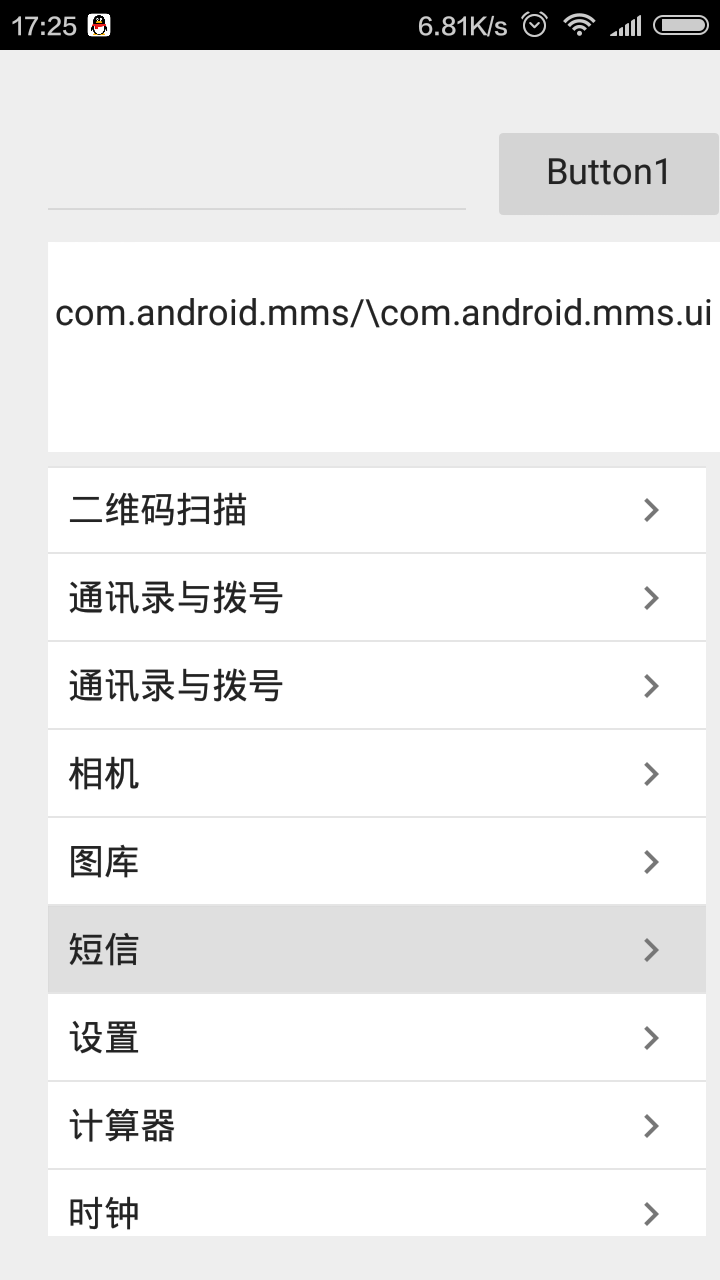
相关资料:
1.群号383675978
2.http://blog.sina.com.cn/s/blog_44fa172f0101rmjt.html
3.PS:ListView1.ItemAppearanceObjects.ItemObjects.Text.Font.Size:=20; 设置字体大小,属性面板也可以设置。代码设置时需要看一下手机支持的大小是多少。
实例源码:
 unit Unit1;

 interface

 uses

   System.SysUtils, System.Types, System.UITypes, System.Classes, System.Variants,

   FMX.Types, FMX.Controls, FMX.Forms, FMX.Graphics, FMX.Dialogs,

   FMX.Controls.Presentation, FMX.Edit,

   Androidapi.JNI.JavaTypes,//JString使用

   Androidapi.JNI.GraphicsContentViewText,//JIntent使用

   FMX.Surfaces,//TBitmapSurface使用

   Androidapi.Helpers,//SharedActivity使用

   System.IOUtils,//TPath使用

   Androidapi.JNIBridge,//ILocalObject使用

   FMX.Helpers.Android,//JBitmapToSurface使用

   System.Generics.Collections,//TList使用

   FMX.ListView.Types, FMX.ListView.Appearances,

   FMX.ListView.Adapters.Base, FMX.ListView, FMX.StdCtrls, FMX.ScrollBox,

   FMX.Memo;

 type

   TForm1 = class(TForm)

     Edit1: TEdit;

     ListView1: TListView;

     Button1: TButton;

     Memo1: TMemo;

     procedure Edit1Change(Sender: TObject);

     procedure Edit1Typing(Sender: TObject);

     procedure Button1Click(Sender: TObject);

     procedure FormCreate(Sender: TObject);

     procedure ListView1ItemClick(const Sender: TObject;

       const AItem: TListViewItem);

   private

     { Private declarations }

     MainList : TList<JActivityInfo>;

     dictAppIcons : TDictionary<Integer, TBitmap>;

     //过虑方法

     procedure FilterListView(AListView: TListView; AFilterName: string);

     //打开APP方法

     procedure OpenApp(PackageName, AppName : JString);

     //获取安装的APP

     function GetActivityAppList: JList;

     function GetOrSetCashAppIcon(appInfo: JApplicationInfo): TBitmap;

     procedure LoadActivityInfoList(var List: TList<JActivityInfo>);

     procedure LoadDictonaryAppIcons(index: Integer; appInfo: JApplicationInfo;

       var dictonaryAppIcons: TDictionary<Integer, TBitmap>);

     procedure LoadListView(listView: TListView; AppList: TList<JActivityInfo>;

       dictonaryAppIcons: TDictionary<Integer, TBitmap>);

     procedure LoadListViewBitmap(listView: TListView; AppList: TList<JActivityInfo>;

       var dictonaryAppIcons: TDictionary<Integer, TBitmap>);

   public

     { Public declarations }

   end;

 const

     DEFAUT_INDEX: Integer = -;

 var

   Form1: TForm1;

 implementation

 {$R *.fmx}

 {$R *.NmXhdpiPh.fmx ANDROID}

 { TForm1 }

 //调用打开APP

 procedure TForm1.Button1Click(Sender: TObject);

 begin

   OpenApp(StringToJString('com.androidillusion.videocamillusionpro'),

     StringToJString('com.androidillusion.videocamillusionpro.VideoillusionActivity'));

 end;

 //改变事件

 procedure TForm1.Edit1Change(Sender: TObject);

 begin

   if Edit1.Text = '' then

    FilterListView(Self.ListView1, Edit1.Text.Trim);

 end;

 //输入事件

 procedure TForm1.Edit1Typing(Sender: TObject);

 begin

   FilterListView(Self.ListView1, Edit1.Text.Trim);

 end;

 //过虑方法

 procedure TForm1.FilterListView(AListView: TListView; AFilterName: string);

 var

   i: integer;

   item: TListViewItem;

   lower: string;

 begin

   if not Assigned(AListView) then

     Exit;

   lower := AFilterName.ToLower.Trim;

   if lower.IsEmpty then

   begin

     if Assigned(AListView.Items.Filter) then

       AListView.Items.Filter := nil;

   end

   else

   begin

     AListView.ItemIndex := DEFAUT_INDEX;

     AListView.Items.Filter :=

     function(sFilter: string): Boolean

     begin

       Result := (lower.IsEmpty) or sFilter.ToLower.Contains(lower);

     end;

   end;

 end;

 procedure TForm1.FormCreate(Sender: TObject);

 begin

   LoadActivityInfoList(MainList);

   LoadListView(Self.ListView1, MainList, self.dictAppIcons);

   LoadListViewBitmap(Self.ListView1, MainList, self.dictAppIcons);

 end;

 //获取安装的APP

 function TForm1.GetActivityAppList: JList;

 var

   tempList: JList;

   Intent: JIntent;

   Manager: JPackageManager;

 begin

   Intent := TJIntent.Create;

   Intent.SetAction(TJIntent.JavaClass.ACTION_MAIN);

   Intent.AddCategory(TJIntent.JavaClass.CATEGORY_LAUNCHER);

   Manager := SharedActivity.GetPackageManager;

   tempList := nil;

   tempList := Manager.QueryIntentActivities(Intent, );

   Result := tempList;

 end;

 function TForm1.GetOrSetCashAppIcon(appInfo: JApplicationInfo): TBitmap;

 var

   Drawable: JDrawable;

   Bitmap: JBitmap;

   itemBitmap: TBitmap;

   Surface: TBitmapSurface;

   saveDir: string;

   pngFileName: string;

   SaveParams: TBitmapCodecSaveParams;

 begin

   if not Assigned(appInfo) then

   begin

     Result := itemBitmap;

     Exit;

   end;

   saveDir := TPath.GetCachePath;

   pngFileName := saveDir + '/' + JStringToString(appInfo.packageName) + '.png';

   itemBitmap := TBitmap.Create;

   if not TDirectory.Exists(saveDir, False) then

     TDirectory.CreateDirectory(saveDir);

   if TFile.Exists(pngFileName) then

     itemBitmap.LoadFromFile(pngFileName)

   else

   begin

     Drawable := appInfo.loadIcon(SharedActivity.getPackageManager);

     Bitmap := TJBitmapDrawable.Wrap((Drawable as ILocalObject).GetObjectID).getBitmap;

     Surface := TBitmapSurface.Create;

     try

       if JBitmapToSurface(Bitmap, Surface) then

       begin

         itemBitmap.Assign(Surface);

         SaveParams.Quality := ;

         itemBitmap.SaveToFile(pngFileName, @SaveParams);

       end;

     finally

       Surface.Free;

     end;

   end;

   Result := itemBitmap;

 end;

 procedure TForm1.ListView1ItemClick(const Sender: TObject;

   const AItem: TListViewItem);

 begin

   if not Assigned(MainList) then

     Exit;

   OpenApp(MainList.Items[AItem.Tag].applicationInfo.packageName,

     MainList.Items[AItem.Tag].name);

   Memo1.Lines.Add(JStringToString(MainList.Items[AItem.Tag].applicationInfo.packageName) + '/\' + JStringToString(MainList.Items[AItem.Tag].name));

 end;

 procedure TForm1.LoadActivityInfoList(var List: TList<JActivityInfo>);

 var

   tempList: JList;

   i: Integer;

   ResolveInfo: JResolveInfo;

   Info: JActivityInfo;

   AppInfo: JApplicationInfo;

 begin

   if not Assigned(List) then

     List := TList<JActivityInfo>.Create;

   List.Clear;

   tempList := Self.GetActivityAppList;

   for i :=  to tempList.size -  do

   begin

     ResolveInfo := TJResolveInfo.Wrap((tempList.get(i) as ILocalObject).GetObjectID);

     Info := TJActivityInfo.Wrap((ResolveInfo.activityInfo as ILocalObject).GetObjectID);

     AppInfo := TJApplicationInfo.Wrap((Info.applicationInfo as ILocalObject).GetObjectID);

     List.Add(Info);

   end;

 end;

 procedure TForm1.LoadDictonaryAppIcons(index: Integer;

   appInfo: JApplicationInfo;

   var dictonaryAppIcons: TDictionary<Integer, TBitmap>);

 var

   itemBitmap : TBitmap;

 begin

   if not Assigned(dictonaryAppIcons) then

     dictonaryAppIcons := TDictionary<Integer, TBitmap>.Create;

   if not dictonaryAppIcons.ContainsKey(index) then

   begin

     itemBitmap := GetOrSetCashAppIcon(appInfo);

     dictonaryAppIcons.AddOrSetValue(index, itemBitmap);

   end;

 end;

 procedure TForm1.LoadListView(listView: TListView;

   AppList: TList<JActivityInfo>;

   dictonaryAppIcons: TDictionary<Integer, TBitmap>);

 var

   tempItem : TListViewItem;

   tempString, tempSubString, tempSubString2 : string;

   i : integer;

 begin

   if (not Assigned(listView)) or (not Assigned(AppList)) then

     Exit;

   listView.Items.Clear;

   listView.BeginUpdate;

   for I :=  to AppList.Count -  do

   begin

     tempString := JStringToString(AppList.Items[i].applicationInfo.loadLabel(SharedActivity.getPackageManager).toString);

     tempItem := listView.Items.Add;

     tempItem.Text := tempString;

     tempItem.Tag := i;

   end;

   listView.EndUpdate;

 end;

 procedure TForm1.LoadListViewBitmap(listView: TListView;

   AppList: TList<JActivityInfo>;

   var dictonaryAppIcons: TDictionary<Integer, TBitmap>);

 var

   i: integer;

 begin

   if (not Assigned(listView)) or (not Assigned(AppList)) then

     Exit;

   listView.BeginUpdate;

   for I :=  to listView.ItemCount -  do

   begin

     listView.Items[i].BeginUpdate;

     LoadDictonaryAppIcons(i, AppList.Items[listView.Items[i].Tag].applicationInfo, dictonaryAppIcons);

     if Assigned(dictonaryAppIcons) and (dictonaryAppIcons.ContainsKey(i)) then

         listView.Items[i].Bitmap := dictonaryAppIcons.Items[i];

     listView.Items[i].EndUpdate;

     Application.ProcessMessages;

   end;

   listView.EndUpdate;

 end;

 //打开APP方法

 procedure TForm1.OpenApp(PackageName, AppName: JString);

 var

   Intent : JIntent;

   NativeComponent : JComponentName;

 begin

   Intent := TJIntent.Create;

   Intent.setAction(TJIntent.JavaClass.ACTION_MAIN);

   Intent.addCategory(TJIntent.JavaClass.CATEGORY_LAUNCHER);

   NativeComponent := TJComponentName.JavaClass.init(PackageName, AppName);

   Intent.addFlags(TJIntent.JavaClass.FLAG_ACTIVITY_NEW_TASK or TJIntent.JavaClass.FLAG_ACTIVITY_RESET_TASK_IF_NEEDED);

   Intent.setComponent(NativeComponent);

   SharedActivity.startActivity(Intent);

 end;

 end.
Android实例-调用系统APP(XE10+小米2)的更多相关文章
- Android实例-获取程序版本号(XE10+小米2)
相关资料: 383675978群号 实例源码: unit Unit1; interface uses System.SysUtils, System.Types, System.UITypes, Sy ...
- Java乔晓松-android中调用系统拍照功能并显示拍照的图片
android中调用系统拍照功能并显示拍照的图片 如果你是拍照完,利用onActivityResult获取data数据,把data数据转换成Bitmap数据,这样获取到的图片,是拍照的照片的缩略图 代 ...
- Android Studio搭建系统App开发环境
一.前言 在Android的体系中开发普通app使用Android Studio这一利器会非常的方便.但是开发系统app可能就会有些吃力,不过经过一些配置仍然会 很简单.我们知道系统app因为涉及到一 ...
- Android中调用系统所装的软件打开文件(转)
Android中调用系统所装的软件打开文件(转) 在应用中如何调用系统所装的软件打开一个文件,这是我们经常碰到的问题,下面是我所用到的一种方法,和大家一起分享一下! 这个是打开文件的一个方法: /** ...
- android intent调用系统camera
利用android的camera通常有两种方式:利用intent调用系统的camera,或者结合surfaceview实现自己定制的camera.先分别对这两种方法说明如下: 一.使用系统自配的cam ...
- android中调用系统的发送短信、发送邮件、打电话功能
1 调用发送短信功能: Uri smsToUri = Uri.parse("smsto:"); Intent sendIntent = new Intent(Intent.ACT ...
- [Android Pro] 调用系统相机和图库,裁剪图片
private static final int PHOTO_REQUEST_TAKEPHOTO = 1;// 拍照 private static final int PHOTO_REQUEST_GA ...
- Android实例-调用GOOGLE的TTS实现文字转语音(XE7+小米2)(XE10.1+小米5)
相关资料: 注意:在手机上必须选安装文字转语音引擎“google Text To Speech”地址:http://www.shouji56.com/soft/GoogleWenZiZhuanYuYi ...
- Android实例-调用GOOGLE的TTS实现文字转语音(XE7+小米2)(无图)
注意:在手机上必须选安装文字转语音引擎“google Text To Speech”地址:http://www.shouji56.com/soft/GoogleWenZiZhuanYuYinYinQi ...
随机推荐
- Fucking "pkg-config not found"
If you got pkg-config not found error in gnu auto tools then, you must install the related librarys ...
- java中的clone
.clone 要实现cloneable接口: .深度clone和浅度clone .对象.clone() 1. Clone&Copy 假设现在有一个Employee对象,Employe ...
- UVa 11752 (素数筛选 快速幂) The Super Powers
首先有个关键性的结论就是一个数的合数幂就是超级幂. 最小的合数是4,所以枚举底数的上限是pow(2^64, 1/4) = 2^16 = 65536 对于底数base,指数的上限就是ceil(64*lo ...
- UVa 12661 (单源最短路) Funny Car Racing
题意: 有一个赛车跑道,可以看做一个加权有向图.每个跑道(有向边)还有一个特点就是,会周期性地打开a秒,然后关闭b秒.只有在赛车进入一直到出来,该跑道一直处于打开状态,赛车才能通过. 开始时所有跑道处 ...
- RTP头结构解析
RTP包头前12个固定字节机构图: 0 1 2 3 0 1 2 3 4 5 6 7 8 9 ...
- 【转】NSDictionary以及NSMutableDictionary的用法
原文网址:http://my.oschina.net/u/1245365/blog/177736 摘要 Foundation中的字典是由 键—值 对组成的数据集合.通过key(键),查找对应的valu ...
- j2ee的13个标准
1:JDBC(Java Database Connectivity)JDBC API为访问不同数据库提供了统一的路径,向ODBC一样,JDBC开发者屏蔽了一些细节问题,另外,JDBC对数据库的访问也具 ...
- Oracle 课程一之Oracle体系结构
课程目标 •理解ORACLE数据库体系架构—内存结构和进程 •理解SQL在数据库中的运作流程 •理解UNDO&REDO原理 •理解commit原理 1.Oracle数据库概述 •数据库:物 ...
- K2 学习笔记
转:http://www.cnblogs.com/kaixuanpisces/category/149223.html k2 简介 工作流介绍 k2流程设计简介 K2流程设计详细版(图文)一 K2流程 ...
- Andorid-Fragment生命周期
官网帮助文档链接: http://developer.android.com/guide/components/fragments.html Fragment的生命周期: Fragment与Activ ...