
SpringBoot 整合 MyBatis-Plus 入门体验
一、前言
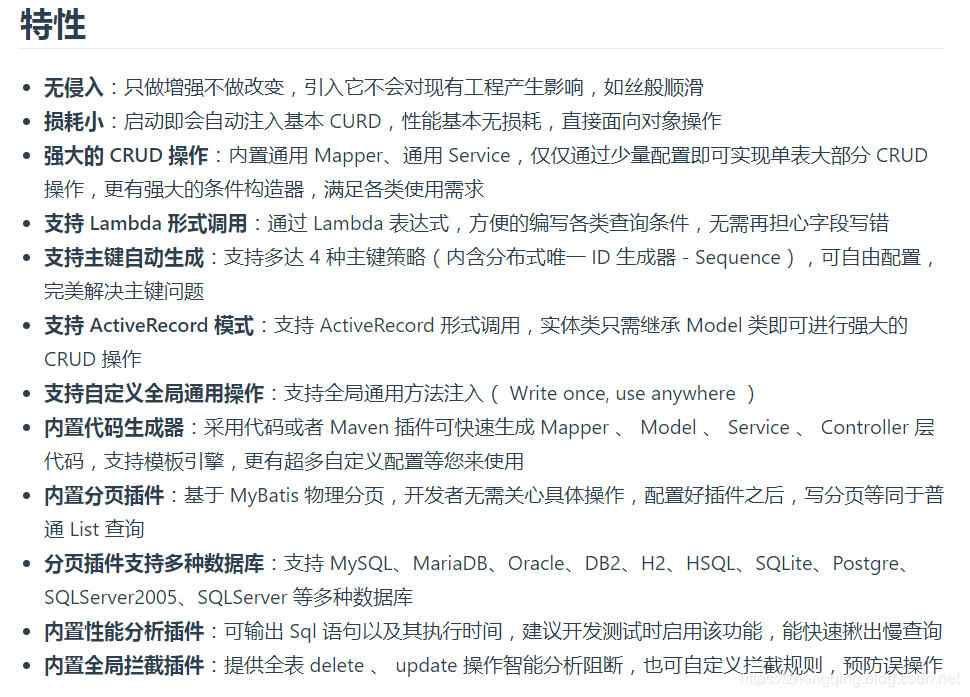
本文小编将基于 SpringBoot 整合 MyBatis-Plus , MyBatis-Plus 是一个 MyBatis 的增强工具,在 MyBatis 的基础上做增强并且不改变原本功能 ~
二、SpringBoot整合MyBatis-Plus
基本环境
- spring-boot 2.1.8
- mybatis-plus 2.2.0
- mysql 5.7.24
- maven项目
1、pom.xml中引入MyBatis-Plus相关依赖
下面直接贴出小编的整个文件内容以作参考,避免因为部分细节缺失导致错误
<?xml version="1.0" encoding="UTF-8"?>

<project xmlns="http://maven.apache.org/POM/4.0.0" xmlns:xsi="http://www.w3.org/2001/XMLSchema-instance"

         xsi:schemaLocation="http://maven.apache.org/POM/4.0.0 https://maven.apache.org/xsd/maven-4.0.0.xsd">

    <modelVersion>4.0.0</modelVersion>

    <parent>

        <groupId>org.springframework.boot</groupId>

        <artifactId>spring-boot-starter-parent</artifactId>

        <version>2.1.8.RELEASE</version>

        <relativePath/> <!-- lookup parent from repository -->

    </parent>

    <groupId>com.zhengqing</groupId>

    <artifactId>demo</artifactId>

    <version>0.0.1-SNAPSHOT</version>

    <name>demo</name>

    <description>Demo project for Spring Boot</description>

    <properties>

        <java.version>1.8</java.version>

        <mybatis-plus-boot-starter.version>2.2.0</mybatis-plus-boot-starter.version>

        <mysql.version>5.1.40</mysql.version>

        <commons-lang3.version>3.6</commons-lang3.version>

        <hutool-all.version>4.6.2</hutool-all.version>

    </properties>

    <dependencies>

        <dependency>

            <groupId>org.springframework.boot</groupId>

            <artifactId>spring-boot-starter-web</artifactId>

        </dependency>

        <dependency>

            <groupId>org.springframework.boot</groupId>

            <artifactId>spring-boot-starter-test</artifactId>

            <scope>test</scope>

        </dependency>

        <!-- mybatis-plus begin =================================== -->

        <dependency>

            <groupId>org.springframework.boot</groupId>

            <artifactId>spring-boot-starter-jdbc</artifactId>

        </dependency>

        <dependency>

            <groupId>com.baomidou</groupId>

            <artifactId>mybatis-plus-boot-starter</artifactId>

            <version>${mybatis-plus-boot-starter.version}</version>

        </dependency>

        <!-- mybatis-plus end -->

        <!-- ========================= 数据库相关 ========================== -->

        <dependency>

            <groupId>mysql</groupId>

            <artifactId>mysql-connector-java</artifactId>

            <version>${mysql.version}</version>

        </dependency>

        <!-- 阿里数据库连接池 -->

        <dependency>

            <groupId>com.alibaba</groupId>

            <artifactId>druid</artifactId>

            <version>1.0.18</version>

        </dependency>

        <!-- ========================= 常用库依赖 ========================== -->

        <!-- lombok插件 -->

        <dependency>

            <groupId>org.projectlombok</groupId>

            <artifactId>lombok</artifactId>

            <optional>true</optional>

        </dependency>

        <!-- Hutool工具类 -->

        <dependency>

            <groupId>cn.hutool</groupId>

            <artifactId>hutool-all</artifactId>

            <version>${hutool-all.version}</version>

        </dependency>

        <!-- StringUtils工具类 -->

        <dependency>

            <groupId>org.apache.commons</groupId>

            <artifactId>commons-lang3</artifactId>

            <version>${commons-lang3.version}</version>

        </dependency>

    </dependencies>

    <build>

        <!-- 注:maven默认是不编译,因此加上如下resources才会生产对应的xml文件 目的:解决mybatis映射关系不对应问题  start =============== -->

        <resources>

            <resource>

                <directory>src/main/java</directory>

                <includes>

                    <include>**/*.xml</include>

                </includes>

                <filtering>false</filtering>

            </resource>

            <resource>

                <directory>src/main/resources</directory>

            </resource>

        </resources>

        <testResources>

            <testResource>

                <directory>src/main/java</directory>

                <includes>

                    <include>**/*.xml</include>

                </includes>

                <filtering>false</filtering>

            </testResource>

        </testResources>

        <!-- 注:maven默认是不编译,因此加上如下resources才会生产对应的xml文件 目的:解决mybatis映射关系不对应问题  end =============== -->

        <plugins>

            <plugin>

                <groupId>org.springframework.boot</groupId>

                <artifactId>spring-boot-maven-plugin</artifactId>

            </plugin>

        </plugins>

    </build>

</project>
2、MyBatis-Plus配置类
这里主要配置分页插件 和 @MapperScan注解扫描 Mapper 文件夹
@EnableTransactionManagement

@Configuration

@MapperScan("com.zhengqing.demo.modules.**.mapper*") // 扫描 Mapper 文件夹 【注:根据自己的项目结构配置】

public class MybatisPlusConfig {

    /**

     * mybatis-plus分页插件<br>

     * 文档:https://mp.baomidou.com/guide/page.html <br>

     */

    @Bean

    public PaginationInterceptor paginationInterceptor() {

        return new PaginationInterceptor();

    }

}
3、application.yml中配置数据库以及mybatis-plus相关配置
温馨小提示:注意修改自己的数据库连接配置信息哦~
# 配置端口

server:

  port: 8080

  servlet:

    #    context-path: /api

    application-display-name: demo

spring:

    application:

        name: demo

    profiles:

      active: dev

    # 配置数据源

    datasource:

      url: jdbc:mysql://127.0.0.1:3306/demo?allowMultiQueries=true&useUnicode=true&characterEncoding=UTF8&zeroDateTimeBehavior=convertToNull&useSSL=false # MySQL在高版本需要指明是否进行SSL连接 解决则加上 &useSSL=false

      name: demo

      username: root

      password: root

      # 使用druid数据源

      type: com.alibaba.druid.pool.DruidDataSource

      driver-class-name: com.mysql.jdbc.Driver

      filters: stat

      maxActive: 20

      initialSize: 1

      maxWait: 60000

      minIdle: 1

      timeBetweenEvictionRunsMillis: 60000

      minEvictableIdleTimeMillis: 300000

      validationQuery: select 'x'

      testWhileIdle: true

      testOnBorrow: false

      testOnReturn: false

      poolPreparedStatements: true

      maxOpenPreparedStatements: 20

management:

  security:

    enabled: false

# mybatis-plus相关配置

mybatis-plus:

  # xml扫描,多个目录用逗号或者分号分隔(告诉 Mapper 所对应的 XML 文件位置)

  mapper-locations: classpath:**/*Mapper.xml

  # 以下配置均有默认值,可以不设置

  global-config:

    #主键类型  0:"数据库ID自增", 1:"用户输入ID",2:"全局唯一ID (数字类型唯一ID)", 3:"全局唯一ID UUID";

    id-type: 0

    #字段策略 0:"忽略判断",1:"非 NULL 判断"),2:"非空判断"

    field-strategy: 2

    #驼峰下划线转换

    db-column-underline: true

    #刷新mapper 调试神器

    refresh-mapper: false

    #数据库大写下划线转换

    #capital-mode: true

    #序列接口实现类配置

    #key-generator: com.baomidou.springboot.xxx

    #逻辑删除配置

    #logic-delete-value: 0 # 逻辑已删除值(默认为 1)

    #logic-not-delete-value: 1 # 逻辑未删除值(默认为 0)

    #自定义填充策略接口实现

#    meta-object-handler: com.zhengqing.config.MyMetaObjectHandler

    #自定义SQL注入器

    #sql-injector: com.baomidou.springboot.xxx

  configuration:

    # 是否开启自动驼峰命名规则映射:从数据库列名到Java属性驼峰命名的类似映射

    map-underscore-to-camel-case: true

    cache-enabled: false

    # 如果查询结果中包含空值的列,则 MyBatis 在映射的时候,不会映射这个字段

#    call-setters-on-nulls: true

    # 这个配置会将执行的sql打印出来,在开发或测试的时候可以用

#    log-impl: org.apache.ibatis.logging.stdout.StdOutImpl

    # 解决oracle更新数据为null时无法转换报错,mysql不会出现此情况

    jdbc-type-for-null: 'null'
三、模拟业务代码 - 对用户信息表做CRUD
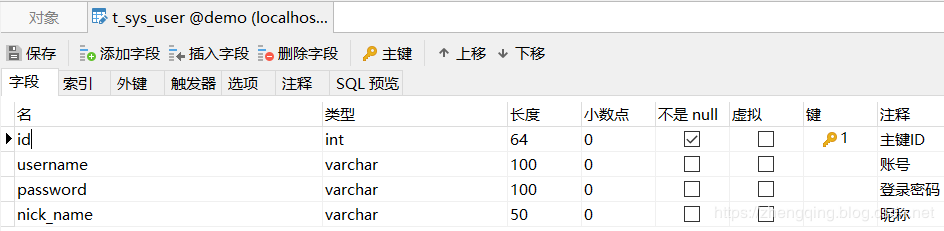
1、数据库新建t_sys_user用户表
2、编写实体类
温馨小提示 : 实体类继承MyBatis-Plus的
Model类 +Mapper类继承MyBatis-Plus的BaseMapper类 -> 可支持ActiveRecord动态语法调用
@Data

@TableName("t_sys_user")

public class User extends Model<User> {

    private static final long serialVersionUID = 1L;

    /**

     * 主键ID

     */

	@TableId(value="id", type= IdType.AUTO)

	private Integer id;

    /**

     * 账号

     */

	@TableField("username")

	private String username;

    /**

     * 登录密码

     */

	@TableField("password")

	private String password;

    /**

     * 昵称

     */

	@TableField("nick_name")

	private String nickName;

	@Override

	protected Serializable pkVal() {

		return this.id;

	}

}
3、编写Mapper类
public interface UserMapper extends BaseMapper<User> { }
四、测试CRUD
温馨小提示:以下CRUD均采用 ActiveRecord 动态语法
@RunWith(SpringRunner.class)

@SpringBootTest

public class ApplicationTests {

    /**

     * 新增数据

     */

    @Test

    public void testAdd() throws Exception{

        User entity = new User();

        entity.setUsername("admin");

        entity.setPassword("123456");

        entity.setNickName("管理员");

        entity.insert();

    }

    /**

     * 更新数据

     */

    @Test

    public void testUpdate() throws Exception{

        User entity = new User();

        entity.setId(1);

        entity.setUsername("test");

        entity.setPassword("123456");

        entity.setNickName("测试号");

        entity.updateById();

    }

    /**

     * 删除数据

     */

    @Test

    public void testDelete() throws Exception{

        User entity = new User();

        entity.deleteById(1);

    }

    /**

     * 查询指定id数据

     */

    @Test

    public void testSelectById() throws Exception{

        User entity = new User();

        User user = entity.selectById(1);

        System.out.println(user);

    }

    /**

     * 查询所有数据

     */

    @Test

    public void testSelectAll() throws Exception{

        User entity = new User();

        List list = entity.selectList(null);

        System.out.println(list);

    }

    /**

     * 查询所有数据 - 分页

     */

    @Test

    public void testSelectAllPage() throws Exception{

        User entity = new User();

        Page<User> page = entity.selectPage(new Page<User>(1, 10), null);

        System.out.println(page);

    }

}
五、原生MyBatis方式
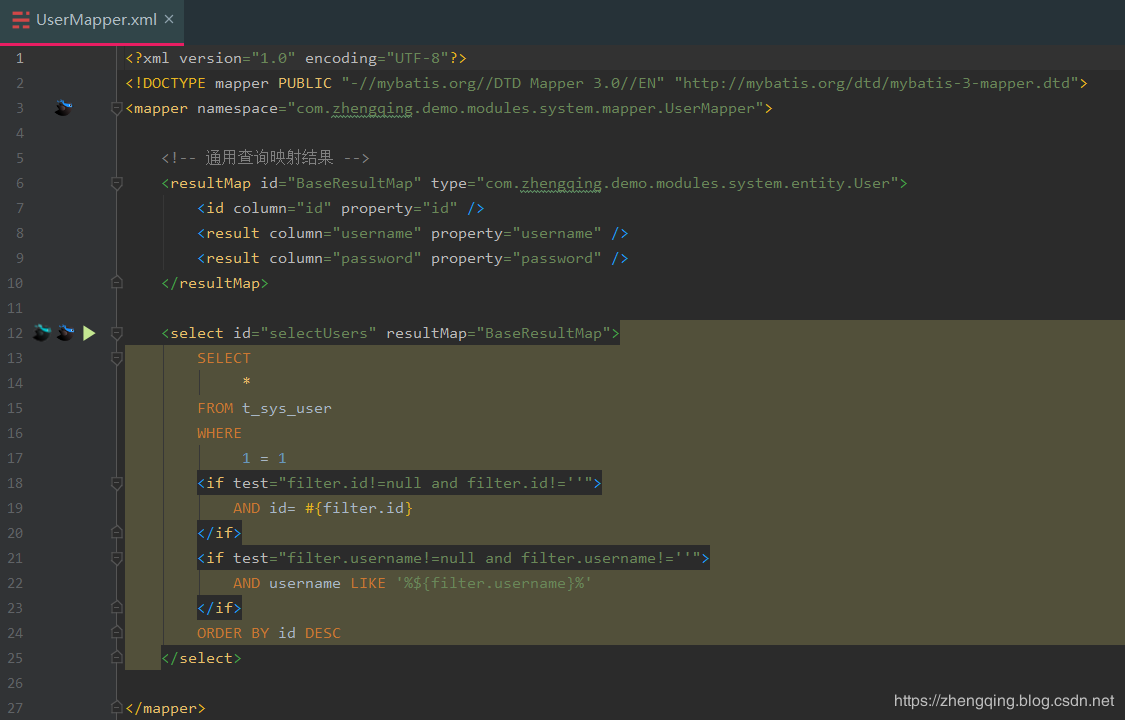
这个案例就放文末demo源码吧,不多说,也就是自己写sql语句处理对应业务
六、总结
- 引入相关依赖
- MyBatis-Plus核心配置 - 扫包、别名、分页插件等
- 编写业务代码测试
总体来说相对简单,关于MyBatis-Plus更多的语法和功能可参考MyBatis-Plus官网文档
https://mp.baomidou.com/guide/crud-interface.html#mapper-crud-%E6%8E%A5%E5%8F%A3
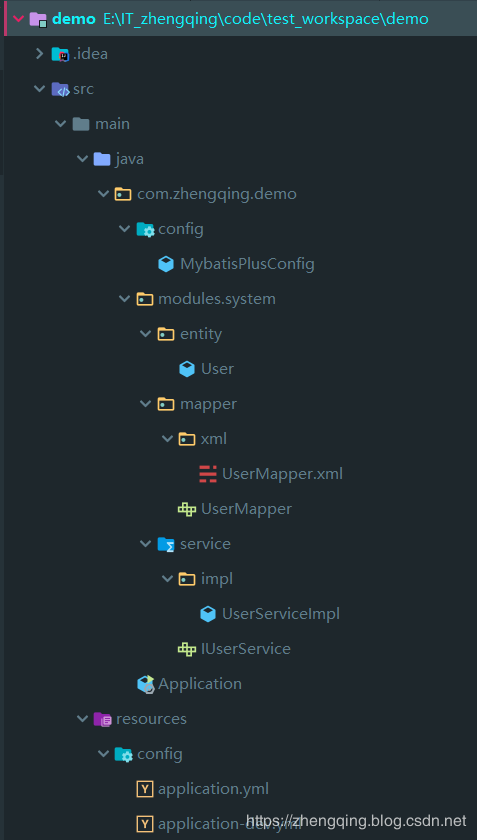
整体项目结构:
本文案例源码
https://gitee.com/zhengqingya/java-workspace
项目实战可参考:
GitHub地址:https://github.com/zhengqingya/code-generator
码云地址:https://gitee.com/zhengqingya/code-generator
SpringBoot 整合 MyBatis-Plus 入门体验的更多相关文章
- SpringBoot整合mybatis快速入门
一.创建一个SpringBoot项目 二.引入相关依赖 <!--web核心依赖--> <dependency> <groupId>o ...
- SpringBoot从入门到精通二(SpringBoot整合myBatis的两种方式)
前言 通过上一章的学习,我们已经对SpringBoot有简单的入门,接下来我们深入学习一下SpringBoot,我们知道任何一个网站的数据大多数都是动态的,也就是说数据是从数据库提取出来的,而非静态数 ...
- springboot 整合 mybatis 入门
springboot整合mybatis 0.yml 配置文件 1.创建数据库表. 2.创建实体类. 3.创建 Mapper 接口 ,添加 @Mapper 注解. 4.创建 Mapper 映射文件. & ...
- 001 SringBoot基础知识及SpringBoot整合Mybatis
1.原有Spring优缺点分析 (1)优点 Spring是Java企业版(Java Enterprise Edition,JEE,也称J2EE)的轻量级代替品.无需开发重量级的Enterprise J ...
- springBoot整合mybatis、jsp 或 HTML
springBoot整合mybatis.jsp Spring Boot的主要优点: 1: 为所有Spring开发者更快的入门: 2: 开箱即用,提供各种默认配置来简化项目配置: 3: 内嵌式容器 ...
- SpringBoot数据访问(一) SpringBoot整合Mybatis
前言 SpringData是Spring提供的一个用于简化数据库访问.支持云服务的开源框架.它是一个伞形项目,包含了大量关系型数据库及非关系型数据库的数据访问解决方案,其设计目的是为了使我们可以快速且 ...
- SpringBoot整合Mybatis之项目结构、数据源
已经有好些日子没有总结了,不是变懒了,而是我一直在奋力学习springboot的路上,现在也算是完成了第一阶段的学习,今天给各位总结总结. 之前在网上找过不少关于springboot的教程,都是一些比 ...
- SpringBoot整合Mybatis【非注解版】
接上文:SpringBoot整合Mybatis[注解版] 一.项目创建 新建一个工程 选择Spring Initializr,配置JDK版本 输入项目名 选择构建web项目所需的state ...
- SpringBoot整合Mybatis注解版---update出现org.apache.ibatis.binding.BindingException: Parameter 'XXX' not found. Available parameters are [arg1, arg0, param1, param2]
SpringBoot整合Mybatis注解版---update时出现的问题 问题描述: 1.sql建表语句 DROP TABLE IF EXISTS `department`; CREATE TABL ...
- springboot学习随笔(四):Springboot整合mybatis(含generator自动生成代码)
这章我们将通过springboot整合mybatis来操作数据库 以下内容分为两部分,一部分主要介绍generator自动生成代码,生成model.dao层接口.dao接口对应的sql配置文件 第一部 ...
随机推荐
- BZOJ4034 [HAOI2015]树上操作+DFS序+线段树
参考:https://www.cnblogs.com/liyinggang/p/5965981.html 题意:是一个数据结构题,树上的,用dfs序,变成线性的: 思路:对于每一个节点x,记录其DFS ...
- codeforces 284 C. Cows and Sequence(线段树)
题目链接:http://codeforces.com/contest/284/problem/C 题意:就是给出3个操作 1)是将前i 个数加x 2)在数组最后添加一个数x 3)删除数组最后的那个数 ...
- yolo进化史之yolov2
yolov1和当时最好的目标检测系统相比,有很多缺点.比如和Fast R-CNN相比,定位错误更多.和基于区域选择的目标检测方法相比,recall也比较低.yolov2的目标即在保证分类准确度的情况下 ...
- 【LeetCode】322-零钱兑换
题目描述 给定不同面额的硬币 coins 和一个总金额 amount.编写一个函数来计算可以凑成总金额所需的最少的硬币个数.如果没有任何一种硬币组合能组成总金额,返回 -1. 示例 1: 输入: co ...
- ConcurrentHashMap 的工作原理及代码实现
ConcurrentHashMap采用了非常精妙的"分段锁"策略,ConcurrentHashMap的主干是个Segment数组.Segment继承了ReentrantLock,所 ...
- springboot以jar运行时参数传递
springboot以jar运行时参数传递 spring boot项目我们都习惯以内嵌tomcat方式.直接打包成jar,运行时使用: java -jar XXX.jar --spring.prof ...
- eclipse中注释模板使用
步骤: Window -->Preferences-->Java-->Code Style -->Code Templates-->Comments 1.Files可对整 ...
- JS枚举对象属性的方法及其区别
愉快的中秋节要过去了,国庆倒计时两个周!!! 闲话不多说,那今天我们来看一看JS中枚举对象属性的方法有哪些以及他们的区别 首先在JS里面枚举对象属性一共有三种方法 for in: 会遍历对象中所有的可 ...
- Spring系列__04AOP
AOP简介 今天来介绍一下AOP.AOP,中文常被翻译为"面向切面编程",其作为OOP的扩展,其思想除了在Spring中得到了应用,也是不错的设计方法.通常情况下,一个软件系统,除 ...
- SqlServer 2014还原数据库时提示:无法在已有的""上还原文件,请重新发出RESTORE语句,用WITH REPLACE来覆盖原先存在的文件
场景 SQL Server 2014在还原数据库时提示: 无法在已有的""上还原文件,请重新发出RESTORE语句,用WITH REPLACE来覆盖原先存在的文件... 实现 在还 ...