
.netCore+Vue 搭建的简捷开发框架 (3)-- Services层实现
继续交作业:
上一篇作业中我们实现了 Repository仓储层的应用。并为我们的框架引入了EFCore 详见:
.netCore+Vue 搭建的简捷开发框架 (2)--仓储层实现和EFCore 的使用
接下来我们继续来实现Services 层,同样,我们在Services 和IServices 中增加 Base 文件夹。并创建BaseServices.cs 和IBaseServices.cs
如图:
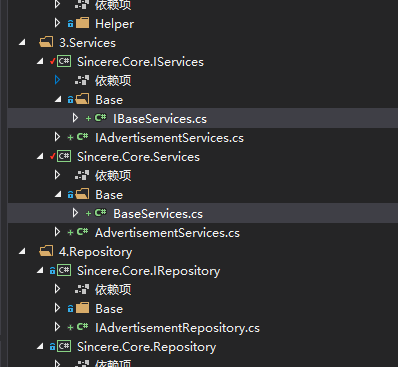
其中BaseServices.cs 和 IBaseServices.cs 代码如下:
 using Sincere.Core.IRepository.Base;

 using Sincere.Core.IServices.Base;

 using Sincere.Core.Model;

 using System;

 using System.Collections.Generic;

 using System.Data;

 using System.Data.SqlClient;

 using System.Linq.Expressions;

 using System.Text;

 using System.Threading.Tasks;

 namespace Sincere.Core.Services.Base

 {

     public class BaseServices<TEntity> : IBaseServices<TEntity> where TEntity : class, new()

     {

         //public IBaseRepository<TEntity> baseDal = new BaseRepository<TEntity>();

         public IBaseRepository<TEntity> BaseDal;//通过在子类的构造函数中注入,这里是基类,不用构造函数

         public async Task<int> Del(TEntity model)

         {

            return await BaseDal.Del(model);

         }

         public async Task<int> DelBy(Expression<Func<TEntity, bool>> delWhere)

         {

             return await BaseDal.DelBy(delWhere);

         }

         public async Task<int> Execute(string sql, List<SqlParameter> parms, CommandType cmdType = CommandType.Text)

         {

             return await BaseDal.Execute(sql,parms,cmdType);

         }

         public async Task<List<TEntity>> GetList()

         {

            return await BaseDal.GetList();

         }

         public async Task<List<TEntity>> GetListBy(Expression<Func<TEntity, bool>> whereLambda)

         {

             return await BaseDal.GetListBy(whereLambda);

         }

         public async Task<List<TEntity>> GetListBy<TKey>(Expression<Func<TEntity, bool>> whereLambda, Expression<Func<TEntity, TKey>> orderLambda, bool isAsc = true)

         {

             return await BaseDal.GetListBy(whereLambda,orderLambda,isAsc);

         }

         public async Task<List<TEntity>> GetListBy<TKey>(int top, Expression<Func<TEntity, bool>> whereLambda, Expression<Func<TEntity, TKey>> orderLambda, bool isAsc = true)

         {

             return await BaseDal.GetListBy(top, whereLambda, orderLambda, isAsc);

         }

         public async Task<List<TEntity>> GetListBy<TKey1, TKey2>(Expression<Func<TEntity, bool>> whereLambda, Expression<Func<TEntity, TKey1>> orderLambda1, Expression<Func<TEntity, TKey2>> orderLambda2, bool isAsc1 = true, bool isAsc2 = true)

         {

             return await BaseDal.GetListBy( whereLambda, orderLambda1,orderLambda2, isAsc1,isAsc2);

         }

         public async Task<List<TEntity>> GetListBy<TKey1, TKey2>(int top, Expression<Func<TEntity, bool>> whereLambda, Expression<Func<TEntity, TKey1>> orderLambda1, Expression<Func<TEntity, TKey2>> orderLambda2, bool isAsc1 = true, bool isAsc2 = true)

         {

             return await BaseDal.GetListBy(top, whereLambda, orderLambda1, orderLambda2, isAsc1, isAsc2);

         }

         public async Task<TEntity> GetModelById(Expression<Func<TEntity, bool>> whereLambda)

         {

             return await BaseDal.GetModelById( whereLambda);

         }

         public async Task<List<TEntity>> GetPagedList<TKey>(int pageIndex, int pageSize, Expression<Func<TEntity, bool>> whereLambda, Expression<Func<TEntity, TKey>> orderByLambda, bool isAsc = true)

         {

             return await BaseDal.GetPagedList(pageIndex,pageSize, whereLambda,orderByLambda,isAsc);

         }

         public async Task<PageModel<TEntity>> GetPagedList<TKey>(Expression<Func<TEntity, bool>> whereLambda, Expression<Func<TEntity, TKey>> orderByLambda, bool isAsc = true, int pageIndex = , int pageSize = )

         {

             return await BaseDal.GetPagedList(  whereLambda, orderByLambda, isAsc, pageIndex, pageSize);

         }

         public async Task<bool> Insert(TEntity model)

         {

             return await BaseDal.Insert(model);

         }

         public async Task<bool> InsertRange(List<TEntity> datas)

         {

             return await BaseDal.InsertRange(datas);

         }

         public async Task<int> Modify(TEntity model)

         {

             return await BaseDal.Modify(model);

         }

         public async Task<int> Modify(TEntity model, params string[] propertyNames)

         {

             return await BaseDal.Modify(model,propertyNames);

         }

         public async Task<int> ModifyBy(TEntity model, Expression<Func<TEntity, bool>> whereLambda, params string[] modifiedPropertyNames)

         {

             return await BaseDal.ModifyBy(model, whereLambda,modifiedPropertyNames);

         }

         public async Task<List<TEntity>> Query(string sql, List<SqlParameter> parms, CommandType cmdType = CommandType.Text)

         {

             return await BaseDal.Query(sql, parms, cmdType);

         }

         public  void RollBackChanges()

         {

               BaseDal.RollBackChanges();

         }

     }

 }
BaseServices
 using Sincere.Core.Model;

 using System;

 using System.Collections.Generic;

 using System.Data;

 using System.Data.SqlClient;

 using System.Linq.Expressions;

 using System.Text;

 using System.Threading.Tasks;

 namespace Sincere.Core.IServices.Base

 {

     public interface IBaseServices<TEntity> where TEntity : class

     {

         Task<int> Execute(string sql, List<SqlParameter> parms, CommandType cmdType = CommandType.Text);

         Task<List<TEntity>> Query(string sql, List<SqlParameter> parms, CommandType cmdType = CommandType.Text);

         Task<bool> Insert(TEntity model);

         Task<bool> InsertRange(List<TEntity> datas);

         Task<int> Del(TEntity model);

         Task<int> DelBy(Expression<Func<TEntity, bool>> delWhere);

         Task<int> Modify(TEntity model);

         Task<int> Modify(TEntity model, params string[] propertyNames);

         Task<int> ModifyBy(TEntity model, Expression<Func<TEntity, bool>> whereLambda, params string[] modifiedPropertyNames);

         Task<List<TEntity>> GetList();

         Task<List<TEntity>> GetListBy(Expression<Func<TEntity, bool>> whereLambda);

         Task<TEntity> GetModelById(Expression<Func<TEntity, bool>> whereLambda);

         Task<List<TEntity>> GetListBy<TKey>(Expression<Func<TEntity, bool>> whereLambda, Expression<Func<TEntity, TKey>> orderLambda, bool isAsc = true);

         Task<List<TEntity>> GetListBy<TKey>(int top, Expression<Func<TEntity, bool>> whereLambda, Expression<Func<TEntity, TKey>> orderLambda, bool isAsc = true);

         Task<List<TEntity>> GetListBy<TKey1, TKey2>(Expression<Func<TEntity, bool>> whereLambda, Expression<Func<TEntity, TKey1>> orderLambda1, Expression<Func<TEntity, TKey2>> orderLambda2, bool isAsc1 = true, bool isAsc2 = true);

         Task<List<TEntity>> GetListBy<TKey1, TKey2>(int top, Expression<Func<TEntity, bool>> whereLambda, Expression<Func<TEntity, TKey1>> orderLambda1, Expression<Func<TEntity, TKey2>> orderLambda2, bool isAsc1 = true, bool isAsc2 = true);

         Task<List<TEntity>> GetPagedList<TKey>(int pageIndex, int pageSize, Expression<Func<TEntity, bool>> whereLambda, Expression<Func<TEntity, TKey>> orderByLambda, bool isAsc = true);

         Task<PageModel<TEntity>> GetPagedList<TKey>(Expression<Func<TEntity, bool>> whereLambda, Expression<Func<TEntity, TKey>> orderByLambda, bool isAsc = true, int pageIndex = , int pageSize = );

         void RollBackChanges();

     }

 }
IBaseServices.cs
需要说明的是,在BaseServices.cs 中我们通过依赖注入的方式引入了IBaseRepository 。

具体的引用需要在子类的构造函数中注入。
结合上一篇中的内容,我们现在的框架就已经搭建好了最基础的框架模型中的Services 和 Repository 层。
为了验证各层之间的调用。接下来我们依旧参照 张老师的课程中使用的Advertisement 类,来进行测试。
我们需要依次建立 Advertisement.cs (Model,已经在上一节中建好) 、IAdvertisementRepository(IRepository 中),AdvertisementRepository(Repository 中)、IAdvertisementServices(IServices中)、AdvertisementServices(Services中)
建好后的代码结构如下:
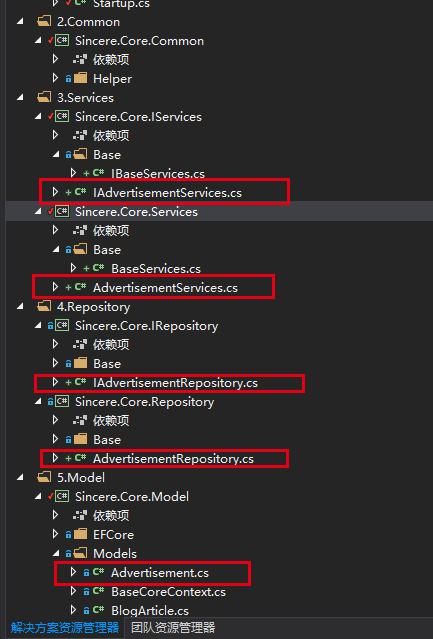
以后我们在此框架上开发其他服务的时候,也参照这样的目录结构建立相应文件。
接下来依次介绍各个文件,以及其实现过程。
首先是IAdvertisementRepository.cs
这个没什么好说的,继承自 IBaseRepository<Advertisement>。这里面我没有写其他的业务逻辑,是一个空的接口。代码如下:
 using Sincere.Core.IRepository.Base;

 using Sincere.Core.Model.Models;

 using System;

 using System.Collections.Generic;

 using System.Text;

 namespace Sincere.Core.IRepository

 {

     public interface IAdvertisementRepository : IBaseRepository<Advertisement>

     {

     }

 }
接下来是AdvertisementRepository.cs ,这里继承自BaseRepository<Advertisement>, 并实现 IAdvertisementRepository接口。代码如下:
 using Sincere.Core.IRepository;

 using Sincere.Core.Model.EFCore;

 using Sincere.Core.Model.Models;

 using Sincere.Core.Repository.Base;

 using System;

 using System.Collections.Generic;

 using System.Text;

 namespace Sincere.Core.Repository

 {

     public class AdvertisementRepository : BaseRepository<Advertisement>, IAdvertisementRepository

     {

         public AdvertisementRepository(IBaseContext mydbcontext) : base(mydbcontext)

         {

         }

     }

 }
这里需要说明的是,因为我在BaseRepository 的构造函数中,使用了有参数的构造函数
public BaseRepository(IBaseContext mydbcontext)
{
this._db = mydbcontext as BaseCoreContext;
this._dbSet = _db.Set<TEntity>();
}
所以在AdvertisementRepository 中,将注入的mydbContext 同步注入到BaseRepository 中。

仓储层的逻辑基本就这样了,接下来写Services中的实现。
同样,首先是接口IAdvertisementServices,继承IBaseServices<Advertisement>。没什么好说的,这里为了假装有一个方法,叫做ReadAllAd(),代码如下:
 using Sincere.Core.IServices.Base;

 using Sincere.Core.Model.Models;

 using System;

 using System.Collections.Generic;

 using System.Text;

 namespace Sincere.Core.IServices

 {

     public interface IAdvertisementServices : IBaseServices<Advertisement>

     {

          void ReadAllAd();

     }

 }
最后就是AdvertisementServices了,未来的开发中,我们大部分的业务逻辑都将在这里实现,于仓储层的实现类似,也是继承: BaseServices<Advertisement>, 实现 IAdvertisementServices接口。
代码如下:
 using Sincere.Core.IRepository;

 using Sincere.Core.IRepository.Base;

 using Sincere.Core.IServices;

 using Sincere.Core.Model.Models;

 using Sincere.Core.Services.Base;

 using System;

 using System.Collections.Generic;

 using System.Text;

 namespace Sincere.Core.Services

 {

     public class AdvertisementServices : BaseServices<Advertisement>, IAdvertisementServices

     {

         IAdvertisementRepository _advertisementRepository;

         public AdvertisementServices(IBaseRepository<Advertisement> baseRepository) {

             base.BaseDal = baseRepository;

             _advertisementRepository = baseRepository as IAdvertisementRepository;

         }

         public void ReadAllAd() {

         }

     }

 }
这里有些地方需要进行一下说明。首先就是通过依赖注入的方式,将IBaseRepository 注入进来。
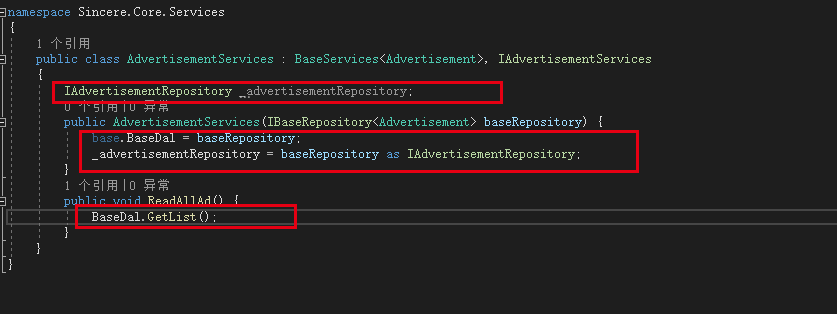
在ReadAllAd 方法中的引用如上图所示。
到此为止,各个层中的实现就都完成了。但是我们在Controller 中该怎么引用呢?
这个地方涉及的东西比较多,比如NetCore 的依赖注入、利用反射机制进行注入、NetCore 的Startup.cs 类等内容。准备用下一节的内容来进行整体说明。谢谢。
谢谢。
.netCore+Vue 搭建的简捷开发框架 (3)-- Services层实现的更多相关文章
- .netCore+Vue 搭建的简捷开发框架 (5)
文章目录:.netCore+Vue 搭建的简捷开发框架--目录 上两节的内容介绍了一些关于.netCore 相关的一些基础知识.介绍这些的目的,最主要的还是为了我们的架构搭建服务. 上一节中,我们介绍 ...
- .netCore+Vue 搭建的简捷开发框架--目录
.netCore+Vue 搭建的简捷开发框架 .netCore+Vue 搭建的简捷开发框架 (2)--仓储层实现和EFCore 的使用 .netCore+Vue 搭建的简捷开发框架 (3)-- Ser ...
- .netCore+Vue 搭建的简捷开发框架
话不多说,上图: 整体项目结构如图所示,我的设计初衷是基于.netCore + DI + Vue 打造一个适合初学者的简捷开发框架. 架构模型采用基于RESTful API风格的前后台分离框架,总体分 ...
- .netCore+Vue 搭建的简捷开发框架 (4)--NetCore 基础
书接上文:上一节中,我们已经实现Services 层.(https://www.cnblogs.com/xuzhencheng/p/11424751.html) 但是具体要如何将服务依赖注入进来呢?继 ...
- .netCore+Vue 搭建的简捷开发框架 (2)--仓储层实现和EFCore 的使用
书接上文,继续搭建我们基于.netCore 的开发框架.首先是我们的项目分层结构. 这个分层结构,是参考张老师的分层结构,但是实际项目中,我没有去实现仓储模型.因为我使用的是EFCore ,最近也一直 ...
- .netCore+Vue 搭建的简捷开发框架 (4)--NetCore 基础 -2
上节中,我们初步的介绍了一下NetCore的一些基础知识,为了控制篇幅(其实也是因为偷懒),我将NetCore 基础分为两部分来写. 0.WebAPI 项目的建立 1..NetCore 项目执行(加载 ...
- .netcore+vue+elementUI 前后端分离---支持前端、后台业务代码扩展的快速开发框架
框架采用.NetCore + Vue前后端分离,并且支持前端.后台代码业务动态扩展,框架内置了一套有着20多种属性配置的代码生成器,可灵活配置生成的代码,代码生成器界面配置完成即可生成单表(主表)的增 ...
- Linux+.NetCore+Nginx搭建集群
本篇和大家分享的是Linux+NetCore+Nginx搭建负载集群,对于netcore2.0发布后,我一直在看官网的文档并学习,关注有哪些新增的东西,我,一个从1.0到2.0的跟随者这里只总结一句话 ...
- 01 基于umi搭建React快速开发框架
介绍 基于umi搭建一个快速开发框架,react 应用框架.umi 以路由为基础的,支持类 next.js 的约定式路由,以及各种进阶的路由功能,并以此进行功能扩展,比如支持路由级的按需加载. 我们会 ...
随机推荐
- Tomcat源码分析 (九)----- HTTP请求处理过程(二)
我们接着上一篇文章的容器处理来讲,当postParseRequest方法返回true时,则由容器继续处理,在service方法中有connector.getService().getContainer ...
- Dig命令使用大全(转自别人翻译),稍加整理
Dig简介: Dig是一个在类Unix命令行模式下查询DNS包括NS记录,A记录,MX记录等相关信息的工具.由于一直缺失Dig man page文档,本文就权当一个dig使用向导吧. Dig的 ...
- NLP(十三) 词义消歧
一个词可能有多个词义 例句 解释 She is my date date: 约会,日期 You have taken too many leaves to skip cleaning leaves i ...
- fiddler的安装于使用(一)安装fiddler
Fiddler的简介 Fiddler是位于客户端和服务器端之间的代理,也是目前最常用的抓包工具之一 .它能够记录客户端和服务器之间的所有 请求,可以针对特定的请求,分析请求数据.设置断点.调试web应 ...
- 树形dp poj2342 Anniversary party * 求最大价值
Description There is going to be a party to celebrate the 80-th Anniversary of the Ural State Univer ...
- PAT 天梯杯 L3-008. 喊山 bfs
L3-008. 喊山 时间限制 150 ms 内存限制 65536 kB 代码长度限制 8000 B 判题程序 Standard 作者 陈越 喊山,是人双手围在嘴边成喇叭状,对着远方高山发出“喂—喂喂 ...
- 关闭Linux(Ubuntu)错误报告
关于错误报告 网上查了下,Ubuntu(包括elementary,elementary是基于Ubuntu的)桌面版预装了Apport,它是一个错误收集系统,会收集软件崩溃.未处理异常和其他,包括程序b ...
- HDU 1015 Safecracker (DFS)
题意:给一个数字n(n<=12000000)和一个字符串s(s<=17),字符串的全是有大写字母组成,字母的大小按照字母表的顺序,比如(A=1,B=2,......Z=26),从该字符串中 ...
- 【Offer】[22] 【链表中倒数第k个结点】
题目描述 思路分析 测试用例 Java代码 代码链接 题目描述 输入一个链表,输出该链表中倒数第k个结点. 思路分析 采用双指针的方法,第一个指针首先向前移动k-1个位置,第二个指针指向头节点,然后将 ...
- SSL证书部署相关知识总结
证书生成工具,手动:Keymanager工具https://keymanager.org/ 证书服务商集成:可自由获得TrustAsia.Let’s Encrypt颁发的 免费证书. Keymanag ...