
.netCore+Vue 搭建的简捷开发框架 (5)
文章目录:.netCore+Vue 搭建的简捷开发框架--目录
上两节的内容介绍了一些关于。netCore 相关的一些基础知识。介绍这些的目的,最主要的还是为了我们的架构搭建服务。
上一节中,我们介绍了有关NetCore DI的一些概念。 整个框架,我们的仓储层、服务层都是通过依赖注入的方式进行加载调用的。
下面就来看一下仓储层和服务层是如何注入的:
 using System;

 using System.Collections.Generic;

 using System.Linq;

 using System.Threading.Tasks;

 using Microsoft.AspNetCore.Builder;

 using Microsoft.AspNetCore.Hosting;

 using Microsoft.AspNetCore.Mvc;

 using Microsoft.EntityFrameworkCore;

 using Microsoft.Extensions.Configuration;

 using Microsoft.Extensions.DependencyInjection;

 using Microsoft.Extensions.Logging;

 using Microsoft.Extensions.Options;

 using Sincere.Core.IRepository.Base;

 using Sincere.Core.IServices.Base;

 using Sincere.Core.Model.EFCore;

 using Sincere.Core.Model.Models;

 using Sincere.Core.Repository.Base;

 using Sincere.Core.Services.Base;

 using Sincere.Core.WebAPI.ServiceExtension;

 namespace Sincere.Core.WebAPI

 {

     public class Startup

     {

         public Startup(IConfiguration configuration)

         {

             Configuration = configuration;

         }

         public IConfiguration Configuration { get; }

         // This method gets called by the runtime. Use this method to add services to the container.

         public void ConfigureServices(IServiceCollection services)

         {

             services.AddMvc().SetCompatibilityVersion(CompatibilityVersion.Version_2_2);

             services.AddDbContextPool<BaseCoreContext>(options =>

                 options.UseSqlServer(BaseDBConfig.ConnectionString));

             services.AddScoped<IBaseContext, BaseCoreContext>();

             //泛型引用方式

             services.AddScoped(typeof(IBaseServices<>), typeof(BaseServices<>));

             services.AddScoped(typeof(IBaseRepository<>), typeof(BaseRepository<>));

             services.RegisterAssembly("IServices");

             services.RegisterAssembly("IRepository");

         }

         // This method gets called by the runtime. Use this method to configure the HTTP request pipeline.

         public void Configure(IApplicationBuilder app, IHostingEnvironment env)

         {

             if (env.IsDevelopment())

             {

                 app.UseDeveloperExceptionPage();

             }

             app.UseMvc();

         }

     }

 }
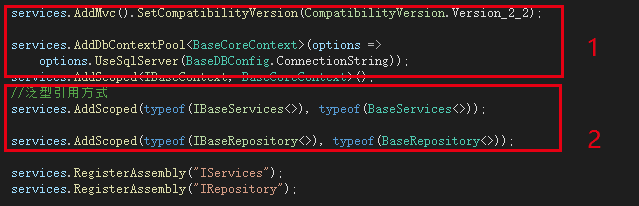
标记1 的部分,是关于EF,以及DbContext 的相关引用,这里涉及到一个AddDbContextPool的概念,我个人的理解就是可以把他当成我们使用ADO.net 时的数据库连接池。
另外需要说明的一点就是,采用AddScoped 的方式,整个数据库链接的上下文,在整个请求过程中,只会被实例化一次。
标记2的部分,时我们对仓储的基础类,和服务层基础类的引用,注意这些基础类是泛型的方式,所以引用的时候,需要采用泛型的方式来实现。在这个地方,刚开始的时候,不知道AddScoped支持泛型的方式,还写过一个工厂类来进行注入。
剩下的方法,services.RegisterAssembly 其实是一个比较巧妙的方式,为了避免每写一个service、repository就在ConfigureServices中注入一次。所以在这里采用了反射的机制。利用反射和我们的约定,将整个程序集中的Service和Repository进行一个引用。
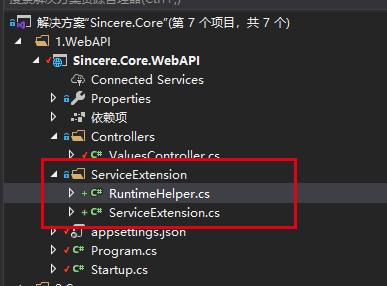
webAPI工程下新建一个ServiceExtension目录,并添加RuntimeHelper类和ServiceExtension。
如下图:
代码如下:
 using Microsoft.Extensions.DependencyInjection;

 using System;

 using System.Collections.Generic;

 using System.Linq;

 using System.Reflection;

 using System.Threading.Tasks;

 namespace Sincere.Core.WebAPI.ServiceExtension

 {

     /// <summary>

     /// IServiceCollection扩展

     /// </summary>

     /// <summary>

     /// IServiceCollection扩展

     /// </summary>

     public static class ServiceExtension

     {

         /// <summary>

         /// 用DI批量注入接口程序集中对应的实现类。

         /// <para>

         /// 需要注意的是,这里有如下约定:

         /// IUserService --> UserService, IUserRepository --> UserRepository.

         /// </para>

         /// </summary>

         /// <param name="service"></param>

         /// <param name="interfaceAssemblyName">接口程序集的名称(不包含文件扩展名)</param>

         /// <returns></returns>

         public static IServiceCollection RegisterAssembly(this IServiceCollection service, string interfaceAssemblyName, ServiceLifetime serviceLifetime = ServiceLifetime.Scoped)

         {

             if (service == null)

                 throw new ArgumentNullException(nameof(service));

             if (string.IsNullOrEmpty(interfaceAssemblyName))

                 throw new ArgumentNullException(nameof(interfaceAssemblyName));

             var assembly = RuntimeHelper.GetAssembly(interfaceAssemblyName);

             if (assembly == null)

             {

                 throw new DllNotFoundException($"the dll \"{interfaceAssemblyName}\" not be found");

             }

             //过滤掉非接口及泛型接口

             var types = assembly.GetTypes().Where(t => t.GetTypeInfo().IsInterface && !t.GetTypeInfo().IsGenericType);

             foreach (var type in types)

             {

                 var implementTypeName = type.Name.Substring();

                 var implementType = RuntimeHelper.GetImplementType(implementTypeName, type);

                 if (implementType != null)

                 {

                     switch (serviceLifetime)

                     {

                         //根据条件,选择注册依赖的方法

                         case ServiceLifetime.Scoped:

                             //将获取到的接口和类注册进去

                             service.AddScoped(type, implementType);

                             break;

                         case ServiceLifetime.Singleton:

                             service.AddSingleton(type, implementType);

                             break;

                         case ServiceLifetime.Transient:

                             service.AddTransient(type, implementType);

                             break;

                     }

                 }

             }

             return service;

         }

     }

 }
ServiceExtension.cs
 using Microsoft.Extensions.DependencyModel;

 using System;

 using System.Collections.Generic;

 using System.Linq;

 using System.Reflection;

 using System.Runtime.Loader;

 using System.Threading.Tasks;

 namespace Sincere.Core.WebAPI.ServiceExtension

 {

     public class RuntimeHelper

     {

         /// <summary>

         /// 获取项目程序集,排除所有的系统程序集(Microsoft.***、System.***等)、Nuget下载包

         /// </summary>

         /// <returns></returns>

         public static IList<Assembly> GetAllAssemblies()

         {

             var list = new List<Assembly>();

             var deps = DependencyContext.Default;

             var libs = deps.CompileLibraries.Where(lib => !lib.Serviceable && lib.Type != "package");//排除所有的系统程序集、Nuget下载包

             foreach (var lib in libs)

             {

                 try

                 {

                     var assembly = AssemblyLoadContext.Default.LoadFromAssemblyName(new AssemblyName(lib.Name));

                     list.Add(assembly);

                 }

                 catch (Exception)

                 {

                     // ignored

                 }

             }

             return list;

         }

         public static Assembly GetAssembly(string assemblyName)

         {

             return GetAllAssemblies().FirstOrDefault(assembly => assembly.FullName.Contains(assemblyName));

         }

         public static IList<Type> GetAllTypes()

         {

             var list = new List<Type>();

             foreach (var assembly in GetAllAssemblies())

             {

                 var typeInfos = assembly.DefinedTypes;

                 foreach (var typeInfo in typeInfos)

                 {

                     list.Add(typeInfo.AsType());

                 }

             }

             return list;

         }

         public static IList<Type> GetTypesByAssembly(string assemblyName)

         {

             var list = new List<Type>();

             var assembly = AssemblyLoadContext.Default.LoadFromAssemblyName(new AssemblyName(assemblyName));

             var typeInfos = assembly.DefinedTypes;

             foreach (var typeInfo in typeInfos)

             {

                 list.Add(typeInfo.AsType());

             }

             return list;

         }

         public static Type GetImplementType(string typeName, Type baseInterfaceType)

         {

             return GetAllTypes().FirstOrDefault(t =>

             {

                 if (t.Name == typeName &&

                     t.GetTypeInfo().GetInterfaces().Any(b => b.Name == baseInterfaceType.Name))

                 {

                     var typeInfo = t.GetTypeInfo();

                     return typeInfo.IsClass && !typeInfo.IsAbstract && !typeInfo.IsGenericType;

                 }

                 return false;

             });

         }

     }

 }
RuntimeHelper.cs
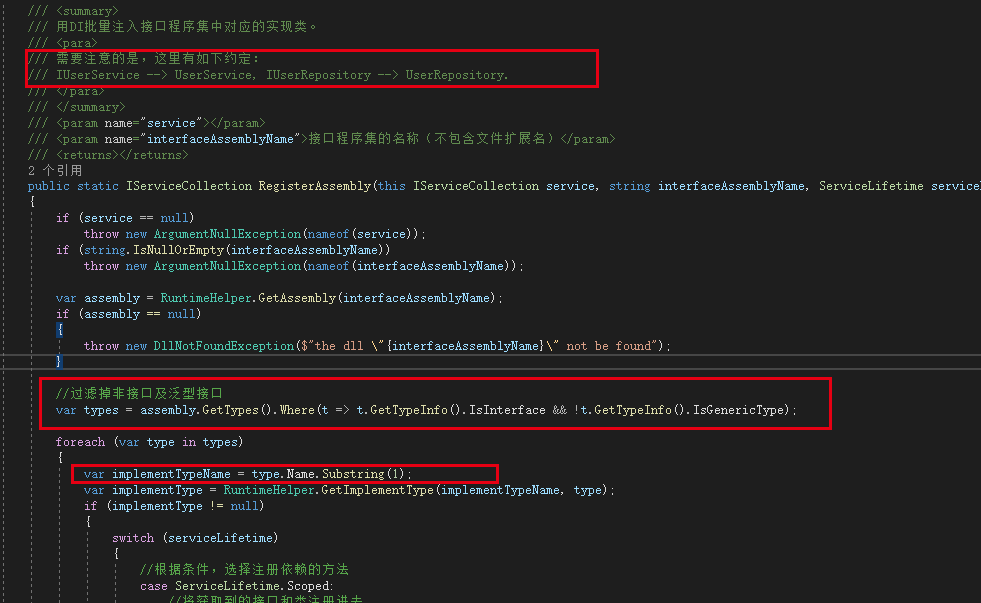
这样类似的代码网上挺多的。大家可以参考借鉴一下。另外这个地方其实不用太过于关心反射带来的性能问题,因为只有在程序启动的时候,加载一次。
仓储层和服务层都注入进来以后,接下来就是怎么去使用了。
来一起看一下我们是怎么在ValuesController里面进行实现的。

1.定义服务层接口
2.在ValuesController初始化的时候,将服务层接口注入进来。
3.使用接口,调用数据。
代码如下:
 using System;

 using System.Collections.Generic;

 using System.Linq;

 using System.Threading.Tasks;

 using Microsoft.AspNetCore.Mvc;

 using Sincere.Core.IServices;

 namespace Sincere.Core.WebAPI.Controllers

 {

     [Route("api/[controller]")]

     [ApiController]

     public class ValuesController : ControllerBase

     {

         readonly IAdvertisementServices _advertisementServices;

         public ValuesController(IAdvertisementServices advertisementServices)

         {

             _advertisementServices = advertisementServices;

         }

         // GET api/values

         [Route("")]

         [HttpGet]

         public async Task<ActionResult<IEnumerable<string>>> Get()

         {

             var t = await _advertisementServices.ReadAllAd();

             return new string[] { "value1", "value2" };

         }

         // GET api/values/5

         [HttpGet("{id}")]

         public ActionResult<string> Get(int id)

         {

             return "value";

         }

         // POST api/values

         [HttpPost]

         public void Post([FromBody] string value)

         {

         }

         // PUT api/values/5

         [HttpPut("{id}")]

         public void Put(int id, [FromBody] string value)

         {

         }

         // DELETE api/values/5

         [HttpDelete("{id}")]

         public void Delete(int id)

         {

         }

     }

 }
关于ReadAllAd()方法,之前的章节中已经有过描述。
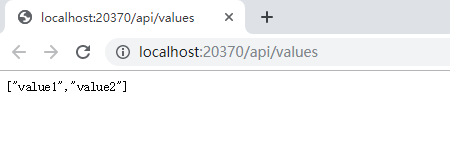
调用成功,说明框架的整体流程已经跑通了!晚上加个鸡腿,庆祝一下!
按照之前的脑图,不知道大家还记得不?
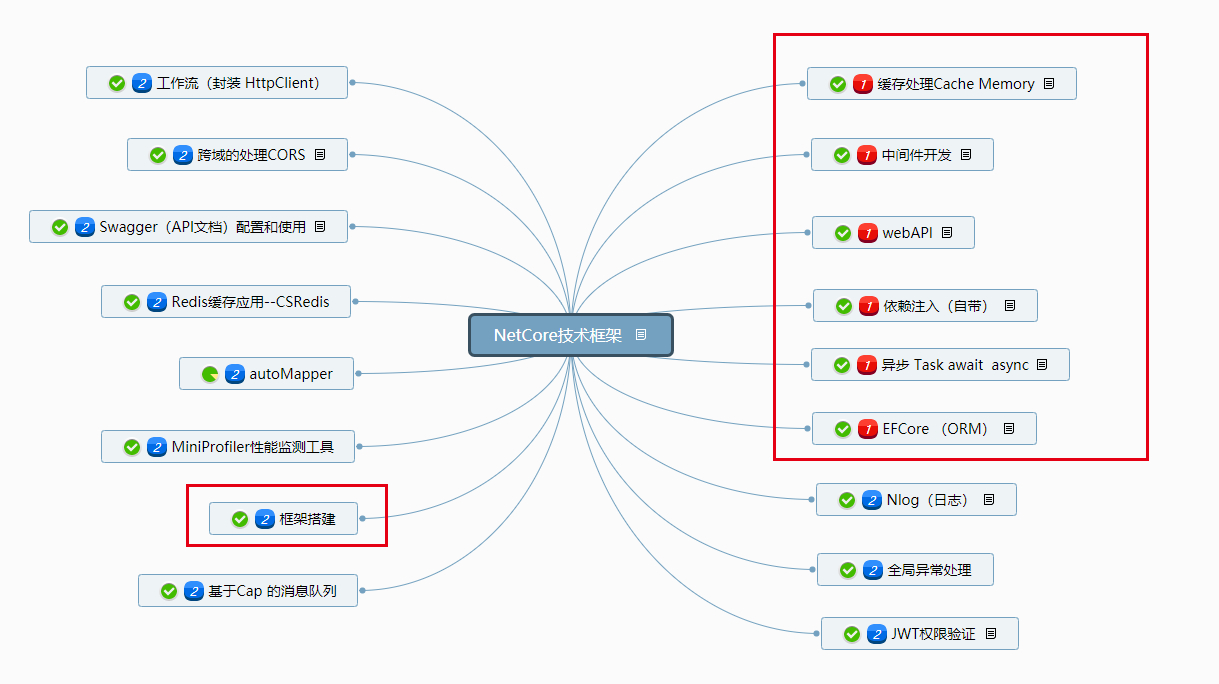
红框里面的内容,到这一节,基本就结束了。接下来,会逐步的丰富我们的框架。加入日志,异常处理,权限验证。以及其他脑图中列出来的内容。
希望整个过程对于想学习、了解netCore 的同学们有所帮助!
源码已经更新:https://github.com/xzhencheng/Sincere.Core
.netCore+Vue 搭建的简捷开发框架 (5)的更多相关文章
- .netCore+Vue 搭建的简捷开发框架 (3)-- Services层实现
继续交作业: 上一篇作业中我们实现了 Repository仓储层的应用.并为我们的框架引入了EFCore 详见: .netCore+Vue 搭建的简捷开发框架 (2)--仓储层实现和EFCore 的使 ...
- .netCore+Vue 搭建的简捷开发框架--目录
.netCore+Vue 搭建的简捷开发框架 .netCore+Vue 搭建的简捷开发框架 (2)--仓储层实现和EFCore 的使用 .netCore+Vue 搭建的简捷开发框架 (3)-- Ser ...
- .netCore+Vue 搭建的简捷开发框架
话不多说,上图: 整体项目结构如图所示,我的设计初衷是基于.netCore + DI + Vue 打造一个适合初学者的简捷开发框架. 架构模型采用基于RESTful API风格的前后台分离框架,总体分 ...
- .netCore+Vue 搭建的简捷开发框架 (2)--仓储层实现和EFCore 的使用
书接上文,继续搭建我们基于.netCore 的开发框架.首先是我们的项目分层结构. 这个分层结构,是参考张老师的分层结构,但是实际项目中,我没有去实现仓储模型.因为我使用的是EFCore ,最近也一直 ...
- .netCore+Vue 搭建的简捷开发框架 (4)--NetCore 基础
书接上文:上一节中,我们已经实现Services 层.(https://www.cnblogs.com/xuzhencheng/p/11424751.html) 但是具体要如何将服务依赖注入进来呢?继 ...
- .netCore+Vue 搭建的简捷开发框架 (4)--NetCore 基础 -2
上节中,我们初步的介绍了一下NetCore的一些基础知识,为了控制篇幅(其实也是因为偷懒),我将NetCore 基础分为两部分来写. 0.WebAPI 项目的建立 1..NetCore 项目执行(加载 ...
- .netcore+vue+elementUI 前后端分离---支持前端、后台业务代码扩展的快速开发框架
框架采用.NetCore + Vue前后端分离,并且支持前端.后台代码业务动态扩展,框架内置了一套有着20多种属性配置的代码生成器,可灵活配置生成的代码,代码生成器界面配置完成即可生成单表(主表)的增 ...
- windows下如何快速搭建web.py开发框架
在windows下如何快速搭建web.py开发框架 用Python进行web开发的话有很多框架供选择,比如最出名的Django,tornado等,除了这些框架之外,有一个轻量级的框架使用起来也是非常方 ...
- Linux+.NetCore+Nginx搭建集群
本篇和大家分享的是Linux+NetCore+Nginx搭建负载集群,对于netcore2.0发布后,我一直在看官网的文档并学习,关注有哪些新增的东西,我,一个从1.0到2.0的跟随者这里只总结一句话 ...
随机推荐
- 阿里云 windows frp 远程桌面
环境: 阿里云服务器 server 2008 ,想要被远程访问的终端(本机)是win7 x64 目的:实现在别的地方(家里,出差在外) 用 远程桌面 访问 位于公司内部的电脑 frp 介绍:https ...
- 分享个人学习js的笔记
1.回到顶部效果. 2.滚动条向上滚动式,滑动滚轮.解决bug的方法. 3.有关Document. 4.getElementByClassName();获取元素类名的封装.单个类名的元素.任然不完美. ...
- Go语言基础之文件操作
本文主要介绍了Go语言中文件读写的相关操作. 文件是什么? 计算机中的文件是存储在外部介质(通常是磁盘)上的数据集合,文件分为文本文件和二进制文件. 打开和关闭文件 os.Open()函数能够打开一个 ...
- Windows10 系统更新之后找不到输入法
是因为 , 系统更新之后 , 系统自带的输入法没有更新好 , 过个一两天,系统会自动修复. 简单解决办法是 , Ctrl+Alt+delete 打开任务管理器, 在进程中,按CPU大小排序,找到输入法 ...
- java生成二维码/java解析二维码
二维码的优缺点 优点:1. 高密度编码,信息容量大:2.编码范围广:3.容错能力强:4.译码可靠性高:5.可引入加密措施:6.成本低,易制作,持久耐用. 缺点:1.二维码技术成为手机病毒.钓鱼网站传播 ...
- java树形结构工具类
一.树形结构数据一般都是以子父id的形式存在数据库中,查询的时候只是带有子id和parent_id的List集合 并不是树形结构,所以我们现在要将普通的List集合转换为树结构数据(本工具类扩展操作树 ...
- Servlet控制台输出乱码问题
在如下图的配置页面: 在此行添加编码格式:
- 新建servlet工程
1.选择新建Dynamic Web Project 2.选择服务器和版本(2.5) 3.src目录下新建一个包 4.包里面新建一个类 5.实现Servlet接口(通过http协议访问) 6.serv ...
- PopupWindow弹出框
使用PopupWindow实现一个悬浮框,悬浮在Activity之上,显示位置可以指定 首先创建pop_window.xml: <?xml version="1.0" enc ...
- Oracle之select
坚持