
.netCore+Vue 搭建的简捷开发框架 (3)-- Services层实现
继续交作业:
上一篇作业中我们实现了 Repository仓储层的应用。并为我们的框架引入了EFCore 详见:
.netCore+Vue 搭建的简捷开发框架 (2)--仓储层实现和EFCore 的使用
接下来我们继续来实现Services 层,同样,我们在Services 和IServices 中增加 Base 文件夹。并创建BaseServices.cs 和IBaseServices.cs
如图:
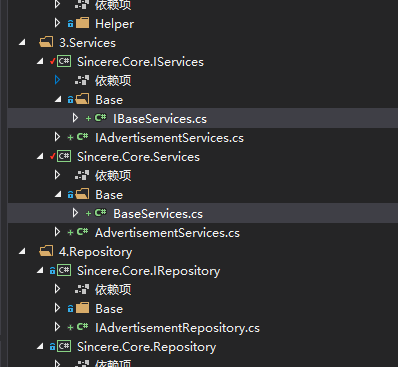
其中BaseServices.cs 和 IBaseServices.cs 代码如下:
 using Sincere.Core.IRepository.Base;

 using Sincere.Core.IServices.Base;

 using Sincere.Core.Model;

 using System;

 using System.Collections.Generic;

 using System.Data;

 using System.Data.SqlClient;

 using System.Linq.Expressions;

 using System.Text;

 using System.Threading.Tasks;

 namespace Sincere.Core.Services.Base

 {

     public class BaseServices<TEntity> : IBaseServices<TEntity> where TEntity : class, new()

     {

         //public IBaseRepository<TEntity> baseDal = new BaseRepository<TEntity>();

         public IBaseRepository<TEntity> BaseDal;//通过在子类的构造函数中注入,这里是基类,不用构造函数

         public async Task<int> Del(TEntity model)

         {

            return await BaseDal.Del(model);

         }

         public async Task<int> DelBy(Expression<Func<TEntity, bool>> delWhere)

         {

             return await BaseDal.DelBy(delWhere);

         }

         public async Task<int> Execute(string sql, List<SqlParameter> parms, CommandType cmdType = CommandType.Text)

         {

             return await BaseDal.Execute(sql,parms,cmdType);

         }

         public async Task<List<TEntity>> GetList()

         {

            return await BaseDal.GetList();

         }

         public async Task<List<TEntity>> GetListBy(Expression<Func<TEntity, bool>> whereLambda)

         {

             return await BaseDal.GetListBy(whereLambda);

         }

         public async Task<List<TEntity>> GetListBy<TKey>(Expression<Func<TEntity, bool>> whereLambda, Expression<Func<TEntity, TKey>> orderLambda, bool isAsc = true)

         {

             return await BaseDal.GetListBy(whereLambda,orderLambda,isAsc);

         }

         public async Task<List<TEntity>> GetListBy<TKey>(int top, Expression<Func<TEntity, bool>> whereLambda, Expression<Func<TEntity, TKey>> orderLambda, bool isAsc = true)

         {

             return await BaseDal.GetListBy(top, whereLambda, orderLambda, isAsc);

         }

         public async Task<List<TEntity>> GetListBy<TKey1, TKey2>(Expression<Func<TEntity, bool>> whereLambda, Expression<Func<TEntity, TKey1>> orderLambda1, Expression<Func<TEntity, TKey2>> orderLambda2, bool isAsc1 = true, bool isAsc2 = true)

         {

             return await BaseDal.GetListBy( whereLambda, orderLambda1,orderLambda2, isAsc1,isAsc2);

         }

         public async Task<List<TEntity>> GetListBy<TKey1, TKey2>(int top, Expression<Func<TEntity, bool>> whereLambda, Expression<Func<TEntity, TKey1>> orderLambda1, Expression<Func<TEntity, TKey2>> orderLambda2, bool isAsc1 = true, bool isAsc2 = true)

         {

             return await BaseDal.GetListBy(top, whereLambda, orderLambda1, orderLambda2, isAsc1, isAsc2);

         }

         public async Task<TEntity> GetModelById(Expression<Func<TEntity, bool>> whereLambda)

         {

             return await BaseDal.GetModelById( whereLambda);

         }

         public async Task<List<TEntity>> GetPagedList<TKey>(int pageIndex, int pageSize, Expression<Func<TEntity, bool>> whereLambda, Expression<Func<TEntity, TKey>> orderByLambda, bool isAsc = true)

         {

             return await BaseDal.GetPagedList(pageIndex,pageSize, whereLambda,orderByLambda,isAsc);

         }

         public async Task<PageModel<TEntity>> GetPagedList<TKey>(Expression<Func<TEntity, bool>> whereLambda, Expression<Func<TEntity, TKey>> orderByLambda, bool isAsc = true, int pageIndex = , int pageSize = )

         {

             return await BaseDal.GetPagedList(  whereLambda, orderByLambda, isAsc, pageIndex, pageSize);

         }

         public async Task<bool> Insert(TEntity model)

         {

             return await BaseDal.Insert(model);

         }

         public async Task<bool> InsertRange(List<TEntity> datas)

         {

             return await BaseDal.InsertRange(datas);

         }

         public async Task<int> Modify(TEntity model)

         {

             return await BaseDal.Modify(model);

         }

         public async Task<int> Modify(TEntity model, params string[] propertyNames)

         {

             return await BaseDal.Modify(model,propertyNames);

         }

         public async Task<int> ModifyBy(TEntity model, Expression<Func<TEntity, bool>> whereLambda, params string[] modifiedPropertyNames)

         {

             return await BaseDal.ModifyBy(model, whereLambda,modifiedPropertyNames);

         }

         public async Task<List<TEntity>> Query(string sql, List<SqlParameter> parms, CommandType cmdType = CommandType.Text)

         {

             return await BaseDal.Query(sql, parms, cmdType);

         }

         public  void RollBackChanges()

         {

               BaseDal.RollBackChanges();

         }

     }

 }
BaseServices
 using Sincere.Core.Model;

 using System;

 using System.Collections.Generic;

 using System.Data;

 using System.Data.SqlClient;

 using System.Linq.Expressions;

 using System.Text;

 using System.Threading.Tasks;

 namespace Sincere.Core.IServices.Base

 {

     public interface IBaseServices<TEntity> where TEntity : class

     {

         Task<int> Execute(string sql, List<SqlParameter> parms, CommandType cmdType = CommandType.Text);

         Task<List<TEntity>> Query(string sql, List<SqlParameter> parms, CommandType cmdType = CommandType.Text);

         Task<bool> Insert(TEntity model);

         Task<bool> InsertRange(List<TEntity> datas);

         Task<int> Del(TEntity model);

         Task<int> DelBy(Expression<Func<TEntity, bool>> delWhere);

         Task<int> Modify(TEntity model);

         Task<int> Modify(TEntity model, params string[] propertyNames);

         Task<int> ModifyBy(TEntity model, Expression<Func<TEntity, bool>> whereLambda, params string[] modifiedPropertyNames);

         Task<List<TEntity>> GetList();

         Task<List<TEntity>> GetListBy(Expression<Func<TEntity, bool>> whereLambda);

         Task<TEntity> GetModelById(Expression<Func<TEntity, bool>> whereLambda);

         Task<List<TEntity>> GetListBy<TKey>(Expression<Func<TEntity, bool>> whereLambda, Expression<Func<TEntity, TKey>> orderLambda, bool isAsc = true);

         Task<List<TEntity>> GetListBy<TKey>(int top, Expression<Func<TEntity, bool>> whereLambda, Expression<Func<TEntity, TKey>> orderLambda, bool isAsc = true);

         Task<List<TEntity>> GetListBy<TKey1, TKey2>(Expression<Func<TEntity, bool>> whereLambda, Expression<Func<TEntity, TKey1>> orderLambda1, Expression<Func<TEntity, TKey2>> orderLambda2, bool isAsc1 = true, bool isAsc2 = true);

         Task<List<TEntity>> GetListBy<TKey1, TKey2>(int top, Expression<Func<TEntity, bool>> whereLambda, Expression<Func<TEntity, TKey1>> orderLambda1, Expression<Func<TEntity, TKey2>> orderLambda2, bool isAsc1 = true, bool isAsc2 = true);

         Task<List<TEntity>> GetPagedList<TKey>(int pageIndex, int pageSize, Expression<Func<TEntity, bool>> whereLambda, Expression<Func<TEntity, TKey>> orderByLambda, bool isAsc = true);

         Task<PageModel<TEntity>> GetPagedList<TKey>(Expression<Func<TEntity, bool>> whereLambda, Expression<Func<TEntity, TKey>> orderByLambda, bool isAsc = true, int pageIndex = , int pageSize = );

         void RollBackChanges();

     }

 }
IBaseServices.cs
需要说明的是,在BaseServices.cs 中我们通过依赖注入的方式引入了IBaseRepository 。

具体的引用需要在子类的构造函数中注入。
结合上一篇中的内容,我们现在的框架就已经搭建好了最基础的框架模型中的Services 和 Repository 层。
为了验证各层之间的调用。接下来我们依旧参照 张老师的课程中使用的Advertisement 类,来进行测试。
我们需要依次建立 Advertisement.cs (Model,已经在上一节中建好) 、IAdvertisementRepository(IRepository 中),AdvertisementRepository(Repository 中)、IAdvertisementServices(IServices中)、AdvertisementServices(Services中)
建好后的代码结构如下:
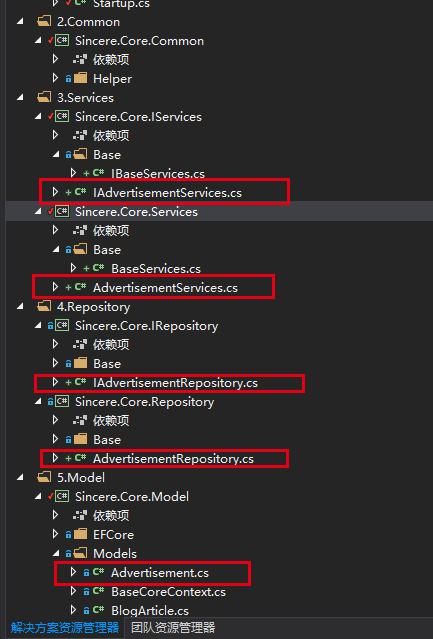
以后我们在此框架上开发其他服务的时候,也参照这样的目录结构建立相应文件。
接下来依次介绍各个文件,以及其实现过程。
首先是IAdvertisementRepository.cs
这个没什么好说的,继承自 IBaseRepository<Advertisement>。这里面我没有写其他的业务逻辑,是一个空的接口。代码如下:
 using Sincere.Core.IRepository.Base;

 using Sincere.Core.Model.Models;

 using System;

 using System.Collections.Generic;

 using System.Text;

 namespace Sincere.Core.IRepository

 {

     public interface IAdvertisementRepository : IBaseRepository<Advertisement>

     {

     }

 }
接下来是AdvertisementRepository.cs ,这里继承自BaseRepository<Advertisement>, 并实现 IAdvertisementRepository接口。代码如下:
 using Sincere.Core.IRepository;

 using Sincere.Core.Model.EFCore;

 using Sincere.Core.Model.Models;

 using Sincere.Core.Repository.Base;

 using System;

 using System.Collections.Generic;

 using System.Text;

 namespace Sincere.Core.Repository

 {

     public class AdvertisementRepository : BaseRepository<Advertisement>, IAdvertisementRepository

     {

         public AdvertisementRepository(IBaseContext mydbcontext) : base(mydbcontext)

         {

         }

     }

 }
这里需要说明的是,因为我在BaseRepository 的构造函数中,使用了有参数的构造函数
public BaseRepository(IBaseContext mydbcontext)
{
this._db = mydbcontext as BaseCoreContext;
this._dbSet = _db.Set<TEntity>();
}
所以在AdvertisementRepository 中,将注入的mydbContext 同步注入到BaseRepository 中。

仓储层的逻辑基本就这样了,接下来写Services中的实现。
同样,首先是接口IAdvertisementServices,继承IBaseServices<Advertisement>。没什么好说的,这里为了假装有一个方法,叫做ReadAllAd(),代码如下:
 using Sincere.Core.IServices.Base;

 using Sincere.Core.Model.Models;

 using System;

 using System.Collections.Generic;

 using System.Text;

 namespace Sincere.Core.IServices

 {

     public interface IAdvertisementServices : IBaseServices<Advertisement>

     {

          void ReadAllAd();

     }

 }
最后就是AdvertisementServices了,未来的开发中,我们大部分的业务逻辑都将在这里实现,于仓储层的实现类似,也是继承: BaseServices<Advertisement>, 实现 IAdvertisementServices接口。
代码如下:
 using Sincere.Core.IRepository;

 using Sincere.Core.IRepository.Base;

 using Sincere.Core.IServices;

 using Sincere.Core.Model.Models;

 using Sincere.Core.Services.Base;

 using System;

 using System.Collections.Generic;

 using System.Text;

 namespace Sincere.Core.Services

 {

     public class AdvertisementServices : BaseServices<Advertisement>, IAdvertisementServices

     {

         IAdvertisementRepository _advertisementRepository;

         public AdvertisementServices(IBaseRepository<Advertisement> baseRepository) {

             base.BaseDal = baseRepository;

             _advertisementRepository = baseRepository as IAdvertisementRepository;

         }

         public void ReadAllAd() {

         }

     }

 }
这里有些地方需要进行一下说明。首先就是通过依赖注入的方式,将IBaseRepository 注入进来。
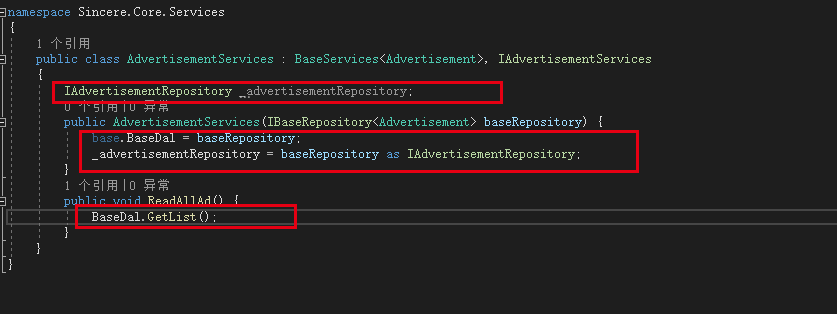
在ReadAllAd 方法中的引用如上图所示。
到此为止,各个层中的实现就都完成了。但是我们在Controller 中该怎么引用呢?
这个地方涉及的东西比较多,比如NetCore 的依赖注入、利用反射机制进行注入、NetCore 的Startup.cs 类等内容。准备用下一节的内容来进行整体说明。谢谢。
谢谢。
.netCore+Vue 搭建的简捷开发框架 (3)-- Services层实现的更多相关文章
- .netCore+Vue 搭建的简捷开发框架 (5)
文章目录:.netCore+Vue 搭建的简捷开发框架--目录 上两节的内容介绍了一些关于.netCore 相关的一些基础知识.介绍这些的目的,最主要的还是为了我们的架构搭建服务. 上一节中,我们介绍 ...
- .netCore+Vue 搭建的简捷开发框架--目录
.netCore+Vue 搭建的简捷开发框架 .netCore+Vue 搭建的简捷开发框架 (2)--仓储层实现和EFCore 的使用 .netCore+Vue 搭建的简捷开发框架 (3)-- Ser ...
- .netCore+Vue 搭建的简捷开发框架
话不多说,上图: 整体项目结构如图所示,我的设计初衷是基于.netCore + DI + Vue 打造一个适合初学者的简捷开发框架. 架构模型采用基于RESTful API风格的前后台分离框架,总体分 ...
- .netCore+Vue 搭建的简捷开发框架 (4)--NetCore 基础
书接上文:上一节中,我们已经实现Services 层.(https://www.cnblogs.com/xuzhencheng/p/11424751.html) 但是具体要如何将服务依赖注入进来呢?继 ...
- .netCore+Vue 搭建的简捷开发框架 (2)--仓储层实现和EFCore 的使用
书接上文,继续搭建我们基于.netCore 的开发框架.首先是我们的项目分层结构. 这个分层结构,是参考张老师的分层结构,但是实际项目中,我没有去实现仓储模型.因为我使用的是EFCore ,最近也一直 ...
- .netCore+Vue 搭建的简捷开发框架 (4)--NetCore 基础 -2
上节中,我们初步的介绍了一下NetCore的一些基础知识,为了控制篇幅(其实也是因为偷懒),我将NetCore 基础分为两部分来写. 0.WebAPI 项目的建立 1..NetCore 项目执行(加载 ...
- .netcore+vue+elementUI 前后端分离---支持前端、后台业务代码扩展的快速开发框架
框架采用.NetCore + Vue前后端分离,并且支持前端.后台代码业务动态扩展,框架内置了一套有着20多种属性配置的代码生成器,可灵活配置生成的代码,代码生成器界面配置完成即可生成单表(主表)的增 ...
- Linux+.NetCore+Nginx搭建集群
本篇和大家分享的是Linux+NetCore+Nginx搭建负载集群,对于netcore2.0发布后,我一直在看官网的文档并学习,关注有哪些新增的东西,我,一个从1.0到2.0的跟随者这里只总结一句话 ...
- 01 基于umi搭建React快速开发框架
介绍 基于umi搭建一个快速开发框架,react 应用框架.umi 以路由为基础的,支持类 next.js 的约定式路由,以及各种进阶的路由功能,并以此进行功能扩展,比如支持路由级的按需加载. 我们会 ...
随机推荐
- 基于python的mysql复制工具
一简介 python-mysql-replication 是由python实现的 MySQL复制协议工具,我们可以用它来解析binlog 获取日志的insert,update,delete等事件 ,并 ...
- 全球DEM数据资源下载
想找有海底地形的全球DEM数据作为三维地球展示用,发现很多都是只有陆地DEM而不带海底的,而且还需要通过Web页面进行选择然后数据下载. 找到一个学校的Ftp可以直接下载数据集,特别是这篇文章几乎汇集 ...
- Spring数据库连接
1.C3P0数据库连接 2.DBCP数据库连接 3.Druid数据库连接 C3P0数据库连接: 1.先到(http://www.mvnrepository.com/)Maven网址找到C3P0的数据源 ...
- seq2seq通俗理解----编码器和解码器(TensorFlow实现)
1. 什么是seq2seq 在⾃然语⾔处理的很多应⽤中,输⼊和输出都可以是不定⻓序列.以机器翻译为例,输⼊可以是⼀段不定⻓的英语⽂本序列,输出可以是⼀段不定⻓的法语⽂本序列,例如: 英语输⼊:&quo ...
- MySQL数据库之单表查询中关键字的执行顺序
目录 MySQL数据库之单表查询中关键字的执行顺序 1 语法顺序 2 执行顺序 3 关键字使用语法 MySQL数据库之单表查询中关键字的执行顺序 1 语法顺序 select distinct from ...
- 第一个Javaweb应用程序
第一个Javaweb应用程序 一.Javaweb应用程序结构 一个 web 应用程序是由一组 Servlet,HTML 页面,类,以及其它的资源组成的运行在 web 服务器上的完整的应用程序,以一种结 ...
- 🕸捕获与改写HTTPS请求
前言 本文站在 macOS 用户的角度下,分享一下对 HTTPS 进行请求拦截.对响应进行修改的经验. 要注意的是,本文介绍的工具虽然一定程度上对 Windows 用户也适用 ,但并非所有工具都是免费 ...
- JavaScript算法模式——动态规划和贪心算法
动态规划 动态规划(Dynamic Programming,DP)是一种将复杂问题分解成更小的子问题来解决的优化算法.下面有一些用动态规划来解决实际问题的算法: 最少硬币找零 给定一组硬币的面额,以及 ...
- 矩阵之间无循环计算L2距离
实现两个矩阵的无循环计算欧氏距离 Euclidean distance navigation: 1.问题描述 2.解决方法 1.问题来源 kNN算法中会计算两个矩阵的距离 可以使用循环的方法来实现,效 ...
- 2018 Petrozavodsk Winter Camp, Yandex Cup
A. Ability Draft solved by RDC 60min start, 148 min AC, 1Y 题意:两只 Dota 队伍,每队 \(n\) 个英雄,英雄一开始无技能,他们需要按 ...