
初识nginx!
What——什么是nginx
nginx是一款高性能的http服务器/反向代理服务器及电子邮件(IMAP/POP3)代理服务器。官方测试nginx能够支撑5w并发连接。并且cup、内存等资源消耗却非常低,运行非常稳定。
Function——功能
1.http服务器。nginx是一个http服务,可以独立提供http服务。可以做网页静态服务器。
2.虚拟主机。可以实现在一台服务器中虚拟出多个网站。类似于购买的虚拟主机。
3.反向代理,负载均衡。当网站的访问量达到一定的程度后,单台服务器不能满足用户的请求时,需要多台服务器集群可以使用nginx做反向代理。并且多台服务器可以平均分担负载,不会因为某台服务器负载高宕(dang)机而某台服务器闲置的情况。
How——如何使用
install——安装
官网下载nginx安装包(http://nginx.org/)
Linux系统安装之前需要环境
安装gcc的环境。
yum install gcc-c++
安装PCRE。
(Perl Compatible Regular Expressions)是一个Perl库,包括 perl 兼容的正则表达式库。nginx的http模块使用pcre来解析正则表达式,所以需要在linux上安装pcre库。注:pcre-devel是使用pcre开发的一个二次开发库。nginx也需要此库。
yum install -y pcre pcre-devel
安装zlib。
zlib库提供了很多种压缩和解压缩的方式,nginx使用zlib对http包的内容进行gzip,所以需要在linux上安装zlib库。
yum install -y zlib zlib-devel
安装openssl。
OpenSSL 是一个强大的安全套接字层密码库,囊括主要的密码算法、常用的密钥和证书封装管理功能及SSL协议,并提供丰富的应用程序供测试或其它目的使用。
nginx不仅支持http协议,还支持https(即在ssl协议上传输http),所以需要在linux安装openssl库。yum install -y openssl openssl-devel
安装步骤
把nginx的源码包上传到linux系统
解压缩
tar zxf nginx-1.8.0.tar.gz使用configure命令创建一makeFile文件。
	 	./configure \

		--prefix=/usr/softwear/nginx \

		--pid-path=/var/run/nginx/nginx.pid \

		--lock-path=/var/lock/nginx.lock \

		--error-log-path=/var/log/nginx/error.log \

		--http-log-path=/var/log/nginx/access.log \

		--with-http_gzip_static_module \

		--http-client-body-temp-path=/var/temp/nginx/client \

		--http-proxy-temp-path=/var/temp/nginx/proxy \

		--http-fastcgi-temp-path=/var/temp/nginx/fastcgi \

		--http-uwsgi-temp-path=/var/temp/nginx/uwsgi \

		--http-scgi-temp-path=/var/temp/nginx/scgi
注意:启动nginx之前,上边将临时文件目录指定为/var/temp/nginx,需要在/var下创建temp及nginx目录
mkdir /var/temp/nginx/client -p
makemake install
常用命令
进入sbin目录

启动nginx:

	./nginx

关闭nginx:

	./nginx -s stop

	./nginx -s quit		(推荐使用)

刷新配置文件:

	 ./nginx -s reload

检查配置文件:

	 ./nginx -t
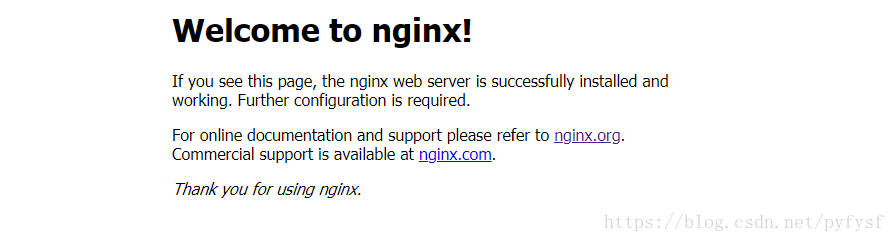
访问nginx:
http://localhost:80
config——配置
Nginx的配置文件:

安装目录/conf/nginx.conf
- 通过端口区分不同虚拟机(通过配置nginx监听不同的端口,从而实现不同端口下不同的跳转)
#user  nobody;

worker_processes  1;

#error_log  logs/error.log;

#error_log  logs/error.log  notice;

#error_log  logs/error.log  info;

#pid        logs/nginx.pid;

events {

    worker_connections  1024;

}

http {

    include       mime.types;

    default_type  application/octet-stream;

    #log_format  main  '$remote_addr - $remote_user [$time_local] "$request" '

    #                  '$status $body_bytes_sent "$http_referer" '

    #                  '"$http_user_agent" "$http_x_forwarded_for"';

    #access_log  logs/access.log  main;

    sendfile        on;

    #tcp_nopush     on;

    #keepalive_timeout  0;

    keepalive_timeout  65;

    #gzip  on;

    server {

    #监听80端口

        listen       80;

        server_name  localhost;

        #charset koi8-r;

        #access_log  logs/host.access.log  main;

        location / {

            root   html;

            index  index.html index.htm;

        }

    }

    server {

    #监听81端口

        listen       81;

        server_name  localhost;

        #charset koi8-r;

        #access_log  logs/host.access.log  main;

        location / {

            root   html-81;

            index  index.html index.htm;

        }

    }

}
- 通过配置域名区分虚拟主机
#user  nobody;

worker_processes  1;

#error_log  logs/error.log;

#error_log  logs/error.log  notice;

#error_log  logs/error.log  info;

#pid        logs/nginx.pid;

events {

    worker_connections  1024;

}

http {

    include       mime.types;

    default_type  application/octet-stream;

    #log_format  main  '$remote_addr - $remote_user [$time_local] "$request" '

    #                  '$status $body_bytes_sent "$http_referer" '

    #                  '"$http_user_agent" "$http_x_forwarded_for"';

    #access_log  logs/access.log  main;

    sendfile        on;

    #tcp_nopush     on;

    #keepalive_timeout  0;

    keepalive_timeout  65;

    #gzip  on;

    server {

        listen       80;

        server_name  localhost;

        #charset koi8-r;

        #access_log  logs/host.access.log  main;

        location / {

            root   html;

            index  index.html index.htm;

        }

    }

    server {

        listen       81;

        server_name  localhost;

        #charset koi8-r;

        #access_log  logs/host.access.log  main;

        location / {

            root   html-81;

            index  index.html index.htm;

        }

    }

    server {

        listen       80;

        server_name  www.pyfysf.com;

        #charset koi8-r;

        #access_log  logs/host.access.log  main;

        location / {

            root   html-pyfysf;

            index  index.html index.htm;

        }

    }

    server {

        listen       80;

        server_name  www.pyfysf888.com;

        #charset koi8-r;

        #access_log  logs/host.access.log  main;

        location / {

            root   html-pyfysf888;

            index  index.html index.htm;

        }

    }

}
上述配置文件就可以实现通过配置不同的域名进行不同的跳转内容。(当前仅仅是静态资源访问)
通过浏览器访问:http://www.pyfysf.com 和 http://www.pyfysf888.com 两个域名同时绑定到一个ip地址(本地测试可以通过修改host文件)
反向代理
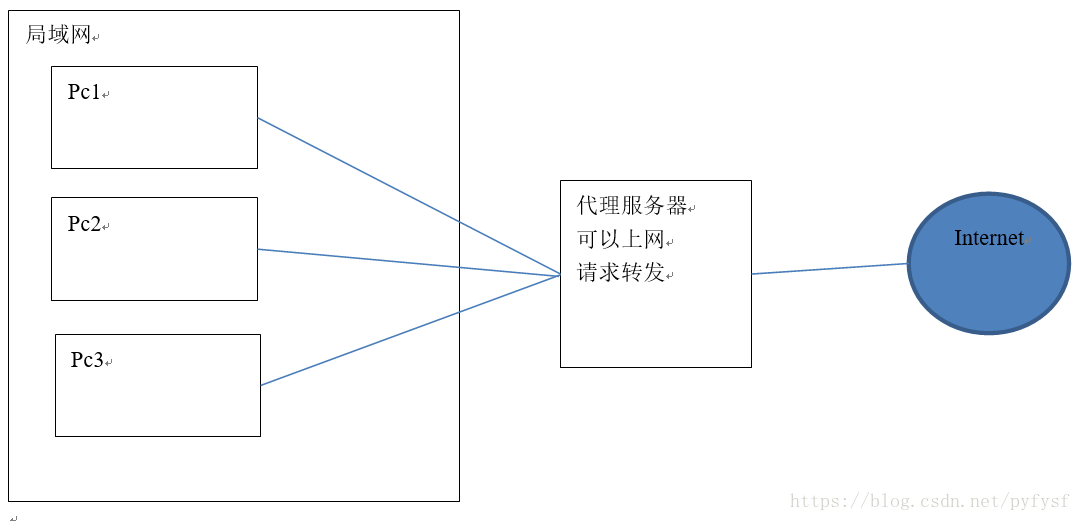
- 正向代理
- 反向代理
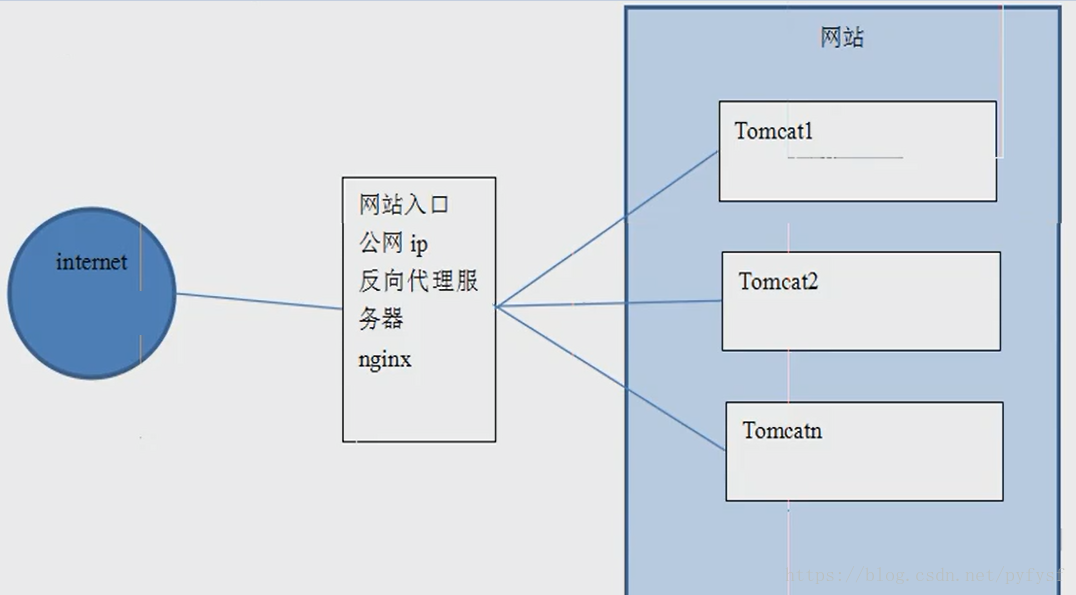
反向代理服务器决定哪台服务器提供服务。
返回代理服务器不提供服务器。也是请求的转发。
upstream tomcat1 {

	server 192.168.25.148:8080;

    }

    server {

        listen       80;

        server_name www.pyfysf.com;

        #charset koi8-r;

        #access_log  logs/host.access.log  main;

        location / {

            proxy_pass   http://tomcat1;

            index  index.html index.htm;

        }

    }

    upstream tomcat2 {

	server 192.168.25.148:8081;

    }

    server {

        listen       80;

        server_name  www.pyfysf888.com;

        #charset koi8-r;

        #access_log  logs/host.access.log  main;

        location / {

            proxy_pass   http://tomcat2;

            index  index.html index.htm;

        }

    }
如果一个服务由多条服务器提供,需要把负载分配到不同的服务器处理,需要负载均衡。
 upstream tomcat2 {

	server 192.168.25.148:8081;

	server 192.168.25.148:8082;

  }
可以根据服务器的实际情况调整服务器权重。权重越高分配的请求越多,权重越低,请求越少。默认是都是1
 upstream tomcat2 {

	server 192.168.25.148:8081;

	server 192.168.25.148:8082 weight=2;

    }
初识nginx!的更多相关文章
- 初识nginx——内存池篇
初识nginx——内存池篇 为了自身使用的方便,Nginx封装了很多有用的数据结构,比如ngx_str_t ,ngx_array_t, ngx_pool_t 等等,对于内存池,nginx设计的十分精炼 ...
- 初识Nginx及编译安装Nginx
初识Nginx及编译安装Nginx 环境说明: 系统版本 CentOS 6.9 x86_64 软件版本 nginx-1.12.2 1.什么是Nginx? 如果你听说或使用过Apache软件 ...
- 初识nginx之第一个demo
商城项目做了一个多月了,想到必须用到负载均衡,简单了解了一下nginx,首先分享第一个demo,五月份上线后,会继续分享一系列相关知识. 在nginx根目录下,用了一个园友的批处理文件nginx.ba ...
- 初识nginx
先来一波官方站点关于nginx介绍.nginx相关历史这里不再赘述啦. nginx 是免费,开源,高性能 HTTP 服务器和反向代理服务器,也可作为IMAP/POP3代理服务器.nginx以它的高 ...
- nginx(四)初识nginx日志文件
nginx 日志相关指令主要有两条,一条是log_format,用来设置日志格式,另外一条是access_log,用来指定日志文件的存放路径.格式和缓存大小,通俗的理解就是先用log_format来定 ...
- 初识nginx+tomcat
百度百科说: Nginx ("engine x") 是一个高性能的HTTP和反向代理服务器,也是一个IMAP/POP3/SMTP服务器.Nginx是由Igor Sysoev为俄罗斯 ...
- nginx(一)初识nginx
什么是nginx?Nginx (engine x) 是一款轻量级的Web 服务器 .反向代理服务器及电子邮件(IMAP/POP3)代理服务器. Nginx应用场景(都很常用): 1:http服务器.N ...
- 初识 Nginx
Nginx 是一个免费的,开源的,高性能的HTTP服务器和反向代理,以及IMAP / POP3代理服务器. Nginx 以其高性能,稳定性,丰富的功能,简单的配置和低资源消耗而闻名.很多高知名度的网站 ...
- 初识nginx反向代理和缓存机制
实现的需求图: 环境: nginx缓存和反向代理服务器:192.168.0.224 实际存储数据机器:192.168.0.37 一.实现反向代理 1.安装nginx,两台服务器都需要安装 1)安装 ...
- [web][nginx] 初识nginx -- 使用nginx搭建https DPI解码测试环境
环境 CentOS 7 X86 文档: https://nginx.org/en/docs/ 安装: [root@dpdk ~]# cat /etc/yum.repos.d/nginx.repo [n ...
随机推荐
- 如何从一张图片中裁剪一部分距形图片另存为文件(使用Canvas.CopyRect)
如何从一张图片中裁剪一部分距形图片另存为文件? Delphi / Windows SDK/APIhttp://www.delphi2007.net/DelphiMultimedia/html/delp ...
- 使用EurekaLog时遇到的问题
1.在DLL项目中千万不要加入EurekaLog,不然在主程序调用时就会出现莫名其妙的内存问题. 2.要使用EurekaLog发邮件的功能,发邮件的SMTP服务器必须支持8bit MIME编码.如SI ...
- Java 转PPT为图片、PDF、SVG、XPS、ODP以及PPT和PPTX互转
同一文档,在不同的文档查看器或者编译环境中,需要对该文档进行相应的格式转换.下面的内容中,将介绍通过Java编程来实现PPT文档格式转换的方法. 使用工具: Spire.Presentation fo ...
- JavaScript规定了几种语言类型?
JavaScript中的每一个值都有它自己的类型,JavaScript规定了七种语言类型: 1.Undefined 2.Null 3.Boolean 4.String 5.Number 6.Symbo ...
- 简单看看java之枚举
枚举类这个类用的比较少,对这个不怎么熟悉,最近看源码刚好可以好好了解一下,那么,枚举Enum是什么呢?在jdk中,Enum是一个抽象类下图所示,这就说明这个类是不能进行实例化的,那么我们应该怎么使用呢 ...
- Storm 学习之路(三)—— Storm单机版本环境搭建
1. 安装环境要求 you need to install Storm’s dependencies on Nimbus and the worker machines. These are: Jav ...
- 系统学习 Java IO (二)----IO 异常处理
目录:系统学习 Java IO---- 目录,概览 我们使用流后,需要正确关闭 Streams 和 Readers / Writers . 这是通过调用 close() 方法完成的,看看下面这段代码: ...
- 【设计模式】行为型01策略模式(strategy patten)
学设计模式一段时间了,有些懂了,有些半知半解,通过写笔记博客的方式总结一下: 关于策略模式,我的个人理解就是将一些经常变动的算法独立抽取出来,可以是一个方法,也可以是一个策略类,这样,如果有需求变更, ...
- memecached存放session数据
memcached存放session 1.session数据需要频繁调用. 2.session数据不需要永久性的保存在服务端. 3.在集群中,可以将session存放在memcached中或者是在数据 ...
- java里字节与字符的区别
当时学Java的时候没搞懂字节和字符的区别,今天看文件输入输出流的时候觉得是时候彻底把这两个概念弄懂. 首先得知道byte的概念和作用: byte即字节的意思,是java中的基本数据类型,用来申明字节 ...