
Mybatis需要注意的细节
mybatis第二篇
1.${}和#{}的区别
- 1.#在传参的时候,会自动拼接单引号;$不能拼接单引号;
2.$传参时,一般不支持jdbcType指定类型的写法;#则可以;如:
#{name,jdbcType=VARCHAR}
3.$一般用于在sql中拼接表名,结果排序,模糊查询等操作;其他正常参数传递一般使用
4.因为${}使用后不会自动拼接单引号,所以可能还会导致sql攻击
select * from user where username=${username} and password=${username}
当输入值为" ttt' or '22'='22' 时,sql就被替换为
select * from user where username='ttt' or '22'='22' and password='ttt' or '22'='22'
在影射文件中结果类型的处理
	<resultMap type="cn.sz.gl.pojo.DeptPlus" id="deptinfo">

		<result column="deptno" property="deptno"/>

		<result column="dname" property="dname"/>

		<result column="loc" property="loc"/>

            <!--第一种,通过association  标签实现连表查询

                <association  column="deptno" property="dept"

                select="cn.sz.gl.dao.DeptDao.findById"></association>-->

            <!--第二种 连表查询,多对一模式

		<collection property="emplist">

				<id column="empno" property="empno"/>

				<result column="ename" property="ename"/>

				<result column="job" property="job"/>

				<result column="hiredate" property="hiredate"/>

				<result column="sal" property="sal"/>

				<result column="comm" property="comm"/>

		</collection>

              -->

	    <!-- 方案3 联表查询下,一对多-->

		<collection property="emplist" column="deptno"

                    ofType="cn.sz.gl.pojo.Emp" javaType="java.util.List"

                     select="cn.sz.gl.pojo.Emp.findByDeptno"></collection>

	</resultMap>

	<!--根据部门编号查看部门所有员工  1对多-->

	<select id="findByIdlist" resultMap="deptinfo" parameterType="java.lang.String">

		select deptno, dname, loc from dept	 where deptno=#{deptno}

	</select>
定义接口方法
    /**

	 * 根据部门编号查看部门所有员工

	 * @param deptno Integer

	 * @return DeptPlus 部门和员工的组合

	 */

	public DeptPlus findByIdlist(Integer deptno);
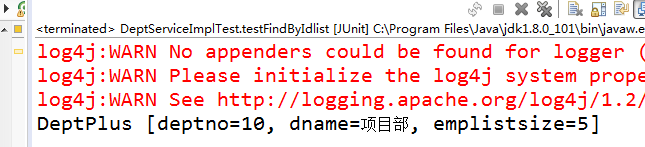
测试
@Test

	public void testFindByIdlist() {

		SqlSession sqlsession

				=MySqlSessionFactory.getMySqlSession();

		//通过工厂调用getMapper获取接口实例

		DeptDao dao = sqlsession.getMapper(DeptDao.class);

		System.out.println(dao.findByIdlist(10));

		MySqlSessionFactory.closeSqlSession();

	}
2.在插入数据时获取主键
<!-- 增加 -->

<insert id="insert" parameterType="cn.sz.gl.pojo.Users" >

	insert into users(id,name,password)

	values(users_seq.nextval, #{name,jdbcType=VARCHAR},

	#{password,jdbcType=VARCHAR})

</insert>
这里提供两种方案
在oracle中,因为自身使用序列自增策略
我们在insert语句中加入selectKey 这样就会把主键,映射到实体类的主键上
<insert id="insert" parameterType="cn.sz.gl.pojo.Users" >

    <selectKey order="AFTER" keyProperty="empno" resultType=" java.lang.Integer">

			select emp_seq.currval from daul

		</selectKey>

	insert into users(id,name,password)

	values(users_seq.nextval, #{name,jdbcType=VARCHAR},

	#{password,jdbcType=VARCHAR})

</insert>
对于mysql和mssql的主键自增策略
先设置启用主键自增策略,将属性useGeneratedKeys="true,指定返回到实体类的属性名,设置对应列名keyColumn="empno",后就会映射到实体类之中
	<!-- 增加 -->

	<insert id="insert" parameterType="cn.sz.gl.pojo.Emp" useGeneratedKeys="true" keyColumn="empno" keyProperty="empno" >

		insert into emp(empno, ename, job, mgr, hiredate, sal, comm, deptno)

		values(emp_seq.nextval, #{ename,jdbcType=VARCHAR}, #{job,jdbcType=VARCHAR}, #{mgr,jdbcType=NUMERIC}, #{hiredate,jdbcType=DATE}, #{sal,jdbcType=NUMERIC}, #{comm,jdbcType=NUMERIC}, #{deptno,jdbcType=NUMERIC})

	</insert>
3.ThreadLocal本地线程的使用
现编写工具类MySqlSessionFactory.java
public class MySqlSessionFactory {

	private static final String RESOURCE = "mybatis_config.xml";

	private static SqlSessionFactoryBuilder builder = null;

	private static SqlSessionFactory factory = null;

	private static ThreadLocal<SqlSession> threadLocal = new ThreadLocal<SqlSession>();

	static{

		try {

			InputStream is = Resources.getResourceAsStream(RESOURCE);

			builder = new SqlSessionFactoryBuilder();

			factory = builder.build(is);

		} catch (IOException e) {

			System.out.println("加载配置文件.....");

		}

	}

	public static SqlSession getMySqlSession() {

		SqlSession sqlSession = threadLocal.get();

		if(sqlSession==null) {

			sqlSession = factory.openSession();

			threadLocal.set(sqlSession);

		}

		return sqlSession;

	}

	public static void closeSqlSession() {

		SqlSession sqlSession = threadLocal.get();

		if(sqlSession!=null) {

			sqlSession.close();

		}

		threadLocal.set(null);

	}

}
使用在service中
public class UsersServiceImpl implements UsersService {

	private static SqlSession sqlsession

				=MySqlSessionFactory.getMySqlSession();

	private UsersDao dao = null;

	/**

	 * 查询全部

	 * @return

	 */

	public List<Users> findAll(){

		try {

			dao=sqlsession.getMapper(UsersDao.class);

			return dao.findAll();

		} catch (Exception e) {

			System.out.println("findAll'查询列表失败!");

		}

		return Collections.EMPTY_LIST;

	}

}
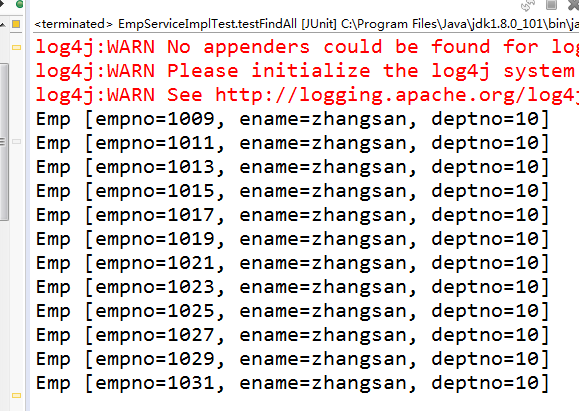
测试
public class UsersServiceImplTest {

	private UsersService service=null;

	@Before

	public void init() {

		service=new UsersServiceImpl();

	}

	@Test

	public void testFindAll() {

		service.findAll().forEach(System.out::println);

	}

}
Mybatis需要注意的细节的更多相关文章
- Mybatis学习的一些细节
一.mybatis 基本配置 最近几天一直在学习mybatis,看了一些源码,本文讲述mybatis的一些基本配置和基本的用法和注意到一些细节.个人时间和精力有限,本文属于流水账类型,不成体系,算是自 ...
- mybatis不可忽略的细节
自我总结,欢迎拍砖! 目的:在需要返回int,long等基础类型数据的情况下,尽量在mybatis的Mapper中用基础类型的包装类. 原因:当查询的字段为空值时,mybatis会返回null,用基础 ...
- mybatis使用注意的细节
1.mybatis对sql执行后会对结果进行封装,如果没有返回任何记录,只是封装后的对象没有值,而对象并不为空null: (这个问题疏忽坑了两次,在对返回数组结果进行判断的时候,我用的if(Array ...
- mybatis的一些小细节
Mybatis要解决的问题: 1. 将sql语句硬编码到java代码中,如果修改sql语句,需要修改java代码,重新编译.系统可维护性不高. 设想如何解决? 能否将sql单独配置在配置文件中. 2. ...
- IntelliJ IDEA 2017版 spring-boot2.0.4+mybatis 自动部署的细节问题
一.加载pom依赖包 <!--spring-boot开发热部署--> <dependency> <groupId>org.springframework.boot& ...
- MyBatis中的特殊符号[20160713]
今天中午回到工位已经是12:20多了,没有时间睡觉了,本想着还能提前开始,结果看了点新闻之后,又是12:40了,所以新闻坚决不能看,执行力. 今天主要记录一下MyBatis中的特殊符号的问题,这个问题 ...
- 6、SpringBoot+Mybatis整合------参数传递
开发工具:STS 代码下载链接:https://github.com/theIndoorTrain/SpringBoot_Mybatis/tree/7892801d804d2060774f3720f8 ...
- 图解Mybatis框架原理及使用
1.前言 努力学习完ssm框架之后,终于也成功的把三大框架的使用以及配置文件细节忘得一干二净.为了努力捡起来以及方便今后的复习,决定写一篇博客记录一下. 本博客的所有分析都是在持久层接口以及接口中的方 ...
- mybatis框架的第二天
一.mybatis的基础crud的操作 先在接口中,写对应的方法名称,返回类型,访问符. 之后在映射配置文件中,写具体的实现 二.mybati中crud的细节 1.模糊查询 这是接口中 这是xml中 ...
随机推荐
- [ch02-00] 反向传播与梯度下降的通俗解释
系列博客,原文在笔者所维护的github上:https://aka.ms/beginnerAI, 点击star加星不要吝啬,星越多笔者越努力. 第2章 神经网络中的三个基本概念 2.0 通俗地理解三大 ...
- CentOs虚拟机配置
1.打开“VMware”,点击“主页”,点“创建新的虚拟机”: 2.会弹出一个“新建虚拟机向导”,类型选择“典型”,点击“下一步”: 3.选择“稍后安装操作系统”,点击“下一步”: 4.我们用的是Li ...
- shell脚本2——控制语句
1.顺序结构体 命令从上往下顺序执行 2.分支结构体 1)判断真假 test 表达式 或者 [ 表达式 ](必须有空格) 真返回0,假返回1 test的别名是[, 参数是] 判断表达式 记忆 解释 ! ...
- MATLAB相机标定转XMl代码
function writeXML(cameraParams,file) %writeXML(cameraParams,file) %功能:将相机校正的参数保存为xml文件 %输入: %cameraP ...
- java中的string对象深入了解
这里来对Java中的String对象做一个稍微深入的了解. Java对象实现的演进 String对象是Java中使用最频繁的对象之一,所以Java开发者们也在不断地对String对象的实现进行优化,以 ...
- Nginx 匹配流程一览
在 nginx server 模块中,location 的定义长被用来匹配一个标准的 URI, 并根据 URI 的不同做出相应的服务方案. nginx location 匹配的优先级 在 locati ...
- 使用sklearn和caffe进行逻辑回归 | Brewing Logistic Regression then Going Deeper
原文首发于个人博客https://kezunlin.me/post/c50b0018/,欢迎阅读! Brewing Logistic Regression then Going Deeper. Bre ...
- 20191107-10 beta发布
此作业要求参见https://edu.cnblogs.com/campus/nenu/2019fall/homework/9962 1.视频地址:https://v.youku.com/v_show/ ...
- 扛把子组20191031-8 alpha week 1/2 Scrum立会报告+燃尽图 06
此作业的要求参见:https://edu.cnblogs.com/campus/nenu/2019fall/homework/9916 一.小组情况 队名:扛把子 组长:孙晓宇 组员:宋晓丽 梁梦瑶 ...
- 【Luogu P3376】网络最大流
Luogu P3376 最大流是网络流模型的一个基础问题. 网络流模型就是一种特殊的有向图. 概念: 源点:提供流的节点(入度为0),类比成为一个无限放水的水厂 汇点:接受流的节点(出度为0),类比成 ...