
报错 Please make sure you have the correct access rights and the repository exists (git 添加ssh密钥 )
1.设置Git的user name和email
$ git config --global user.name "wubaiwan"
$ git config --global user.email "576953565@qq.com"
2.然后系统会自动在.ssh文件夹(一般在c盘)下生成两个文件,id_rsa和id_rsa.pub,用记事本打开id_rsa.pub
3.全选复制里面的内容
4,打开git 设置 粘贴到里面
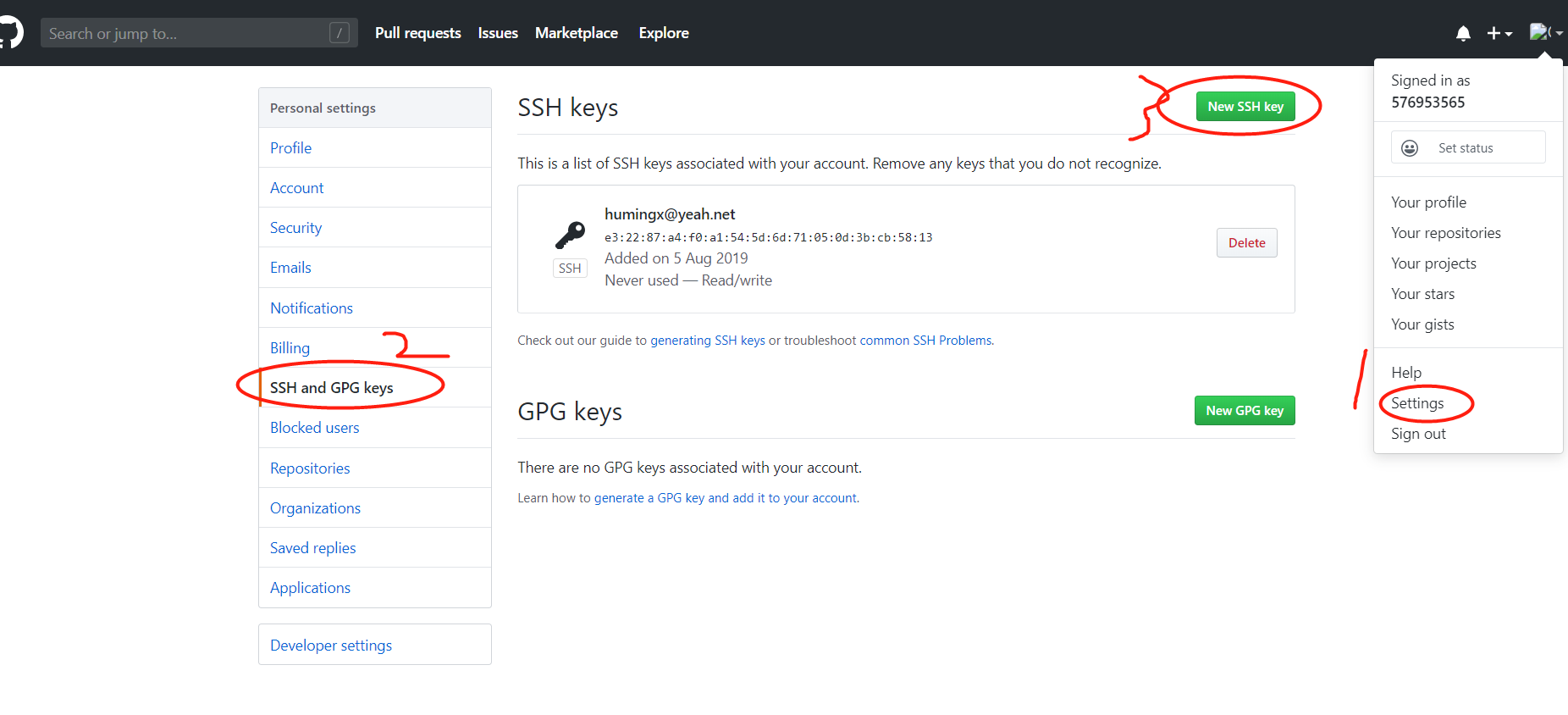
5,回到git bash 输入命令ssh -T git@github.com ,运行后在输入yes,回车,啦啦啦就ok了
报错 Please make sure you have the correct access rights and the repository exists (git 添加ssh密钥 )的更多相关文章
- 【Devops】【docker】【CI/CD】Jenkins源码管理,设置gitlab上项目的clone地址 + jenkins构建报错:Please make sure you have the correct access rights and the repository exists.
注意,如果 jenkins构建报错:Please make sure you have the correct access rights and the repository exists. 而此时 ...
- 【Devops】【docker】【CI/CD】jenkins源码管理,添加SSH地址后报错+Jenkins构建报错:Please make sure you have the correct access rights and the repository exists.
jenkins源码管理,添加SSH地址后报错: Could not read from remote repository. Please make sure you have the correct ...
- windows 部署 git 服务器报 Please make sure you have the correct access rights and the repository exists.错误
这两天在阿里云上弄windows 服务器,顺便部署了一个git服务.根据网上教程一步步操作下来,最后在 remote远程仓库的时候提示 fatal: 'yourpath/test.git' does ...
- Git push提交时报错Permission denied(publickey)...Please make sure you have the correct access rights and the repository exists.
一.git push origin master 时出错 错误信息为: Permission denied(publickey). fatal: Could not read from remote ...
- Nginx启动报错:10013: An attempt was made to access a socket in a way forbidden
Nginx在win7,win2008下启动报错:bind() to 0.0.0.0:80 failed (10013: An attempt was made to access a socket i ...
- MySQL复制报错(Slave failed to initialize relay log info structure from the repository)
机器重启以后,主从出现了问题,具体报错信息: Slave failed to initialize relay log info structure from the repository 解决方案: ...
- 解决报错:类型“System.Object”在未被引用的程序集中定义。必须添加对程序集“System.Runtime, Version=4.0.0.0, Culture=neutral, PublicKeyToken=b03f5f7f11d50a3a”的引用
Razor视图引擎中,使用部分视图编译报错 类型“System.Object”在未被引用的程序集中定义.必须添加对程序集“System.Runtime, Version=4.0.0.0, Cultur ...
- SVN资源库报错:Could not create the view: org.tigris.subversion.subclipse.ui.repository.RepositoriesView
解决方法: 关闭正在运行的myeclipse,然后打开myeclipse安装路径(我的安装在c盘): c:\ProgramFiles\MyEclipse\MyEclipse Professional ...
- mysql报错1872: Slave failed to initialize relay log info structure from the repository
ERROR 1872 (HY000): Slave failed to initialize relay log info structure from the repository 在一台主机上增加 ...
随机推荐
- BigInt 的使用!
今天学长讲的卡特兰数真的是卡的一批,整个全是高精的题,这时我就使用重载运算符,然后一下午就过去了 首先来看一波水题(也就卡了2小时) . A. 网格 内存限制:512 MiB 时间限制:1000 ms ...
- 『题解』LibreOJ6277 数列分块入门 1
更好的阅读体验 Portal Portal1: LibreOJ Description 给出一个长为\(n\)的数列,以及\(n\)个操作,操作涉及区间加法,单点查值. Input 第一行输入一个数字 ...
- nyoj 73-比大小 (Java, 高精度)
73-比大小 内存限制:64MB 时间限制:3000ms 特判: No 通过数:15 提交数:64 难度:3 题目描述: 给你两个很大的数,你能不能判断出他们两个数的大小呢? 比如1234567891 ...
- Vue导入非模块化的第三方插件功能无效解决方案
一.问题: 最近在写vue项目时,想引入某些非模块化的第三方插件时,总是发现会有报错.且在与本地运行插件测试对比时发现插件根本没有注入到jQuery中(console.log($.fn)查看当前jq有 ...
- PowerMock学习(六)之Mock Final的使用
Mock Final mockfinal相对来说就比较简单了,使用powermock来测试使用final修饰的method或class,比较简单,接口调用部分,还是service调用dao. 对于接口 ...
- 【集训Day2】字符串
字符串(string) [问题描述] 给一个字符串T,问在字符串T 中可以包含最多多少个不重叠的字符串S. 字符串中的每个字符为小写或者大写字母. [输入格式] 第一行输入一个字符串S. 第二行输入一 ...
- day 49
今日内容 标签操作 样式操作 样式类操作 addClass(); // 添加指定的CSS类名. removeClass(); // 移除指定的CSS类名. hasClass(); // 判断样式存不存 ...
- 【python测试开发栈】—python内存管理机制(二)—垃圾回收
在上一篇文章中(python 内存管理机制-引用计数)中,我们介绍了python内存管理机制中的引用计数,python正是通过它来有效的管理内存.今天来介绍python的垃圾回收,其主要策略是引用计数 ...
- vue JS实现监听浏览器返回按键事件
// 这个是监听浏览器回退键的returnButton () { let vm = this; $(document).ready(function () { if (window.history & ...
- 关于HashMap容量的初始化,还有这么多学问。
在<HashMap中傻傻分不清楚的那些概念>文章中,我们介绍了HashMap中和容量相关的几个概念,简单介绍了一下HashMap的扩容机制. 文中我们提到,默认情况下HashMap的容量是 ...