
调用远程service aidl接口定义
Android studio 查看aidl定义的文件:当你进入你的AIDL文件并编写好了之后,点击AS上方菜单栏中的Build->Make Project,之后便可以在当前工程的app/build/generated/source/aidl/debug中找到系统为我们生成的.java文件了。
Service端
  <service android:name="com.atguigu.l07_service.remote.MyRemoteService">
            <intent-filter>
                <action android:name="com.atguigu.l07_service.remote.MyRemoteService.Action"/>
            </intent-filter>
        </service>
public class MyRemoteService extends Service {

    @Override
    public IBinder onBind(Intent intent) {
        Log.e("TAG", "onBind()");
        return new StudentService();
    }

    @Override
    public boolean onUnbind(Intent intent) {
        Log.e("TAG", "onUnbind()");
        return super.onUnbind(intent);
    }

    //处理Student相关的业务逻辑类
    class StudentService extends IStudentService.Stub {
        @Override
        public Student getStudentById(int id) throws RemoteException {
            Log.e("TAG", "Service getStudentById() "+id);
            return new Student(id, "Tom", 10000);
        }
    }

}
《------------------------------start定义aidl接口--------------------------------------------》
定义自定义类型Student
//必须实现Parcelable接口
public class Student implements Parcelable {
  private int id;
  private String name;

  get set。。。。

  public int describeContents() { return 0;}
  //将当前对象的属性数据写到Parcel包对象中(也就是打包) 打包解包在服务器端或client端都有可能,根据功能需求分类,如果服务器传出数据,则打包就在服务器端完成,如果客户端传输数据,则打包就在客户端完成
 public void writeToParcel(Parcel dest, int flags) {
    dest.writeInt(this.id);
    dest.writeString(this.name);
  }
  // 添加一个静态成员,名为CREATOR,该对象实现了Parcelable.Creator接口
  public static final Parcelable.Creator<Student> CREATOR = new Parcelable.Creator<Student>() {
    public Student createFromParcel(Parcel source) {
     return new Student(source.readInt(), source.readString());
    }
    public Student[] newArray(int size) {
     return new Student[size];
    }
  };
}
创建文件:Student.aidl
package com.atguigu.service.test.remote;
parcelable Student;
创建文件:IStudentService.aidl
package com.atguigu.service.test.remote;
import com.atguigu.service.test.remote.Student;

interface IStudentService {
       Student getStudentById(int id);
}
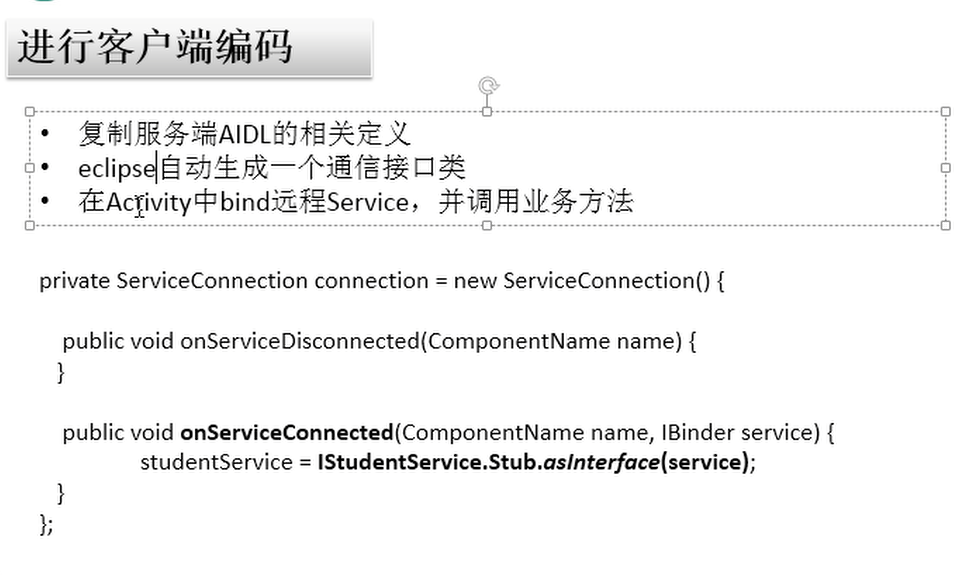
eclipse自动生成一个通信接口类package com.atguigu.service.test.remote;
public interface IStudentService extends android.os.IInterface{
    .......
}
《------------------------------end定义aidl接口--------------------------------------------》
client
public class MainActivity extends Activity {

    private EditText et_aidl_id;

    @Override
    protected void onCreate(Bundle savedInstanceState) {
        super.onCreate(savedInstanceState);
        setContentView(R.layout.activity_main);

        et_aidl_id = (EditText) findViewById(R.id.et_aidl_id);
    }

    private ServiceConnection conn;
    private IStudentService studentService;

    public void bindRemoteService(View v) {

        Intent intent = new Intent(
                "com.atguigu.l07_service.remote.MyRemoteService.Action");
        if (conn == null) {
            conn = new ServiceConnection() {

                @Override
                public void onServiceDisconnected(ComponentName name) {

                }

                @Override
                public void onServiceConnected(ComponentName name,
                        IBinder service) {
                    Log.e("TAG", "onServiceConnected()");
                    studentService = IStudentService.Stub.asInterface(service);
                }
            };
            bindService(intent, conn, Context.BIND_AUTO_CREATE);
            Toast.makeText(this, "绑定Service", 0).show();
        } else {
            Toast.makeText(this, "已经绑定Service", 0).show();
        }

    }

    public void invokeRemote(View v) throws RemoteException {
        if(studentService!=null) {
            int id = Integer.parseInt(et_aidl_id.getText().toString());
            Student student = studentService.getStudentById(id);
            Toast.makeText(this, student.toString(), 0).show();
        }
    }

    public void unbindRemoteService(View v) {
        if (conn != null) {
            unbindService(conn);
            conn = null;
            studentService = null;
            Toast.makeText(this, "解绑Service", 0).show();
        } else {
            Toast.makeText(this, "还未绑定Service", 0).show();
        }
    }
}
调用远程service aidl接口定义的更多相关文章
- android 中activity调用远程service中的方法之 aidl的使用
服务端:只有服务,没有界面 1.编写interface文件,复制到 .aidl 文件中,并去掉其中的public 等修饰符.系统会自动在gen目录下生成对应的java文件 (对应本地调用中的接口文件 ...
- Android调用远程Service的参数和返回值都需要实现Parcelable接口
import android.os.Parcel;import android.os.Parcelable; public class Person implements Parcelable{ pr ...
- AIDL —— Android接口定义语言
AIDL:Android Interface Definition Language,即Android接口定义语言,是Android进程间通信比较常用的一种方式.翻译一下,就是为了让某个Service ...
- AIDL使用绑定启动远程Service出现Service Intent must be explicit: Intent
Intent intent = new Intent(); intent.setAction("remote.MyRemoteService.Action"); 使用AIDL调用远 ...
- Android Activity与远程Service的通信学习总结
当一个Service在androidManifest中被声明为 process=":remote", 或者是还有一个应用程序中的Service时,即为远程Service, 远程的意 ...
- Android开发,Eclipse创建aidl接口时,出错
Android开发中,当我们需要调用远程Service时,我们一般通过远程接口(RMI)来实现的,而Android的RMI需要AIDL(Android Interface Definition Lan ...
- 大仙说道之Android studio实现Service AIDL
今天要开发过程中要用到AIDL的调用,之前用的eclipse有大量教程,用起来很方便,现在刚换了Android studio,不可否认studio真的很强大,只是很多功能还需要摸索. AIDL(And ...
- Android Studio实现Service AIDL
Android Studio实现Service AIDL [日期:2015-01-02] 来源:Linux社区 作者:teenyboy [字体:大 中 小] 今天要开发过程中要用到AID ...
- 一个简单的demo学习Android远程Service(AIDL的使用)
这是milo很早之前写在论坛上的一个帖子,现在整理出来,milo也复习一下一般来说Android 的四大组件都是运行在同一个进程中的,但远程Service运行在不同的进程里.这进程间的通信是使用了An ...
随机推荐
- hdu 4632 子字符串统计的区间dp
题意:查找这样的子回文字符串(未必连续,但是有从左向右的顺序)个数. 简单的区间dp,哎,以为很神奇的东西,其实也是dp,只是参数改为区间,没做过此类型的题,想不到用dp,以后就 知道了,若已经知道[ ...
- Java中将List转成逗号数组的方案
说明:逗号字符串转成数组或者List都是可以的,反过来依然可行:但是如果是List<String>转List<Integer>,基本误解,在Java 7只能for循环,如果在J ...
- 自定义PropertyGrid控件【转】
自定义PropertyGrid控件 这篇随笔其实是从别人博客上载录的.感觉很有价值,整理了一下放在了我自己的博客上,希望原作者不要介意. 可自定义PropertyGrid控件的属性.也可将属性名称显示 ...
- 高仿QQ6.0側滑菜单之滑动优化(二)
好了,昨天已经实现了高仿QQ6.0的側滑大致框架.如有兴趣.能够去看下仿QQ6.0側滑之ViewDragHelper的使用(一) 可是之前的实现.仅仅是简单的能够显示和隐藏左側的菜单,可是特别生硬,并 ...
- py3处理数据库
处理mysql使用 pymysql模块 import pymysql conn=pymysql.connect(host='127.0.0.1',port=3306,user='root',passw ...
- mysql: Data source rejected establishment of connection, message from server: "Too many connections"
http://www.oschina.net/question/558677_66703 com.mysql.jdbc.exceptions.MySQLNonTransientConnectionEx ...
- Linux上mysql修改密码
http://www.cnblogs.com/wangjiangze/archive/2011/03/03/1970105.html MySQL中修改密码及访问限制设置详解
- CrtmpServr 接收Http流程
最近在研究CrtmpServer http部分,记录一些基本的流程,以备查阅. 首先,打开配置脚本CrtmpServer.lua ,确认脚本中有以下内容,如果没有需要加上. { name=" ...
- 3D打印技术之切片引擎(4)
[此系列文章基于熔融沉积( fused depostion modeling, FDM )成形工艺] 这一篇文章我讲一下多边打印的问题,多边打印是切片引擎的一项关键的技术. 图1 双边打印 首先.它能 ...
- Spring Cloud(十):服务网关zuul(转)
前面的文章我们介绍了,Eureka用于服务的注册于发现,Feign支持服务的调用以及均衡负载,Hystrix处理服务的熔断防止故障扩散,Spring Cloud Config服务集群配置中心,似乎一个 ...