
asp.net 的一个简单进度条功能
我们先看下效果
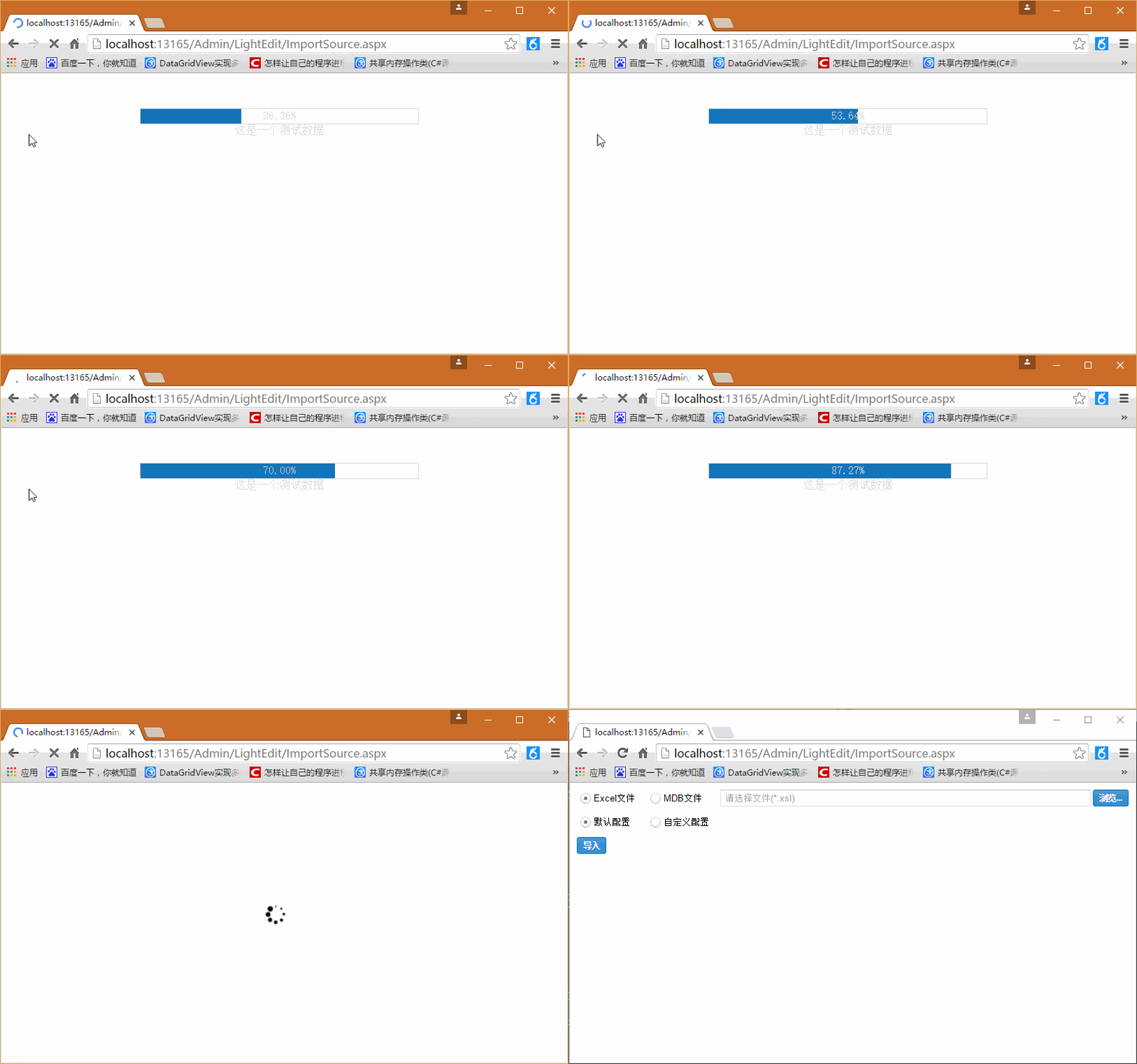
我点击了按钮后他会显示进度页面,进度完成后,进度条消失,其实也是比较简单的了。
我们需要一个进度条代码文件ProgressBar.htm(注意:是没有head这些标签的)
<script language="javascript">

    function SetPorgressBar(pos) {

        //设置进度条居中

        var screenWidth = document.body.offsetWidth;

        ProgressBarSide.style.width = Math.round(screenWidth / 2) + "px";

        ProgressBarSide.style.left = Math.round(screenWidth / 4) + "px";

        ProgressBarSide.style.top = "50px";

        ProgressBarSide.style.height = "21px";

        ProgressBarSide.style.display = "block";

        //设置进度条百分比

        ProgressBar.style.width = pos + "%";

        ProgressText.innerHTML = pos + "%";

    }

    function SetMaxValue(maxValue) {

        ProgressBarSide.style.width = maxValue + "px";

    }

    //完成后隐藏进度条

    function SetCompleted() {

        ProgressBarSide.style.display = "none";

    }

    function SetTitle(title) {

        ProgressTitle.innerHTML = title;

    }

</script>

<div id="ProgressBarSide" style="position: absolute; height: 21px; width: 100px;

    color: Silver; border-width: 1px; border-style: Solid; display: block">

    <div id="ProgressBar" style="position: absolute; height: 21px; width: 0%; background-color: #1475BB">

    </div>

    <div id="ProgressText" style="position: absolute; height: 21px; width: 100%; text-align: center">

    </div>

    <div id="ProgressTitle" style="position: absolute; height: 21px; top: 21px; width: 100%;

        text-align: center">

    </div>

</div>
然后需要一个进度条类ProgressBar.cs
using System;

using System.Collections.Generic;

using System.Linq;

using System.Web;

using System.IO;

namespace ZhuoYueE.Dop.Web.UI

{

    /// <summary>

    ///显示进度条

    /// </summary>

    public class ProgressBar : System.Web.UI.Page

    {

        /// <summary>

        /// 最大值

        /// </summary>

        private int MaxValue

        {

            get

            {

                if (ViewState["MaxValue"] == null)

                {

                    return ;

                }

                else

                {

                    return Convert.ToInt32(ViewState["MaxValue"]);

                }

            }

            set

            {

                ViewState["MaxValue"] = value;

            }

        }

        /// <summary>

        /// 当前值

        /// </summary>

        private int ThisValue

        {

            get

            {

                if (ViewState["ThisValue"] == null)

                {

                    return ;

                }

                else

                {

                    return Convert.ToInt32(ViewState["ThisValue"]);

                }

            }

            set

            {

                ViewState["ThisValue"] = value;

            }

        }

        /// <summary>

        /// 当前页面

        /// </summary>

        System.Web.UI.Page m_page;

        /// <summary>

        /// 功能描述:构造函数

        /// 作  者:huangzh

        /// 创建日期:2016-05-06 11:54:34

        /// 任务编号:

        /// </summary>

        /// <param name="page">当前页面</param>

        public ProgressBar(System.Web.UI.Page page)

        {

            m_page = page;

        }

        public void SetMaxValue(int intMaxValue)

        {

            MaxValue = intMaxValue;

        }

        /// <summary>

        /// 功能描述:初始化进度条

        /// 作  者:huangzh

        /// 创建日期:2016-05-06 11:55:26

        /// 任务编号:

        /// </summary>

        public void InitProgress()

        {

            //根据ProgressBar.htm显示进度条界面

            string templateFileName = AppDomain.CurrentDomain.BaseDirectory + "ProgressBar.htm";

            StreamReader reader = new StreamReader(@templateFileName, System.Text.Encoding.GetEncoding("GB2312"));

            string strhtml = reader.ReadToEnd();

            reader.Close();

            m_page.Response.Write(strhtml);

            m_page.Response.Flush();

        }

        /// <summary>

        /// 功能描述:设置标题

        /// 作  者:huangzh

        /// 创建日期:2016-05-06 11:55:36

        /// 任务编号:

        /// </summary>

        /// <param name="strTitle">strTitle</param>

        public void SetTitle(string strTitle)

        {

            string strjsBlock = "<script>SetTitle('" + strTitle + "'); </script>";

            m_page.Response.Write(strjsBlock);

            m_page.Response.Flush();

        }

        /// <summary>

        /// 功能描述:设置进度

        /// 作  者:huangzh

        /// 创建日期:2016-05-06 11:55:45

        /// 任务编号:

        /// </summary>

        /// <param name="percent">percent</param>

        public void AddProgress(int intpercent)

        {

            ThisValue = ThisValue + intpercent;

            double dblstep = ((double)ThisValue / (double)MaxValue) * ;

            string strjsBlock = "<script>SetPorgressBar('" + dblstep.ToString("0.00") + "'); </script>";

            m_page.Response.Write(strjsBlock);

            m_page.Response.Flush();

        }

        public void DisponseProgress()

        {

            string strjsBlock = "<script>SetCompleted();</script>";

            m_page.Response.Write(strjsBlock);

            m_page.Response.Flush();

        }

    }

}
然后就是调用方法了,调用很简单,在页面的按钮事件或者其他什么地方加入代码,如在按钮事件里这么用
   protected void btnImport_Click(object sender, EventArgs e)

        {

            ProgressBar pb = new ProgressBar(this);

            pb.SetMaxValue();

            pb.InitProgress();

            pb.SetTitle("这是一个测试数据");

            for (int i = ; i <= ; i++)

            {

                pb.AddProgress();

                //此处用线程休眠代替实际的操作,如加载数据等

                System.Threading.Thread.Sleep();

            }

            pb.DisponseProgress();

        }
怎么样,是不是很简单呢。
asp.net 的一个简单进度条功能的更多相关文章
- .Net Framework4.5中Asp.net mvc使用Singal R轮训实现导入进度条功能
.Net Framework4.5中Asp.net mvc使用Singal R轮训实现导入进度条功能 我的项目需求是:在.net4.5中用mvc5实现上传xml文件,后台实时导入数据库时传到前台进度, ...
- wpf 导出Excel Wpf Button 样式 wpf简单进度条 List泛型集合对象排序 C#集合
wpf 导出Excel 1 private void Button_Click_1(object sender, RoutedEventArgs e) 2 { 3 4 ExportDataGrid ...
- js 实现进度条功能。
/** * 纯js进度条 * Created by kiner on 15/3/22. */ function progress(options){ this.w = (options &&a ...
- 一个Notification 进度条插件(android,NJS实现,直接就可使用)
参考文章:http://ask.dcloud.net.cn/article/503 源码地址下载 如题,分享一个Notification 进度条插件(android,用js调用原生api实现,直接就可 ...
- php+javascript实现的动态显示服务器运行程序进度条功能示例
本文实例讲述了php+javascript实现的动态显示服务器运行程序进度条功能.分享给大家供大家参考,具体如下: 经常有这样的业务要处理,服务器上有较多的业务需要处理,需要分批操作,于是就需要一个提 ...
- python基础-实现进度条功能,for和yield实现
实现进度条功能 方法一:简单FOR实现打印进度条功能 for i in range(10): print("#",end="",flush=True) time ...
- jquery自带的进度条功能如何使用?
弹出进度条:先做弹出的功能modal,再做进度条显示.在弹出的界面上增加进度条功能 $.ajax({ xhr: function() { var xhr = new window.XMLHttpReq ...
- Python实现进度条功能
Python实现进度条功能 import sys, time def progress(percent, width=50): # 设置进度条的宽度 if percent >= 100: # 当 ...
- asp.net文件上传进度条研究
文章:asp.net 文件上传进度条实现代码
随机推荐
- 读取上传的CSV为DataTable
csv导入文件会把每列的数据用英文逗号分割开来,如果遇到某列中包含英文逗号,则会把该列用英文双引号进行包装. 如果csv文件中某列的数据本身包含英文逗号,应该使用读取字符串的方式进行解析数据,如csv ...
- 使用Blend的一些问题
原文:使用Blend的一些问题 WPF开发,界面处理首选Blend,如果你开发了两年WPF都没接触过blend(当然这种几率不高),或者你刚接触WPF,可以考虑使用Blend,这货也算得上一个神器,上 ...
- Nutch之简介与安装
初学Nutch之简介与安装 初学Nutch之简介与安装 1.Nutch简介 Nutch是一个由Java实 现的,开放源代码(open-source)的web搜索引擎.主要用于收集网页数据,然后对其 ...
- oracle_分区表的新增、修改、删除、合并。普通表转分区表方法
一. 分区表理论知识Oracle提供了分区技术以支持VLDB(Very Large DataBase).分区表通过对分区列的判断,把分区列不同的记录,放到不同的分区中.分区完全对应用透明. Oracl ...
- HDU 1686 Oulipo(kmp)
Problem Description The French author Georges Perec (1936–1982) once wrote a book, La disparition, w ...
- Eclipse 引导阮卓项目 No projects are found to import解
我们指示import当项目.由于一些git项目不.project和.classpath档.因此,直接import当然不是现有项目. 下面是解决方式: 1. new Android Project里面换 ...
- Linux 解决文件删除,但并没有改变磁盘可用性
昨天收到zabbix警报邮件,有一个server的 /home 文件夹的使用达成90%以上.检查,发现MongoDB数据文件到这个文件夹.高.而这个MongoDB的数据如今又都不用了.于是就直接把它的 ...
- Android结构分析Android智能指针(两)
笔者:刘蒿羽 博客:http://blog.csdn.net/liuhaoyutz Android版本号:4.4.2 在上一篇文章中,我们分析了Android智能指针中的强指针sp,本文我们来分析弱指 ...
- C控制语句--分支和跳转
/*C控制语句--分支和跳转*/ /*关键字 if else switch continue break case default goto 运算符:&&(且) ||(或) ?:(三元 ...
- STL源代码分析——STL算法sort排序算法
前言 因为在前文的<STL算法剖析>中,源代码剖析许多,不方便学习,也不方便以后复习.这里把这些算法进行归类,对他们单独的源代码剖析进行解说.本文介绍的STL算法中的sort排序算法,SG ...