
zabbix完整安装
一、nginx安装
1.必要软件准备:
为了支持rewrite功能,我们需要安装pcre: yum install pcre-*
需要ssl的支持,如果不需要ssl支持,请跳过这一步: yum install openssl*
增加:yum install gcc gcc-c++ autoconf libjpeg libjpeg-devel libpng libpng-devel freetype freetype-devel libxml2 libxml2-devel zlib zlib-devel glibc glibc-devel glib2 glib2-devel bzip2 bzip2-devel ncurses ncurses-devel curl curl-devel e2fsprogs e2fsprogs-devel krb5 krb5-devel libidn libidn-devel openssl openssl-devel openldap openldap-devel nss_ldap openldap-clients openldap-servers mysql-devel -y
2.安装nginx:
./configure --prefix=/usr/local/nginx-1.11.3 --with-http_ssl_module --with-http_spdy_module --with-http_stub_status_module --with-pcre
出现报错:
取消--with-http_spdy_module选项
./configure --prefix=/usr/local/nginx-1.11.3 --with-http_ssl_module --with-http_stub_status_module --with-pcre
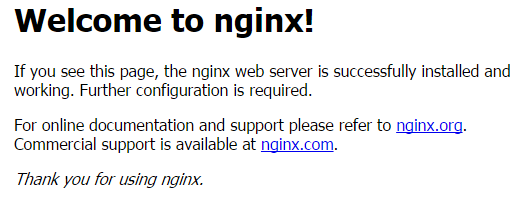
编译安装成功 开启防火墙端口后测试
【
注解:
--with-http_stub_status_module:支持nginx状态查询
--with-http_ssl_module:支持https
--with-http_spdy_module:支持google的spdy,想了解请百度spdy,这个必须有ssl的支持
--with-pcre:为了支持rewrite重写功能,必须制定pcre
】
二、编译安装php
1.下载php源码包
http://cn2.php.net/get/php-7.0.10.tar.gz/from/this/mirror
2.安装依赖包,确保安装之前有安装gd,png,curl,xml等等lib开发库。如果不确定,执行以下命令:
yum install gcc make gd-devel libjpeg-devel libpng-devel libxml2-devel bzip2-devel libcurl-devel -y
3.编译安装PHP-7.0.10
以下参数支持,ftp,图片函数,pdo等支持,因为使用了php自带的mysqlnd,所以不需要额外安装mysql的lib库了.如果你是64位系统,参数后面加上--with-libdir=lib64,如果不是可以跳过。
./configure --prefix=/usr/local/php-7.0.10 --with-config-file-path=/usr/local/php-7.0.10/etc --with-bz2 --with-curl --enable-ftp --enable-sockets --disable-ipv6 --with-gd --with-jpeg-dir=/usr/local --with-png-dir=/usr/local --with-freetype-dir=/usr/local --enable-gd-native-ttf --with-iconv-dir=/usr/local --enable-mbstring --enable-calendar --with-gettext --with-libxml-dir=/usr/local --with-zlib --with-pdo-mysql=mysqlnd --with-mysqli=mysqlnd --with-mysql=mysqlnd --enable-dom --enable-xml --enable-fpm --with-libdir=lib64 --enable-bcmath

三、整合nginx和php
1.配置nginx的配置文件nginx.conf 内容如下:
先注释掉http段server{}的内容,再在http其中增加
server {
listen 80;
server_name localhost;
#access_log /data/logs/access.log main;
index index.php index.html index.html;
root /data/zabbix;
location /
{
try_files $uri $uri/ /index.php?$args;
}
location ~ .*\.(php)?$
{
expires -1s;
try_files $uri =404;
fastcgi_split_path_info ^(.+\.php)(/.+)$;
include fastcgi_params;
fastcgi_param PATH_INFO $fastcgi_path_info;
fastcgi_index index.php;
fastcgi_param SCRIPT_FILENAME $document_root$fastcgi_script_name;
fastcgi_pass 127.0.0.1:9000;
}
}
2.测试:
mkdir -p /data/zabbix
cd /data/zabbix
vim info.php
写入内容:<?php phpinfo(); ?>
:wq 保存退出
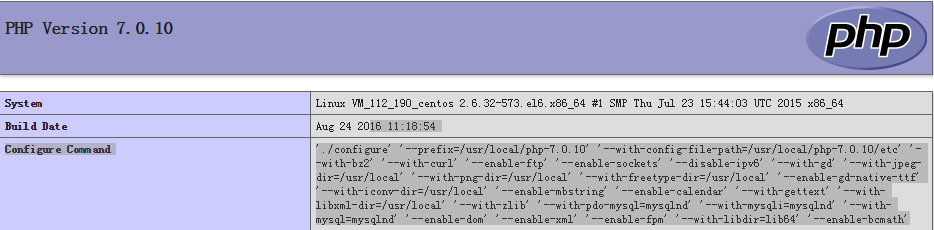
浏览器地址栏输入:http://IP/info.php
四、安装mysql【此处使用yum安装】
1.安装
yum install mysql mysql-server -y
2.启动
service mysqld start
3.设置mysql的密码
mysqladmin -uroot password 'root'
4.进入mysql
mysql -uroot -p root
5.创建zabbix数据库
create database zabbix default charset utf8; 【default charset utf8:设置数据库为utf8,防止中文乱码】
6.使用数据库 查看数据库
use zabbix; show databases;
7.导入zabbix数据库文件
source /home/zabbix-3.0.4/database/mysql/schema.sql
source /home/zabbix-3.0.4/database/mysql/data.sql
source /home/zabbix-3.0.4/database/mysql/images.sql
8.退出数据库
quit
五、安装zabbix
1.安装:
./configure --prefix=/usr/local/zabbix-3.0.4/ --enable-server --enable-agent --enable-proxy --with-mysql --with-net-snmp --with-libcurl --with-libxml2
提示报--with-net-snmp错

执行 yum install net-snmp.x86_64 net-snmp-devel.x86_64 安装后修复
make
make install
2.创建zabbix的用户组
groupadd zabbix
3.在zabbix用户组中创建zabbix用户
useradd -g zabbix zabbix
4.配置zabbix web管理界面
cp -r /home/zabbix-3.0.4/frontends/php /data/zabbix
5.配置zabbix
【1】vim /usr/local/zabbix-3.0.4/etc/zabbix_server.conf
配置以下内容:
DBName=zabbix
DBUser=root
【2】cd /data/zabbix/php/conf
cp zabbix.conf.php.example zabbix.conf.php
6.启动zabbix-server
/usr/local/zabbix-3.0.4/sbin/zabbix_server
六、zabbix界面安装配置
1.【缺少组件,配置php.ini】
vim /usr/local/php-7.0.10/etc/php.ini
配置内容如下:
max_execution_time = 300
2.【页面配置报错,提示不能连接数据库】

页面配置是报错,无法连接到数据库,原因读取不了mysql.sock文件
解决:ln -s /var/lib/mysql/mysql.sock /tmp/
也可以修改配置文件的mysql.sock的路径
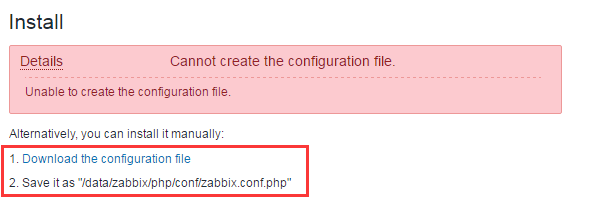
3.【无法创建zabbix.conf.php】 在 【五、5、【2】已解决此问题】

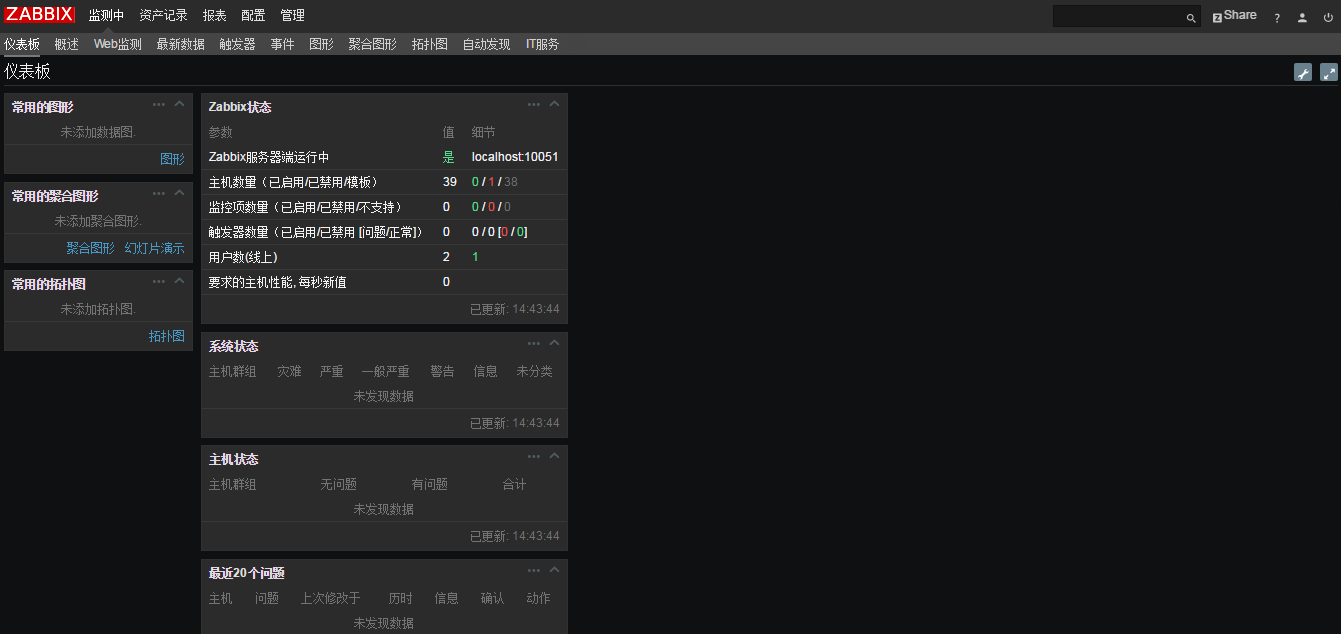
七、最后附上界面图
参考来源:http://www.ttlsa.com/zabbix/install-zabbix-on-linux-5-ttlsa/

【2】修改配置文件
vim /data/zabbix/php/include/defines.inc.php
45行:将DejaVuSans改为simkai

或者:
sed -i 's/DejaVuSans/simkai/g' ./include/defines.inc.php

欢迎读者留言,继续完善或联系qq1071179133交流
zabbix完整安装的更多相关文章
- Zabbix 4.0.24 完整安装
依赖包安装: yum install net-snmp* libssh-devel libssh2-devel -y Zabbix server安装: wget https://cdn.zabbix. ...
- Zabbix 完整的监控流程
目录 1.Zabbix的监控历程概念 1.1 基本概念 1.2 流程图 2.创建主机并加入主机组 3.添加新加主机的应用集(aplication) 4.添加监控项(item) 5.告警触发器配置(Tr ...
- 如何使用本地账户"完整"安装 SharePoint Server 2010+解决“New-SPConfigurationDatabase : 无法连接到 SharePoint_Config 的 SQL Server 的数据 库 master。此数据库可能不存在,或当前用户没有连接权限。”
注:目前看到的解决本地账户完整安装SharePoint Server 2010的解决方案如下,但是,有但是的哦: 当我们选择了"完整"模式安装SharePointServer201 ...
- 如何在Zabbix上安装MySQL监控插件PMP
PMP,全称是Percona Monitoring Plugins,是Percona公司为MySQL监控写的插件.支持Nagios,Cacti.从PMP 1.1开始,支持Zabbix. 下面,看看如何 ...
- IIS网站或系统验证码不显示问题——"使用了托管的处理程序,但是未安装或未完整安装 ASP.NET"
在IIS上发布了一个系统,但是登陆页面的验证码图片一直出不来,尝试了各种办法,权限.路径.继承父类路径等都不管用,进入Login.html,对着无验证码图片的图标,右键复制图片的网址,粘贴到地址栏,出 ...
- Zabbix的安装与部署---问题处理(php65.6.28 mysqli 报错误 处理)
1)php65.6.28 mysqli 报错误 处理 http://www.xiaochengfu.com/index.php/index/detail/aid/92.html 2)linux下p ...
- Win7 32bit(x86)/64bit(x64) 完整安装版(非GHOST版本)
Windows7 32bit 旗舰iso格式完整安装镜像 百度云盘:http://pan.baidu.com/s/1bpjLPs Windows7 64bit 旗舰iso格式完整安装镜像 百度云盘:h ...
- MS-DOS 7.10完整安装版(含图文安装程序)
大家知道,要想学习或使用DOS,安装一个DOS并进行实际操作是非常必要的.MS-DOS 7.10是一个非常好且强大实用的操作系统,而且兼容性和性能都十分强.要在系统中安装MS-DOS 7.10,可以使 ...
- zabbix agent安装详解
安装 Installing repository configuration package Zabbix 2.2 for RHEL5, Oracle Linux 5, CentOS 5: rpm - ...
随机推荐
- Linux Nano命令
Nano命令指南 今天在输命令时,无意中输入了nano,对这个命令不太熟悉,结果不知道如何才能退出,保存,赶快查了一下资料,原来是这样的啊. 打开文件与新建文件 使用nano打开或新建文件,只需键入: ...
- [转载]Google Guava官方教程(中文版)
原文链接 译文链接 译者: 沈义扬,罗立树,何一昕,武祖 校对:方腾飞 引言 Guava工程包含了若干被Google的 Java项目广泛依赖 的核心库,例如:集合 [collections] ...
- Code First Migrations
在MVC开发当中难免会对类进行修改,修改后再次运行就会出现异常,提示上下文的模型已在数据库创建后发生改变. 支持“AppContext”上下文的模型已在数据库创建后发生更改.请考虑使用 Code Fi ...
- ASP.NET MVC5+EF6+EasyUI 后台管理系统(29)-T4模版
系列目录 本节不再适合本系统,在58,59节已经重构.请超过本节 这讲适合所有的MVC程序 很荣幸,我们的系统有了体验的地址了.演示地址 之前我们发布了一个简单的代码生成器,其原理就是读取数据库的表结 ...
- ASP.NET MVC5+EF6+EasyUI 后台管理系统(53)-工作流设计-我的批阅
系列目录 前言:由于工作原因工作流一直没时间更新,虽然没有更新,但是批阅和申请差不多,改变一下数据的状态字段就行,有几个园友已经率先完成了 说句实话,一个工作流用文章表达很难,我起初以为这是一个很简单 ...
- Android自定义控件之自定义ViewGroup实现标签云
前言: 前面几篇讲了自定义控件绘制原理Android自定义控件之基本原理(一),自定义属性Android自定义控件之自定义属性(二),自定义组合控件Android自定义控件之自定义组合控件(三),常言 ...
- CentOS7安装iptables防火墙
CentOS7默认的防火墙不是iptables,而是firewalle. 安装iptable iptable-service #先检查是否安装了iptables service iptables st ...
- css或者js文件后面跟着参数
以前一直不懂,看到某某网站上面css链接 ?v=20130203类似这样的 后来发现是为了避免浏览器读取缓存而采取的强制刷新缓存的办法. “比如新浪首页在2010年4月5日改版,只是改变CSS样式表, ...
- Nginx最大客户连接数算法一些遐想
Nginx最大客户连接数算法一些遐想 现在很多互联网公司都在使用nginx,并且替换掉以前的Apache,nginx的优点就不说了,浅聊两句nginx的某些配置参数,找到这些参数设置的目的和关联性,并 ...
- NopCommerce 在Category 显示Vendor List列表
实现效果如下: 1.在前台Web的Category Menu显示 Vendor; 2.点击Vendor 显示Vendor List列表: 主要配置步骤: 1.运行网站 Admin 后台 Categ ...