
mysql Access denied for user root @localhost (using password:YES)错误
C:\AppServ\MySQL> mysql -u root -p
Enter password:
ERROR 1045 (28000): Access denied for user 'root'@'localhost' (using password: YES)
解决方法:
编辑mysql配置文件my.ini(在mysql的安装目录下,我的在D:\phpStudy\MySQL\my.ini),在[mysqld]这个条目下加入 skip-grant-tables 保存退出后重启mysql
1.点击“开始”->“运行”(快捷键Win+R)。
2.停止:输入 net stop mysql
3.启动:输入 net start mysql
这个时候会出现mysql服务无法启动的情况 我的解决方法是:
cmd中输入命令 “tasklist | findstr "mysql" ” ,用于查找mysql的残留进程。果不其然,确实存在mysql的残留进程,难怪一直提示MySQL服务处于正在启动或者停止的状态中,此时要做的就是杀死MySQL进程。之后输入命令 “taskkill /f /t /im mysqld.exe” ,就可以将mysql残留进程全部杀死了,再次输入命令“tasklist| findstr "mysql"”,查看是否还留有有其他的mysql残留进程,如果还有,则继续杀死,直到完全杀死进程为止,如下图所示。

当mysql残留进程全部结束之后,我们就可以正常启动MySQL服务了,如下图所示。需要注意的是此时还是要以管理员的身份进入命令行窗口。
继续重复mysql的停止 ,启动 的操作
这时候在cmd里面输入mysql -u root -p就可以不用密码登录了,出现 password:的时候直接回车可以进入,不会出现ERROR 1045 (28000),但很多操作都会受限制,因为我们不能grant(没有权限)。(以下操作的目录都是在phpStudy\Mysql\bin下完成的)
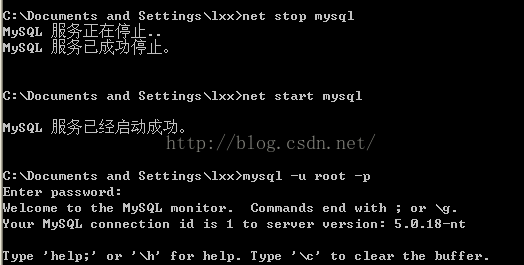
继续按下面的流程走:
1.进入mysql数据库:
mysql> use mysql;
Database changed
2.给root用户设置新密码:
mysql> update user set password=password("新密码") where user="root";
Query OK, 1 rows affected (0.01 sec)
Rows matched: 1 Changed: 1 Warnings: 0
3.刷新数据库
mysql> flush privileges;
Query OK, 0 rows affected (0.00 sec)
4.退出mysql:
mysql> quit;
Bye
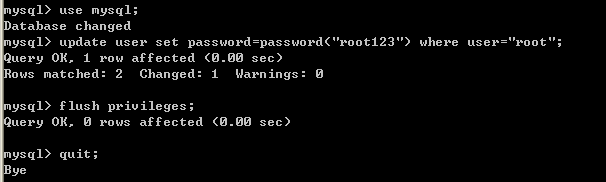
第3步:刷新数据库时失败了 但是仍然没有妨碍最后的成功
改好之后,再修改一下my.ini这个文件,把我们刚才加入的 "skip-grant-tables"这行删除,保存退出再重启mysql就可以了。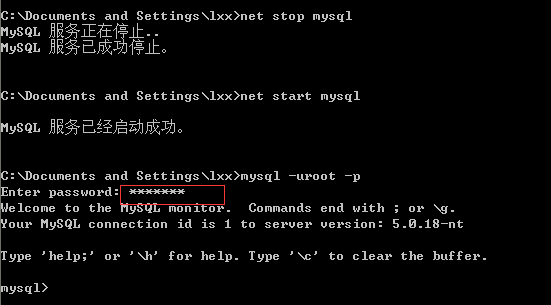
最后这一步没有执行 因为已经可以了
本文参考https://www.cnblogs.com/m97i/p/7586628.html 真的好用谢谢
mysql Access denied for user root @localhost (using password:YES)错误的更多相关文章
- Web项目打成war包部署到tomcat时报MySQL Access denied for user 'root'@'localhost' (using password: YES)错误解决方案
Web项目使用使用root账号root密码进行部署,通过Eclipse加载到Tomcat服务器可以发布成功,打成war包放到tomcat的webapps目录无法发布成功,报错: jdbc.proper ...
- linux连接mysql 出现Access denied for user 'root'@'localhost'(using password: YES)错误解决方案
linux连接mysql /usr/local/mysql/bin/mysql -uroot -p 输入密码出现Access denied for user 'root'@'localhost'(us ...
- Windows系统下MySQL数据库出现Access denied for user 'root'@'localhost' (using password:YES) 错误
Windows系统下MySQL数据库出现Access denied for user 'root'@'localhost' (using password:YES) 错误,(root密码错误) 处理方 ...
- MySql Access denied for user 'root'@'localhost' (using password:YES) 解决方案
关于昨天下午说的MySQL服务无法启动的问题,解决之后没有进入数据库,就直接关闭了电脑. 今早打开电脑,开始-运行 输入"mysql -uroot -pmyadmin"后出现以下错 ...
- MySQL 出现 Access denied for user 'root'@'localhost' (using password: YES) 错误
登录某台服务器的mysql时候总报错: mysql2/client.rb:58:in `connect': Access denied for user 'root'@'localhost' (usi ...
- MySQL在登陆时出现ERROR 1045 (28000): Access denied for user 'root'@'localhost' (using password: YES)错误
错误显示:ERROR 1045 (28000): Access denied for user 'root'@'localhost' (using password: YES) 解决方案: 1.找到配 ...
- mysql—Access denied for user 'root'@'localhost' (using password:NO)
安装mysql未设置初始密码,登录提示Access denied for user 'root'@'localhost' (using password:NO): 解决方案: sudo /etc/i ...
- Access denied for user 'root'@'localhost' (using password: NO)错误的解决方案
在windows下使用PHP连接MYSQL数据库,确定MYSQL的服务已经启动了,而且Workbench也是可以连上去的,但是始终网页测试都提示Access Denied. 最终解决办法: set p ...
- mariadb mysql 报'Access denied for user 'root'@'localhost' (using password: NO)'错误的解决
C:\Program Files\MariaDB 10.2\bin>mysql admin -u root password "x123456789" mysql Ver 1 ...
随机推荐
- 记录心得-FastJson分层解析demo示例
记录一下,平时用到,可速查!关键: // startArray(); 开始解析数组 // endArray(); 结束解析数组 // startObject(); 开始解析键值对 // endObje ...
- Vue学习5:条件渲染
上代码: <!DOCTYPE html> <html lang="en"> <head> <meta charset="UTF- ...
- MyBatis探究-----核心配置文件mybatis-config.xml中配置mappers的几种方式
1.package name="映射文件所在包名" 必须保证接口名(例如IUserDao)和xml名(IUserDao.xml)相同,还必须在同一个包中 例如:<packag ...
- CCF CSP 201503-2 数字排序 (map+自定义排序)
题目链接:http://118.190.20.162/view.page?gpid=T26 返回试题列表 问题描述 试题编号: 201503-2 试题名称: 数字排序 时间限制: 1.0s 内存限制: ...
- matlab 表示一个导数的函数
对此式在matlab做表示:
- [Python数据挖掘]第8章、中医证型关联规则挖掘
一.背景和挖掘目标 二.分析方法与过程 1.数据获取 2.数据预处理 1.筛选有效问卷(根据表8-6的标准) 共发放1253份问卷,其中有效问卷数为930 2.属性规约 3.数据变换 ''' 聚类 ...
- wordpress安装教程
最近安装了wordpress来搭建自己的网站,过程有些艰辛,以防以后转移服务器再次遇到这个难题,在此记下自己的这次安装过程以及一些问题,同时也供遇到相同问题的初次接触者做参考. 另外说明一下我用的操作 ...
- ConcurrentHashMap源码理解
1.ConcurrentHashMap继承关系 ConcurrentHashMap继承了AbstractMap类,同时实现了ConcurrentMap接口. 2.ConcurrentHashMap构造 ...
- IDEA 发布Api
1.修改Main方法 代码: public class AlicsbapiApplication extends SpringBootServletInitializer { @Override pr ...
- Java基础学习-关键字的概述和特点以及常量的概述和分类
1.关键字概述 -被Java语言赋予特定含义的单词 2.关键字的特点 -组成关键字的字母全部小写 -常用的代码编辑器,针对关键字有特殊的颜色标记,非常直观,所以我们不需要死记硬 ...