
Vue+Typescript项目中使用echarts
方案一:推荐
在typescript+Vue的项目中引用echarts,为了加强引用,引入echarts和@types/echarts两个包,一个是工程依赖,一个是声明依赖。
npm install echarts --save

npm install --save @types/echarts
然后在需要引用echarts的组件中引入echarts
<script lang="ts">

……

import echarts from 'echarts';

……

</script>
然后设置好option选项,将图表渲染在DOM里:
// HTML部分

<div ref="chart"></div>

// Script部分

option={};

const Chart = echarts.init(this.$refs.chart as HTMLCanvasElement);

        Chart.setOption(this.option);
按理来说是这样的,然后我run的时候图表显示也是正确的,但是控制台爆出了类型不兼容的错误,如下:
Argument of type '{ color: string[]; legend: { data: { name: string; textStyle: { color: string; fontSize: number; }; }[]; right: number; top: number; itemWidth: number; itemHeight: number; padding: number; itemGap: number; }; xAxis: { ...; }; yAxis: { ...; }; grid: { ...; }; series: { ...; }[]; }' is not assignable to parameter of type 'EChartOption<SeriesBar | SeriesBoxplot | SeriesCandlestick | SeriesCustom | SeriesEffectScatter | SeriesFunnel | SeriesGauge | SeriesGraph | SeriesHeatmap | SeriesLine | SeriesLines | ... 10 more ... | SeriesTreemap>'.

  Types of property 'xAxis' are incompatible.

    Type '{ type: string; data: string[]; boundaryGap: boolean; axisLabel: { textStyle: { color: string; }; }; axisLine: { lineStyle: { type: string; color: string[]; width: string; }; }; }' is not assignable to type 'XAxis | XAxis[] | undefined'.

      Type '{ type: string; data: string[]; boundaryGap: boolean; axisLabel: { textStyle: { color: string; }; }; axisLine: { lineStyle: { type: string; color: string[]; width: string; }; }; }' is not assignable to type 'XAxis'.

        Types of property 'type' are incompatible.

          Type 'string' is not assignable to type '"value" | "category" | "time" | "log" | undefined'.

    124 |     draw() {

    125 |         const Chart = echarts.init(this.$refs.chart as HTMLCanvasElement);

  > 126 |         watchChart.setOption(this.option);
最后发现所有在@type/echarts(node_modules/@types/echarts/index.d.ts)里面声明的一些联合变量类型,类似于下图所示的这种,都会出现这种问题:
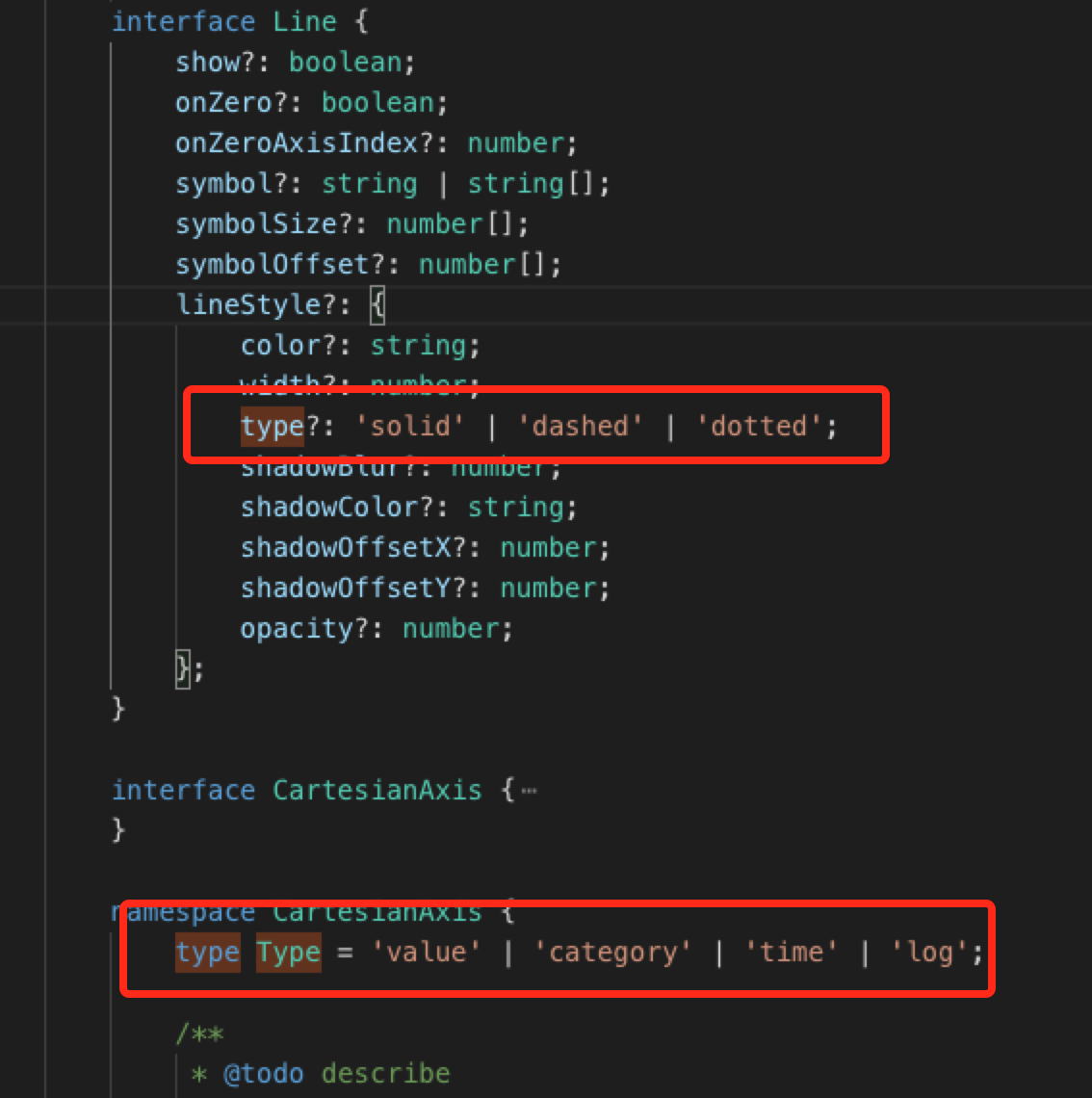
也可以说是一个字符串字面量类型,详见: https://ts.xcatliu.com/advanced/string-literal-types.html
我在引用处代码里面option配置是:
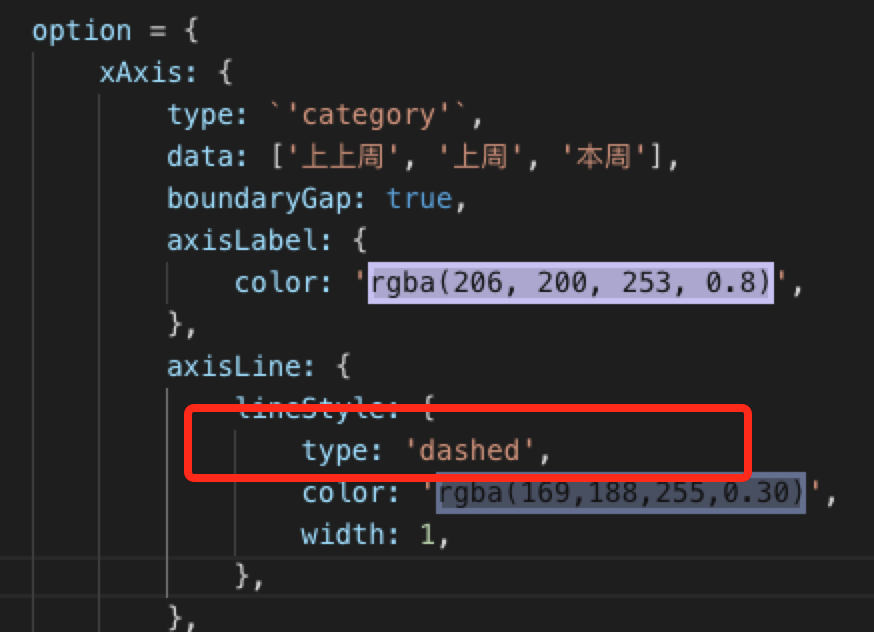
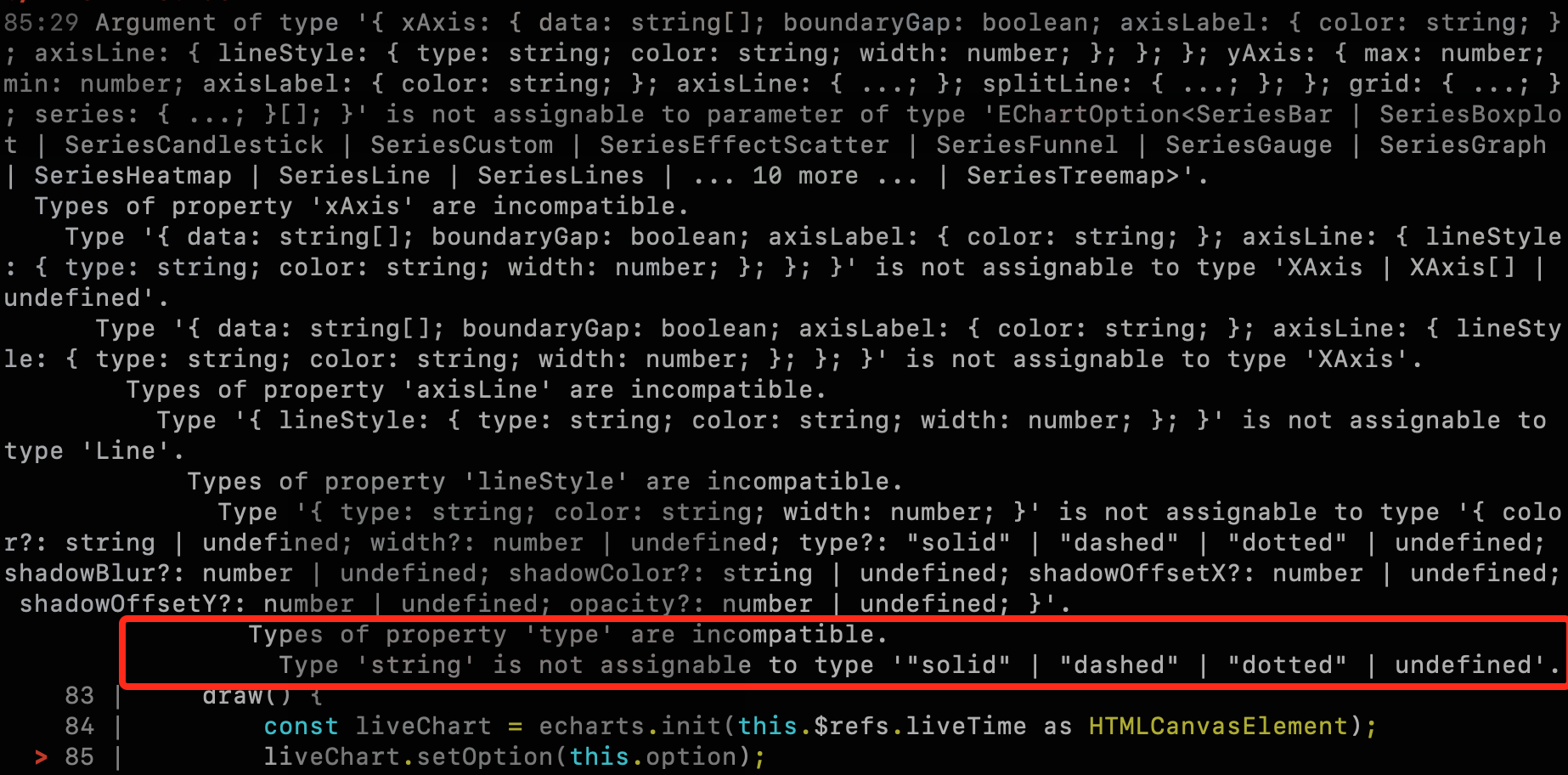
因为声明的时候type是个联合类型,而不是type?:string这种类型,所以导致直接配置参数出现错误:
最后查看了网上的解决办法:https://zhuanlan.zhihu.com/p/28902584
可以直接 const ec = echarts as any; 但是这种做法很不可取。
最后在 https://jkchao.github.io/typescript-book-chinese/typings/literals.html#%E6%8E%A8%E6%96%AD 找到了解决办法,可以采用一个简单的类型断言来告诉 TypeScript 想推断的字面量:
在本实例中就是:
option = {

        xAxis: {

            type: ('category' as 'category'),

            axisLine: {

                lineStyle: {

                    type: ('dashed' as 'dashed'),

                },

            },

        },

}
到此,完美解决了我的问题(其实是个大神帮我找到的解决方法,在此感谢所有的前辈们)。
方案二:成功但是不够严谨
最后删除了 @types/echarts ,在 echarts.d.ts 中自定义了 echarts 的声明 ,
declare module 'echarts' {

    const echarts: any;

    export default echarts;

}
然后引用成功并且没有爆出类型错误,但是失去了ts强引用的优势。
方案三:简单直接

直接越过ts的类型检查………………………………………………
Vue+Typescript项目中使用echarts的更多相关文章
- vue + typescript 项目起手式
https://segmentfault.com/a/1190000011744210 2017-10-27 发布 vue + typescript 项目起手式 javascript vue.js t ...
- 在 Ionic2 TypeScript 项目中导入第三方 JS 库
原文发表于我的技术博客 本文分享了在Ionic2 TypeScript 项目中导入第三方 JS 库的方法,供参考. 原文发表于我的技术博客 1. Typings 的方式 因在 TypeScript 中 ...
- 在react项目中使用ECharts
这里我们要在自己搭建的react项目中使用ECharts,我们可以在ECharts官网上看到有一种方式是在 webpack 中使用 ECharts,我们需要的就是这种方法. 我们在使用ECharts之 ...
- 在基于ABP框架的前端项目Vue&Element项目中采用电子签章处理文件和打印处理
在一些内部OA或者流转的文件,或者给一些客户的报价文件.合同,或者一些医院出示的给保险机构的病历资料等,有时候可能都希望快速的使用电子签章的处理方式来给文件盖上特定的印章,本篇随笔介绍基于Vue&am ...
- 在基于ABP框架的前端项目Vue&Element项目中采用电子签名的处理
在前面随笔介绍了<在基于ABP框架的前端项目Vue&Element项目中采用电子签章处理文件和打印处理>的处理,有的时候,我们在流程中或者一些文件签署的时候,需要签上自己的大名,一 ...
- 在TypeScript项目中进行BDD测试
在TypeScript项目中进行BDD测试 什么是BDD? BDD(Behavior-Driven Design)是软件团队的一种工作方式,通过以下方式缩小业务人员和技术人员之间的差距: 鼓励跨角色协 ...
- vue项目中引用echarts的几种方式
准备工作: 首先我们初始化一个vue项目,执行vue init webpack echart,接着我们进入初始化的项目下.安装echarts, npm install echarts -S //或 ...
- 在vue项目中封装echarts的正确姿势
为什么需要封装echarts 每个开发者在制作图表时都需要从头到尾书写一遍完整的option配置,十分冗余 在同一个项目中,各类图表设计十分相似,甚至是相同,没必要一直做重复工作 可能有一些开发者忘记 ...
- Vue系列——在vue项目中使用echarts
该示例使用 vue-cli 脚手架搭建 安装echarts依赖 npm install echarts -S 或者使用国内的淘宝镜像安装 npm install -g cnpm --registry= ...
随机推荐
- spring cloud 的自我保护机制
spring cloud 的自我保护机制定义: 自我保护模式是:在出现网络异常波动的情况下,使用自我保护模式使eureka 集群更加健壮,稳定. 自我保护机制是:在15分钟内客户端没有雨注册中心发生心 ...
- 使goroutine同步的方法总结
前言: 在前面并发性能对比的文章中,我们可以看到Golang处理大并发的能力十分强劲,而且开发也特别方便,只需要用go关键字即可开启一个新的协程. 但当多个goroutine同时进行处理的时候,就会遇 ...
- 三星S8相机黑画面解决
最近手机刷机卸载系统软件后有遇到相机黑化面不能工作的情况,同时闪光灯也无法开启,人脸识别也无法使用.具体情况如下图. 后来接上电脑打开logcat,发现相机相关的错误,说libquramresize. ...
- 添加宿主为控制台应用程序的WCF服务
1.创建WCF服务库:WcfServiceLibrary,根据自动创建的代码修改自己的WCF 服务协议.操作协议.数据协议.本次先实现简单的WCF最基本的通信方式:请求->应答模式. 定义服务. ...
- nginx 配置 同一域名端口下,根据URL 导向不同的项目目录
我们现在拥有2个项目.但是只有一个域名,通过nginx配置来实现以下url导向不同的项目. 后台管理台:{域名}/admin 用户客户端:{域名}/client server { listen 888 ...
- 大学生对vivo手机的看法
- 【转载】 “强化学习之父”萨顿:预测学习马上要火,AI将帮我们理解人类意识
原文地址: https://yq.aliyun.com/articles/400366 本文来自AI新媒体量子位(QbitAI) ------------------------------- ...
- padding填充属性
内边距属性: 设置元素的内容与边框之间的距离. 分4个方向(上右下左): padding-top padding-right padding-bottom padding-left 说明:值不能为负值 ...
- Python多线程的运行及time.sleep()的应用
已知小明和其弟弟小白每月都需要生活费,二人同时从同一个账户中取钱,两人每人每月需要1000元,账户中现有余额3200元,如果卡内余额大于2000元,则父母不会存入,如果卡内余额小于2000元,则父母当 ...
- 20155219付颖卓《网络攻防》Exp4 恶意代码分析
一.基础问题回答 如果在工作中怀疑一台主机上有恶意代码,但只是猜想,所有想监控下系统一天天的到底在干些什么.请设计下你想监控的操作有哪些,用什么方法来监控. 可以用window7自带的schtasks ...