
Ubuntu 16.04 上安装 MySQL 5.7 教程
介绍
MySQL 是一种开源数据库管理系统,通常作为流行的LAMP(Linux,Apache,MySQL,PHP / Python / Perl)堆栈的一部分安装。它使用关系数据库和SQL(结构化查询语言)来管理其数据。
安装的方式很简单:更新软件包索引,安装mysql-server软件包,然后运行附带的安全脚本即可。
sudo apt-get install mysql-server # 安装server
sudo apt-get isntall mysql-client #安装client客户端
安装完成后mysql-server 会提示可以运行mysql_secure_installation。运行mysql_secure_installation会执行几个设置:
a)为root用户设置密码
b)删除匿名账号
c)取消root用户远程登录
d)删除test库和对test库的访问权限
e)刷新授权表使修改生效
通过这几项的设置能够提高mysql库的安全。建议生产环境中mysql安装这完成后一定要运行一次mysql_secure_installation,直接在终端中输入mysql_secure_installation即可开始配置。详细步骤请参看下面的命令:
stephen@stephen:~$ mysql_secure_installation

Securing the MySQL server deployment.

Enter password for user root:

VALIDATE PASSWORD PLUGIN can be used to test passwords

and improve security. It checks the strength of password

and allows the users to set only those passwords which are

secure enough. Would you like to setup VALIDATE PASSWORD plugin?

Press y|Y for Yes, any other key for No:  #是否设置密码检测插件,检测密码复杂度 ,根据自己需求设置

Using existing password for root.

Change the password for root ? ((Press y|Y for Yes, any other key for No) :  #是否更改密码

 ... skipping.

By default, a MySQL installation has an anonymous user,

allowing anyone to log into MySQL without having to have

a user account created for them. This is intended only for

testing, and to make the installation go a bit smoother.

You should remove them before moving into a production

environment.

Remove anonymous users? (Press y|Y for Yes, any other key for No) : y  #是否移除匿名账户 生产环境建议移除

Success.

Normally, root should only be allowed to connect from

'localhost'. This ensures that someone cannot guess at

the root password from the network.

Disallow root login remotely? (Press y|Y for Yes, any other key for No) : y  #是否禁止远程登录 根据实际情况设置

Success.

By default, MySQL comes with a database named 'test' that

anyone can access. This is also intended only for testing,

and should be removed before moving into a production

environment.

Remove test database and access to it? (Press y|Y for Yes, any other key for No) : #删除测试数据库 直接回车

 ... skipping.

Reloading the privilege tables will ensure that all changes

made so far will take effect immediately.

Reload privilege tables now? (Press y|Y for Yes, any other key for No) : #是否重新加载权限表 直接回车

 ... skipping.

All done!
测试MySQL
安装过程中会提示设置密码什么的,注意设置了不要忘了,安装完成之后可以使用如下命令来检查是否安装成功:
sudo netstat -tap | grep mysql
通过上述命令检查之后,如果看到有mysql 的socket处于 listen 状态则表示安装成功。
按上边方式安装完成后,MySQL应该已经开始自动运行了。要测试它,请检查其状态。
systemctl status mysql.service #systemctl 用法 : https://linux.cn/article-5926-1.html
您将看到类似于以下内容的输出:
mysql.service - MySQL Community Server

Loaded: loaded (/lib/systemd/system/mysql.service; enabled; vendor preset: en Active: active (running) since Wed 2016-11-23 21:21:25 UTC; 30min ago Main PID: 3754 (mysqld) Tasks: 28 Memory: 142.3M CPU: 1.994s CGroup: /system.slice/mysql.service └─3754 /usr/sbin/mysqld
如果MySQL没有运行,您可以启动它:
sudo systemctl mysql start
如果额外的检查,您可以尝试使用该 mysqladmin 工具连接到数据库,该工具是允许您运行管理命令的客户端。例如,该命令表示以 root(-u root)方式连接到 MySQL ,提示输入密码(-p)并返回版本。
mysqladmin -p -u root version
你应该看到类似的输出:
mysqladmin  Ver 8.42 Distrib 5.7.16, for Linux on x86_64

Copyright (c) 2000, 2016, Oracle and/or its affiliates. All rights reserved.

Oracle is a registered trademark of Oracle Corporation and/or its affiliates. Other names may be trademarks of their respective owners.

Server version 5.7.16-0ubuntu0.16.04.1 Protocol version 10 Connection Localhost via UNIX socket UNIX socket /var/run/mysqld/mysqld.sock Uptime: 30 min 54 sec

Threads: 1 Questions: 12 Slow queries: 0 Opens: 115 Flush tables: 1 Open tables: 34 Queries per second avg: 0.006
这意味着MySQL正在运行。
登陆mysql数据库可以通过如下命令:
mysql -u root -p
-u 表示选择登陆的用户名, -p 表示登陆的用户密码,上面命令输入之后会提示输入密码,此时输入密码就可以登录到mysql。

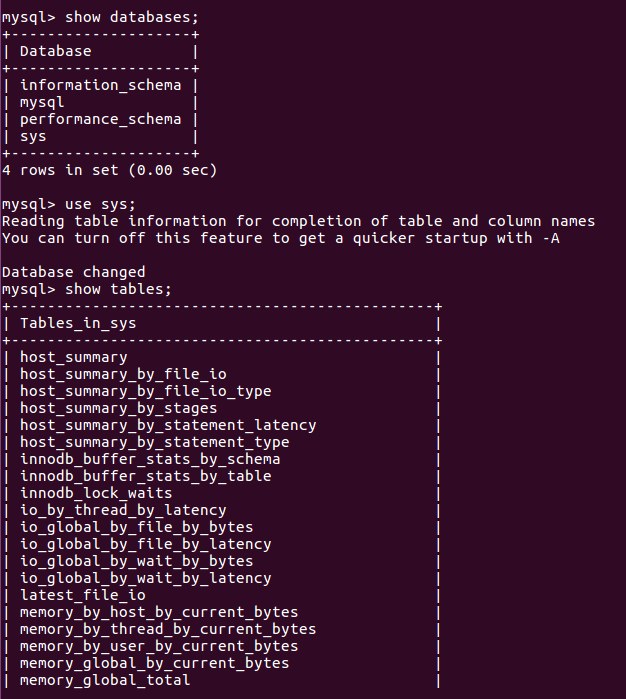
然后通过 show databases; 就可以查看当前的数据库。
我们选择 mysql数据库就行下一步操作,使用use mysql 命令,显示当前数据库的表单:show tables
Ubuntu 16.04 上安装 MySQL 5.7 教程的更多相关文章
- Ubuntu 12.04上安装MySQL并运行
Ubuntu 12.04上安装MySQL并运行 作者:凯鲁嘎吉 - 博客园 http://www.cnblogs.com/kailugaji/ 安装MySQL数据库 sudo apt-get upda ...
- 如何在Ubuntu 16.04上安装配置Redis
如何在Ubuntu 16.04上安装配置Redis Redis是一个内存中的键值存储,以其灵活性,性能和广泛的语言支持而闻名.在本指南中,我们将演示如何在Ubuntu 16.04服务器上安装和配置Re ...
- 在 Ubuntu 16.04上安装 vsFTPd
在 Ubuntu 16.04上安装 vsFTPd Ubuntu vsFTPd 关于 vsFTPd vsFTPd 代表 Very Secure File Transfer Protocol Daemon ...
- 在 Ubuntu 16.04 上安装 Eclipse Oxygen
2017 年 6 月 28 日,Eclipse 社区(the Eclipse Community)发布了 Eclipse Oxygen.本文记录了我在 Ubuntu 16.04 上安装 Eclipse ...
- Ubuntu 16.04上安装SkyEye及测试
说明一下,在Ubuntu 16.04上安装SkyEye方法不是原创,是来自互联网,仅供学习参考. 一.检查支持软件包 gcc,make,vim(optional),ssh,subversionbinu ...
- Ternsorflow 学习:000-在 Ubuntu 16.04 上安装并使用 TensorFlow_v1.14 (改)
声明:本人已经对原文链接根据情况做出合理的改动. 本系列文章使用的是Tensorflow v1.14 引言 TensorFlow 是由谷歌构建的用于训练神经网络的开源机器学习软件.TensorFlow ...
- Ubuntu 20.04上安装MySQL教程,ubuntu安装mysql
在Ubuntu 20.04上安装MySQL教程 先决条件 确保您以具有sudo特权的用户身份登录. 在Ubuntu上安装MySQL 在撰写本文时,Ubuntu存储库中可用的MySQL的最新版本是MyS ...
- 如何在Ubuntu 16.04上安装Apache Web服务器
转载自:https://www.howtoing.com/how-to-install-the-apache-web-server-on-ubuntu-16-04 介绍 Apache HTTP服务器是 ...
- 如何在Ubuntu 16.04上安装Nginx
原文链接https://www.digitalocean.com/community/tutorials/how-to-install-nginx-on-ubuntu-16-04 介绍 Nginx是世 ...
随机推荐
- contenOs7编码问题
- yii DbCriteria相关属性常用方法
$criteria = new CDbCriteria; //函数方式 $criteria->addCondition("id=1"); //查询条件,即where id = ...
- NetSec2019 20165327 Exp2 后门原理与实践
NetSec2019 20165327 Exp2 后门原理与实践 快速找到重点: (1)使用netcat获取主机操作Shell,cron启动 (0.5分) (2)使用socat获取主机操作Shell, ...
- 修改 jenkins 主目录
说明 Jenkins有时需要进行迁移,主目录会发生改变,本文主要讲解如何更改主目录.由于jenkins安装方式的不同,主目录也不一样.本测试环境:Centos6.8 X64.注意:在更改主目录之前,请 ...
- libcrypto.so.1.0.0: no version information available
openssl-1.0.1p源码安装后,依赖于openssl.so库的应用报错libcrypto.so.1.0.0: no version information available 解法:1. 创建 ...
- og协议-有利于SNS网站分享
一丶前言 全球快递toWhere官网发现使用og协议,并且支付宝和淘宝活动源码也会添加og协议,查阅资料弄清og协议是什么,此刻附上og协议官方文档 一丶什么是og协议 Open Graph通讯协定( ...
- Jekyll博客添加Valine评论
Jekyll博客添加Valine评论 关于github搭建jekyl博客,在这里不做过多描述,详情参考: 百度搜索关键字:github搭建jekyll博客 官网:https://www.jekyll. ...
- oracleDBconsole服务启动失败
问题出现的故障: 在一次正常使用企业管理器后,重新启动计算机,再次启动OracleDBConsoleORCL服务时,报:Windows 不能在 本地计算机 启动 OracleDBConsoleo ...
- 世界各国GDP动态排名可视化实现(基于d3.js)
一.说明 之前在抖音上看到GDP等各种排名的可视化,一直想知道是怎么实现的.之前也有研究过一次,但觉得太麻烦放弃了,昨天又心痒难耐研究了一翻. 先是看到这篇文章说是有人基于d3.js实现:https: ...
- bind与继承 待研究
class a { f() { console.log('a') } get f2() { console.log('f2') return (this['f'] = this.f.bind(this ...