
Qt5.6.0+OpenGL 纹理贴图首战告捷
重要的话写在前面~~通过今晚的实验,知道了EBO是不能随便release的~~~一直不要release就可以了,否则vao会失效
Display.h
#ifndef DISPLAYWIDGET_H

#define DISPLAYWIDGET_H

#include <QGLWidget>

#include <QOpenGLFunctions>

#include <QOpenGLBuffer>

#include <QOpenGLVertexArrayObject>

#include <QOpenGLShaderProgram>

#include <QOpenGLVertexArrayObject>

#include <QOpenGLTexture>

class DisplayGLWidget:public QGLWidget,protected QOpenGLFunctions

{

    Q_OBJECT

public:

    DisplayGLWidget(QWidget *parent = );

    ~DisplayGLWidget();

    void teardownGL();

public slots:

    //void CompileAndLinkVertexShader(const QString& shaderText);

    //void CompileAndLinkFragmentShader(const QString& shaderText);

protected:

    void initializeGL() ;

    void paintGL() ;

    void resizeGL(int width, int height) ;

    //void keyPressEvent(QKeyEvent *event) override;

    void mousePressEvent(QMouseEvent *event) override;

    void mouseMoveEvent(QMouseEvent *event) override;

private:

    QOpenGLBuffer m_vbo;

    QOpenGLBuffer m_ebo;

    QOpenGLVertexArrayObject m_vao;

    QOpenGLShaderProgram *m_program;

    QOpenGLTexture *texture;

    void printVersionInformation();

    void initTextures();

};

#endif
Display.cpp
#include "DisplayGLWidget.h"

#include "Vertex.h"

#include <QDebug>

#include <iostream>

// Create a colored triangle

static const Vertex sg_vertexes[] = {

  Vertex( QVector3D( 0.00f,  0.75f, 1.0f), QVector3D(1.0f, 0.0f, 0.0f) ),

  Vertex( QVector3D( 0.75f, -0.75f, 1.0f), QVector3D(0.0f, 1.0f, 0.0f) ),

  Vertex( QVector3D(-0.75f, -0.75f, 1.0f), QVector3D(0.0f, 0.0f, 1.0f) )

};

static const GLfloat vertices[] = {

    // Positions // Colors // Texture Coords

    0.5f, 0.5f, 0.0f, 1.0f, 0.0f, 0.0f, 1.0f, 1.0f, // Top Right

    0.5f, -0.5f, 0.0f, 0.0f, 1.0f, 0.0f, 1.0f, 0.0f, // Bottom Right

    -0.5f, -0.5f, 0.0f, 0.0f, 0.0f, 1.0f, 0.0f, 0.0f, // Bottom Left

    -0.5f, 0.5f, 0.0f, 1.0f, 1.0f, 0.0f, 0.0f, 1.0f // Top Left

};

static const GLfloat vertices1[] =

{

-0.5f, 0.5f, 0.0f, // Top Left

-0.5f,0.0f,    0.0f,

0.0f, 0.5f, 0.0f

};

static const GLuint indices[] = { // Note that we start from 0!

, , , // First Triangle

, ,  // Second Triangle

};

DisplayGLWidget::DisplayGLWidget(QWidget* parent)

    :QGLWidget(parent)

    //: QGLWidget(QGLFormat(QGL::SampleBuffers),parent)

    , m_vbo(QOpenGLBuffer::VertexBuffer)

    , m_ebo(QOpenGLBuffer::IndexBuffer)

{

    int a = ;

    //timer.start();

}

DisplayGLWidget::~DisplayGLWidget()

{

    makeCurrent();

    teardownGL();

}

void DisplayGLWidget::teardownGL()

{

     // Actually destroy our OpenGL information

    m_vbo.destroy();

    m_ebo.destroy();

    m_vao.destroy();

    delete m_program;

}

void DisplayGLWidget::initializeGL()

{

    //glShadeModel(GL_SMOOTH);        // 启用阴影光滑

    //glClearColor(0.2,0.2,0.2,0);    // 设置清除屏幕的颜色

    //glClearDepth(1.0);                // 设置深度缓存

    //glEnable(GL_DEPTH_TEST);        // 深度测试

    //glDepthFunc(GL_LEQUAL);            // 启用深度测试

    //glHint(GL_PERSPECTIVE_CORRECTION_HINT,GL_NICEST);    // 进行最好的透视修正,可能会影响性能

     initializeOpenGLFunctions();

     printVersionInformation();

     glClearColor(0.3,0.3,0.3,);

     // Application-specific initialization

    {

    // Create Shader (Do not release until VAO is created)

    m_program = new QOpenGLShaderProgram();

    m_program->addShaderFromSourceFile(QOpenGLShader::Vertex, "./shaders/simple.vert");

    m_program->addShaderFromSourceFile(QOpenGLShader::Fragment, "./shaders/simple.frag");

    m_program->link();

    m_program->bind();

    // Create Vertex Array Object

    m_vao.create();

    m_vao.bind();

    // Create Buffer (Do not release until VAO is created)

    m_vbo.create();

    m_vbo.bind();

    m_vbo.setUsagePattern(QOpenGLBuffer::StaticDraw);

    m_vbo.allocate(vertices, sizeof(vertices));

    m_ebo.create();

    m_ebo.bind();

    m_ebo.setUsagePattern(QOpenGLBuffer::StaticDraw);

    m_ebo.allocate(indices,sizeof(indices));

    m_program->enableAttributeArray();

    m_program->enableAttributeArray();

    m_program->enableAttributeArray();

    m_program->setAttributeBuffer(, GL_FLOAT, ,  , *sizeof(GLfloat));      // 3表示的是这一个属性里面有几个分量

    m_program->setAttributeBuffer(, GL_FLOAT, *sizeof(GLfloat), ,  *sizeof(GLfloat));

    m_program->setAttributeBuffer(, GL_FLOAT,  * sizeof(GLfloat), ,  * sizeof(GLfloat));

    initTextures();

    // Release (unbind) all

    m_vbo.release();

    m_vao.release();

    //m_ebo.release();

    m_program->release();

  }

}

void DisplayGLWidget::paintGL()

{

    //makeCurrent();

    glClear(GL_COLOR_BUFFER_BIT|GL_DEPTH_BUFFER_BIT);    // 清除屏幕和深度缓存

    //glLoadIdentity();                                    // 重置当前模型的观察矩阵

     // Render using our shader

    m_program->bind();

    {

        m_program->setUniformValue("ourTexture", );

        texture->bind();

        m_vao.bind();

        glPolygonMode(GL_FRONT_AND_BACK, GL_FILL);

        glDrawElements(GL_TRIANGLES,,GL_UNSIGNED_INT,);

        //glDrawArrays(GL_TRIANGLES, 0, sizeof(sg_vertexes) / sizeof(sg_vertexes[0]));

        //glDrawArrays(GL_TRIANGLES, 0, 3);

        m_vao.release();

    }

    m_program->release();

    /*m_program1->bind();

    {

        m_vao1.bind();

        glDrawArrays(GL_TRIANGLES,0,3);

        m_vao1.release();

    }

    m_program1->release();*/

}

void DisplayGLWidget::resizeGL(int width, int height)

{

    if (height == )                            // 规定屏幕高度不得低于20

    {

        height = ;

    }

    glViewport(,,(GLint)width,(GLint)height);    // 重置当前的视口

    glMatrixMode(GL_PROJECTION);                // 选择投影矩阵

    glLoadIdentity();                            // 重置投影矩阵

    //gluPerspective(45.0,(GLfloat)width/(GLfloat)height,0.1,100.0); // 建立透视投影矩阵

    glMatrixMode(GL_MODELVIEW); // 选择模型观察矩阵

    glLoadIdentity();            // 重置模型观察矩阵

}

//void DisplayGLWidget::keyPressEvent(QKeyEvent* e)

//{

//    switch (e->key())

//    {

//    default:

//        break;

//    }

//}

void DisplayGLWidget::mouseMoveEvent(QMouseEvent* event)

{

}

void DisplayGLWidget::printVersionInformation()

{

    QString glType;

    QString glVersion;

    QString glProfile;

    // Get Version Information

    //glType = (context()->isOpenGLES()) ? "OpenGL ES" : "OpenGL";

    glVersion = reinterpret_cast<const char*>(glGetString(GL_VERSION));

    // Get Profile Information

#define CASE(c) case QSurfaceFormat::c: glProfile = #c; break

  switch (format().profile())

  {

    CASE(NoProfile);

    CASE(CoreProfile);

    CASE(CompatibilityProfile);

  }

#undef CASE

  // qPrintable() will print our QString w/o quotes around it.

  //qDebug() << qPrintable(glType) << qPrintable(glVersion) << "(" << qPrintable(glProfile) << ")";

  qDebug() << qPrintable(glVersion) << "(" << qPrintable(glProfile) << ")";

}

void DisplayGLWidget::initTextures()

{

    texture = new QOpenGLTexture(QImage("./resources/texture/flower.jpg").mirrored());

    texture->setMinificationFilter(QOpenGLTexture::Nearest);

    texture->setMagnificationFilter(QOpenGLTexture::Linear);

    texture->setWrapMode(QOpenGLTexture::Repeat);

}

void DisplayGLWidget::mousePressEvent(QMouseEvent* event)

{

}
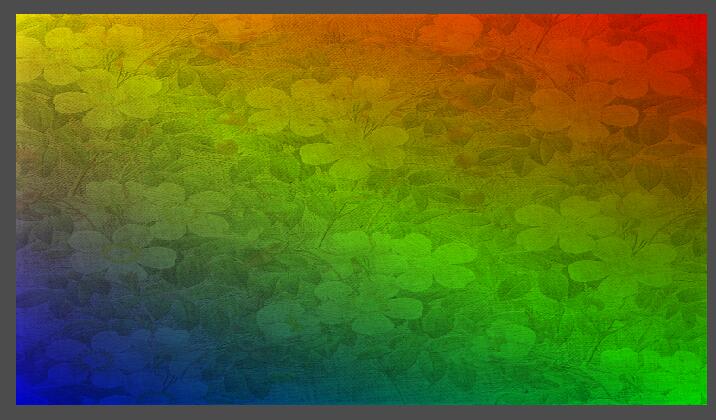
结果:
Qt5.6.0+OpenGL 纹理贴图首战告捷的更多相关文章
- 基于Cocos2d-x学习OpenGL ES 2.0系列——纹理贴图(6)
在上一篇文章中,我们介绍了如何绘制一个立方体,里面涉及的知识点有VBO(Vertex Buffer Object).IBO(Index Buffer Object)和MVP(Modile-View-P ...
- OpenGL 纹理贴图
前一节实例代码中有个贴图操作. 今天就简单说明一下纹理贴图... 为了使用纹理贴图.我们首先需要启用纹理贴图功能. 我们可以在Renderer实现的onSurfaceCreated中定义启用: // ...
- (转载)Cocos2dx-OpenGL ES2.0教程:纹理贴图(6)
在上一篇文章中,我们介绍了如何绘制一个立方体,里面涉及的知识点有VBO(Vertex Buffer Object).IBO(Index Buffer Object)和MVP(Modile-View-P ...
- [OpenGL]纹理贴图实现 总结
实现步骤 第一步:设置所需要的OpenGL环境 设置上下文环境 删除已经存在的渲染的缓存 设置颜色缓存 设置帧缓存 清除缓存 设置窗口大小 开启功能 编译shander 使用program 获取sha ...
- 用OpenGL进行立方体表面纹理贴图
一.目的 掌握OpenGL中纹理对象的创建.绑定与使用方法. 二.简单介绍 1,连接静态库 #pragma comment(lib, "glut32.lib") #pragma c ...
- opengl学习笔记(三):经过纹理贴图的棋盘
opengl纹理贴图的步骤: 1:创建纹理对象,并为它指定一个纹理 2:确定纹理如何应用到每个像素上 3:启用纹理贴图功能 4:绘制场景,提供纹理坐标和几何图形坐标 注意:纹理坐标必须在RGBA模式下 ...
- (转)使用OpenGL显示图像(七)Android OpenGLES2.0——纹理贴图之显示图片
转:http://blog.csdn.net/junzia/article/details/52842816 前面几篇博客,我们将了Android中利用OpenGL ES 2.0绘制各种形体,并在上一 ...
- IOS 中openGL使用教程3(openGL ES 入门篇 | 纹理贴图(texture)使用)
在这篇文章中,我们将学习如何在openGL中使用纹理贴图. penGL中纹理可以分为1D,2D和3D纹理,我们在绑定纹理对象的时候需要指定纹理的种类.由于本文将以一张图片为例,因此我们为我们的纹理对象 ...
- android ndk调用OpenGL 实现纹理贴图Texture
android ndk调用OpenGL 实现纹理贴图Texture 时间 2014-06-25 05:24:39 CSDN博客 原文 http://blog.csdn.net/chrisfxs/a ...
随机推荐
- JDBC(一)
JDBC(Java DataBase Conectivity)Java数据库连接,是J2SE的一部分,由java.sql和javax.sql组成. package dbTest; import jav ...
- Java设计模式——模板方法模式
转载自:https://www.cnblogs.com/zplogo/p/6428593.html 用抽象基类定义算法框架 RefreshBeverage package com.pattern.te ...
- 使用TransactionScope(轻量级事务)实现数据库操作事务
TransactionScope是.Net Framework 2.0滞后,新增了一个名称空间.它的用途是为数据库访问提供了一个"轻量级"[区别于:SqlTransaction]的 ...
- "abc123 ,def456",反转字母,其他位置不变
"abc123 ,def456",反转字母,其他位置不变. 无意间看到个有意思的面试题,忽然来了兴趣想着来做一下. 操作字符串用正则的效率比较高,但第一反应还是用原生来操作.下面说 ...
- 零基础2018如何系统地学习python?
首先告诉你的是,零基础学习开始系统学习Python肯定难,Python的专业程度本身就不简单,学习这事本来就是一件非常煎熬的事情,人都不愿意学习,可是没办法,为了生存掌握一个技能,你必须学,如果你认真 ...
- Docker可视化管理工具Shipyard安装与配置
Shipyard简介 Shipyard是一个集成管理docker容器.镜像.Registries的系统,它具有以下特点: 1.支持多节点的集成管理 2.可动态加载节点 3.可托管node下的容器 镜像 ...
- 用mount挂载远程服务器网络硬盘
环境: 服务器:192.168.20.204 客户端:192.168.20.203 1. 在服务器配置/etc/export 添加可以共享的文件夹和允许的客户端地址 /home/dir 192.16 ...
- oracle12c各个版本对其需要的依赖包及系统参数的修改
本文来自我的github pages博客http://galengao.github.io/ 即www.gaohuirong.cn 以下是我在oracle官网上对oracle12c 各个版本的依赖包需 ...
- 验证SQLServer死锁进程
SELECT '现在没有阻塞和死锁信息' AS message -- 循环开始WHILE @intCounter <= @intCountProperties BEGIN-- 取第一条记录 SE ...
- OSI网络模型
OSI中的层 功能 TCP/IP协议族 应用层 文件传输,电子邮件,文件服务,虚拟终端 TFTP,HTTP,SNMP,FTP,SMTP,DNS,Telnet 表示层 数 ...