
Centos7安装配置Nginx
Nginx 安装
系统平台:CentOS 7.4 64位。
一,安装编译工具及文件
yum -y install make zlib zlib-devel gcc-c++ libtool openssl openssl-devel
二,安装PCRE
可以使Nginx支持Rewrite功能
1.安装
[root@localhost ]  # cd /usr/local/src/

[root@localhost src]# wget http://downloads.sourceforge.net/project/pcre/pcre/8.35/pcre-8.35.tar.gz
2,解压安装包
@localhost src]# tar zxvf pcre-8.35.tar.gz
3,进入安装目录
[root@localhost src]# cd pcre-8.35
4,编译安装
[root@localhost pcre-8.35]# ./configure
[root@localhost pcre-8.35]# make && make install
5,查看pcre版本
[root@localhost pcre-8.35]# pcre-config --version
三,安装Nginx
1,安装
wget http://nginx.org/download/nginx-1.15.5.tar.gz -P /usr/src
2,解压
[root@localhost src]# tar xf nginx-1.15..tar.gz
3,编译安装到指定目录
[root@localhost src]# cd nginx-1.15.

[root@localhost nginx-1.15.]# ./configure --prefix=/usr/local/src/nginx --with-http_stub_status_module --with-http_ssl_module --with-pcre=/usr/local/src/pcre-8.35
[root@localhost nginx-1.15.]# make

[root@localhost nginx-1.15.]# make install
4,查看版本
[root@localhost nginx-1.15.]# /usr/local/src/nginx/sbin/nginx -v

安装完成
5,检查配置文件
[root@localhost nginx-1.15.]# /usr/local/src/nginx/sbin/nginx -t

nginx: the configuration file /usr/local/src/nginx/conf/nginx.conf syntax is ok

nginx: configuration file /usr/local/src/nginx/conf/nginx.conf test is successful
四,启动Nginx
[root@localhost nginx-1.15.]# /usr/local/src/nginx/sbin/nginx
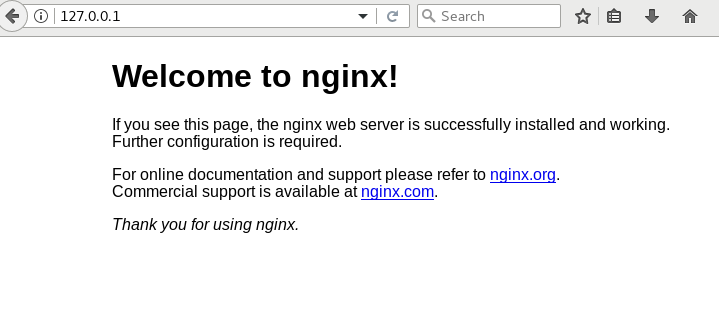
五,Nginx常用命令
/nginx/sbin/nginx -s reload            # 重新载入配置文件

/nginx/sbin/nginx -s reopen            # 重启 Nginx

/nginx/sbin/nginx -s stop              # 停止 Nginx
六,Nginx配置文件
worker_processes ; #设置值和CPU核心数一致

error_log /usr/local/webserver/nginx/logs/nginx_error.log crit; #日志位置和日志级别

pid /usr/local/webserver/nginx/nginx.pid;

#Specifies the value for maximum file descriptors that can be opened by this process.

worker_rlimit_nofile ;

events

{

  use epoll;

  worker_connections ;

}

http

{

  include mime.types;

  default_type application/octet-stream;

  log_format main  '$remote_addr - $remote_user [$time_local] "$request" '

               '$status $body_bytes_sent "$http_referer" '

               '"$http_user_agent" $http_x_forwarded_for';

#charset gb2312;

  server_names_hash_bucket_size ;

  client_header_buffer_size 32k;

  large_client_header_buffers  32k;

  client_max_body_size 8m;

  sendfile on;

  tcp_nopush on;

  keepalive_timeout ;

  tcp_nodelay on;

  fastcgi_connect_timeout ;

  fastcgi_send_timeout ;

  fastcgi_read_timeout ;

  fastcgi_buffer_size 64k;

  fastcgi_buffers  64k;

  fastcgi_busy_buffers_size 128k;

  fastcgi_temp_file_write_size 128k;

  gzip on;

  gzip_min_length 1k;

  gzip_buffers  16k;

  gzip_http_version 1.0;

  gzip_comp_level ;

  gzip_types text/plain application/x-javascript text/css application/xml;

  gzip_vary on;

  #limit_zone crawler $binary_remote_addr 10m;

 #下面是server虚拟主机的配置

 server

  {

    listen ;#监听端口

    server_name localhost;#域名

    index index.html index.htm index.php;

    root /usr/local/webserver/nginx/html;#站点目录

      location ~ .*\.(php|php5)?$

    {

      #fastcgi_pass unix:/tmp/php-cgi.sock;

      fastcgi_pass 127.0.0.1:;

      fastcgi_index index.php;

      include fastcgi.conf;

    }

    location ~ .*\.(gif|jpg|jpeg|png|bmp|swf|ico)$

    {

      expires 30d;

  # access_log off;

    }

    location ~ .*\.(js|css)?$

    {

      expires 15d;

   # access_log off;

    }

    access_log off;

  }

}
Centos7安装配置Nginx的更多相关文章
- virtualBox安装centos7并配置nginx php mysql运行环境
virtualBox安装centos7并配置nginx php mysql运行环境 一:virtualBox安装centos7并进行基础设置 1.下载dvd.iso安装文件,下载地址:https:// ...
- Centos7安装配置gitlab
Centos7安装配置gitlab 这篇文字我会介绍在Centos7上安装gitlab,配置gitlab的smtp,并且创建项目demo. sudo yum install openssh-serve ...
- ELK 6安装配置 nginx日志收集 kabana汉化
#ELK 6安装配置 nginx日志收集 kabana汉化 #环境 centos 7.4 ,ELK 6 ,单节点 #服务端 Logstash 收集,过滤 Elasticsearch 存储,索引日志 K ...
- (转)windows 下安装配置 Nginx 详解
windows 下安装配置 Nginx 详解 本文转自https://blog.csdn.net/kingscoming/article/details/79042874 nginx功能之一可以启动一 ...
- Centos7安装配置Apache+PHP+Mysql+phpmyadmin
转载自: Centos7安装配置Apache+PHP+Mysql+phpmyadmin 一.安装Apache yum install httpd 安装成功后,Apache操作命令: systemctl ...
- Centos7安装配置JDK8
Centos7安装配置JDK8 一.准备工作 第一步,去甲骨文官网下载Jdk相应的版本,我这里下载的是jdk1.8. 第二步将你从官网上下载下来的jdk使用FTP工具上传到云服务器上的相应目录,我的是 ...
- centos7命令行和图形界面的相互切换(附centos7安装配置教程)
一.最近安装了centos7,发现在命令行和图形界面的相互切换命令上,与centos以往版本有很大不同,先整理如下,加深记忆. 1,centos7默认安装后,跟其他版本一样,启动默认进入图形界面: 2 ...
- (转)Centos7安装配置NFS服务和挂载
Centos7安装配置NFS服务和挂载 原文:https://www.u22e.com/601.html NFS简介 NFS(Network File System)即网络文件系统,是FreeBSD支 ...
- CentOS7 安装配置笔记
CentOS7 安装配置笔记 1.通过镜像安装 CentOS7 ==============================* 使用 UltraISO 9.7 或者 rufus-3.5p 制作ISO的 ...
随机推荐
- 自学python的日记分享
2019.4.22登记 课堂笔记 2019.4.8 在windows环境下,用python写出第一个程序“hello world” print("Hello World!!!") ...
- invokedynamic字节码指令
1. 方法引用和invokedynamic invokedynamic是jvm指令集里面最复杂的一条.本文将从高观点的角度下分析invokedynamic指令是如何实现方法引用(Method refe ...
- 以前的博客内容迁至CSDN,博客名不变,以后博客将在两个平台同步更新
为了更好的利用博客园和csdn这两个博客家园,今天把博客园中的内容迁至csdn,博客名称还是使用cooldream2009,以后的文章将同步在博客园和csdn发表,特此声明.
- android客户端向服务器发送请求中文乱码的问
android客户端向服务器发送请求的时候,并将参数保存到数据库时遇到了中文乱码的问题: 解决方法: url = "http://xxxx.com/Orders/saveorder.html ...
- 【Android Studio安装部署系列】十二、Android studio代码混淆
版权声明:本文为HaiyuKing原创文章,转载请注明出处! 概述 为什么需要代码混淆呢?原因很简单,你的apk很容易被反编译出来,你写的代码都会被看到,因此我们需要在编译过程中对代码进行一定程度的混 ...
- PermissionDialog【权限申请提示对话框】
版权声明:本文为HaiyuKing原创文章,转载请注明出处! 前言 随着Android6.0的普及,权限申请也变成了我们开发中必写的一段代码.比如sd卡权限.定位权限.拍照权限,这些几乎都是每个app ...
- LogcatHelperDemo【应用log信息保存成本地文件】
版权声明:本文为HaiyuKing原创文章,转载请注明出处! 前言 简单记录下LogcatHelper的使用,并对原有代码进行了修改[因为保存到应用内的目录中不需要申请权限,所以去掉保存到SD的功能- ...
- 简单介绍shell编程四剑客之grep
概要:分别的作用 grep:文本过滤(模式:pattern)工具,grep,egrep,fgrep,擅长过滤. sed:stream editor 文本编辑工具:(流编辑器),擅长取行.替换. awk ...
- Autofac 和 Quartz.Net 自动注入的整合
一:问题场景 在一次项目开发中,项目中已使用了Autofac.在新需求中要用到Quatrz.Net.在任务中使用注入方法,确始终无法使用注入的方法,经过千百次的度娘,终于找到了解决办法!吐槽下度娘真心 ...
- acrobat pdf 按页拆分
百度 https://jingyan.baidu.com/article/37bce2be7098a21002f3a2f2.html 百度acrobat版本比我的高,操作不同了: 我的方案: 组织页面 ...