
rabbtimq非持久化测试
send端代码
import pika,time,threading

class send():

    def __init__(self,que_nam='hello'):

        self.credentials = pika.PlainCredentials('mytest', 'mytest')

        self.connection = pika.BlockingConnection(pika.ConnectionParameters(host='192.168.157.132',credentials=self.credentials))

        self.channel = self.connection.channel()

        self.channel.queue_declare(queue=que_nam)

    def action(self,msgj='ndyd 996'):

        while True:

            self.channel.basic_publish(exchange='',

                              routing_key='hello',

                              body=msgj)

        print(" [x] Sent %s" %msgj)

        time.sleep(0.5)

    def lll(self):

        li=[]

        for i in range(,):

            th=threading.Thread(target=self.action())

            th.start()

            li.append(th)

        for i in li:

            i.join()

        # connection.close()

song=send()

song.lll()
消费端代码
import pika

class send():

    def __init__(self,msg='ndyd 996',que_nam='hello'):

        self.credentials = pika.PlainCredentials('mytest', 'mytest')

        self.connection = pika.BlockingConnection(pika.ConnectionParameters(host='192.168.157.132',credentials=self.credentials))

        self.channel = self.connection.channel()

        self.channel.queue_declare(queue=que_nam)

    def callback(self,ch, method, properties, body):

        print(" [x] Received %r" % body)

    def start(self):

        self.channel.basic_consume(self.callback,

                          queue='hello',

                          no_ack=True)

        print(' [*] Waiting for messages. To exit press CTRL+C')

        self.channel.start_consuming()

song=send()

song.start()
rabbitmq配置
[root@localhost ~]# free -h

              total        used        free      shared  buff/cache   available

Mem:           472M        107M        296M        1.5M         67M        326M

Swap:          .0G         88M        .9G

[root@localhost ~]# lscpu

Architecture:          x86_64

CPU op-mode(s):        -bit, -bit

Byte Order:            Little Endian

CPU(s):

On-line CPU(s) list:

Thread(s) per core:

Core(s) per socket:

Socket(s):

NUMA node(s):

Vendor ID:             GenuineIntel

CPU family:

Model:

Model name:            Intel(R) Core(TM) i5-6300HQ CPU @ .30GHz

Stepping:

CPU MHz:               2303.139

BogoMIPS:              4608.00

Hypervisor vendor:     VMware

Virtualization type:   full

L1d cache:             32K

L1i cache:             32K

L2 cache:              256K

L3 cache:              6144K

NUMA node0 CPU(s):

Flags:                 fpu vme de pse tsc msr pae mce cx8 apic sep mtrr pge mca cmov pat pse36 clflush mmx fxsr sse sse2 ss syscall nx pdpe1gb rdtscp lm constant_tsc arch_perfmon nopl xtopology tsc_reliable nonstop_tsc eagerfpu pni pclmulqdq ssse3 fma cx16 pcid sse4_1 sse4_2 x2apic movbe popcnt tsc_deadline_timer aes xsave avx f16c rdrand hypervisor lahf_lm abm 3dnowprefetch fsgsbase tsc_adjust bmi1 hle avx2 smep bmi2 invpcid rtm mpx rdseed adx smap clflushopt xsaveopt xsavec arat
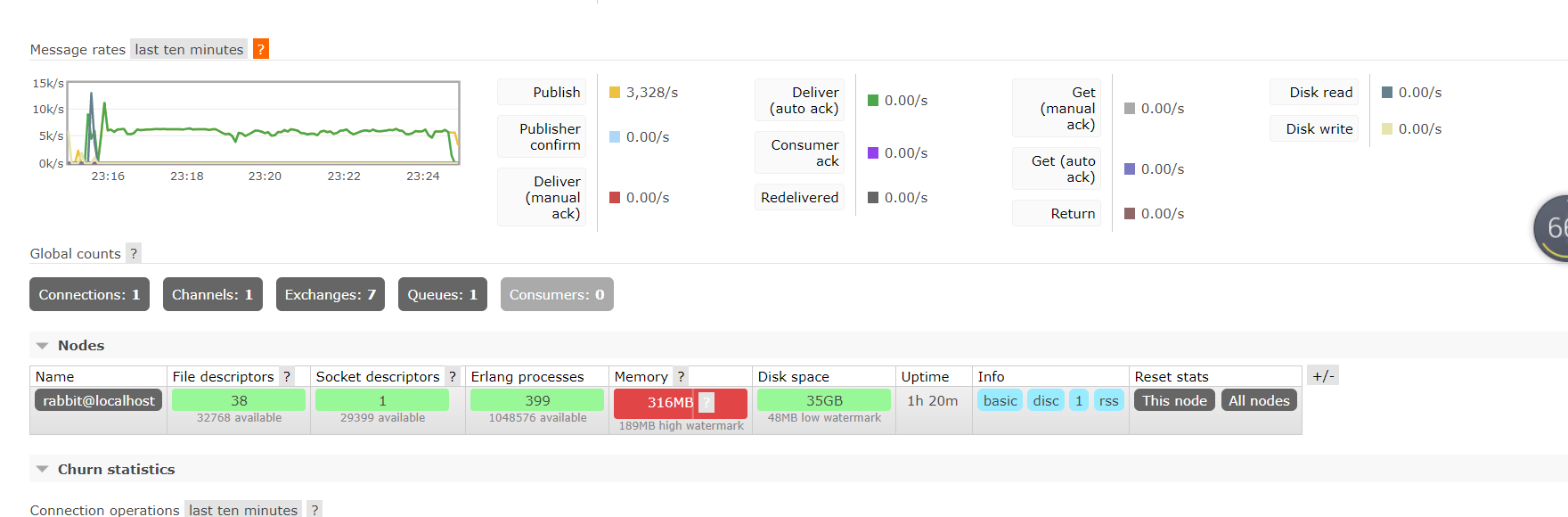
稳定发送速率

停止接收端 rabbitmq 瞬间崩溃
rabbtimq非持久化测试的更多相关文章
- redisd的非持久化配置
如何关闭redis持久化?我的需求是只把redis当作缓存来用,所以持久化到硬盘对我的需求来说没有意义. 修改redis配置文件,redis.conf 第115行左右. 1.注释掉原来的持久化规则 # ...
- JMS开发步骤和持久化/非持久化Topic消息
------------------------------------------------ 开发一个JMS的基本步骤如下: 1.创建一个JMS connection factory 2.通过co ...
- JMS学习(五)--ActiveMQ中的消息的持久化和非持久化 以及 持久订阅者 和 非持久订阅者之间的区别与联系
一,消息的持久化和非持久化 ①DeliveryMode 这是传输模式.ActiveMQ支持两种传输模式:持久传输和非持久传输(persistent and non-persistent deliver ...
- RabbitMQ学习笔记(6)----RabbitMQ 持久化和非持久化
持久化:将交换机或队列数据保存到磁盘,服务器宕机或重启之后依然存在. 非持久化:将交换机或队列的数据保存到内存中,服务器宕机或重启之后数据将不存在. 在RabbitMQ中也提供了持久化和非持久化方式. ...
- RabbitMQ持久化和非持久化
但是,非持久化要比持久化速度更快. 队列是否需要持久化:看需求
- maven dubbo zookeeper 项目搭建(有效)jar包非war测试
zookeeper安装以及dubbo-admin.war(管理端)配置启动,本章省略,参考其他内容 这里主要说服务提供者和消费者 项目结构: 1)服务端 DemoServer.java package ...
- PostgreSQL 非持久化设置(Non-Durable Settings)
Durability is a database feature that guarantees the recording of committed transactions even if the ...
- ActiveMQ broker 非持久化queue消息的入队、出队和应答
消息入队:Queue.doMessageSend 消息分发:Queue.doActualDispatch 消息发送:TransportConnection.dispatch broker收到consu ...
- 单核CPU并发与非并发测试
多线程运行程序的目的一般是提高程序运行效率并且能够提高硬件的利用率比如多核CPU,但是如果我们只有单核CPU并发运行程序会怎样呢? 我以两个环境作为对比: 环境A(我本机8c) 环境B(我的云服务器1 ...
随机推荐
- python小技巧01递归解释内嵌
现假设有一份机器人配件名单 list[头部,躯干,肢体] 头部这个list又有鼻子眼睛嘴巴这些小零件 肢体这个list有胳膊,肩膀,手.手这个list又有3种手指 所以这个list详细写出是: lis ...
- 基于IdentityServer的系统对接微信公众号
业务需求 公司有两个业务系统,A和B,AB用户之间属于多对一的关系,数据库里面也就是两张表,A表有个外键指向B.现在需要实现以下几个功能. A用户扫描B的二维码,填写相关的注册信息,注册完成之后自动属 ...
- 权限管理系统之SpringBoot集成LayUI实现后台管理首页
万事开头难,昨天一直在构思用户权限管理系统怎么实现,实现哪些需求,采用什么技术等,也在网上百度了好多,计划使用SpringBoot + Mybatis + thymeleaf + LayUI + S ...
- [转]How to Download and Setup Blue Prism
本文转自:https://www.hopetutors.com/blog/uncategorized/how-to-download-and-setup-blue-prism/ The Downloa ...
- Asp.Net MVC Unobtrusive Ajax
1. Unobtrusive JavaScript介绍 说到Unobtrusive Ajax,就要谈谈UnobtrusiveJavaScript了,所谓Unobtrusive JavaScript ...
- 第三章:shiro授权认证
授权:也叫访问控制,即在应用中控制谁能访问哪些资源(如访问页面/编辑数据/页面操作等). 主体:即访问应用的用户,在Shiro中使用Subject代表该用户.用户只有授权后才允许访问相应的资源. 资源 ...
- ServiceStack.Redis 请求次数6000次异常
Redis是一个非常NB的内存级的数据库,我们可以把很多”热数据“(即读写非常多的数据)放入其中来操作,这样就减少了和关系型数据库(如SqlServer/My Sql等)之间的交互,程序的响应速度也大 ...
- Hacking Bsides Vancouver 2018 walkthrough
概述: Name: BSides Vancouver: 2018 (Workshop) Date release: 21 Mar 2018 Author: abatchy Series: BSides ...
- iOS----------use_frameworks!
1.https://segmentfault.com/a/1190000007076865 2.https://www.jianshu.com/p/8269e4cac48f 3.https://www ...
- 基于hadoop分析,了解hive的使用
一.Hadoop理论 Hadoop是一个专为离线和大规模数据分析而设计的,并不适合那种对几个记录随机读写的在线事务处理模式. Hadoop=HDFS(文件系统,数据存储技术相关)+ Mapreduce ...