
ASP.NET Core - 从Program和Startup开始
Program
我们先看一下1.x和2.x的程序入口项的一个差异
1.x
public class Program

{

    public static void Main(string[] args)

     {

        var host = new WebHostBuilder()

               .UseKestrel()

                .UseContentRoot(Directory.GetCurrentDirectory())

                .UseIISIntegration()

                .UseStartup<Startup>()

                .Build();

        host.Run();

     }

}
2.x
public class Program

{

    public static void Main(string[] args)

    {

        BuildWebHost(args).Run();

    }

    public static IWebHost BuildWebHost(string[] args) =>

        WebHost.CreateDefaultBuilder(args)

            .UseStartup<Startup>()

            .Build();

}
2.x对默认配置进行了简化,把一些基本配置移动了 CreateDefaultBuilder 方法中
  public static IWebHostBuilder CreateDefaultBuilder(string[] args)

    {

      IWebHostBuilder hostBuilder = new WebHostBuilder()
    .UseKestrel((Action<WebHostBuilderContext, KestrelServerOptions>) ((builderContext, options) => options.Configure((IConfiguration) builderContext.Configuration.GetSection("Kestrel"))))
    .UseContentRoot(Directory.GetCurrentDirectory())
    .ConfigureAppConfiguration((Action<WebHostBuilderContext, IConfigurationBuilder>) ((hostingContext, config) =>

      {

        IHostingEnvironment hostingEnvironment = hostingContext.HostingEnvironment;

        config.AddJsonFile("appsettings.json", true, true)
      .AddJsonFile("appsettings." + hostingEnvironment.EnvironmentName + ".json", true, true);

        if (hostingEnvironment.IsDevelopment())

        {

          Assembly assembly = Assembly.Load(new AssemblyName(hostingEnvironment.ApplicationName));

          if (assembly != (Assembly) null)

            config.AddUserSecrets(assembly, true);

        }

        config.AddEnvironmentVariables();

        if (args == null)

          return;

        config.AddCommandLine(args);

      }))
    .ConfigureLogging((Action<WebHostBuilderContext, ILoggingBuilder>) ((hostingContext, logging) =>

      {

        logging.AddConfiguration((IConfiguration) hostingContext.Configuration.GetSection("Logging"));

        logging.AddConsole();

        logging.AddDebug();

      }))
    .ConfigureServices((Action<WebHostBuilderContext, IServiceCollection>) ((hostingContext, services) =>

      {

        services.PostConfigure<HostFilteringOptions>((Action<HostFilteringOptions>) (options =>

        {

          if (options.AllowedHosts != null && options.AllowedHosts.Count != )

            return;

          string str = hostingContext.Configuration["AllowedHosts"];

          string[] strArray1;

          if (str == null)

            strArray1 = (string[]) null;

          else

            strArray1 = str.Split(new char[]{ ';' }, StringSplitOptions.RemoveEmptyEntries);

          string[] strArray2 = strArray1;

          HostFilteringOptions filteringOptions = options;

          string[] strArray3;

          if (strArray2 == null || strArray2.Length == )

            strArray3 = new string[]{ "*" };

          else

            strArray3 = strArray2;

          filteringOptions.AllowedHosts = (IList<string>) strArray3;

        }));

        services.AddSingleton<IOptionsChangeTokenSource<HostFilteringOptions>>((IOptionsChangeTokenSource<HostFilteringOptions>) new ConfigurationChangeTokenSource<HostFilteringOptions>(hostingContext.Configuration));

        services.AddTransient<IStartupFilter, HostFilteringStartupFilter>();

      }))
    .UseIISIntegration()
    .UseDefaultServiceProvider((Action<WebHostBuilderContext, ServiceProviderOptions>) ((context, options) => options.ValidateScopes = context.HostingEnvironment.IsDevelopment()));

      if (args != null)

        hostBuilder.UseConfiguration((IConfiguration) new ConfigurationBuilder().AddCommandLine(args).Build());

      return hostBuilder;

    }
这里我们可以看到在CreateDefaultBuilder生成器中,定义了默认使用的Web服务器(UseKestrel,使用的是KestrelServer)和一些基础的配置,包括文件路径、应用配置(按appsettings.json,appsettings.{Environment}.json次序加载)、环境变量、日志,IIS集成等,如果需要的话,还可以指定其他类型的Server(IIS HTTP Server,HTTP.sys Server)和自定义Server(继承IServer)。
返回到Program中,在获取到了WebHostBuilder之后紧接着就指定了启动类UseStartup<Startup>(),Build方法是WebHostBuilder最终的目的(在这个方法里面构建了管道),将构造一个WebHost返回,这里引出了我们在ASP.NET Core - 开篇所说的重要对象:WebHost,并且运行它的Run方法用于启动应用并开始监听所有到来的HTTP请求。
Startup
Startup方法用来指定应用程序的启动类,这里主要有两个作用:
- 配置应用需要的服务(服务注册,ConfigureServices方法)。
- 创建应用的请求处理处理管道(Configure方法)。
public class Startup

{

   private readonly IHostingEnvironment _env;

    private readonly IConfiguration _config;

    private readonly ILoggerFactory _loggerFactory;

    public Startup(IHostingEnvironment env, IConfiguration config,

        ILoggerFactory loggerFactory)

    {

        _env = env;

        _config = config;

        _loggerFactory = loggerFactory;

    }

    // 注入服务到容器中

    public void ConfigureServices(IServiceCollection services)

    {

        var logger = _loggerFactory.CreateLogger<Startup>();

        if (_env.IsDevelopment())

        {

            // Development service configuration

            logger.LogInformation("Development environment");

        }

        else

        {

            // Non-development service configuration

            logger.LogInformation($"Environment: {_env.EnvironmentName}");

        }

        ...

    }

    // 配置Http请求处理管道

    public void Configure(IApplicationBuilder app)

    {

        ...

    }

}
Startup 类的 执行顺序:构造 -> ConfigureServices -> Configure
1)Startup Constructor(构造函数)
上面的构造函数引出了我们开篇说的三个重要对象:IHostingEnvironment ,IConfiguration ,ILoggerFactory ,这里先讲构造函数的作用,这些对象后面会分篇讲。显而易见,这里主要是通过依赖注入实例化了该类中需要用到的对象(根据自己的业务),比较简单。
2) ConfigureServices
首先这个方法是可选的,它的参数是IServiceCollection,这也是我们开篇说的重要对象,而且是非常重要的对象,这是一个原生的Ioc容器,所有需要用到的服务都可以注册到里面,一般是通过约定风格services.Addxxx, 这样就可以让这些服务在应用和Configure方法使用(用来构建管道)。
3)Configure
用于构建管道处理Http请求,管道中的每个中间件(Middleware)组件负责请求处理和选择是否将请求传递到管道中的下一个组件,在这里我们可以添加自己想要的中间件来处理每一个Http请求,一般是使用上面的ConfigureServices方法中注册好的服务,一般的用法是 app.Usexxx,这个Usexxx方法是基于IApplicationBuilder的扩展。
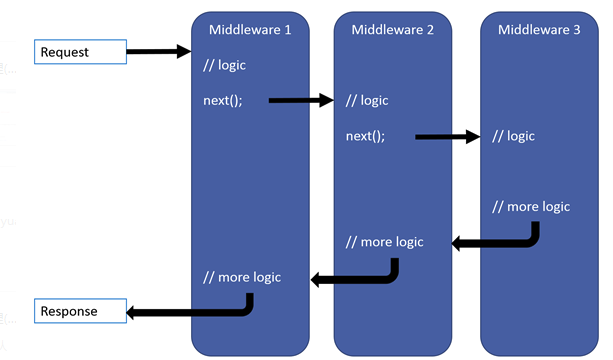
需要注意的有三个地方:
- 应尽早在管道中调用异常处理委托,这样就能捕获在后续管道发生的异常,所以能看到微软的经典写法是先把异常处理的中间件写在最前面,这样方可捕获稍后调用中发生的任何异常。
- 当某个中间件不将请求传递给下一个中间件时,这被称为“请求管道短路”。 我们通常都会需要短路,这样可以避免资源浪费,类似与当抛出异常时我们将不会再往下请求,因为这完全没有必要:)
- 如果你想某些模块不需要授权就能访问,应把这些模块放在认证模块前面,所以我们一般会把访问静态文件的中间件放在认证模块的前面。
public void Configure(IApplicationBuilder app)

{

    if (env.IsDevelopment())

    {//   Use the Developer Exception Page to report app runtime errors.

        app.UseDeveloperExceptionPage();

    }

    else

    {//   Enable the Exception Handler Middleware to catch exceptions

        //     thrown in the following middlewares.

        app.UseExceptionHandler("/Error");

    }

// Return static files and end the pipeline.

    app.UseStaticFiles();

    // Use Cookie Policy Middleware to conform to EU General Data

    // Protection Regulation (GDPR) regulations.

    app.UseCookiePolicy();

    // Authenticate before the user accesses secure resources.

    app.UseAuthentication();

    // If the app uses session state, call Session Middleware after Cookie

    // Policy Middleware and before MVC Middleware.

    app.UseSession();

    // Add MVC to the request pipeline.

    app.UseMvc();

}
如果你不想使用Startup类的话,可以使用以下方式配置自己的服务注册和管道构建,虽然这种方式有点odd :)
public class Program

{

    public static IHostingEnvironment HostingEnvironment { get; set; }

    public static IConfiguration Configuration { get; set; }

    public static void Main(string[] args)

    {

        CreateWebHostBuilder(args).Build().Run();

    }

    public static IWebHostBuilder CreateWebHostBuilder(string[] args) =>

        WebHost.CreateDefaultBuilder(args)

            .ConfigureAppConfiguration((hostingContext, config) =>

            {

            })

            .ConfigureServices(services =>

            {

                ...

            })

            .Configure(app =>

            {

                var loggerFactory = app.ApplicationServices

                    .GetRequiredService<ILoggerFactory>();

                var logger = loggerFactory.CreateLogger<Program>();

                var env = app.ApplicationServices.GetRequiredServices<IHostingEnvironment>();

                var config = app.ApplicationServices.GetRequiredServices<IConfiguration>();

                logger.LogInformation("Logged in Configure");

                if (env.IsDevelopment())

                {

                    ...

                }

                else

                {

                    ...

                }

                var configValue = config["subsection:suboption1"];

                ...

            });

}
这里需要注意的是,Startup只是一个概念,类的名字是可以任意的,只需要在启动项UseStartup中指定你这个启动类即可。
总结
正如ASP.NET Core - 开篇所说的,一个ASP.NET Core应用其实就是一个控制台应用程序,它在应用启动时构建一个 Web 服务器,并且通过指定的Startup类来构建应用服务和请求管道,进而监听和处理所有的Http请求。
ASP.NET Core - 从Program和Startup开始的更多相关文章
- 如何在 asp.net core 3.x 的 startup.cs 文件中获取注入的服务
一.前言 从 18 年开始接触 .NET Core 开始,在私底下.工作中也开始慢慢从传统的 mvc 前后端一把梭,开始转向 web api + vue,之前自己有个半成品的 asp.net core ...
- asp.net core 系列 2 启动Startup类介绍
一.Startup类 ASP.NET Core 应用是一个控制台应用,它在其 Program.Main 方法中创建 Web 服务器.其中Main方法是应用的托管入口点,Main 方法调用 WebHos ...
- asp.netcore 3.1 program、Startup 类详解
Program类 public class Program { /// <summary> /// 应用程序入口 /// 1.asp.netcore 本质上是控制台程序 /// </ ...
- ASP.NET Core Web API中Startup的使用技巧
Startup类和服务配置 STARTUP CLASS AND THE SERVICE CONFIGURATION 在 Startup 类中,有两个方法:ConfigureServices 是用于 ...
- ASP.NET Core[源码分析篇] - Startup
应用启动的重要类 - Startup 在ASP.NET Core - 从Program和Startup开始这篇文章里面,我们知道了Startup这个类的重要性,它主要负责了: 配置应用需要的服务(服务 ...
- ASP.NET Core 运行原理剖析2:Startup 和 Middleware(中间件)
ASP.NET Core 运行原理剖析2:Startup 和 Middleware(中间件) Startup Class 1.Startup Constructor(构造函数) 2.Configure ...
- ASP.NET Core 运行原理剖析1:初始化WebApp模版并运行
ASP.NET Core 运行原理剖析1:初始化WebApp模版并运行 核心框架 ASP.NET Core APP 创建与运行 总结 之前两篇文章简析.NET Core 以及与 .NET Framew ...
- ASP.NET Core 运行原理剖析
1. ASP.NET Core 运行原理剖析 1.1. 概述 1.2. 文件配置 1.2.1. Starup文件配置 Configure ConfigureServices 1.2.2. appset ...
- ASP.NET Core 实战:构建带有版本控制的 API 接口
一.前言 在上一篇的文章中,主要是搭建了我们的开发环境,同时创建了我们的项目模板框架.在整个前后端分离的项目中,后端的 API 接口至关重要,它是前端与后端之间进行沟通的媒介,如何构建一个 “好用” ...
随机推荐
- mime.go
package manager import ( "mime" "path" ) //初始化数据 func init() { if mi ...
- bzoj 3505 [Cqoi2014]数三角形 组合
ans=所有的三点排列-共行的-共列的-斜着一条线的 斜着的枚举每个点和原点的gcd,反过来也可以,还能左右,上下挪 #include<cstdio> #include<cstrin ...
- 【最小生成树+子集枚举】Uva1151 Buy or Build
Description 平面上有n个点(1<=N<=1000),你的任务是让所有n个点连通,为此,你可以新建一些边,费用等于两个端点的欧几里得距离的平方. 另外还有q(0<=q< ...
- Linux vim常用命令
什么是 vim? Vim是从 vi 发展出来的一个文本编辑器.代码补完.编译及错误跳转等方便编程的功能特别丰富,在程序员中被广泛使用. 简单的来说, vi 是老式的字处理器,不过功能已经很齐全了,但是 ...
- 记一次logback传输日志到logstash根据自定义设置动态创建ElasticSearch索引
先说背景,由于本人工作需要创建很多小应用程序,而且在微服务的大环境下,服务越来越多,然后就导致日志四分五裂,到处都有,然后就有的elk,那么问题来了 不能每个小应用都配置一个 logstash 服务来 ...
- MYSQL—— Insert的几种用法!
向表中插入数据 标题头示例图如下: 用insert插入值得方式: 1.使用如下语句进行插入值操作,要求:插入值必须与表头给出列数值一致,否则报:[Err] 1136 - Column count do ...
- C#EF中,使用类似于SQL中的% 模糊查询
最近在做项目的时候需要使用到模糊查询,但是后台使用EF写的 而不是ADO或者是Dapper,如果是这样的话,我们就可以使用Sql语句直接进行模糊查询 现在我们需要在LINQ中使用类似于模糊查询 在EF ...
- 简单导出下载excel的方法
简单导出excel方法 /// <summary> /// Excel打包下载 /// </summary> /// <returns></returns&g ...
- Java 在PPT中绘制图形
Microsoft PowerPoint可支持在幻灯片中插入各种类型的图形并且可设置图形填充.线条颜色.图形大小.位置等.下面将通过Java编程来演示在PPT中绘制图形的方法. 工具:Free Spi ...
- Java笔记(day12)
包: 对类文件进行分类管理:给类提供多层命名(名称)空间:写在程序文件的第一行:类名的全称是 包名.类名包也是一种封装形式: package protected必须是成为其子类,才能继承import导 ...