
spring+jotm+ibatis+mysql实现JTA分布式事务
1 环境
1.1 软件环境
ibatis-2.3.4
ow2-jotm-dist-2.1.4-bin.tar.gz
MySQL-5.1
JDK1.5
 CREATE DATABASE IF NOT EXISTS testdb_a    DEFAULT CHARACTER SET utf8;

 USE testdb_a;

 DROP TABLE IF EXISTS tab_a;

 CREATE TABLE tab_a (

     id bigint(20) NOT NULL,

     name varchar(60) DEFAULT NULL,

     address varchar(120) DEFAULT NULL,

     PRIMARY KEY (id)

 ) ENGINE=InnoDB DEFAULT CHARSET=utf8;

 CREATE DATABASE IF NOT EXISTS testdb_b    DEFAULT CHARACTER SET utf8;

 USE testdb_b;

 DROP TABLE IF EXISTS tab_b;

 CREATE TABLE tab_b (

     id bigint(20) NOT NULL,

     name varchar(60) DEFAULT NULL,

     address varchar(120) DEFAULT NULL,

     PRIMARY KEY (id)

 ) ENGINE=InnoDB DEFAULT CHARSET=utf8;
2 建立项目testJOTM
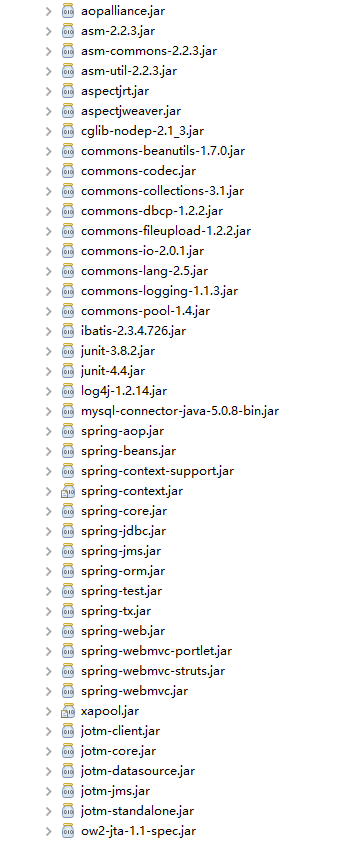
2.1 建立项目后,准备依赖的类库,结构如下
2.2 主要代码
 /**

  * 测试JOTM的Service

  *

  * @author leizhimin 2009-6-25 12:53:55

  */

 public interface StuJotmService {

     /**

      * 同时保存TabA、TabB

      *

      * @param a

      *            TabA对象

      * @param b

      *            TabB对象

      */

     void saveAB(TabA a, TabB b);

     /**

      * 同时更新TabA、TabB

      *

      * @param a

      *            TabA对象

      * @param b

      *            TabB对象

      */

     void updateAB(TabA a, TabB b);

     /**

      * 删除指定id的TabA、TabB记录

      *

      * @param id

      *            指定id

      */

     void deleteABif(Long id);

 }
StuJotmService
 public class StuJotmServiceImpl implements StuJotmService {

     private TabADAO tabADAO;

     private TabBDAO tabBDAO;

     /**

      * 同时保存TabA、TabB

      *

      * @param a

      *            TabA对象

      * @param b

      *            TabB对象

      */

 //    @Transactional(readOnly=false)

     public void saveAB(TabA a, TabB b) {

         tabADAO.saveTabA(a);

         tabBDAO.saveTabB(b);

     }

     /**

      * 同时更新TabA、TabB

      *

      * @param a

      *            TabA对象

      * @param b

      *            TabB对象

      */

     // @Transactional(readOnly=false)

     public void updateAB(TabA a, TabB b) {

         tabADAO.updateTabA(a);

         tabBDAO.updateTabB(b);

     }

     /**

      * 删除指定id的TabA、TabB记录

      *

      * @param id

      *            指定id

      */

     // @Transactional(readOnly=false)

     public void deleteABif(Long id) {

         tabADAO.deleteTabAById(id);

         tabBDAO.deleteTabBById(id);

     }

     public void setTabADAO(TabADAO tabADAO) {

         this.tabADAO = tabADAO;

     }

     public void setTabBDAO(TabBDAO tabBDAO) {

         this.tabBDAO = tabBDAO;

     }

 }
StuJotmServiceImpl
 <?xml version="1.0" encoding="UTF-8"?>

 <!-- 局部单元测试使用,不正式发布,不要删除 -->

 <beans xmlns="http://www.springframework.org/schema/beans"

     xmlns:xsi="http://www.w3.org/2001/XMLSchema-instance" xmlns:jee="http://www.springframework.org/schema/jee"

     xmlns:aop="http://www.springframework.org/schema/aop" xmlns:tx="http://www.springframework.org/schema/tx"

     xsi:schemaLocation="http://www.springframework.org/schema/beans http://www.springframework.org/schema/beans/spring-beans-2.0.xsd

                      http://www.springframework.org/schema/jee http://www.springframework.org/schema/jee/spring-jee-2.0.xsd

                      http://www.springframework.org/schema/aop http://www.springframework.org/schema/aop/spring-aop-2.0.xsd

                      http://www.springframework.org/schema/tx http://www.springframework.org/schema/tx/spring-tx-2.0.xsd">

     <!--指定Spring配置中用到的属性文件 -->

     <bean id="propertyConfig"

         class="org.springframework.beans.factory.config.PropertyPlaceholderConfigurer">

         <property name="locations">

             <list>

                 <value>classpath:jdbc.properties</value>

             </list>

         </property>

     </bean>

     <!-- JOTM实例 -->

     <bean id="jotm" class="org.springframework.transaction.jta.JotmFactoryBean" />

     <!-- JTA事务管理器 -->

     <bean id="myJtaManager"

         class="org.springframework.transaction.jta.JtaTransactionManager">

         <property name="userTransaction">

             <ref local="jotm" />

         </property>

     </bean>

     <!-- 数据源A -->

     <bean id="dataSourceA" class="org.enhydra.jdbc.pool.StandardXAPoolDataSource"

         destroy-method="shutdown">

         <property name="dataSource">

             <bean class="org.enhydra.jdbc.standard.StandardXADataSource"

                 destroy-method="shutdown">

                 <property name="transactionManager" ref="jotm" />

                 <property name="driverName" value="${jdbc.driver}" />

                 <property name="url" value="${jdbc.url}" />

             </bean>

         </property>

         <property name="user" value="${jdbc.username}" />

         <property name="password" value="${jdbc.password}" />

     </bean>

     <!-- 数据源B -->

     <bean id="dataSourceB" class="org.enhydra.jdbc.pool.StandardXAPoolDataSource"

         destroy-method="shutdown">

         <property name="dataSource">

             <bean class="org.enhydra.jdbc.standard.StandardXADataSource"

                 destroy-method="shutdown">

                 <property name="transactionManager" ref="jotm" />

                 <property name="driverName" value="${jdbc2.driver}" />

                 <property name="url" value="${jdbc2.url}" />

             </bean>

         </property>

         <property name="user" value="${jdbc2.username}" />

         <property name="password" value="${jdbc.password}" />

     </bean>

     <!-- 事务切面配置 -->

     <aop:config>

         <aop:pointcut id="serviceOperation" expression="execution(* *..service*..*(..))" />

         <aop:advisor pointcut-ref="serviceOperation" advice-ref="txAdvice" />

     </aop:config>

     <!-- 通知配置 -->

     <tx:advice id="txAdvice" transaction-manager="myJtaManager">

         <tx:attributes>

             <tx:method name="delete*" rollback-for="Exception" />

             <tx:method name="save*" rollback-for="Exception" />

             <tx:method name="update*" rollback-for="Exception" />

             <tx:method name="*" read-only="true" rollback-for="Exception" />

         </tx:attributes>

     </tx:advice>

     <!--根据dataSourceA和sql-map-config_A.xml创建一个SqlMapClientA -->

     <bean id="sqlMapClientA" class="org.springframework.orm.ibatis.SqlMapClientFactoryBean">

         <property name="dataSource">

             <ref local="dataSourceA" />

         </property>

         <property name="configLocation">

             <value>sql-map-config_A.xml</value>

         </property>

     </bean>

     <!--根据dataSourceB和sql-map-config_B.xml创建一个SqlMapClientB -->

     <bean id="sqlMapClientB" class="org.springframework.orm.ibatis.SqlMapClientFactoryBean">

         <property name="dataSource">

             <ref local="dataSourceB" />

         </property>

         <property name="configLocation">

             <value>sql-map-config_B.xml</value>

         </property>

     </bean>

     <!--根据sqlMapClientA创建一个SqlMapClientTemplate的模版类实例sqlMapClientTemplateA -->

     <bean id="sqlMapClientTemplateA" class="org.springframework.orm.ibatis.SqlMapClientTemplate">

         <property name="sqlMapClient" ref="sqlMapClientA" />

     </bean>

     <!--根据sqlMapClientB创建一个SqlMapClientTemplate的模版类实例sqlMapClientTemplateB -->

     <bean id="sqlMapClientTemplateB" class="org.springframework.orm.ibatis.SqlMapClientTemplate">

         <property name="sqlMapClient" ref="sqlMapClientB" />

     </bean>

     <!-- 配置DAO,并注入所使用的sqlMapClientTemplate实例 -->

     <bean id="tabADAO" class="com.lavasoft.stu.jtom.dao.impl.TabADAOImpl">

         <property name="sqlMapClientTemplate" ref="sqlMapClientTemplateA" />

     </bean>

     <bean id="tabBDAO" class="com.lavasoft.stu.jtom.dao.impl.TabBDAOImpl">

         <property name="sqlMapClientTemplate" ref="sqlMapClientTemplateB" />

     </bean>

     <!-- Service配置,注入DAO -->

     <bean id="stuJotmService" class="com.lavasoft.stu.jtom.service.StuJotmServiceImpl">

         <property name="tabADAO" ref="tabADAO" />

         <property name="tabBDAO" ref="tabBDAO" />

     </bean>

 </beans>
applicationContext.xml
 jdbc.database=cms_release

 jdbc.driver=com.mysql.jdbc.Driver

 jdbc.url=jdbc:mysql://192.168.0.1:3306/test?useUnicode=true&characterEncoding=utf8&autoReconnect=true&zeroDateTimeBehavior=convertToNull

 jdbc.username=root

 jdbc.password=123456

 jdbc2.database=cms_release

 jdbc2.driver=com.mysql.jdbc.Driver

 jdbc2.url=jdbc:mysql://192.168.0.2:3306/test?useUnicode=true&characterEncoding=utf8&autoReconnect=true&zeroDateTimeBehavior=convertToNull

 jdbc2.username=root

 jdbc2.password=123456
jdbc.properties
 <?xml version="1.0" encoding="UTF-8"?>

 <!DOCTYPE sqlMapConfig

                 PUBLIC "-//ibatis.apache.org//DTD SQL Map Config 2.0//EN"

                 "http://ibatis.apache.org/dtd/sql-map-config-2.dtd">

 <sqlMapConfig>

         <settings cacheModelsEnabled="true" enhancementEnabled="true"

                             lazyLoadingEnabled="true" errorTracingEnabled="true"

                             useStatementNamespaces="true"/>

         <sqlMap resource="com/lavasoft/stu/jtom/entity/sqlmap/TabA.xml"/>

 </sqlMapConfig>
sql-map-config_A.xml
 <?xml version="1.0" encoding="UTF-8"?>

 <!DOCTYPE sqlMapConfig

                 PUBLIC "-//ibatis.apache.org//DTD SQL Map Config 2.0//EN"

                 "http://ibatis.apache.org/dtd/sql-map-config-2.dtd">

 <sqlMapConfig>

         <settings cacheModelsEnabled="true" enhancementEnabled="true"

                             lazyLoadingEnabled="true" errorTracingEnabled="true"

                             useStatementNamespaces="true"/>

         <sqlMap resource="com/lavasoft/stu/jtom/entity/sqlmap/TabB.xml"/>

 </sqlMapConfig>
sql-map-config_B.xml
 public class Test {

     private static ApplicationContext ctx = ApplicationContextUtil.getApplicationContext();

     private static StuJotmService ser = (StuJotmService) ctx.getBean("stuJotmService");

     public static void test_() {

         TabA a = new TabA();

         a.setId(2L);

         a.setName("aaa4");

         a.setAddress("address a4");

         TabB b = new TabB();

         b.setId(3L);

         b.setName("bbb3");

         b.setAddress("address b5");

         ser.saveAB(a, b);

     }

     public static void main(String[] args) {

         test_();

     }

 }
2.3 测试效果
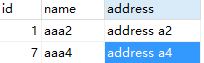
先运行Test文件,可以看到两个库两个表都正常插入值。

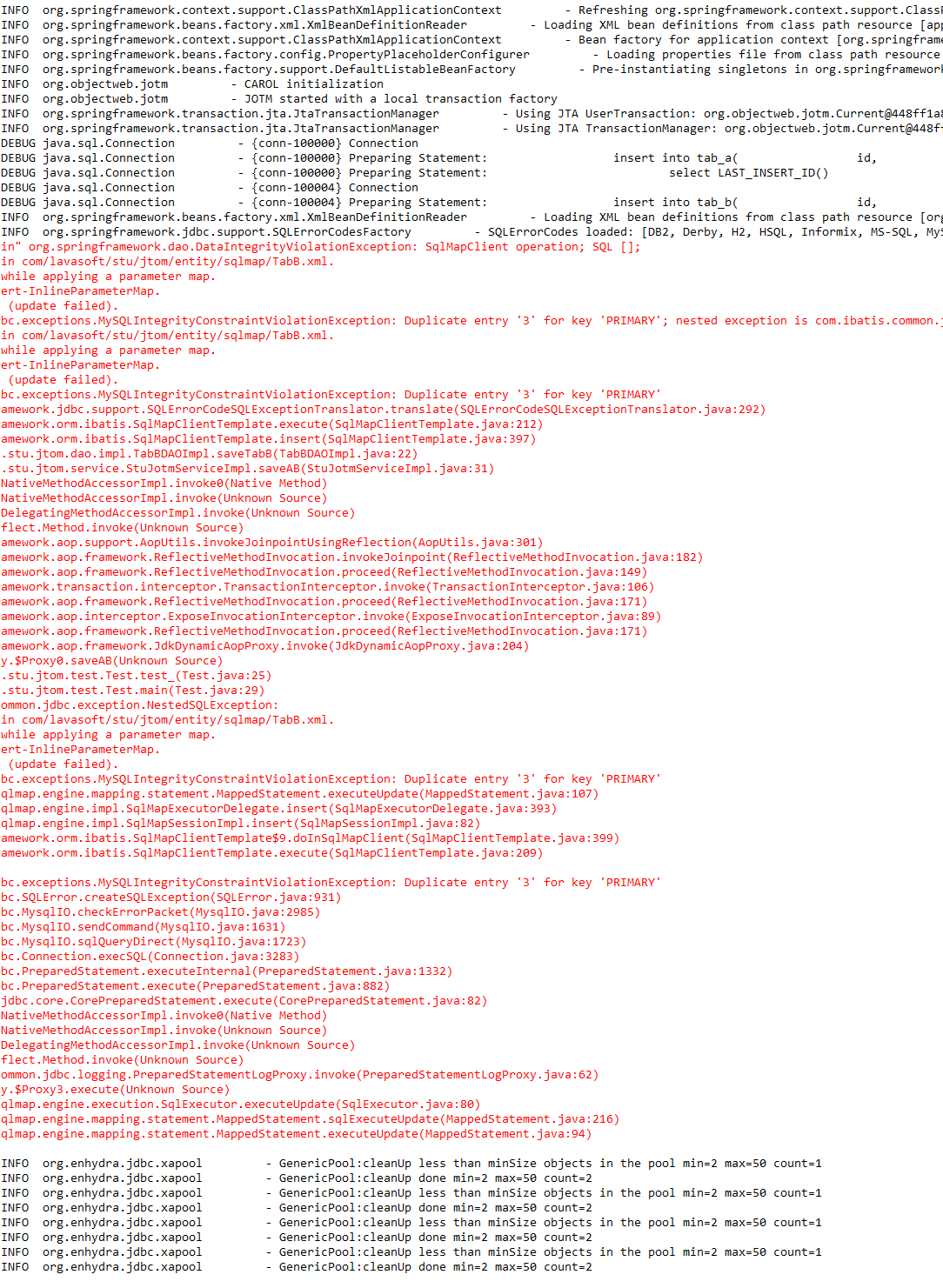
再把TabA的setId改为其他任意一个长整型,那么TabB肯定会报主键重复错,因为TabB的setId没改,那么如果事务生效的话,最后应该是两张表都没插入值,如果事务没生效,那么TabA会插入一条新的数据。
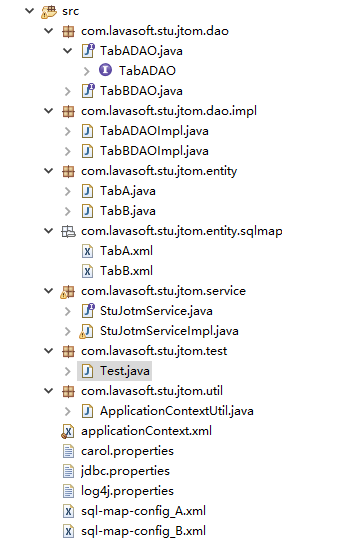
2.3 完整结构
完整代码下载:
spring+jotm+ibatis+mysql实现JTA分布式事务的更多相关文章
- Springboot+Atomikos+Jpa+Mysql实现JTA分布式事务
1 前言 之前整理了一个spring+jotm实现的分布式事务实现,但是听说spring3.X后不再支持jotm了,jotm也有好几年没更新了,所以今天整理springboot+Atomikos+jp ...
- Spring 3.0 + Atomikos构建jta分布式事务
Spring3.0已经不再支持jtom了,不过我们可以用第三方开源软件atomikos(http://www.atomikos.com/)来实现.Atomikos是目前在分布式事务管理中做得相当不错的 ...
- Springboot + Atomikos + Druid + Mysql 实现JTA分布式事务
DataSource 配置 package com.cheng.dynamic.config; import java.util.Properties; import javax.sql.DataSo ...
- 使用Atomikos Transactions Essentials实现多数据源JTA分布式事务--转载
原文:http://www.ite/topic/122700 9.17 update:使用NonXADataSourceBean. Mysql在5.0版本和Connecter/J5.0版本后提供了XA ...
- Spring Boot2.0之多数据源分布式事务问题
分布式事务解决方案的问题, 分布式事务产生的原因: 多个不同的服务连接不同的数据源 ,做分布式事务的管理. 这种情况是连接两个数据源的情况,然后事务管理器是这样的 只管理了test02的这端业务代码. ...
- springboot学习笔记:10.springboot+atomikos+mysql+mybatis+druid+分布式事务
前言 上一篇文章我们整合了springboot+druid+mybatis+mysql+多数据源: 本篇文章大家主要跟随你们涛兄在上一届基础上配置一下多数据源情况下的分布式事务: 首先,到底啥是分布式 ...
- spring boot:shardingsphere+druid整合seata分布式事务(spring boot 2.3.3)
一,shardingshpere为什么要整合seata? 分库分表是数据库扩展中最常用的处理方法, shardingshpere作为使用最广泛的分表中间件, 如果不支持分布式事务,则它的数据一致性就会 ...
- Spring Cloud Alibaba 使用Seata解决分布式事务
为什么会产生分布式事务? 随着业务的快速发展,网站系统往往由单体架构逐渐演变为分布式.微服务架构,而对于数据库则由单机数据库架构向分布式数据库架构转变.此时,我们会将一个大的应用系统拆分为多个可以独立 ...
- JTA 分布式事务
什么是JTA - 2009-07-25 18:31:06| 分类: 技术文章|举报|字号 订阅 什么是JTA? Java Transaction API(Java事务API) (JTA)Ja ...
随机推荐
- SpriteBuilder添加的TrueType字体未显示在log中的原因分析
按照书上的说法,在SpriteBuilder中添加的TrueType字体名称会在枚举字体方法显示的log中出现.但是运行程序后没有在log中发现对应的字体名称. 因为该字体是例子中作者制作的,所以字体 ...
- 生产者消费者的java实现
先看最简单的,也就是缓冲区的容量为1 缓冲区容量为1 import java.util.List; public class ProducerAndConsumer2 { static class A ...
- myeclipse和输入法冲突的问题
问题:在myeclipse中编写注释的时候,偶尔出现繁体字的现象令人头疼. 原因:myeclipse中格式化快捷键为"ctrl+shift+f" 与搜狗输入法快捷键冲突.按下后输入 ...
- Gradle 1.12用户指南翻译——第三十五章. Sonar 插件
本文由CSDN博客万一博主翻译,其他章节的翻译请参见: http://blog.csdn.net/column/details/gradle-translation.html 翻译项目请关注Githu ...
- iOS监听模式系列之键值编码KVC、键值监听KVO的简单介绍和应用
键值编码KVC 我们知道在C#中可以通过反射读写一个对象的属性,有时候这种方式特别方便,因为你可以利用字符串的方式去动态控制一个对象.其实由于ObjC的语言特性,你根部不必进行任何操作就可以进行属性的 ...
- C++实现双链表
#include <iostream> using namespace std ; #define NR(x) (sizeof(x)/sizeof(x[0])) class node { ...
- Mina源码阅读笔记(五)—Mina对连接的操作IoSession
IoSession是Mina管理两端的一个重要部分,也是Mina的核心,Session具有了生命周期的概念,它的生命周期和连接时紧密相关的,这点在后面的介绍中会涉及.另外,好像hibernate中也有 ...
- LeetCode(30)-Pascal's Triangle
题目: Given numRows, generate the first numRows of Pascal's triangle. For example, given numRows = 5, ...
- rails中weill_paginate的paginate方法中不能使用额外参数的解决办法
我们知道高版本中的rails中的分页功能已经放在will_paginate这个gem中,我们在控制器方法中往往需要调用其paginate方法来实现分页数据集控制,举个例子:正常的情况我们想要每页显示1 ...
- 详解linux进程间通信-消息队列
前言:前面讨论了信号.管道的进程间通信方式,接下来将讨论消息队列. 一.系统V IPC 三种系统V IPC:消息队列.信号量以及共享内存(共享存储器)之间有很多相似之处. 每个内核中的 I P C结构 ...