
Springboot+Atomikos+Jpa+Mysql实现JTA分布式事务
1 前言
之前整理了一个spring+jotm实现的分布式事务实现,但是听说spring3.X后不再支持jotm了,jotm也有好几年没更新了,所以今天整理springboot+Atomikos+jpa+mysql的JTA分布式事务实现。
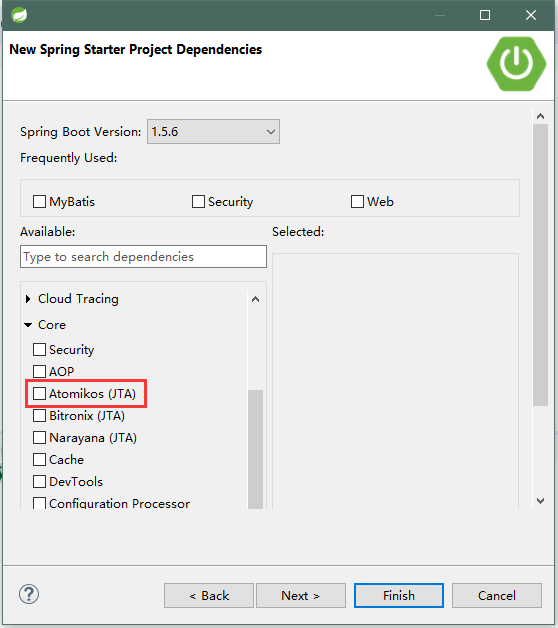
Atomikos网上的资料确实比jotm多,另外我发现STS工具里集成了Atomikos,那spring对Atomikos的支持毋庸置疑肯定会在相当长的时间内会是友好的。
2 开发环境
Springboot 1.0.1 + Atomikos 3.9.3 + JPA (Hibernate 4.3.5) + Mysql 5.1.73 + Mysql Connector 5.1.31 + Junit + Maven
3 代码
这套代码的基础我是从网上下载的,作了些修改,因为它原来用的是H2数据库,我改成了Mysql,另外,其实spring官网的例子也是这样写的,http://spring.io/blog/2011/08/15/configuring-spring-and-jta-without-full-java-ee/
3.1 数据库sql
 DROP DATABASE IF EXISTS `datasource1`;

 CREATE DATABASE `datasource1` DEFAULT CHARACTER SET utf8 COLLATE utf8_general_ci;

 use datasource1;

 DROP TABLE IF EXISTS `orders`;

 CREATE TABLE `orders` (

   `id` int(11) NOT NULL AUTO_INCREMENT,

   `code` int(11) DEFAULT NULL,

   `quantity` int(11) DEFAULT NULL,

   PRIMARY KEY (`id`)

 ) ENGINE=MyISAM DEFAULT CHARSET=utf8;

 DROP DATABASE IF EXISTS `datasource2`;

 CREATE DATABASE `datasource2` DEFAULT CHARACTER SET utf8 COLLATE utf8_general_ci;

 use datasource2;

 DROP TABLE IF EXISTS `customer`;

 CREATE TABLE `customer` (

   `id` int(11) NOT NULL AUTO_INCREMENT,

   `name` varchar(45) DEFAULT NULL,

   `age` int(11) DEFAULT NULL,

   PRIMARY KEY (`id`)

 ) ENGINE=MyISAM AUTO_INCREMENT=2 DEFAULT CHARSET=utf8;
3.2 部分重要代码
pom.xml
 <dependencies>

         <dependency>

             <groupId>org.springframework.boot</groupId>

             <artifactId>spring-boot-starter-data-jpa</artifactId>

         </dependency>

         <!-- <dependency>

             <groupId>com.h2database</groupId>

             <artifactId>h2</artifactId>

         </dependency> -->

         <dependency>

             <groupId>org.projectlombok</groupId>

             <artifactId>lombok</artifactId>

             <version>1.12.4</version>

         </dependency>

         <dependency>

             <groupId>com.atomikos</groupId>

             <artifactId>transactions</artifactId>

             <version>3.9.3</version>

         </dependency>

         <dependency>

             <groupId>com.atomikos</groupId>

             <artifactId>transactions-jta</artifactId>

             <version>3.9.3</version>

         </dependency>

         <dependency>

             <groupId>com.atomikos</groupId>

             <artifactId>transactions-hibernate3</artifactId>

             <version>3.9.3</version>

             <exclusions>

                 <exclusion>

                     <artifactId>hibernate</artifactId>

                     <groupId>org.hibernate</groupId>

                 </exclusion>

             </exclusions>

         </dependency>

         <dependency>

             <groupId>org.springframework.boot</groupId>

             <artifactId>spring-boot-starter-test</artifactId>

         </dependency>

         <dependency>

             <groupId>junit</groupId>

             <artifactId>junit</artifactId>

             <scope>test</scope>

         </dependency>

         <!-- https://mvnrepository.com/artifact/mysql/mysql-connector-java -->

         <dependency>

             <groupId>mysql</groupId>

             <artifactId>mysql-connector-java</artifactId>

             <version>5.1.31</version>

         </dependency>

     </dependencies>
application.properties
 spring.main.show_banner=false

 order.datasource.url=jdbc:mysql://192.168.0.12:3306/datasource1?serverTimezone=UTC

 order.datasource.user=root

 order.datasource.password=123456

 #jdbc:h2:order

 customer.datasource.url=jdbc:mysql://127.0.0.1:3312/datasource2?serverTimezone=UTC

 customer.datasource.user=root

 customer.datasource.password=123456
 import java.util.HashMap;

 import javax.sql.DataSource;

 import org.springframework.beans.factory.annotation.Autowired;

 import org.springframework.boot.context.properties.EnableConfigurationProperties;

 import org.springframework.context.annotation.Bean;

 import org.springframework.context.annotation.Configuration;

 import org.springframework.context.annotation.DependsOn;

 import org.springframework.data.jpa.repository.config.EnableJpaRepositories;

 import org.springframework.orm.jpa.JpaVendorAdapter;

 import org.springframework.orm.jpa.LocalContainerEntityManagerFactoryBean;

 import com.at.mul.repository.customer.CustomerDatasourceProperties;

 import com.atomikos.jdbc.AtomikosDataSourceBean;

 import com.mysql.jdbc.jdbc2.optional.MysqlXADataSource;

 @Configuration

 @DependsOn("transactionManager")

 @EnableJpaRepositories(basePackages = "com.at.mul.repository.customer", entityManagerFactoryRef = "customerEntityManager", transactionManagerRef = "transactionManager")

 @EnableConfigurationProperties(CustomerDatasourceProperties.class)

 public class CustomerConfig {

     @Autowired

     private JpaVendorAdapter jpaVendorAdapter;

     @Autowired

     private CustomerDatasourceProperties customerDatasourceProperties;

     @Bean(name = "customerDataSource", initMethod = "init", destroyMethod = "close")

     public DataSource customerDataSource() {

         MysqlXADataSource mysqlXaDataSource = new MysqlXADataSource();

         mysqlXaDataSource.setURL(customerDatasourceProperties.getUrl());

         mysqlXaDataSource.setUser(customerDatasourceProperties.getUser());

         mysqlXaDataSource.setPassword(customerDatasourceProperties.getPassword());

         mysqlXaDataSource.setPinGlobalTxToPhysicalConnection(true);

         AtomikosDataSourceBean xaDataSource = new AtomikosDataSourceBean();

         xaDataSource.setXaDataSource(mysqlXaDataSource);

         xaDataSource.setUniqueResourceName("datasource2");

 //        xaDataSource.setXaDataSourceClassName("com.mysql.jdbc.jdbc2.optional.MysqlXADataSource");

         return xaDataSource;

     }

     @Bean(name = "customerEntityManager")

     @DependsOn("transactionManager")

     public LocalContainerEntityManagerFactoryBean customerEntityManager() throws Throwable {

         HashMap<String, Object> properties = new HashMap<String, Object>();

         properties.put("hibernate.transaction.jta.platform", AtomikosJtaPlatform.class.getName());

         properties.put("javax.persistence.transactionType", "JTA");

         LocalContainerEntityManagerFactoryBean entityManager = new LocalContainerEntityManagerFactoryBean();

         entityManager.setJtaDataSource(customerDataSource());

         entityManager.setJpaVendorAdapter(jpaVendorAdapter);

         entityManager.setPackagesToScan("com.at.mul.domain.customer");

         entityManager.setPersistenceUnitName("customerPersistenceUnit");

         entityManager.setJpaPropertyMap(properties);

         return entityManager;

     }

 }
 @Configuration

 @DependsOn("transactionManager")

 @EnableJpaRepositories(basePackages = "com.at.mul.repository.order", entityManagerFactoryRef = "orderEntityManager", transactionManagerRef = "transactionManager")

 @EnableConfigurationProperties(OrderDatasourceProperties.class)

 public class OrderConfig {

     @Autowired

     private JpaVendorAdapter jpaVendorAdapter;

     @Autowired

     private OrderDatasourceProperties orderDatasourceProperties;

     @Bean(name = "orderDataSource", initMethod = "init", destroyMethod = "close")

     public DataSource orderDataSource() {

         MysqlXADataSource mysqlXaDataSource = new MysqlXADataSource();

         mysqlXaDataSource.setURL(orderDatasourceProperties.getUrl());

         mysqlXaDataSource.setUser(orderDatasourceProperties.getUser());

         mysqlXaDataSource.setPassword(orderDatasourceProperties.getPassword());

 //        mysqlXaDataSource.setAllowMultiQueries(true);

 //        mysqlXaDataSource.setLogXaCommands(true);

         mysqlXaDataSource.setPinGlobalTxToPhysicalConnection(true);

         AtomikosDataSourceBean xaDataSource = new AtomikosDataSourceBean();

         xaDataSource.setXaDataSource(mysqlXaDataSource);

         xaDataSource.setUniqueResourceName("datasource1");

 //        xaDataSource.setXaDataSourceClassName("com.mysql.jdbc.jdbc2.optional.MysqlXADataSource");

         return xaDataSource;

     }

     @Bean(name = "orderEntityManager")

     public LocalContainerEntityManagerFactoryBean orderEntityManager() throws Throwable {

         HashMap<String, Object> properties = new HashMap<String, Object>();

         properties.put("hibernate.transaction.jta.platform", AtomikosJtaPlatform.class.getName());

         properties.put("javax.persistence.transactionType", "JTA");

         LocalContainerEntityManagerFactoryBean entityManager = new LocalContainerEntityManagerFactoryBean();

         entityManager.setJtaDataSource(orderDataSource());

         entityManager.setJpaVendorAdapter(jpaVendorAdapter);

         entityManager.setPackagesToScan("com.at.mul.domain.order");

         entityManager.setPersistenceUnitName("orderPersistenceUnit");

         entityManager.setJpaPropertyMap(properties);

         return entityManager;

     }

 }
 import com.at.mul.domain.customer.Customer;

 import com.at.mul.domain.order.Order;

 import com.at.mul.exception.NoRollbackException;

 import com.at.mul.exception.StoreException;

 public interface StoreService {

     void store(Customer customer, Order order) throws Exception;

     void storeWithStoreException(Customer customer, Order order) throws StoreException;

     void storeWithNoRollbackException(Customer customer, Order order) throws NoRollbackException;

 }
 import org.springframework.beans.factory.annotation.Autowired;

 import org.springframework.stereotype.Service;

 import org.springframework.transaction.annotation.Transactional;

 import com.at.mul.domain.customer.Customer;

 import com.at.mul.domain.order.Order;

 import com.at.mul.exception.NoRollbackException;

 import com.at.mul.exception.StoreException;

 import com.at.mul.repository.customer.CustomerRepository;

 import com.at.mul.repository.order.OrderRepository;

 @Service

 public class StoreServiceImpl implements StoreService {

     @Autowired

     private CustomerRepository customerRepository;

     @Autowired

     private OrderRepository orderRepository;

     @Transactional

     public void store(Customer customer, Order order) {

         customerRepository.save(customer);

         orderRepository.save(order);

     }

     @Transactional(rollbackFor = StoreException.class)

     public void storeWithStoreException(Customer customer, Order order) throws StoreException {

         customerRepository.save(customer);

         orderRepository.save(order);

         throw new StoreException();

     }

     @Transactional(noRollbackFor = NoRollbackException.class, rollbackFor = StoreException.class)

     public void storeWithNoRollbackException(Customer customer, Order order) throws NoRollbackException {

         customerRepository.save(customer);

         orderRepository.save(order);

         throw new NoRollbackException();

     }

 }
完整代码下载:http://download.csdn.net/download/u013081610/9927514
4 遇到的坑
4.1 bug: The server time zone value '�й���ʱ��' is unrecognized or represents more than one time zone.
http://blog.csdn.net/sunlggggg/article/details/54564114
4.2 com.mysql.jdbc.jdbc2.optional.MysqlXAException: XAER_INVAL: Invalid arguments (or unsupported command)
WARNING: XA resource 'jdbc/mysqlDs': resume for XID '3139322E3136382E31342E3131372E746D30303030323030303831:3139322E3136382E31342E3131372E746D32' raised -5: invalid arguments were given for the XA operation
这个错误是我运行StoreServiceTest里的testStore()方法时出现的,就是把数据分别插入两个库的表里,之前用H2的时候都很正常,但是换成Mysql就是不行,操作第二个库的时候就报这个错,第一个不会报错。
猜测可能是以下原因吧
a.这可能是MySQL服务器对XA支持的限制,也就是可能是MySQL的一个bug,可以看Mysql官方文档的解释https://dev.mysql.com/doc/refman/5.5/en/xa-statements.html
b.也可能是atomikos里的问题,具体看https://www.atomikos.com/Documentation/KnownProblems#ActiveMQ_error:_34Transaction_39XID:..._39_has_not_been_started_34
找到下面的段落
MySQL XA bug

Some users have reported problems with MySQL XA (related to this MySQL bug: http://bugs.mysql.com/bug.php?id=27832external). This problem only happens if you access the same MySQL database more than once in the same transaction. A workaround can be setting the following property in jta.properties:

com.atomikos.icatch.serial_jta_transactions=false

Also, make sure to set the following property on the MySQL datasource:

pinGlobalTxToPhysicalConnection="true"

MariaDB's java driver also supports this workaround since v.1.1.8
看来atomikos已经针对mysql的这个bug作了处理了,根据提示我加了mysqlXaDataSource.setPinGlobalTxToPhysicalConnection(true)就可以了。
4.3 貌似对mysql的InnoDB引擎没用
具体什么原因我还没研究,暂时测试只是使用的MyISAM
Springboot+Atomikos+Jpa+Mysql实现JTA分布式事务的更多相关文章
- Springboot + Atomikos + Druid + Mysql 实现JTA分布式事务
DataSource 配置 package com.cheng.dynamic.config; import java.util.Properties; import javax.sql.DataSo ...
- spring+jotm+ibatis+mysql实现JTA分布式事务
1 环境 1.1 软件环境 spring-framework-2.5.6.SEC01-with-dependencies.zip ibatis-2.3.4 ow2-jotm-dist-2.1.4-b ...
- SpringBoot 使用JPA+MySQL+Thymeleaf 总结 二
SpringBoot 使用JPA+MySQL+Thymeleaf 总结 一 SpringBoot 使用JPA+MySQL+Thymeleaf 总结 二 方法一 使用原生sql查询 或者 为方法名增加 ...
- SpringBoot 使用JPA+MySQL+Thymeleaf 总结 一
SpringBoot 使用JPA+MySQL+Thymeleaf 总结 一 SpringBoot 使用JPA+MySQL+Thymeleaf 总结 二 pom引用 <?xml version=& ...
- springboot学习笔记:10.springboot+atomikos+mysql+mybatis+druid+分布式事务
前言 上一篇文章我们整合了springboot+druid+mybatis+mysql+多数据源: 本篇文章大家主要跟随你们涛兄在上一届基础上配置一下多数据源情况下的分布式事务: 首先,到底啥是分布式 ...
- 使用Atomikos Transactions Essentials实现多数据源JTA分布式事务--转载
原文:http://www.ite/topic/122700 9.17 update:使用NonXADataSourceBean. Mysql在5.0版本和Connecter/J5.0版本后提供了XA ...
- Spring 3.0 + Atomikos构建jta分布式事务
Spring3.0已经不再支持jtom了,不过我们可以用第三方开源软件atomikos(http://www.atomikos.com/)来实现.Atomikos是目前在分布式事务管理中做得相当不错的 ...
- atomikos实现多数据源支持分布式事务管理(spring、tomcat、JTA)
原文链接:http://iteye.blog.163.com/blog/static/1863080962012102945116222/ Atomikos TransactionsEssenti ...
- JTA 分布式事务
什么是JTA - 2009-07-25 18:31:06| 分类: 技术文章|举报|字号 订阅 什么是JTA? Java Transaction API(Java事务API) (JTA)Ja ...
随机推荐
- 我也来写DBUtils
关于重复造轮子 作为一个程序员,我们不止一次听到师长前辈们说:不要重复造轮子,已经有现成的了,直接用就是了. 对于这个观点,我觉得得仔细分析分析. 如果我们正在做一个真实的项目,经理天天追在我们屁股后 ...
- Linux 内核配置机制(make menuconfig、Kconfig、makefile)讲解
前面我们介绍模块编程的时候介绍了驱动进入内核有两种方式:模块和直接编译进内核,并介绍了模块的一种编译方式--在一个独立的文件夹通过makefile配合内核源码路径完成 那么如何将驱动直接编译进内核呢? ...
- Erlang Rebar 使用指南之四:依赖管理
Erlang Rebar 使用指南之四:依赖管理 全文目录: https://github.com/rebar/rebar/wiki 本章链接: https://github.com/rebar/re ...
- Linux的常用命令(2) - 关机
关机命令 shutdown‑h now 立即进行关机 shutdown‑r now 现在重新启动计算机 -t sec : -t后面加秒数,即"过几秒后关机" -k : 不 ...
- ReentrantReadWriteLock读写锁的使用2
本文可作为传智播客<张孝祥-Java多线程与并发库高级应用>的学习笔记. 这一节我们做一个缓存系统. 在读本节前 请先阅读 ReentrantReadWriteLock读写锁的使用1 第一 ...
- iOS监听模式系列之NSNotificationCenter的简单使用
NSNotificationCenter 对于这个没必要多说,就是一个消息通知机制,类似广播.观察者只需要向消息中心注册感兴趣的东西,当有地方发出这个消息的时候,通知中心会发送给注册这个消息的对象.这 ...
- CImage 对话框初始化时候显示透明 PNG
使用CImage的时候,发现显示出来的并不是透明背景的图片,而是白色背景的图片. 后发现原因如下: PNG图片的透明背景总是一片白色,后来才发现这其实是微软GDI+的设计问题,PNG图片是ARGB,使 ...
- Angular v6 正式发布
Angular 6 正式发布 Angular 6 已经正式发布了!这个主要版本并不关注于底层的框架,更多地关注于工具链,以及使 Angular 在未来更容易快速推进. 作为发布的一部分,我们同步了主要 ...
- Memcache 运行情况
Memcache Memcache是danga.com的一个开源项目,它是一个高性能的分布式的内存对象缓存系统,通过在内存里维护一个统一的巨大的Hash表,能够用来存储各种格式的数据. 查看当前的me ...
- Zabbix如何设置脚本告警
设置告警脚本的路径 # vim /etc/zabbix/zabbix_server.confAlertScriptsPath=/usr/lib/zabbix/alertscripts 创建脚本 在这里 ...