
CentsOS7无网情况下安装mysql5.7
1.需求就不用讲了,客户现场,政府环境,银行环境,大多是没网的,所以无网安装是很有必要的
mysql下载路径:https://dev.mysql.com/downloads/mysql/

查看自己Linux系统版本
[root@kylintest ~]# cat /etc/redhat-release

CentOS Linux release 7.3.1611 (Core)
往下拉继续选择

选择对应的下载,mysql-5.7.20-1.el7.x86_64.rpm-bundle.tar
这样几分钟就下载了。
2.准备依赖包:
a.numactl 软件包:
- numactl-2.0.9-6.el7_2.x86_64.rpm
- numactl-devel-2.0.9-6.el7_2.x86_64.rpm
- numactl-libs-2.0.9-6.el7_2.x86_64.rpm
b.其他相关支持:
- perl-Data-Dumper-2.145-3.el7.x86_64.rpm
- libaio-0.3.109-13.el7.x86_64.rpm
下载方式:https://pkgs.org
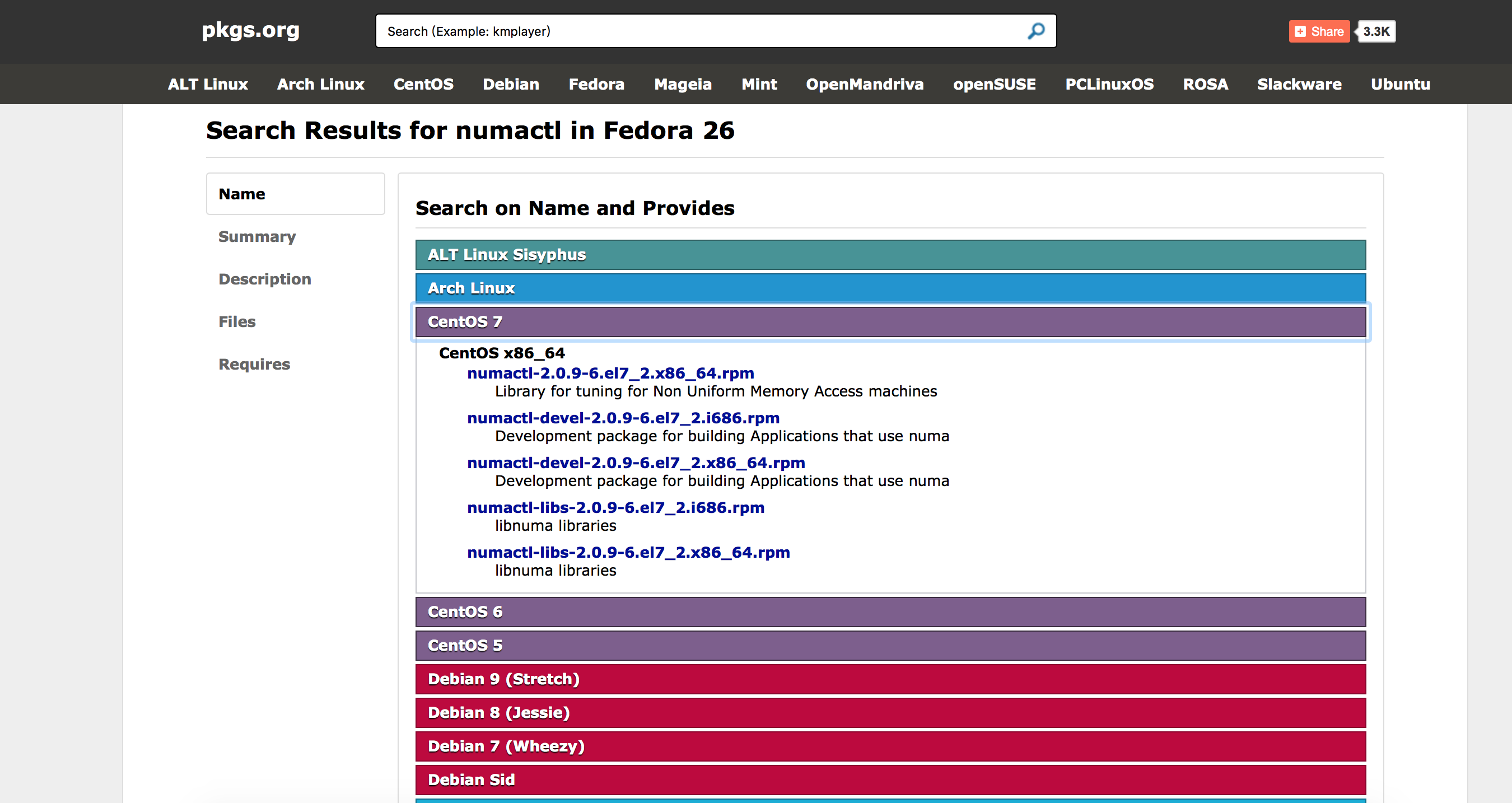
下面是下载路径:
libaio-0.3.109-13.el7.x86_64.rpm
perl-Data-Dumper-2.145-3.el7.x86_64.rpm
numactl-libs-2.0.9-6.el7_2.x86_64.rpm
numactl-devel-2.0.9-6.el7_2.x86_64.rpm
numactl-2.0.9-6.el7_2.x86_64.rpm
3.上传文件到服务器上
localhost:Downloads kylin$ scp -r numactl-2.0.9-6.el7_2.x86_64.rpm root@kylintest:/root/

root@kylintest's password:

numactl-2.0.9-6.el7_2.x86_64.rpm              100%   65KB   2.1MB/s   00:00

localhost:Downloads kylin$ scp -r numactl-libs-2.0.9-6.el7_2.x86_64.rpm root@kylintest:/root/

root@kylintest's password:

numactl-libs-2.0.9-6.el7_2.x86_64.rpm         100%   29KB   1.7MB/s   00:00

localhost:Downloads kylin$ scp -r numactl-devel-2.0.9-6.el7_2.x86_64.rpm root@kylintest:/root/

root@kylintest's password:

numactl-devel-2.0.9-6.el7_2.x86_64.rpm        100%   23KB   1.5MB/s   00:00

localhost:Downloads kylin$ scp -r perl-Data-Dumper-2.145-3.el7.x86_64.rpm root@kylintest:/root/

root@kylintest's password:

perl-Data-Dumper-2.145-3.el7.x86_64.rpm       100%   47KB   1.2MB/s   00:00

localhost:Downloads kylin$ scp -r libaio-0.3.109-13.el7.x86_64.rpm root@kylintest:/root/

root@kylintest's password:

Permission denied, please try again.

root@kylintest's password:

libaio-0.3.109-13.el7.x86_64.rpm              100%   24KB 618.3KB/s   00:00

localhost:Downloads kylin$ scp -r mysql-5.7.20-1.el7.x86_64.rpm-bundle.tar root@kylintest:/root/

root@kylintest's password:

mysql-5.7.20-1.el7.x86_64.rpm-bundle.tar                     100%  566MB   4.5MB/s   02:05
查看上传的包
[root@kylintest ~]# ls

anaconda-ks.cfg                           numactl-devel-2.0.9-6.el7_2.x86_64.rpm

libaio-0.3.109-13.el7.x86_64.rpm          numactl-libs-2.0.9-6.el7_2.x86_64.rpm

miniconda2                                perl-Data-Dumper-2.145-3.el7.x86_64.rpm

mysql-5.7.20-1.el7.x86_64.rpm-bundle.tar  pythonshell

numactl-2.0.9-6.el7_2.x86_64.rpm
4.安装
第一步,先安装依赖,安装 perl-Data-Dumper-2.145-3.el7.x86_64.rpm 和 libaio-0.3.109-13.el7.x86_64.rpm
[root@kylintest ~]# rpm -ivh libaio-0.3.109-13.el7.x86_64.rpm

Preparing...                          ################################# [100%]

	package libaio-0.3.109-13.el7.x86_64 is already installed

[root@kylintest ~]# rpm -ivh perl-Data-Dumper-2.145-3.el7.x86_64.rpm

Preparing...                          ################################# [100%]

Updating / installing...

   1:perl-Data-Dumper-2.145-3.el7     ################################# [100%]
第二步,继续安装 numactl相关
[root@kylintest ~]# rpm -ivh numactl*

Preparing...                          ################################# [100%]

	package numactl-libs-2.0.9-6.el7_2.x86_64 is already installed
如果不安装这个包会报错,错误如下(本人未测试):
error: Failed dependencies:

libnuma.so.1()(64bit) is needed by mysql-community-server-5.7.18-1.el7.x86_64

libnuma.so.1(libnuma_1.1)(64bit) is needed by mysql-community-server-5.7.18-1.el7.x86_64

libnuma.so.1(libnuma_1.2)(64bit) is needed by mysql-community-server-5.7.18-1.el7.x86_64
若此时直接安装mysql,还会异常:
warning: mysql-community-libs-5.7.18-1.el7.x86_64.rpm: Header V3 DSA/SHA1 Signature, key ID 5072e1f5: NOKEY error: Failed dependencies:

 mysql-community-common(x86-64) >= 5.7.9 is needed by mysql-community-libs-5.7.18-1.el7.x86_64

 mariadb-libs is obsoleted by mysql-community-libs-5.7.18-1.el7.x86_64
第一行还能看明白,是依赖问题,第二行的“mariadb-libs 被废弃”是什么鬼?废弃了为什么不提供一个新的还要出现这种弱智提示呢?经过一番搜寻,才发现是因为在CentOS 7上已经有一个mariadb 而这个会与 MySQL的mariadb发生冲突。所以此时我们需要将系统自带的mariadb卸载掉,然后使用mysql自带的mariadb。
接下来查看mariadb版本
[root@kylintest ~]# rpm -qa | grep mariadb

mariadb-libs-5.5.52-1.el7.x86_64
卸载系统安装的mariadb
[root@kylintest ~]# rpm -e --nodeps mariadb-libs-5.5.52-1.el7.x86_64

[root@kylintest ~]# rpm -qa | grep mariadb

[root@kylintest ~]#
解决好这个问题后,就可以安装mysql了,先解压mysql,并查看安装包
[root@kylintest ~]# tar -xf mysql-5.7.20-1.el7.x86_64.rpm-bundle.tar

[root@kylintest ~]# ls

anaconda-ks.cfg

libaio-0.3.109-13.el7.x86_64.rpm

miniconda2

mysql-5.7.20-1.el7.x86_64.rpm-bundle.tar

mysql-community-client-5.7.20-1.el7.x86_64.rpm

mysql-community-common-5.7.20-1.el7.x86_64.rpm

mysql-community-devel-5.7.20-1.el7.x86_64.rpm

mysql-community-embedded-5.7.20-1.el7.x86_64.rpm

mysql-community-embedded-compat-5.7.20-1.el7.x86_64.rpm

mysql-community-embedded-devel-5.7.20-1.el7.x86_64.rpm

mysql-community-libs-5.7.20-1.el7.x86_64.rpm

mysql-community-libs-compat-5.7.20-1.el7.x86_64.rpm

mysql-community-minimal-debuginfo-5.7.20-1.el7.x86_64.rpm

mysql-community-server-5.7.20-1.el7.x86_64.rpm

mysql-community-server-minimal-5.7.20-1.el7.x86_64.rpm

mysql-community-test-5.7.20-1.el7.x86_64.rpm

numactl-2.0.9-6.el7_2.x86_64.rpm

numactl-devel-2.0.9-6.el7_2.x86_64.rpm

numactl-libs-2.0.9-6.el7_2.x86_64.rpm

perl-Data-Dumper-2.145-3.el7.x86_64.rpm

pythonshell
直接安装,报错:
[root@kylintest ~]# rpm -ivh mysql-community-*

warning: mysql-community-client-5.7.20-1.el7.x86_64.rpm: Header V3 DSA/SHA1 Signature, key ID 5072e1f5: NOKEY

error: Failed dependencies:

	net-tools is needed by mysql-community-server-5.7.20-1.el7.x86_64

	perl(JSON) is needed by mysql-community-test-5.7.20-1.el7.x86_64
貌似不能直接全安装,有顺序,继续:
[root@kylintest ~]# rpm -ivh mysql-community-common-5.7.20-1.el7.x86_64.rpm

warning: mysql-community-common-5.7.20-1.el7.x86_64.rpm: Header V3 DSA/SHA1 Signature, key ID 5072e1f5: NOKEY

Preparing...                          ################################# [100%]

Updating / installing...

   1:mysql-community-common-5.7.20-1.e################################# [100%]

[root@kylintest ~]# rpm -ivh mysql-community-libs-*

warning: mysql-community-libs-5.7.20-1.el7.x86_64.rpm: Header V3 DSA/SHA1 Signature, key ID 5072e1f5: NOKEY

Preparing...                          ################################# [100%]

Updating / installing...

   1:mysql-community-libs-5.7.20-1.el7################################# [ 50%]

   2:mysql-community-libs-compat-5.7.2################################# [100%]

[root@kylintest ~]# rpm -ivh mysql-community-devel-5.7.20-1.el7.x86_64.rpm

warning: mysql-community-devel-5.7.20-1.el7.x86_64.rpm: Header V3 DSA/SHA1 Signature, key ID 5072e1f5: NOKEY

Preparing...                          ################################# [100%]

Updating / installing...

   1:mysql-community-devel-5.7.20-1.el################################# [100%]

[root@kylintest ~]#

[root@kylintest ~]# rpm -ivh mysql-community-server-5.7.20-1.el7.x86_64.rpm

warning: mysql-community-server-5.7.20-1.el7.x86_64.rpm: Header V3 DSA/SHA1 Signature, key ID 5072e1f5: NOKEY

error: Failed dependencies:

	mysql-community-client(x86-64) >= 5.7.9 is needed by mysql-community-server-5.7.20-1.el7.x86_64

	net-tools is needed by mysql-community-server-5.7.20-1.el7.x86_64
说缺少net-tools ,下载下来装呗,继续:
net-tools-2.0-0.22.20131004git.el7.x86_64.rpm
[root@kylintest ~]# rpm -ivh net-tools-2.0-0.22.20131004git.el7.x86_64.rpm

Preparing...                          ################################# [100%]

Updating / installing...

   1:net-tools-2.0-0.22.20131004git.el################################# [100%]

[root@kylintest ~]# rpm -ivh mysql-community-server-5.7.20-1.el7.x86_64.rpm

warning: mysql-community-server-5.7.20-1.el7.x86_64.rpm: Header V3 DSA/SHA1 Signature, key ID 5072e1f5: NOKEY

error: Failed dependencies:

	mysql-community-client(x86-64) >= 5.7.9 is needed by mysql-community-server-5.7.20-1.el7.x86_64

[root@kylintest ~]# rpm -ivh mysql-community-c

mysql-community-client-5.7.20-1.el7.x86_64.rpm  mysql-community-common-5.7.20-1.el7.x86_64.rpm

[root@kylintest ~]# rpm -ivh mysql-community-client-5.7.20-1.el7.x86_64.rpm

warning: mysql-community-client-5.7.20-1.el7.x86_64.rpm: Header V3 DSA/SHA1 Signature, key ID 5072e1f5: NOKEY

Preparing...                          ################################# [100%]

Updating / installing...

   1:mysql-community-client-5.7.20-1.e################################# [100%]

[root@kylintest ~]# rpm -ivh mysql-community-server-5.7.20-1.el7.x86_64.rpm

warning: mysql-community-server-5.7.20-1.el7.x86_64.rpm: Header V3 DSA/SHA1 Signature, key ID 5072e1f5: NOKEY

Preparing...                          ################################# [100%]

Updating / installing...

   1:mysql-community-server-5.7.20-1.e################################# [100%]
中间安装server时,又说必须安装client,至此,mysql安装成功,打完收工。
5.启动查看配置
[root@kylintest ~]# service mysqld start

Redirecting to /bin/systemctl start  mysqld.service

[root@kylintest ~]# service mysqld status

Redirecting to /bin/systemctl status  mysqld.service

● mysqld.service - MySQL Server

   Loaded: loaded (/usr/lib/systemd/system/mysqld.service; enabled; vendor preset: disabled)

   Active: active (running) since Sat 2017-11-04 13:56:37 CST; 24s ago

     Docs: man:mysqld(8)

           http://dev.mysql.com/doc/refman/en/using-systemd.html

  Process: 4644 ExecStart=/usr/sbin/mysqld --daemonize --pid-file=/var/run/mysqld/mysqld.pid $MYSQLD_OPTS (code=exited, status=0/SUCCESS)

  Process: 4571 ExecStartPre=/usr/bin/mysqld_pre_systemd (code=exited, status=0/SUCCESS)

 Main PID: 4647 (mysqld)

   CGroup: /system.slice/mysqld.service

           └─4647 /usr/sbin/mysqld --daemonize --pid-file=/var/run/mysqld/mysqld.pid

Nov 04 13:56:07 kylintest systemd[1]: Starting MySQL Server...

Nov 04 13:56:37 kylintest systemd[1]: Started MySQL Server.
至此,无网安装难的历史已经结束,至少的我实验没问题了,好像还缺点是什么,数据库密码是啥?
[root@kylintest ~]# cat /var/log/mysqld.log | grep password

2017-11-04T05:56:08.454323Z 1 [Note] A temporary password is generated for root@localhost: ps1DY?%T.Vc4
这样就可以登录数据库了,try一下:
[root@kylintest ~]# mysql -u root

ERROR 1045 (28000): Access denied for user 'root'@'localhost' (using password: NO)
报错了,连输入密码的机会也没有。
[root@kylintest ~]# mysql -uroot -p

Enter password:

Welcome to the MySQL monitor.  Commands end with ; or \g.

Your MySQL connection id is 6

Server version: 5.7.20

Copyright (c) 2000, 2017, Oracle and/or its affiliates. All rights reserved.

Oracle is a registered trademark of Oracle Corporation and/or its

affiliates. Other names may be trademarks of their respective

owners.

Type 'help;' or '\h' for help. Type '\c' to clear the current input statement.

mysql>
登陆成功试试,数据库好使不
mysql> show databases;

ERROR 1820 (HY000): You must reset your password using ALTER USER statement before executing this statement.
不改密码,用不了,继续:
mysql> ALTER USER 'root'@'localhost' IDENTIFIED BY '你的密码';

Query OK, 0 rows affected (0.02 sec)

mysql> FLUSH PRIVILEGES;

Query OK, 0 rows affected (0.01 sec)
然后再使用SQL就没问题了
mysql> show databases;

+--------------------+

| Database           |

+--------------------+

| information_schema |

| mysql              |

| performance_schema |

| sys                |

+--------------------+

4 rows in set (0.00 sec)
用数据库工具链接,出现问题:

不允许远程访问,改继续:
mysql>  GRANT ALL PRIVILEGES ON *.* TO 'root'@'%' IDENTIFIED BY '你的密码' WITH GRANT OPTION;

Query OK, 0 rows affected, 1 warning (0.00 sec)

mysql> FLUSH PRIVILEGES;

Query OK, 0 rows affected (0.00 sec)
再试就没有问题了,至此数据库安装问题基本没有。
查看mysql配置文件地址:
[root@kylintest ~]# find / -iname '*.cnf' -print

/etc/pki/tls/openssl.cnf

/etc/my.cnf

/root/miniconda2/pkgs/openssl-1.0.2l-0/ssl/openssl.cnf

/root/miniconda2/ssl/openssl.cnf

/var/lib/mysql/auto.cnf
查看字符集:
mysql> show variables like 'char%';

+--------------------------+----------------------------+

| Variable_name            | Value                      |

+--------------------------+----------------------------+

| character_set_client     | utf8                       |

| character_set_connection | utf8                       |

| character_set_database   | latin1                     |

| character_set_filesystem | binary                     |

| character_set_results    | utf8                       |

| character_set_server     | latin1                     |

| character_set_system     | utf8                       |

| character_sets_dir       | /usr/share/mysql/charsets/ |

+--------------------------+----------------------------+

8 rows in set (0.01 sec)
至此数据库安装完毕。
CentsOS7无网情况下安装mysql5.7的更多相关文章
- Python离线断网情况下安装numpy、pandas和matplotlib等常用第三方包
联网情况下在命令终端CMD中输入“pip install numpy”即可自动安装,pandas和matplotlib同理一样方法进行自动安装. 工作的电脑不能上外网,所以不能通过直接输入pip命令来 ...
- linux 无外网情况下安装 mysql
由于工作需要,需要在一台装有 CentOS 系统的测试服务器上安装 MySQL ,由于该服务器上存有其他比较重要的测试数据,所以不能连接外网.由于之前安装 MySQL 一直都是使用 yum 命令一键搞 ...
- Kali Linux ——在无网络情况下安装无线网卡驱动
1.背景: 今日刚刚开始学习kali linux,众所周知,安装完成后,系统是没有无线网卡驱动的,这就对学生党造成相当的困扰:校园网要连接有线是需要认证客户端的,而认证客户端只有windows端,如此 ...
- 无网情况下linux安装django
创建虚拟环境~/project/hanqin/django> virtualenv monitor2~/project/hanqin/django/monitor2> cd bin~/pr ...
- centos7服务器无GUI情况下安装使用Xvfb、selenium、chrome和selenium-server
最近需要用到selenium浏览器抓取,在windows下对照chrome浏览器开发的代码,在linux服务器上换成phantomjs驱动后,却不能运行了,通过截图发现phantomjs渲染效果和ch ...
- linux无网络情况下安装rpm包
首先理清楚两个东西:rpm和yum.rpm全称redhat package manager,用来管理软件包:yum全称yellow dog updater,modified,它是rpm的前端程序,因为 ...
- 【Docker】CentOS7 上无网络情况下安装
自建虚拟机,但是连接不上网络,只能通过下载rpm包进行安装docker 环境:CentOS 7.3.1611 x64 rpm镜像下载地址用的阿里的https://mirrors.aliyun.com/ ...
- 【无网条件下】Linux系统、jdk、redis及集群、rabbitmq、nginx、weblogic和oracle安装及配置
本篇文章为原创,仅供参考使用,如果需要文章中提到的所有软件安装包和依赖包(即data),请以博客园邮箱联系获取链接. 准备资料 软件 主要软件包版本 路径 系统镜像 CentOS-6.10-x86_6 ...
- Linux下安装mysql5.6.11(找点有用的信息太费劲)(转)
Linux下安装mysql5.6.11(找点有用的信息太费劲) (2013-04-25 10:25:09) 1.申请阿里云Linux服务器 昨天在阿里云申请了一个免费试用5天的Linux云服务 ...
随机推荐
- 前端学习:html基础学习五
9.HTML表单设计(主要内容<form><input><select>标记) 表单标记 <form>...</form> <form ...
- rjs 合并压缩完 js 后 js 不压缩的问题
线下用 requirejs 开发完后,代码上线前要用 rjs 将多个有依赖关系的 js 文件压成一个,然后某天居然发现压成一个的 js 文件,没有压缩!!!几万行的 js!!! 很显然,是 uglif ...
- JAVA入门 面向对象
主要内容 1.类和对象的概念 2.什么是面向对象 3.什么对象的属性方法 4.何谓对象引用 5.实例化 类和对象的概念 万物皆对象,客观存在的事物皆为对象.我们大到名胜古迹,小道生活中的一件物品,例如 ...
- 爬虫、请求库selenium
阅读目录 一 介绍 二 安装 三 基本使用 四 选择器 五 等待元素被加载 六 元素交互操作 七 其他 八 项目练习 一 介绍 selenium最初是一个自动化测试工具,而爬虫中使用它主要是为了解决r ...
- 【经验分享】Hydra(爆破神器)使用方法
这个也是backtrack下面很受欢迎的一个工具 参数详解:-R 根据上一次进度继续破解-S 使用SSL协议连接-s 指定端口-l 指定用户名-L 指定用户名字典(文件)-p 指定密码破解-P 指定密 ...
- PE 001~010
题意: 001(Multiples of 3 and 5):对小于1000的被3或5整除的数字求和. 002(Even Fibonacci numbers):斐波那契数列中小于等于4 000 000的 ...
- JAVA多线程之CountDownLatch
前序: 上周测试给开发的同事所开发的模块提出了一个bug,并且还是偶现. 经过仔细查看代码,发现是在业务中启用了多线程,2个线程同时跑,但是新启动的2个线程必须保证一个完成之后另一个再继续运行,才能消 ...
- POI Sax 事件驱动解析Excel2007文件
Excel2007版本的代码如下,本文主要是用于POI解析大文件Excel容易出现内存溢出的现象而提出解决方案,故此解决了大数据量的Excel文件解析的难度,在此拿出来贡献给大家,谢谢! 里面用到的相 ...
- Eclipse集成Tomcat的步骤,我已测试N次都是成功的
本文转自:https://www.cnblogs.com/weixing/p/3229983.html#undefined 使用Eclipse开发B/S结构Web应用时,必须使用Web应用服务器,常见 ...
- cesium编程入门(一)cesium简介
cesium编程入门 cesium是什么 Cesium 是一个跨平台.跨浏览器的展示三维地球和地图的 javascript 库. Cesium 使用WebGL 来进行硬件加速图形,使用时不需要任何插件 ...