
无网情况下linux安装django
创建虚拟环境
~/project/hanqin/django> virtualenv monitor2
~/project/hanqin/django/monitor2> cd bin
~/project/hanqin/django/monitor2/bin> source activate

上传Django-1.11.11到以下文件夹
~/project/hanqin/django/monitor2/tmp
~/project/hanqin/django/monitor2/tmp> cd Django-1.11.11/
~/project/hanqin/django/monitor2/tmp/Django-1.11.11> python3 setup.py install

安装时候最后面因为没网报错,
Processing dependencies for Django==1.11.11
Searching for pytz
Reading https://pypi.python.org/simple/pytz/
Download error on https://pypi.python.org/simple/pytz/: unknown url type: https -- Some packages may not be found!
Couldn't find index page for 'pytz' (maybe misspelled?)
Scanning index of all packages (this may take a while)
Reading https://pypi.python.org/simple/
Download error on https://pypi.python.org/simple/: unknown url type: https -- Some packages may not be found!
No local packages or working download links found for pytz
error: Could not find suitable distribution for Requirement.parse('pytz')
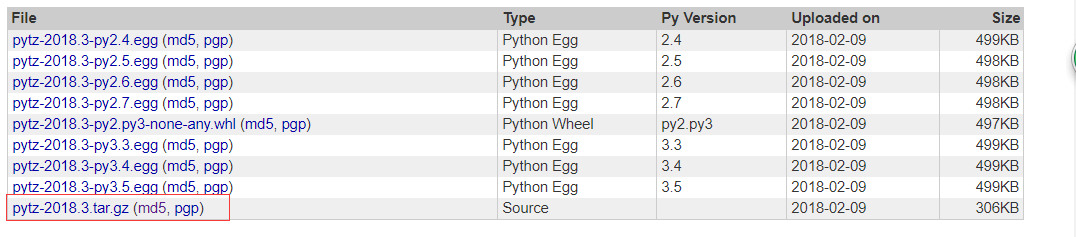
去官网下载对应版本的tz,tz是timezone时区的意思,我用的python3.6下的是标红版本
https://pypi.python.org/pypi/pytz/#downloads
~/project/hanqin/django/monitor2/tmp> tar -zxvf pytz-2018.3.tar.gz
~/project/hanqin/django/monitor2/tmp> cd pytz-2018.3/
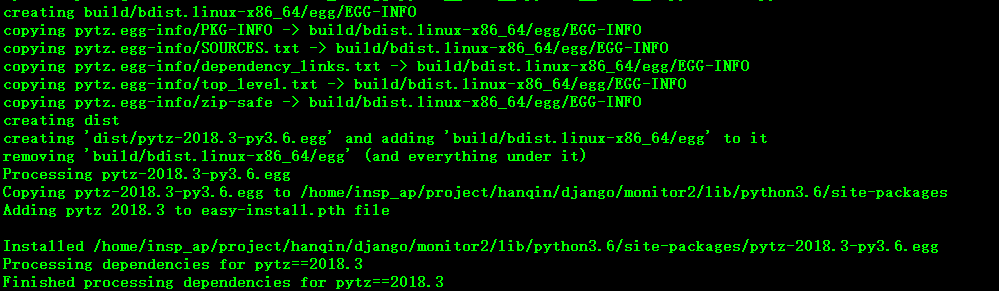
~/project/hanqin/django/monitor2/tmp/pytz-2018.3> python3 setup.py install
~/project/hanqin/django/monitor2/tmp/pytz-2018.3> cd /home/insp_ap/project/hanqin/django/monitor2/lib/python3.6/site-packages/
~/project/hanqin/django/monitor2/lib/python3.6/site-packages> ls -lrt
total 511
drwxr-xr-x 2 insp_ap users 344 Apr 7 10:42 setuptools-28.8.0.dist-info
drwxr-xr-x 5 insp_ap users 1032 Apr 7 10:42 setuptools
drwxr-xr-x 5 insp_ap users 160 Apr 7 10:42 pkg_resources
-rw-r--r-- 1 insp_ap users 126 Apr 7 10:42 easy_install.py
drwxr-xr-x 2 insp_ap users 96 Apr 7 10:42 __pycache__
drwxr-xr-x 2 insp_ap users 312 Apr 7 10:42 wheel-0.29.0.dist-info
drwxr-xr-x 6 insp_ap users 592 Apr 7 10:42 wheel
drwxr-xr-x 2 insp_ap users 280 Apr 7 10:42 pip-9.0.1.dist-info
drwxr-xr-x 11 insp_ap users 648 Apr 7 10:42 pip
drwxr-xr-x 4 insp_ap users 96 Apr 7 10:50 Django-1.11.11-py3.6.egg
-rw-r--r-- 1 insp_ap users 510240 Apr 7 10:56 pytz-2018.3-py3.6.egg
-rw-r--r-- 1 insp_ap users 51 Apr 7 10:56 easy-install.pth
(monitor2) insp_ap@inspect01:~/project/hanqin/django/monitor2/lib/python3.6/site-packages>
~/project/hanqin/django/monitor2/lib/python3.6/site-packages> cat easy-install.pth
./Django-1.11.11-py3.6.egg
./pytz-2018.3-py3.6.egg
由于用的是Oracle数据库,继续安装cx_Oracle,确保环境变量.bash_profile下已经有如下ORACLE配置
export ORACLE_SID=inspdb

export ORACLE_HOME=/oracle/app/oracle/product/11.2.0/db_1

export ORACLE_HOME=/oracle/app/oracle/product/11.2.0/db_1

export PATH=$PATH:$HOME/bin:$ORACLE_HOME/bin:$ORACLE_HOME/OPatch:$JAVA_HOME/bin

insp_ap@inspect01:~/project/hanqin/django/monitor2/tmp> pwd
/home/insp_ap/project/hanqin/django/monitor2/tmp
insp_ap@inspect01:~/project/hanqin/django/monitor2/tmp> ls cx_Oracle-6.0.3.tar.gz
cx_Oracle-6.0.3.tar.gz

解压后使用命令  python3 setup.py install
running install

running bdist_egg

running egg_info

writing cx_Oracle.egg-info/PKG-INFO

writing dependency_links to cx_Oracle.egg-info/dependency_links.txt

writing top-level names to cx_Oracle.egg-info/top_level.txt

reading manifest file 'cx_Oracle.egg-info/SOURCES.txt'

reading manifest template 'MANIFEST.in'

no previously-included directories found matching 'odpi/test'

no previously-included directories found matching 'odpi/samples'

writing manifest file 'cx_Oracle.egg-info/SOURCES.txt'

installing library code to build/bdist.linux-x86_64/egg

running install_lib

running build_ext

building 'cx_Oracle' extension

creating build

creating build/temp.linux-x86_64-3.6

creating build/temp.linux-x86_64-3.6/src

gcc -pthread -Wsign-compare -DNDEBUG -g -fwrapv -O3 -Wall -Wstrict-prototypes -fPIC -Iodpi/include -Iodpi/src -I/usr/local/include/python3.6m -c src/cx_Oracle.c -o build/temp.linux-x86_64-3.6/src/cx_Oracle.o -DBUILD_VERSION=6.0.

src/Cursor.c: In function 'Cursor_MultiFetch':

src/Cursor.c:: warning: 'found' may be used uninitialized in this function

creating build/lib.linux-x86_64-3.6

gcc -pthread -shared build/temp.linux-x86_64-3.6/src/cx_Oracle.o -o build/lib.linux-x86_64-3.6/cx_Oracle.cpython-36m-x86_64-linux-gnu.so

creating build/bdist.linux-x86_64

creating build/bdist.linux-x86_64/egg

copying build/lib.linux-x86_64-3.6/cx_Oracle.cpython-36m-x86_64-linux-gnu.so -> build/bdist.linux-x86_64/egg

creating stub loader for cx_Oracle.cpython-36m-x86_64-linux-gnu.so

byte-compiling build/bdist.linux-x86_64/egg/cx_Oracle.py to cx_Oracle.cpython-.pyc

installing package data to build/bdist.linux-x86_64/egg

running install_data

creating build/bdist.linux-x86_64/egg/cx_Oracle-doc

copying LICENSE.txt -> build/bdist.linux-x86_64/egg/cx_Oracle-doc

copying README.txt -> build/bdist.linux-x86_64/egg/cx_Oracle-doc

creating build/bdist.linux-x86_64/egg/EGG-INFO

copying cx_Oracle.egg-info/PKG-INFO -> build/bdist.linux-x86_64/egg/EGG-INFO

copying cx_Oracle.egg-info/SOURCES.txt -> build/bdist.linux-x86_64/egg/EGG-INFO

copying cx_Oracle.egg-info/dependency_links.txt -> build/bdist.linux-x86_64/egg/EGG-INFO

copying cx_Oracle.egg-info/top_level.txt -> build/bdist.linux-x86_64/egg/EGG-INFO

writing build/bdist.linux-x86_64/egg/EGG-INFO/native_libs.txt

zip_safe flag not set; analyzing archive contents...

__pycache__.cx_Oracle.cpython-: module references __file__

creating dist

creating 'dist/cx_Oracle-6.0.3-py3.6-linux-x86_64.egg' and adding 'build/bdist.linux-x86_64/egg' to it

removing 'build/bdist.linux-x86_64/egg' (and everything under it)

Processing cx_Oracle-6.0.-py3.-linux-x86_64.egg

creating /home/insp_ap/project/hanqin/django/monitor2/lib/python3./site-packages/cx_Oracle-6.0.-py3.-linux-x86_64.egg

Extracting cx_Oracle-6.0.-py3.-linux-x86_64.egg to /home/insp_ap/project/hanqin/django/monitor2/lib/python3./site-packages

Adding cx-Oracle 6.0. to easy-install.pth file

Installed /home/insp_ap/project/hanqin/django/monitor2/lib/python3./site-packages/cx_Oracle-6.0.-py3.-linux-x86_64.egg

Processing dependencies for cx-Oracle==6.0.

Finished processing dependencies for cx-Oracle==6.0.
可以看到安装完成并未报错
无网情况下linux安装django的更多相关文章
- 没有外网情况下linux安装mysql
首先linux要使用局域网 环境要求:局域网, windows系统, linux系统, mysql安装包mysql.tar.gz 注意:32位操作系统用32位安装包,64位系统用64位安装包,不 ...
- CentsOS7无网情况下安装mysql5.7
1.需求就不用讲了,客户现场,政府环境,银行环境,大多是没网的,所以无网安装是很有必要的 mysql下载路径:https://dev.mysql.com/downloads/mysql/ 查看自己Li ...
- CentOS 6.5本地yum源、局域网离线yum仓库(断网情况下轻松安装各种依赖包)
在工作中, 公司的服务器大部分都禁止连接外网的,初始化系统,测试某些产品时,往往缺一些软件或依赖包,一个个上传到机器,如此浪费时间,浪费金钱,en...yum能够自动查找并解决rpm包之间的依赖关系, ...
- linux服务器没网情况下手动安装软件几个方法
1,找到一个有网的服务器,使用yumdownloader gcc,获取需要的rmp包: 2,在http://pkgs.org 下下载所需要的rpm包
- 【无网条件下】Linux系统、jdk、redis及集群、rabbitmq、nginx、weblogic和oracle安装及配置
本篇文章为原创,仅供参考使用,如果需要文章中提到的所有软件安装包和依赖包(即data),请以博客园邮箱联系获取链接. 准备资料 软件 主要软件包版本 路径 系统镜像 CentOS-6.10-x86_6 ...
- Python离线断网情况下安装numpy、pandas和matplotlib等常用第三方包
联网情况下在命令终端CMD中输入“pip install numpy”即可自动安装,pandas和matplotlib同理一样方法进行自动安装. 工作的电脑不能上外网,所以不能通过直接输入pip命令来 ...
- KVM虚拟机内无agent情况下的监控方法
KVM虚拟机内无agent情况下的监控(ceilometer实现) 今天看到大家在群里讨论KVM虚拟机的监控问题,而且是要求VM内无agent情况下的监控.这方面确实没有深入研究,但尚有些openst ...
- 自己瞎捣腾的Win7下Linux安装之路-----理论篇
接着上回说道,我把双系统做好啦,开心.... 之后我就在想几个问题: 1.在Ubuntu装好后,重启电脑却还是win7,等我用EasyBCD之后,才可选择使用装好的Ubuntu呢? 2.在用EasyB ...
- 高并发情况下Linux系统及kernel参数优化
众所周知在默认参数情况下Linux对高并发支持并不好,主要受限于单进程最大打开文件数限制.内核TCP参数方面和IO事件分配机制等.下面就从几方面来调整使Linux系统能够支持高并发环境. Iptabl ...
随机推荐
- atnodes命令使用方法
一条命令可以同时执行多台机器,结果会输出列表. atnodes -L 'grep -c "查询订单列表,userId=bing.wang03" /home/w/www/order- ...
- Sklearn (一) 监督学习
本系列博文是根据SKlearn的一个学习小结,并非原创! 1.直接学习TensorFlow有点不知所措,感觉需要一些基础知识做铺垫. 2.之前机器学习都是理论<Ng机器学习基础>+底层 ...
- 使用libvirtAPI打快照原理
参考: https://blog.51cto.com/3646344/2096347 https://blog.51cto.com/3646344/2096351(磁盘外部快照) API接口: htt ...
- 【Python】pip国内安装源和yum恢复
豆瓣安装源 pip install packages -i http://pypi.doubanio.com/simple --upgrade --trusted-host pypi.doubanio ...
- leetcode617
这道题想了很久,并没有掌握思想,写了很多,也没有解决.先贴出思考的过程. class Solution { public: vector<TreeNode> v1; vector<T ...
- Ubuntu输入命令无效的问题
https://blog.csdn.net/u014797226/article/details/80800550?utm_source=blogxgwz2 Ubuntu启动时输入密码后,一直停留在登 ...
- python学习笔记(七)- 递归、python内置函数、random模块
1.函数的不固定参数: #参数不是必填的.没有限制参数的个数.返回参数组的元组 def syz(*args): #参数组,不限制参数个数 #‘args’参数的名字可以随便命名 print(args) ...
- C源文件和头文件 模版
头文件: /********************************************************************************************** ...
- netty(一) netty有哪几部分构成
netty netty是一个支持高并发的非阻塞I/O框架. Channel Channel 是 NIO 基本的结构.它代表了一个用于连接到实体如硬件设备.文件.网络套接字或程序组件,能够执行一个或多个 ...
- HDU 6304 Chiaki Sequence Revisited
题目链接 : http://acm.hdu.edu.cn/showproblem.php?pid=6304 多校contest1 Problem Description Chiaki is int ...