
linux环境中设置jacoco覆盖率
cd /alidata1/admin/za-themis

pkill -9 -f za-themis

#CATALINA_HOME=/root/za-tomcat

#CATALINA_BASE=/root/za-tomcat

export JAVA_OPTS="-server -Xms2g -Xmx2g -XX:NewSize=1g -XX:MaxNewSize=1g

-XX:PermSize=512m -XX:MaxPermSize=512m

-XX:+UseConcMarkSweepGC

-XX:CMSFullGCsBeforeCompaction=5

-XX:+UseCMSCompactAtFullCollection

-XX:+CMSParallelRemarkEnabled

-XX:+CMSPermGenSweepingEnabled

-XX:+CMSClassUnloadingEnabled

-XX:+UseCMSInitiatingOccupancyOnly

-XX:CMSInitiatingOccupancyFraction=70

-XX:+DisableExplicitGC

-XX:+UseCompressedOops

-XX:+DoEscapeAnalysis

-XX:MaxTenuringThreshold=10

-Dhsf.http.enable=true

-Dhsf.server.ip=10.253.104.74

-Dpandora.qos.port=8081

-Dcom.sun.management.jmxremote.ssl=false

-Dcom.sun.management.jmxremote.authenticate=false

-Dcom.sun.management.jmxremote.port=7092

-Djava.rmi.server.hostname=10.253.104.74

-javaagent:./jacoco-0.8.0/lib/jacocoagent.jar=includes=*,output=tcpserver,port=17297,address=10.253.104.74

-Dhsf.server.port=8082 -Dhsf.http.port=8083

-Xdebug -Xnoagent -Djava.compiler=NONE

-Xrunjdwp:transport=dt_socket,server=y,suspend=n,address=8184

-Dproject.name=za-themis

"

./bin/startup.sh

tail ./logs/catalina.out
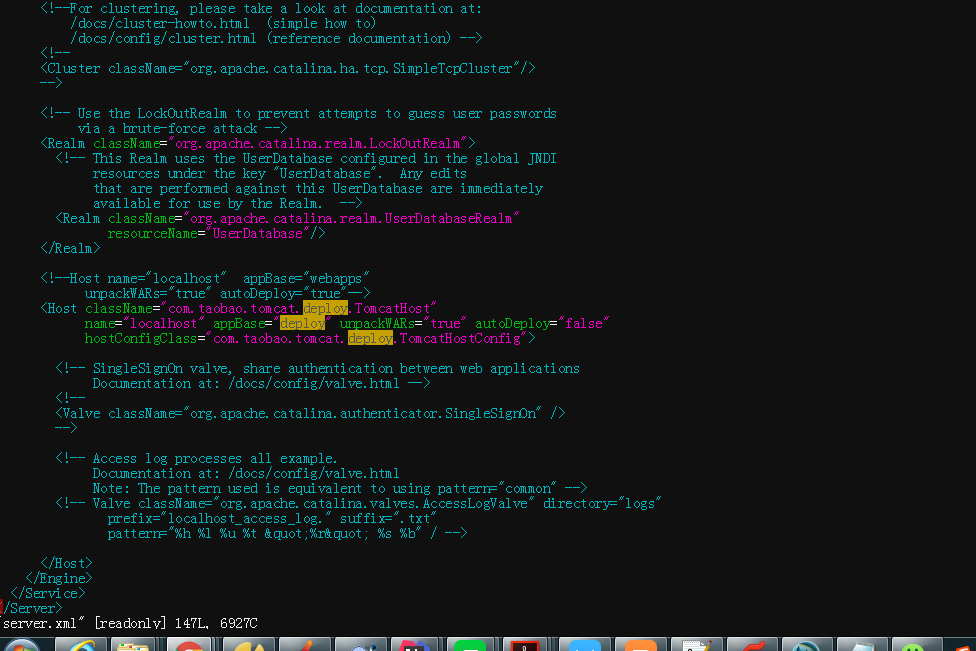
ant build.xml文件:
<?xml version="1.0"?>
-<project default="jacoco" xmlns:jacoco="antlib:org.jacoco.ant" name="PPAUTO">
<!--Jacoco的安装路径-->
<property name="jacocoantPath" value="./jacoco-0.8.0/lib/jacocoant.jar"/>
<!--最终生成.exec文件的路径,Jacoco就是根据这个文件生成最终的报告的-->
<property name="jacocoexecPath" value="./jacoco.exec"/>
<!--生成覆盖率报告的路径-->
<property name="reportfolderPath" value="./report/"/>
<!--远程tomcat服务的ip地址-->
<property name="server_ip" value="10.253.104.74"/>
<!--前面配置的远程tomcat服务打开的端口,要跟上面配置的一样-->
<property name="server_port" value="17297"/>
<!--za-themis.源代码路径-->
<property name="za-themispath" value="/root/.jenkins/workspace/za-qa-jacocoThemis/za-themis/"/>
<property name="za-themisbizpath" value="/root/.jenkins/workspace/za-qa-jacocoThemis/za-themis-biz/"/>
<property name="za-themiscommonpath" value="/root/.jenkins/workspace/za-qa-jacocoThemis/za-themis-common/"/>
<property name="za-themisenginepath" value="/root/.jenkins/workspace/za-qa-jacocoThemis/za-themis-engine/"/>
<property name="za-themisdaopath" value="/root/.jenkins/workspace/za-qa-jacocoThemis/za-themis-dao/"/>
<!--za-themis.class文件路径-->
<property name="za-themisClasspath" value="/root/.jenkins/workspace/za-qa-jacocoThemis/za-themis/target/classes/com/zhongan/themis"/>
<property name="za-themisbizClasspath" value="/root/.jenkins/workspace/za-qa-jacocoThemis/za-themis-biz/target/classes/com/zhongan/themis"/>
<property name="za-themiscommonClasspath" value="/root/.jenkins/workspace/za-qa-jacocoThemis/za-themis-common/target/classes/com/zhongan/themis"/>
<property name="za-themisdaoClasspath" value="/root/.jenkins/workspace/za-qa-jacocoThemis/za-themis-dao/target/classes/com/zhongan/themis"/>
<property name="za-themisengineClasspath" value="/root/.jenkins/workspace/za-qa-jacocoThemis/za-themis-engine/target/classes/com/zhongan/themis"/>
<!--让ant知道去哪儿找Jacoco-->
-<taskdef resource="org/jacoco/ant/antlib.xml" uri="antlib:org.jacoco.ant">
<classpath path="${jacocoantPath}"/>
</taskdef>
<!--dump任务: 根据前面配置的ip地址,和端口号, 访问目标tomcat服务,并生成.exec文件。-->
-<target name="dump">
<jacoco:dump append="true" port="${server_port}" destfile="${jacocoexecPath}" reset="false" address="${server_ip}"/>
</target>
<!--jacoco任务: 根据前面配置的源代码路径和.class文件路径, 根据dump后,生成的.exec文件,生成最终的html覆盖率报告。-->
-<target name="report">
<delete dir="${reportfolderPath}"/>
<mkdir dir="${reportfolderPath}"/>
-<jacoco:report>
-<executiondata>
<file file="${jacocoexecPath}"/>
</executiondata>
-<structure name="JaCoCo Report">
-<group name="za-themis">
-<classfiles>
<fileset dir="${za-themisClasspath}"/>
</classfiles>
-<sourcefiles encoding="utf-8">
<fileset dir="${za-themispath}"/>
</sourcefiles>
</group>
-<group name="za-themis-biz">
-<classfiles>
<fileset dir="${za-themisbizClasspath}"/>
</classfiles>
-<sourcefiles encoding="utf-8">
<fileset dir="${za-themisbizpath}"/>
</sourcefiles>
</group>
-<group name="za-themis-common">
-<classfiles>
<fileset dir="${za-themiscommonClasspath}"/>
</classfiles>
-<sourcefiles encoding="utf-8">
<fileset dir="${za-themiscommonpath}"/>
</sourcefiles>
</group>
-<group name="za-themis-engine">
-<classfiles>
<fileset dir="${za-themisengineClasspath}"/>
</classfiles>
-<sourcefiles encoding="utf-8">
<fileset dir="${za-themisenginepath}"/>
</sourcefiles>
</group>
-<group name="za-themis-dao">
-<classfiles>
<fileset dir="${za-themisdaoClasspath}"/>
</classfiles>
-<sourcefiles encoding="utf-8">
<fileset dir="${za-themisdaopath}"/>
</sourcefiles>
</group>
</structure>
<html encoding="utf-8" destdir="${reportfolderPath}"/>
</jacoco:report>
</target>
</project>
linux环境中设置jacoco覆盖率的更多相关文章
- 教你如何在Kali Linux 环境下设置蜜罐?
导读 Pentbox是一个包含了许多可以使渗透测试工作变得简单流程化的工具的安全套件.它是用Ruby编写并且面向GNU/Linux,同时也支持Windows.MacOS和其它任何安装有Ruby的系统. ...
- linux环境中安装ftp服务
需求说明: 今天项目中有一个新的需求,需要在linux环境中搭建一个ftp服务,在此记录下. 操作过程: 1.通过yum的方式安装ftp服务对应的软件包 [root@testvm01 ~]# yum ...
- linux环境变量设置错误后的恢复方法(转)
原文: http://blog.csdn.net/hoholook/article/details/2793447 linux环境变量设置错误后的恢复方法 中国自学编程网收集整理 发布日期:2008 ...
- 【事件中心 Azure Event Hub】在Linux环境中(Ubuntu)安装Logstash的简易步骤及配置连接到Event Hub
在文章([事件中心 Azure Event Hub]使用Logstash消费EventHub中的event时遇见的几种异常(TimeoutException, ReceiverDisconnected ...
- (3)ElasticSearch在linux环境中安装与配置head插件
1.简介 ElasticSearch-Head跟Kibana一样也是一个针对ElasticSearch集群操作的API的可视化管理工具,它提供了集群管理.数据可视化.增删改查.查询语句等功能,最重要还 ...
- 【Azure 应用服务】NodeJS Express + MSAL 应用实现AAD集成登录并部署在App Service Linux环境中的实现步骤
问题描述 实现部署NodeJS Express应用在App Service Linux环境中,并且使用Microsoft Authentication Library(MSAL)来实现登录Azure ...
- 【Azure 应用服务】PHP应用部署在App Service for Linux环境中,上传文件大于1MB时,遇见了413 Request Entity Too Large 错误的解决方法
问题描述 在PHP项目部署在App Service后,上传文件如果大于1MB就会遇见 413 Request Entity Too Large 的问题. 问题解决 目前这个问题,首先需要分析应用所在的 ...
- 在 SharePoint Server 2016 本地环境中设置 OneDrive for Business
建议补丁 建议在sharepoint2016打上KB3127940补丁,补丁下载地址 https://support.microsoft.com/zh-cn/kb/3127940 当然不打,也可以用O ...
- Linux环境中Openfire安装指南
Linux环境中Openfire安装指南 安装环境: 安装软件:Openfire 4_1_0 http://download.igniterealtime.org/openfire/openfire_ ...
随机推荐
- CF17E Palisection 差分+manacher算法
题目大意: 给定一个串$S$,询问有多少对相交的回文子串 直接做的办法: 我们先考虑求出以$i$为结尾的串的数量,这个很好统计 之后,我们再求出所有包含了点$i$的回文串的数目 这个相当于在$i$的左 ...
- 程序逻辑问题---Writeup
原题地址:http://ctf5.shiyanbar.com/web/5/index.php 打开后是一处登陆界面 右键查看源代码 发现有一处txt文件 很明显就是程序的源代码 可以看到其中一句 $s ...
- 最新OFFICE 0day漏洞分析
漏洞概述 fireeye最近公布了一个OFFICE 0day,在无需用户交互的情况下,打开word文档就可以通过hta脚本执行任意代码.经过研究发现,此漏洞的成因主要是word在处理内嵌OLE2LIN ...
- C++11中的raw string literals
作为一名C++书看得少得可怜的新手,我一直没有勇气去系统地学习一下C++ 11添加的新特性.不过,平日里逛论坛,阅读大犇们的博客,倒是了解了一些.比如,这个帖子: 如何绕过g++ 4.8.1那个不能在 ...
- bzoj 3671 贪心
想到了从小到大依次填,但想到可能有重复元素,那是就会有分支,就不知怎样办了,最后才发现它是用随机数来调整排列,所以没有重复元素,唉..... /**************************** ...
- hdu 4676 Sum Of Gcd 莫队+phi反演
Sum Of Gcd 题目连接: http://acm.hdu.edu.cn/showproblem.php?pid=4676 Description Given you a sequence of ...
- python类型比较的3种方式(转)
通过types模块的类成员来判断,其实所有python中的类型都是这个types模块中类型的实例. import types type(x) is types.IntType # 判断是否int 类型 ...
- delphi win64 DEBUG不能进预设断点的问题
delphi win64 DEBUG不能进预设断点的问题 delphi win64,debug模式下运行,如果含有中文路径,不能进断点,音频跟踪.而同样的代码,DELPHI WIN32却没有这个问题 ...
- Matlab的linprog解决简单线性规划问题
一个简单的线性规划问题,使用Matlab的linprog解决 假定有n种煤,各种煤的配比为x1,x2,x3,……首先需要满足下列两个约束条件,即 x1+x2+x3……+xn=1 x1≥0, x2≥0, ...
- andriod 获得MP4时长
//获得MP4时长 private int getTimeLong(String videoPath) { MediaMetadataRetriever retr = new MediaMetadat ...