
【Azure 应用服务】PHP应用部署在App Service for Linux环境中,上传文件大于1MB时,遇见了413 Request Entity Too Large 错误的解决方法
问题描述
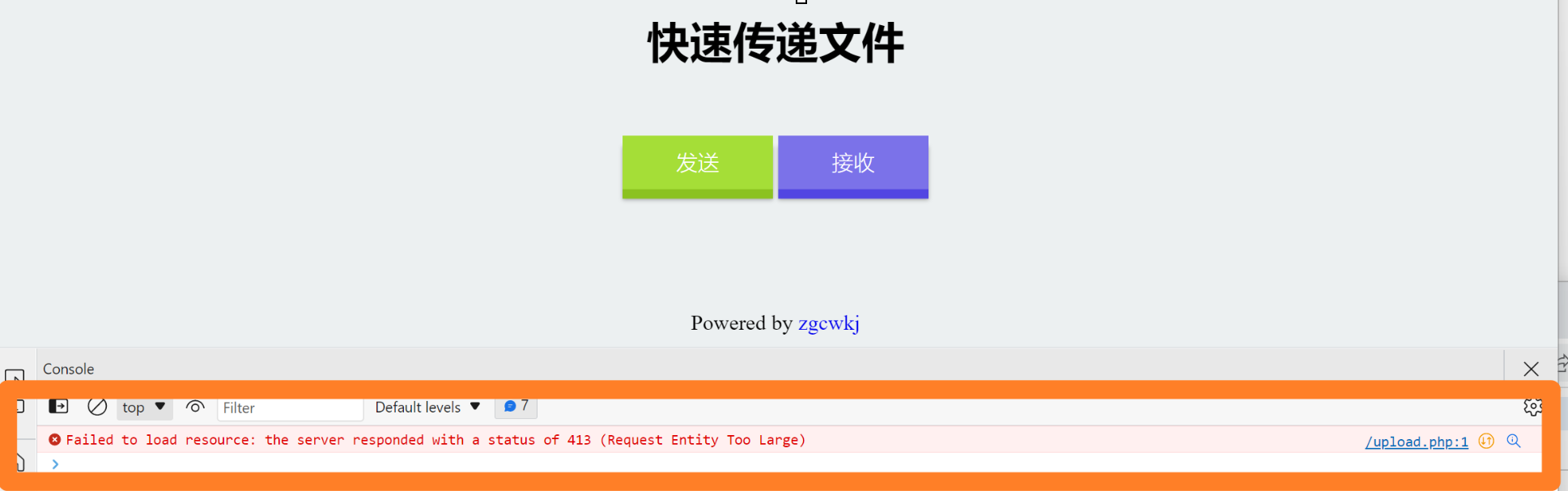
在PHP项目部署在App Service后,上传文件如果大于1MB就会遇见 413 Request Entity Too Large 的问题。
问题解决
目前这个问题,首先需要分析应用所在的环境。 在App Service for Linux环境中,为PHP提供的运行时当前只有PHP 8.0, 并且 PHP 8.0 中使用的Nginx作为代理服务器。然后请求才会传递到PHP应用中。
基于以上分析,在PHP应用中,会收到Nginx 和PHP双重限制。所以传递文件的限制问题设计到两个方面:
一:Nginx 服务器对上传文件大小的限制。(默认限制为 1 MB,需通过 client_max_body_size 参数修改大小)
二:PHP 对上传文件文件大小的限制。(默认限制为 2MB,可以通过 upload_max_filesize 和 post_max_size 修改大小)
所以,本文主要介绍,如何在App Service For Linux环境中,修改Nginx对文件大小的限制和PHP文件大小的限制。
第一部分:修改 Nginx client_max_body_size
第一步:进入App Service SSH 页面,寻找Nginx的default文件,路径为( /etc/nginx/sites-available/default),通过CAT查看默认的内容。
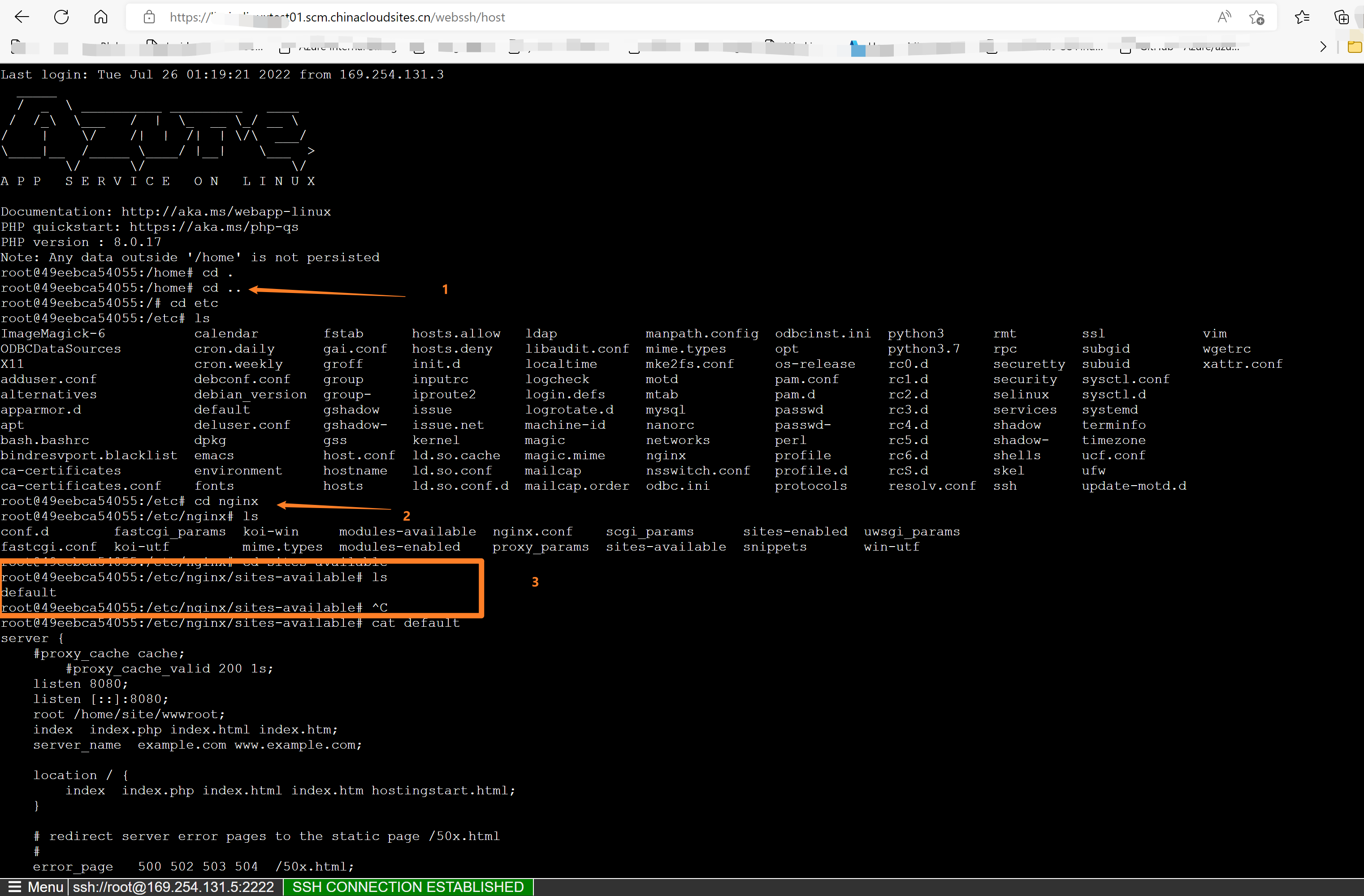
上图中执行的指令有:
cd ..

cd etc/nginx/sites-availabled

ls

cat default
第二步:复制default的内容到本地自己的PHP项目文件中,添加client_max_body_size后,随项目文件一起部署到 /home/site/wwwroot/目录下
(PS: 目录可以自定义修改,但必须注意,如果项目部署的根目录不在wwwroot中,必须同步修改 nginx 的 default配置文件,避免应用报错找不到源文件)
default的默认内容为
server {

    #proxy_cache cache;

        #proxy_cache_valid 200 1s;

    listen 8080;

    listen [::]:8080;

    root /home/site/wwwroot;

    index  index.php index.html index.htm;

    server_name  example.com www.example.com;

    location / {

        index  index.php index.html index.htm hostingstart.html;

    }

    # redirect server error pages to the static page /50x.html

    #

    error_page   500 502 503 504  /50x.html;

    location = /50x.html {

        root   /html/;

    }

    # Disable .git directory

    location ~ /\.git {

        deny all;

        access_log off;

        log_not_found off;

    }

    # Add locations of phpmyadmin here.

    location ~ [^/]\.php(/|$) {

        fastcgi_split_path_info ^(.+?\.php)(|/.*)$;

        fastcgi_pass 127.0.0.1:9000;

        include fastcgi_params;

        fastcgi_param HTTP_PROXY "";

        fastcgi_param SCRIPT_FILENAME $document_root$fastcgi_script_name;

        fastcgi_param PATH_INFO $fastcgi_path_info;

        fastcgi_param QUERY_STRING $query_string;

        fastcgi_intercept_errors on;

        fastcgi_connect_timeout         300;

        fastcgi_send_timeout           3600;

        fastcgi_read_timeout           3600;

        fastcgi_buffer_size 128k;

        fastcgi_buffers 4 256k;

        fastcgi_busy_buffers_size 256k;

        fastcgi_temp_file_write_size 256k;

    }

}
需要在其中添加 client_max_body_size , 比如这里设置为10m (不要写成 10MB,并且结尾要带上分号 ;)
server {

    #proxy_cache cache;

    #proxy_cache_valid 200 1s;

    listen 8080;

    listen [::]:8080;

    root /home/site/wwwroot;

    index  index.php index.html index.htm;

    server_name  lbphplinuxtest01.chinacloudsites.cn;

    client_max_body_size 10m;

   location / {

        try_files $uri $uri/ /index.php$is_args$query_string;

        index  index.php index.html index.htm hostingstart.html;

    }

   # redirect server error pages to the static page /50x.html

    #

    error_page   500 502 503 504  /50x.html;

    location = /50x.html {

        root   /html/;

    }

    # Disable .git directory

    location ~ /\.git {

        deny all;

        access_log off;

        log_not_found off;

    }

   # Add locations of phpmyadmin here.

    location ~ [^/]\.php(/|$) {

        fastcgi_split_path_info ^(.+?\.php)(|/.*)$;

        fastcgi_pass 127.0.0.1:9000;

        include fastcgi_params;

        fastcgi_param HTTP_PROXY "";

        fastcgi_param SCRIPT_FILENAME $document_root$fastcgi_script_name;

        fastcgi_param PATH_INFO $fastcgi_path_info;

        fastcgi_param QUERY_STRING $query_string;

        fastcgi_intercept_errors on;

        fastcgi_connect_timeout         300;

        fastcgi_send_timeout           3600;

        fastcgi_read_timeout           3600;

        fastcgi_buffer_size 128k;

        fastcgi_buffers 4 256k;

        fastcgi_busy_buffers_size 256k;

        fastcgi_temp_file_write_size 256k;

    }

}
第三步:PHP应用文件部署后,可以也SSH中通过cp 命令把修改后的default文件复制到 nginx sites-available default目录下,并且重启Nginx服务(service nginx restart)。此步为临时性有效。
此步执行的命令为
##复制 default 到nginx sites-available目录中

cp /home/site/wwwroot/default /etc/nginx/sites-available/default

##重新加载 nginx 服务

service nginx reload
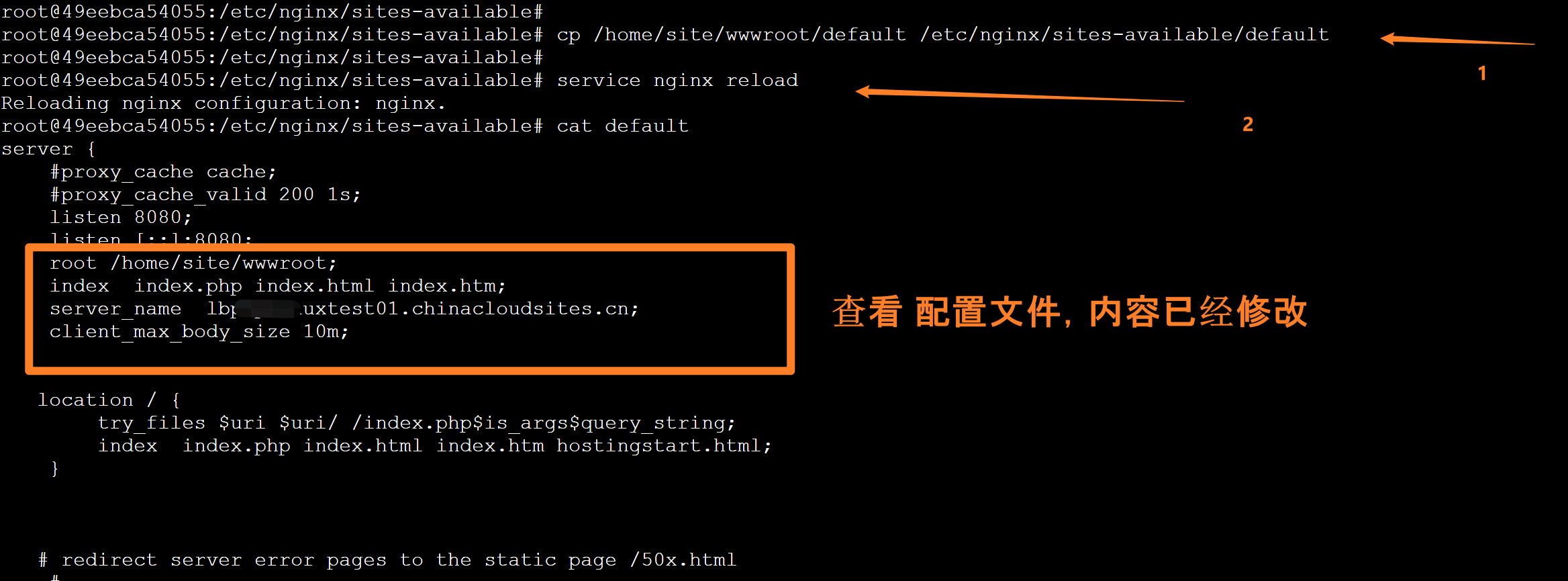
如果通过SSH直接在应用的容器中执行以上命令,当App Service站点重启,应用重新部署时,以上修改都会丢失,Nginx配置会恢复默认。所以需要下一步永久性操作。
PS: 修改完成后,可以通过 Nginx -T 来查看Nginx所使用的配置参数。以及可以在 /var/log/nginx中查看error.log日志


root@49eebca54055:~# nginx -T

nginx: the configuration file /etc/nginx/nginx.conf syntax is ok

nginx: configuration file /etc/nginx/nginx.conf test is successful

# configuration file /etc/nginx/nginx.conf:

user www-data;

worker_processes auto;

pid /run/nginx.pid;

include /etc/nginx/modules-enabled/*.conf;

events {

        worker_connections 10068;

        multi_accept on;

}

http {

        ##

        # Basic Settings

        ##

        sendfile on;

        tcp_nopush on;

        tcp_nodelay on;

        keepalive_timeout 65;

        types_hash_max_size 2048;

        # server_tokens off;

        # server_names_hash_bucket_size 64;

        # server_name_in_redirect off;

        include /etc/nginx/mime.types;

        default_type application/octet-stream;

        ##

        # SSL Settings

        ##

        ssl_protocols TLSv1 TLSv1.1 TLSv1.2; # Dropping SSLv3, ref: POODLE

        ssl_prefer_server_ciphers on;

        ##

        # Logging Settings

        ##

        access_log off;

        error_log /dev/stderr;

        ##

        # Gzip Settings

        ##

        gzip on;

        # gzip_vary on;

        # gzip_proxied any;

        # gzip_comp_level 6;

        # gzip_buffers 16 8k;

        # gzip_http_version 1.1;

        # gzip_types text/plain text/css application/json application/javascript text/xml application/xml application/xml+rss text/javascript;

        ##

        # Virtual Host Configs

        ##

        include /etc/nginx/conf.d/*.conf;

        include /etc/nginx/sites-enabled/*;

}

#mail {

#       # See sample authentication script at:

#       # http://wiki.nginx.org/ImapAuthenticateWithApachePhpScript

#

#       # auth_http localhost/auth.php;

#       # pop3_capabilities "TOP" "USER";

#       # imap_capabilities "IMAP4rev1" "UIDPLUS";

#

#       server {

#               listen     localhost:110;

#               protocol   pop3;

#               proxy      on;

#       }

#

#       server {

#               listen     localhost:143;

#               protocol   imap;

#               proxy      on;

#       }

#}

# configuration file /etc/nginx/modules-enabled/50-mod-http-auth-pam.conf:

load_module modules/ngx_http_auth_pam_module.so;

# configuration file /etc/nginx/modules-enabled/50-mod-http-dav-ext.conf:

load_module modules/ngx_http_dav_ext_module.so;

# configuration file /etc/nginx/modules-enabled/50-mod-http-echo.conf:

load_module modules/ngx_http_echo_module.so;

# configuration file /etc/nginx/modules-enabled/50-mod-http-geoip.conf:

load_module modules/ngx_http_geoip_module.so;

# configuration file /etc/nginx/modules-enabled/50-mod-http-image-filter.conf:

load_module modules/ngx_http_image_filter_module.so;

# configuration file /etc/nginx/modules-enabled/50-mod-http-subs-filter.conf:

load_module modules/ngx_http_subs_filter_module.so;

# configuration file /etc/nginx/modules-enabled/50-mod-http-upstream-fair.conf:

load_module modules/ngx_http_upstream_fair_module.so;

# configuration file /etc/nginx/modules-enabled/50-mod-http-xslt-filter.conf:

load_module modules/ngx_http_xslt_filter_module.so;

# configuration file /etc/nginx/modules-enabled/50-mod-mail.conf:

load_module modules/ngx_mail_module.so;

# configuration file /etc/nginx/modules-enabled/50-mod-stream.conf:

load_module modules/ngx_stream_module.so;

# configuration file /etc/nginx/mime.types:

types {

    text/html                             html htm shtml;

    text/css                              css;

    text/xml                              xml;

    image/gif                             gif;

    image/jpeg                            jpeg jpg;

    application/javascript                js;

    application/atom+xml                  atom;

    application/rss+xml                   rss;

    text/mathml                           mml;

    text/plain                            txt;

    text/vnd.sun.j2me.app-descriptor      jad;

    text/vnd.wap.wml                      wml;

    text/x-component                      htc;

    image/png                             png;

    image/tiff                            tif tiff;

    image/vnd.wap.wbmp                    wbmp;

    image/x-icon                          ico;

    image/x-jng                           jng;

    image/x-ms-bmp                        bmp;

    image/svg+xml                         svg svgz;

    image/webp                            webp;

    application/font-woff                 woff;

    application/java-archive              jar war ear;

    application/json                      json;

    application/mac-binhex40              hqx;

    application/msword                    doc;

    application/pdf                       pdf;

    application/postscript                ps eps ai;

    application/rtf                       rtf;

    application/vnd.apple.mpegurl         m3u8;

    application/vnd.ms-excel              xls;

    application/vnd.ms-fontobject         eot;

    application/vnd.ms-powerpoint         ppt;

    application/vnd.wap.wmlc              wmlc;

    application/vnd.google-earth.kml+xml  kml;

    application/vnd.google-earth.kmz      kmz;

    application/x-7z-compressed           7z;

    application/x-cocoa                   cco;

    application/x-java-archive-diff       jardiff;

    application/x-java-jnlp-file          jnlp;

    application/x-makeself                run;

    application/x-perl                    pl pm;

    application/x-pilot                   prc pdb;

    application/x-rar-compressed          rar;

    application/x-redhat-package-manager  rpm;

    application/x-sea                     sea;

    application/x-shockwave-flash         swf;

    application/x-stuffit                 sit;

    application/x-tcl                     tcl tk;

    application/x-x509-ca-cert            der pem crt;

    application/x-xpinstall               xpi;

    application/xhtml+xml                 xhtml;

    application/xspf+xml                  xspf;

    application/zip                       zip;

    application/octet-stream              bin exe dll;

    application/octet-stream              deb;

    application/octet-stream              dmg;

    application/octet-stream              iso img;

    application/octet-stream              msi msp msm;

    application/vnd.openxmlformats-officedocument.wordprocessingml.document    docx;

    application/vnd.openxmlformats-officedocument.spreadsheetml.sheet          xlsx;

    application/vnd.openxmlformats-officedocument.presentationml.presentation  pptx;

    audio/midi                            mid midi kar;

    audio/mpeg                            mp3;

    audio/ogg                             ogg;

    audio/x-m4a                           m4a;

    audio/x-realaudio                     ra;

    video/3gpp                            3gpp 3gp;

    video/mp2t                            ts;

    video/mp4                             mp4;

    video/mpeg                            mpeg mpg;

    video/quicktime                       mov;

    video/webm                            webm;

    video/x-flv                           flv;

    video/x-m4v                           m4v;

    video/x-mng                           mng;

    video/x-ms-asf                        asx asf;

    video/x-ms-wmv                        wmv;

    video/x-msvideo                       avi;

}

# configuration file /etc/nginx/sites-enabled/default:

server {

    #proxy_cache cache;

    #proxy_cache_valid 200 1s;

    listen 8080;

    listen [::]:8080;

    root /home/site/wwwroot;

    index  index.php index.html index.htm;

    server_name  lbphplinuxtest01.chinacloudsites.cn;

    client_max_body_size 10m;

   location / {

        try_files $uri $uri/ /index.php$is_args$query_string;

        index  index.php index.html index.htm hostingstart.html;

    }

   # redirect server error pages to the static page /50x.html

    #

    error_page   500 502 503 504  /50x.html;

    location = /50x.html {

        root   /html/;

    }

    # Disable .git directory

    location ~ /\.git {

        deny all;

        access_log off;

        log_not_found off;

    }

   # Add locations of phpmyadmin here.

    location ~ [^/]\.php(/|$) {

        fastcgi_split_path_info ^(.+?\.php)(|/.*)$;

        fastcgi_pass 127.0.0.1:9000;

        include fastcgi_params;

        fastcgi_param HTTP_PROXY "";

        fastcgi_param SCRIPT_FILENAME $document_root$fastcgi_script_name;

        fastcgi_param PATH_INFO $fastcgi_path_info;

        fastcgi_param QUERY_STRING $query_string;

        fastcgi_intercept_errors on;

        fastcgi_connect_timeout         300;

        fastcgi_send_timeout           3600;

        fastcgi_read_timeout           3600;

        fastcgi_buffer_size 128k;

        fastcgi_buffers 4 256k;

        fastcgi_busy_buffers_size 256k;

        fastcgi_temp_file_write_size 256k;

    }

}

# configuration file /etc/nginx/fastcgi_params:

fastcgi_param  QUERY_STRING       $query_string;

fastcgi_param  REQUEST_METHOD     $request_method;

fastcgi_param  CONTENT_TYPE       $content_type;

fastcgi_param  CONTENT_LENGTH     $content_length;

fastcgi_param  SCRIPT_NAME        $fastcgi_script_name;

fastcgi_param  REQUEST_URI        $request_uri;

fastcgi_param  DOCUMENT_URI       $document_uri;

fastcgi_param  DOCUMENT_ROOT      $document_root;

fastcgi_param  SERVER_PROTOCOL    $server_protocol;

fastcgi_param  REQUEST_SCHEME     $scheme;

fastcgi_param  HTTPS              $https if_not_empty;

fastcgi_param  GATEWAY_INTERFACE  CGI/1.1;

fastcgi_param  SERVER_SOFTWARE    nginx/$nginx_version;

fastcgi_param  REMOTE_ADDR        $remote_addr;

fastcgi_param  REMOTE_PORT        $remote_port;

fastcgi_param  SERVER_ADDR        $server_addr;

fastcgi_param  SERVER_PORT        $server_port;

fastcgi_param  SERVER_NAME        $server_name;

# PHP only, required if PHP was built with --enable-force-cgi-redirect

fastcgi_param  REDIRECT_STATUS    200;

root@49eebca54055:~#
第四步:把第三步的 cp 命令和 restart命令设置在 App Service的启动命令中,以便长久有效。如果启动命令中内容过多,可以把全部内容写入到一个脚本文件中(如 startscript.sh),并随项目文件一起放置。然后把文件全路径填入启动命令中。
把第三步的两句命令用分号(;)连接在一起设置在Startup Command中,操作如下图:
cp /home/site/wwwroot/default /etc/nginx/sites-available/default; service nginx reload
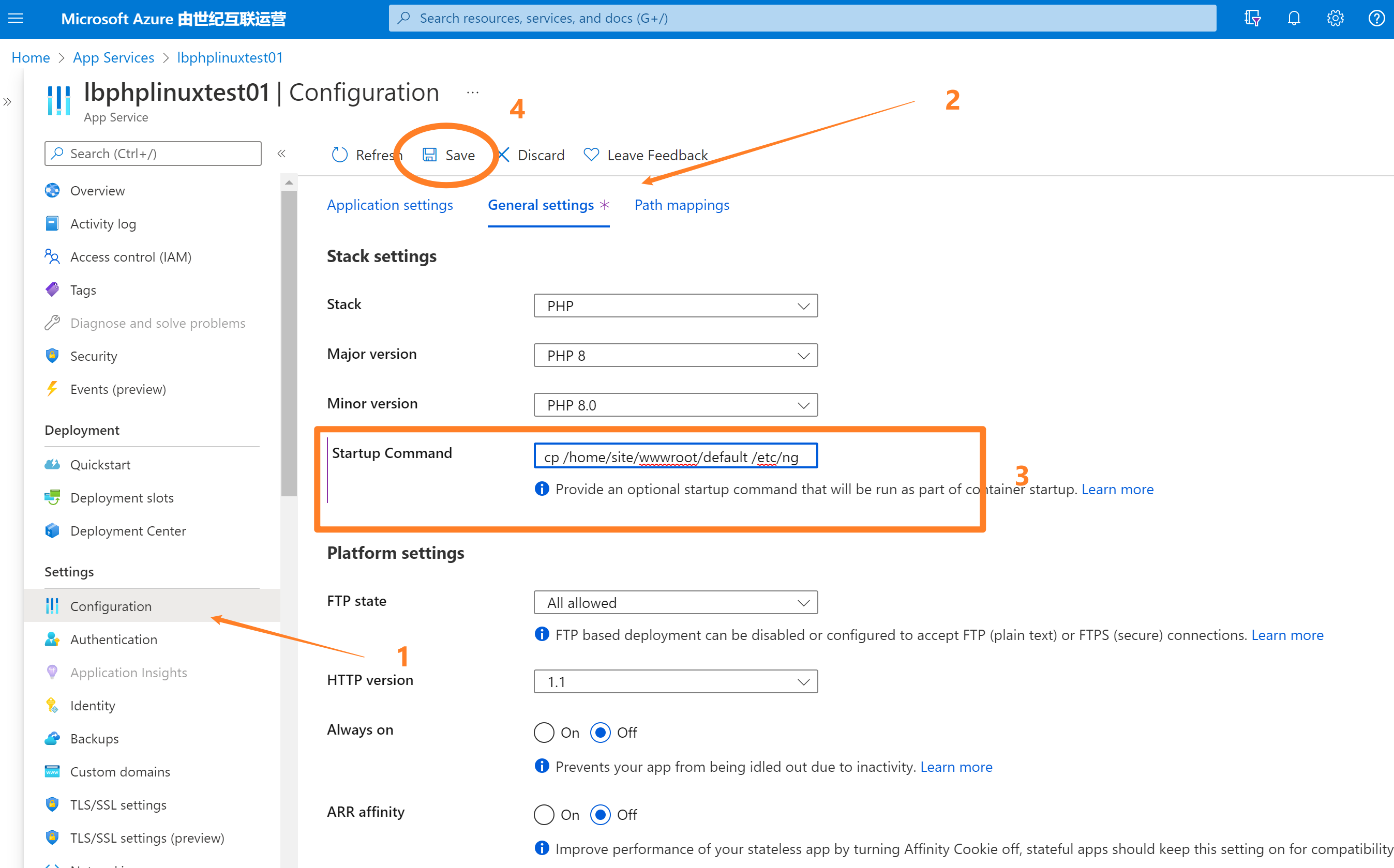
1)在App Service的目录页面中, 点击Configuration目录进入Configuration页面
2)选择General Settings选项卡
3)在Startup Command中添加 cp和restart命令
4)点击保存按钮。应用会自动重启并运行命令
注意:当以上操作完成后,Nginx上传文件默认1MB 的限制就变为了 10MB,但是因为PHP的限制还没有修改,所以当在应用中上传文件大于2MB时候,依旧会收到 413 或者 404 错误。只是,此时错误的根源为PHP限制。
第二部分:修改PHP upload_max_filesize 和 post_max_size
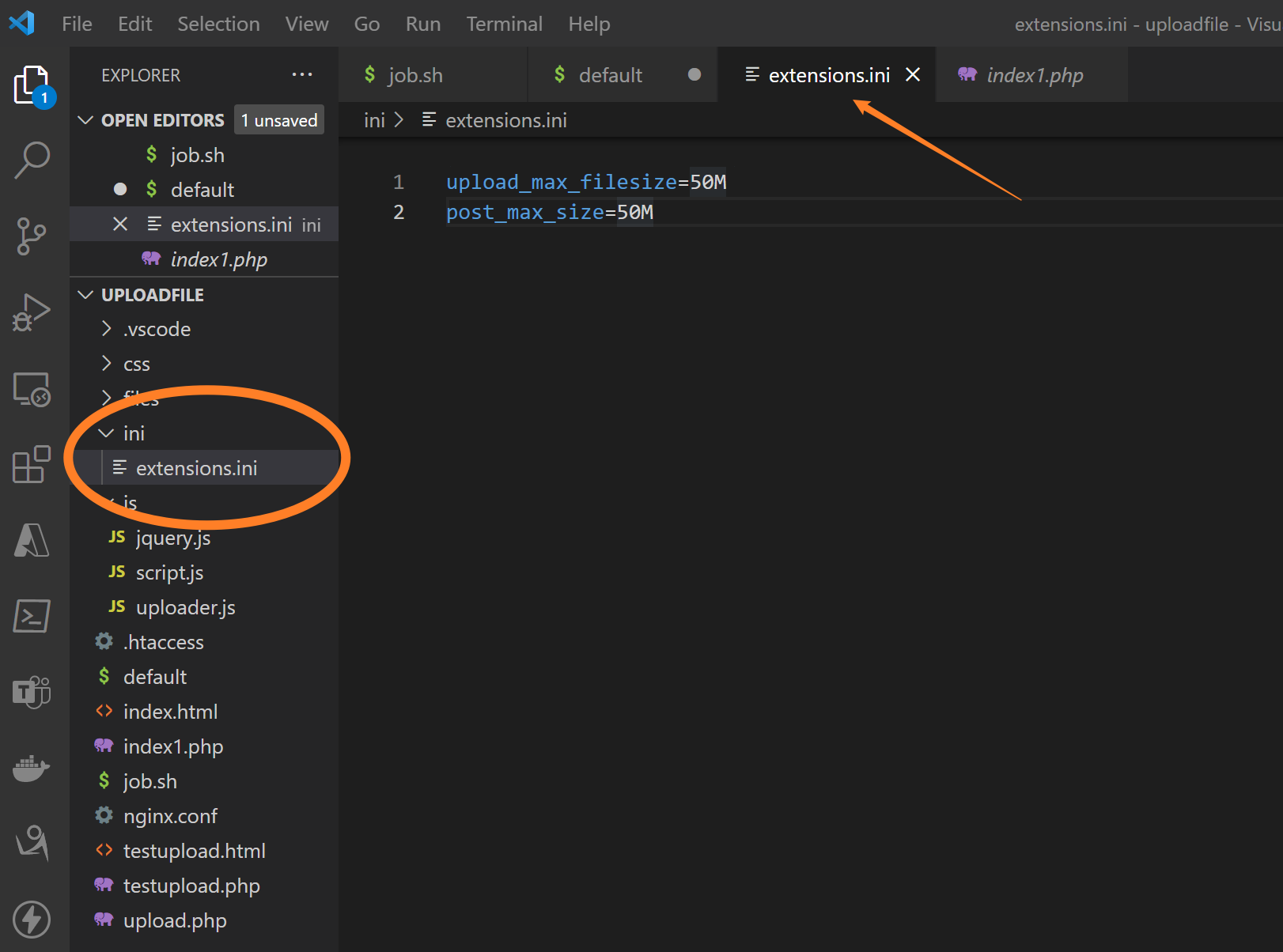
第一步:在项目文件根目录中创建 extensions.ini 的文件,并在其中设置 upload_max_filesize 和 post_max_size 值为50M。然后把修改后的文件一起部署到 wwwroot中
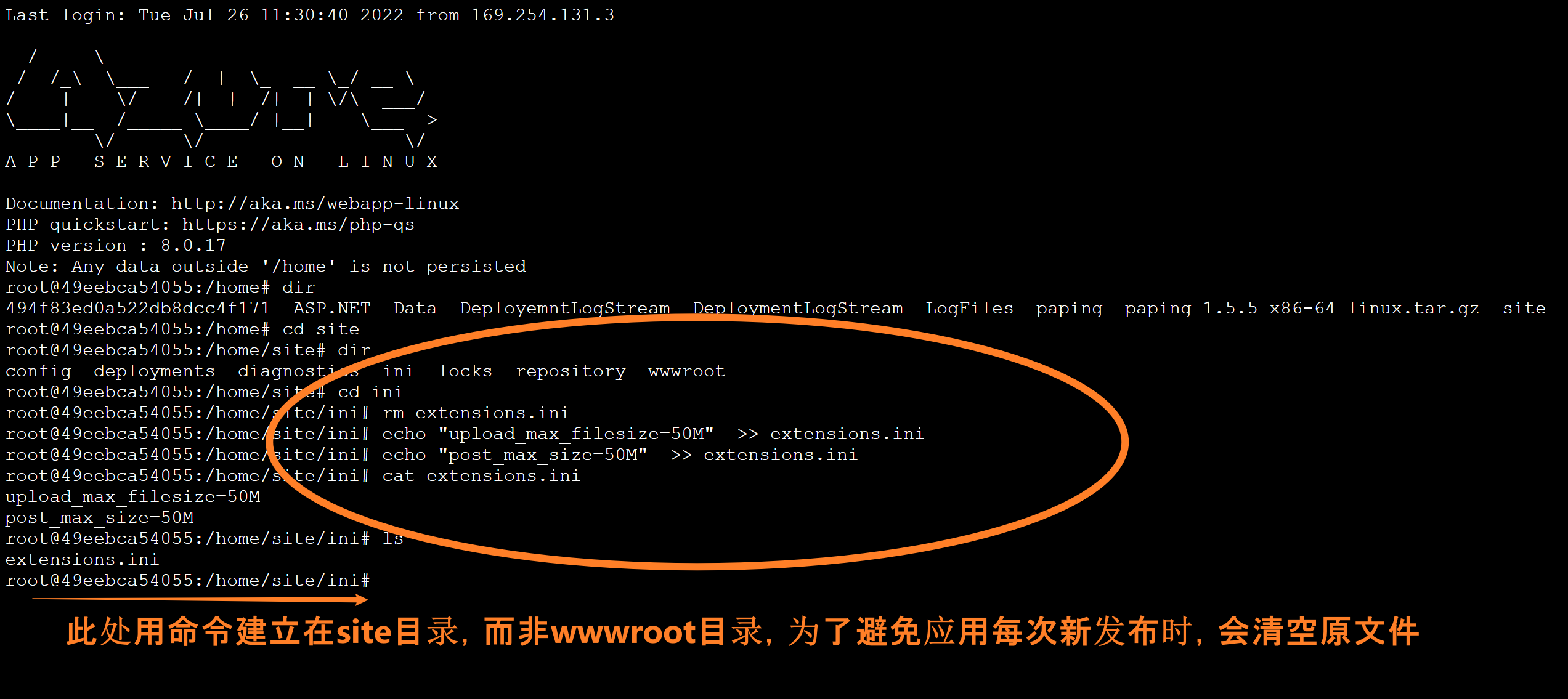
或者也可以直接在 SSH中通过命令创建 extensions.ini 文件和内容
cd site

mkdir ini

cd ini

echo "upload_max_filesize=50M"  >> extensions.ini

echo "post_max_size=50M"  >> extensions.ini

cat extensions.ini

ls
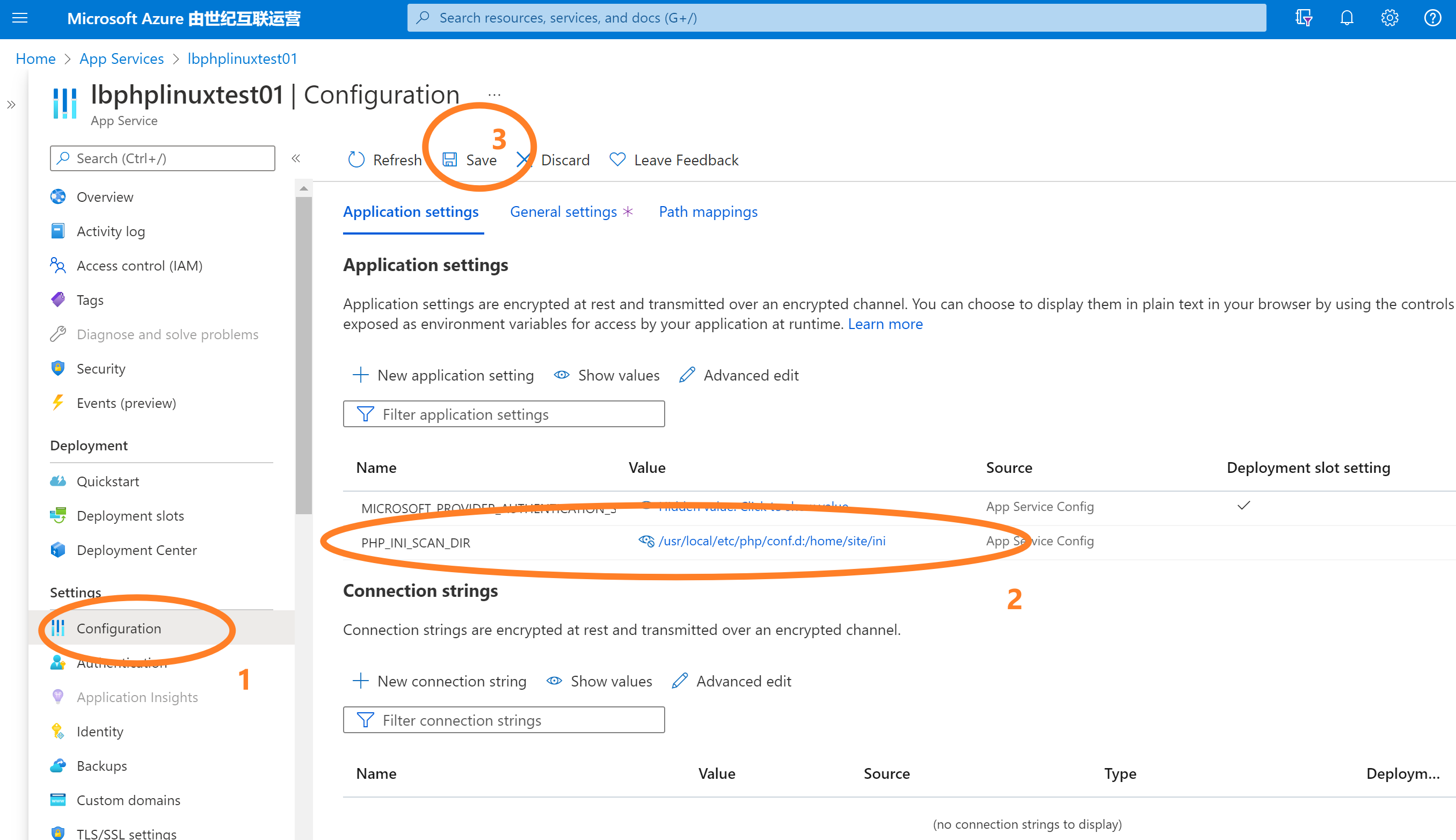
第二步:回到Azure App Service 门户页面,在Application Setting中添加 PHP_INI_SCAN_DIR 参数,指定它的值为 /usr/local/etc/php/conf.d:/home/site/ini 或者 /usr/local/etc/php/conf.d:/home/site/wwwroot/ini
PS: 前一段 /usr/local/etc/php/conf.d 路径固定,为PHP Runtime加载配置配置文件的路径,而一部分 /home/site/ini 则需要根据第一步extensions.ini文件的路径而改变
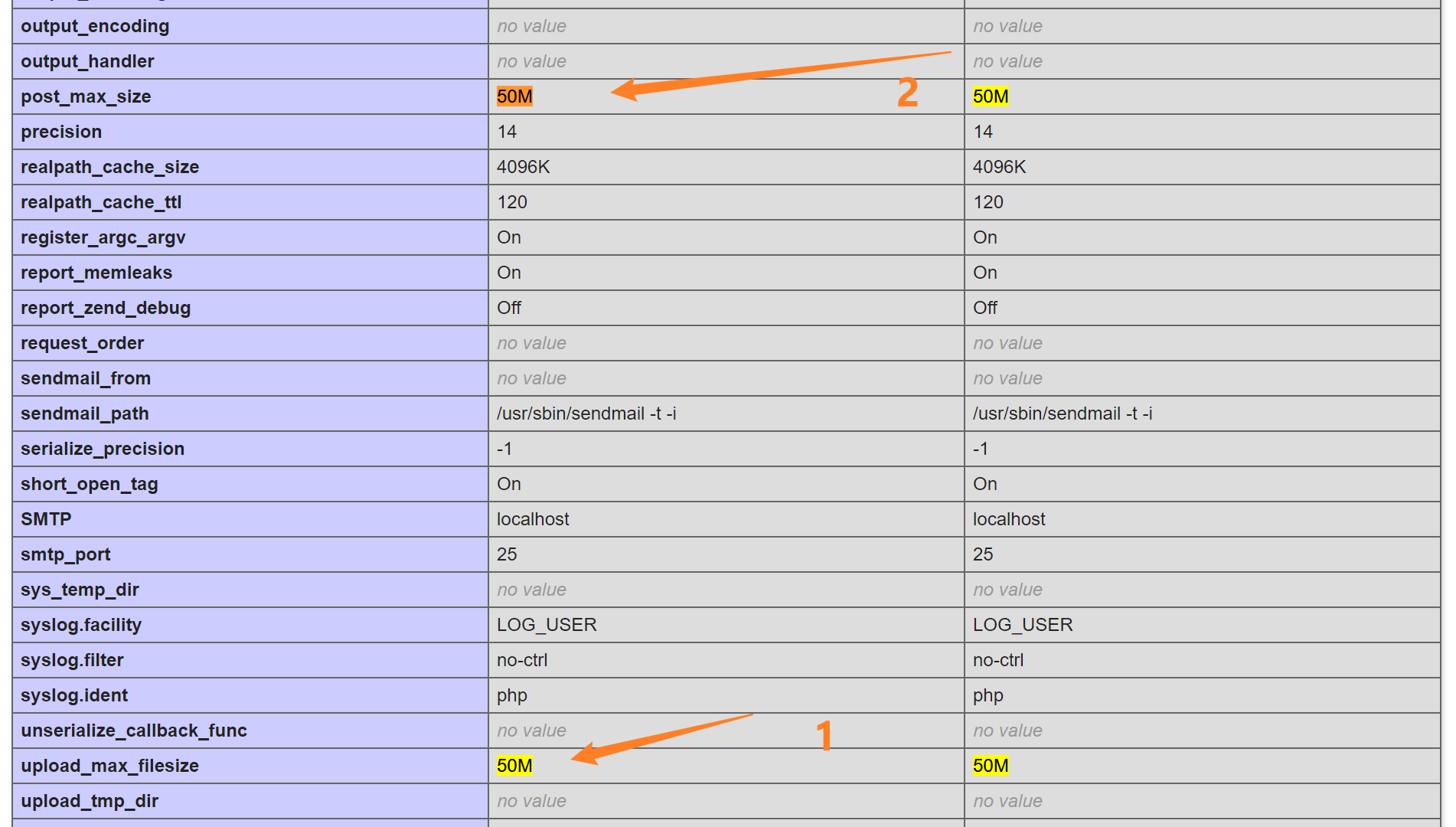
第三步: 通过phpinfo()函数验证修改后的参数
在info.php文件中写入 <?php phpinfo(); ,然后通过url访问 https://<sitename>.chinacloudsites.cn/info.php
echo "<?php phpinfo();" >> info.php
附录:PHP上传文件的可用代码
W3School PHP File Upload : https://www.w3schools.com/php/php_file_upload.asp
参考资料
NGINX Rewrite Rules for Azure App Service Linux PHP 8.x:https://azureossd.github.io/2021/09/02/php-8-rewrite-rule/index.html
Azure App Service Linux - Update PHP Settings:https://azureossd.github.io/2019/01/29/azure-app-service-linux-update-php-settings/
[END]
【Azure 应用服务】PHP应用部署在App Service for Linux环境中,上传文件大于1MB时,遇见了413 Request Entity Too Large 错误的解决方法的更多相关文章
- 基于Ubuntu Server 16.04 LTS版本安装和部署Django之(三):设置上传文件夹权限(这里测试用完全共享)
基于Ubuntu Server 16.04 LTS版本安装和部署Django之(一):安装Python3-pip和Django 基于Ubuntu Server 16.04 LTS版本安装和部署Djan ...
- .netcore 部署时遇到413 Request Entity Too Large 和 413Payload Too Large 的问题
.netcore3.1 遇到一个webapi 上传大文件问题 首先,在kestrel模式调试模式下上传 会报错413, 需要在三个地方添加 1.startup中 这里设置的2g最大值 2.在progr ...
- 部署项目到远程tomcat的413 Request Entity Too Large报错处理
当项目jar包过多时,部署项目会报错而错误原因很清楚了,文件太大了. 因为用了nginx代理,而nginx默认文件大小有限,所以需要设置nginx上传文件大小限制 client_max_body_si ...
- 【Azure 应用服务】App Service For Windows 环境中部署Python站点后,如何继续访问静态资源文件呢(Serving Static Files)?
问题描述 当创建一个App Service 后,运行时环境和版本选择Windows 和 Python 3.6. 登录Kudu 站点查看,默认的文件有 web.config, hostingstart- ...
- 【Python】部署上手App后端服务器 - Linux环境搭建安装Python、Tornado、SQLAlchemy
基于阿里云服务器端环境搭建 文章目录 基于阿里云服务器端环境搭建 配置开发环境 安装 Python 3.8.2 安装 Tornado 安装 MySQL 安装 mysqlclient 安装 SQLAlc ...
- 【Azure 应用服务】App Service For Linux 部署PHP Laravel 项目,如何修改首页路径为 wwwroot\public\index.php
问题描述 参考官方文档部署 PHP Laravel 项目到App Service for Linux环境中,但是访问应用时候遇见了500 Server Error 错误. 从部署的日志中,可以明确看出 ...
- 【Azure 应用服务】NodeJS Express + MSAL 应用实现AAD集成登录并部署在App Service Linux环境中的实现步骤
问题描述 实现部署NodeJS Express应用在App Service Linux环境中,并且使用Microsoft Authentication Library(MSAL)来实现登录Azure ...
- 【Azure 应用服务】App Service for Linux 中实现 WebSocket 功能 (Python SocketIO)
问题描述 使用 python websockets 模块作为Socket的服务端,发布到App Service for Linux环境后,发现Docker Container无法启动.错误消息为: 2 ...
- FastDFS的配置、部署与API使用解读(2)以字节方式上传文件的客户端代码(转)
本文来自 诗商·柳惊鸿 Poechant CSDN博客,转载请注明源地址:FastDFS的配置.部署与API使用解读(2)上传文件到FastDFS分布式文件系统的客户端代码 在阅读本文之前,请您先通过 ...
随机推荐
- 【Electron】使用 build-tools 在 Windows 中编译 electron
[Electron]使用 build-tools 在 Windows 中编译 electron 提前准备 预留好磁盘空间 Git 缓存目录:%UserProfile%/.git_cache ,大概有 ...
- 实验:Python图形图像处理
1. 准备一张照片,编写Python程序将该照片进行图像处理,分别输出以下效果的图片:(a)灰度图:(b)轮廓图: (c)变换RGB通道图:(d)旋转45度图. 2. 假设当前文件夹中data.csv ...
- 原创工具14Finger-全能web指纹识别与分享平台
14Finger 功能齐全的Web指纹扫描和分享平台,基于vue3+django前后端分离的web架构,并集成了长亭出品的rad爬虫的功能,内置了一万多条互联网开源的指纹信息. Github:http ...
- Redis设计与实现3.3:集群
集群 这是<Redis设计与实现>系列的文章,系列导航:Redis设计与实现笔记 集群中的节点 创建集群 通过 CLUSTER NODE 命令可以查看当前集群中的节点.刚启动时,默认每一台 ...
- 690. Employee Importance - LeetCode
Question 690. Employee Importance Example 1: Input: [[1, 5, [2, 3]], [2, 3, []], [3, 3, []]], 1 Outp ...
- 每日一题20180401-Linux
一.题目 1.1 在mysql命令行临时开启自动补全 1.2 通过shell脚本打印乘法口诀表 二.答案 2.1 # auto-rehash:读取表信息和列信息,可以在连上终端后开启tab补齐功能 # ...
- ZIP压缩输入/输出
学习内容: 一.压缩文件 1.利用ZipOutputStream类对象,可将文件压缩. 2.ZipOutputStream类构造方法:ZipOutputStream(OutputStream out) ...
- 「VMware校园挑战赛」小V的和式
Description 给定 \(n,m\) ,求 \[\sum\limits_{x_1=1}^{n}\sum\limits_{x_2=1}^{n}\sum\limits_{y_1=1}^{m}\su ...
- Dcoker镜像管理与容器应用
Dcoker镜像管理与容器应用 docker基于镜像创建容器 相同版本的镜像只允许存在一个 同一个镜像可以创建多个容器 镜像管理 [root@localhost ~]# docker pull cen ...
- Java学习-第一阶段-第一节:Java概述
JAVA概述 Java版本 原网址(https://www.oracle.com/java/technologies/java-se-support-roadmap.html) Oracle 将仅将某 ...