
linux环境中设置jacoco覆盖率
cd /alidata1/admin/za-themis

pkill -9 -f za-themis

#CATALINA_HOME=/root/za-tomcat

#CATALINA_BASE=/root/za-tomcat

export JAVA_OPTS="-server -Xms2g -Xmx2g -XX:NewSize=1g -XX:MaxNewSize=1g

-XX:PermSize=512m -XX:MaxPermSize=512m

-XX:+UseConcMarkSweepGC

-XX:CMSFullGCsBeforeCompaction=5

-XX:+UseCMSCompactAtFullCollection

-XX:+CMSParallelRemarkEnabled

-XX:+CMSPermGenSweepingEnabled

-XX:+CMSClassUnloadingEnabled

-XX:+UseCMSInitiatingOccupancyOnly

-XX:CMSInitiatingOccupancyFraction=70

-XX:+DisableExplicitGC

-XX:+UseCompressedOops

-XX:+DoEscapeAnalysis

-XX:MaxTenuringThreshold=10

-Dhsf.http.enable=true

-Dhsf.server.ip=10.253.104.74

-Dpandora.qos.port=8081

-Dcom.sun.management.jmxremote.ssl=false

-Dcom.sun.management.jmxremote.authenticate=false

-Dcom.sun.management.jmxremote.port=7092

-Djava.rmi.server.hostname=10.253.104.74

-javaagent:./jacoco-0.8.0/lib/jacocoagent.jar=includes=*,output=tcpserver,port=17297,address=10.253.104.74

-Dhsf.server.port=8082 -Dhsf.http.port=8083

-Xdebug -Xnoagent -Djava.compiler=NONE

-Xrunjdwp:transport=dt_socket,server=y,suspend=n,address=8184

-Dproject.name=za-themis

"

./bin/startup.sh

tail ./logs/catalina.out
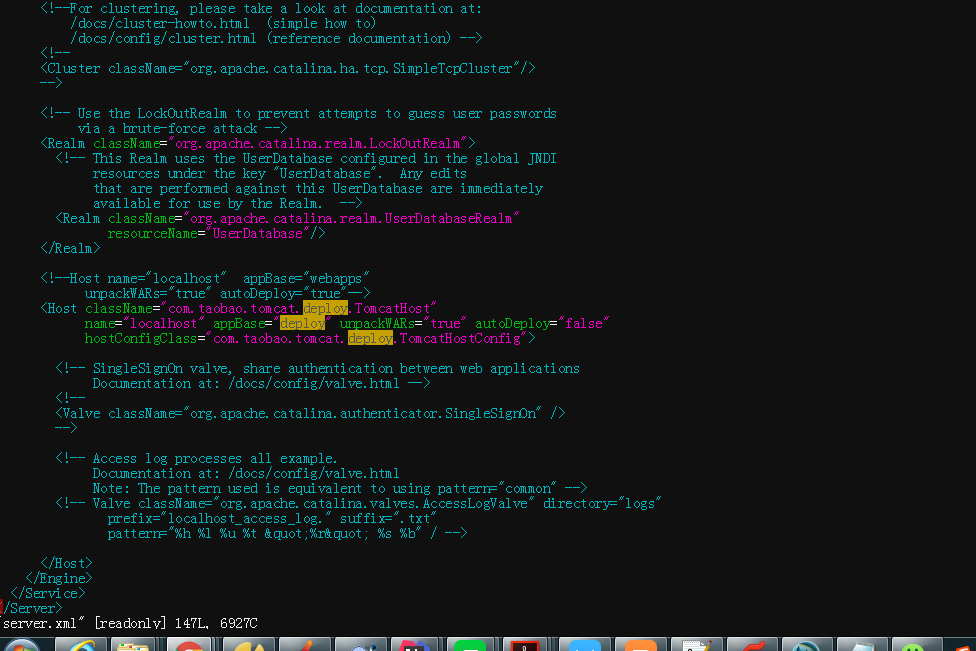
ant build.xml文件:
<?xml version="1.0"?>
-<project default="jacoco" xmlns:jacoco="antlib:org.jacoco.ant" name="PPAUTO">
<!--Jacoco的安装路径-->
<property name="jacocoantPath" value="./jacoco-0.8.0/lib/jacocoant.jar"/>
<!--最终生成.exec文件的路径,Jacoco就是根据这个文件生成最终的报告的-->
<property name="jacocoexecPath" value="./jacoco.exec"/>
<!--生成覆盖率报告的路径-->
<property name="reportfolderPath" value="./report/"/>
<!--远程tomcat服务的ip地址-->
<property name="server_ip" value="10.253.104.74"/>
<!--前面配置的远程tomcat服务打开的端口,要跟上面配置的一样-->
<property name="server_port" value="17297"/>
<!--za-themis.源代码路径-->
<property name="za-themispath" value="/root/.jenkins/workspace/za-qa-jacocoThemis/za-themis/"/>
<property name="za-themisbizpath" value="/root/.jenkins/workspace/za-qa-jacocoThemis/za-themis-biz/"/>
<property name="za-themiscommonpath" value="/root/.jenkins/workspace/za-qa-jacocoThemis/za-themis-common/"/>
<property name="za-themisenginepath" value="/root/.jenkins/workspace/za-qa-jacocoThemis/za-themis-engine/"/>
<property name="za-themisdaopath" value="/root/.jenkins/workspace/za-qa-jacocoThemis/za-themis-dao/"/>
<!--za-themis.class文件路径-->
<property name="za-themisClasspath" value="/root/.jenkins/workspace/za-qa-jacocoThemis/za-themis/target/classes/com/zhongan/themis"/>
<property name="za-themisbizClasspath" value="/root/.jenkins/workspace/za-qa-jacocoThemis/za-themis-biz/target/classes/com/zhongan/themis"/>
<property name="za-themiscommonClasspath" value="/root/.jenkins/workspace/za-qa-jacocoThemis/za-themis-common/target/classes/com/zhongan/themis"/>
<property name="za-themisdaoClasspath" value="/root/.jenkins/workspace/za-qa-jacocoThemis/za-themis-dao/target/classes/com/zhongan/themis"/>
<property name="za-themisengineClasspath" value="/root/.jenkins/workspace/za-qa-jacocoThemis/za-themis-engine/target/classes/com/zhongan/themis"/>
<!--让ant知道去哪儿找Jacoco-->
-<taskdef resource="org/jacoco/ant/antlib.xml" uri="antlib:org.jacoco.ant">
<classpath path="${jacocoantPath}"/>
</taskdef>
<!--dump任务: 根据前面配置的ip地址,和端口号, 访问目标tomcat服务,并生成.exec文件。-->
-<target name="dump">
<jacoco:dump append="true" port="${server_port}" destfile="${jacocoexecPath}" reset="false" address="${server_ip}"/>
</target>
<!--jacoco任务: 根据前面配置的源代码路径和.class文件路径, 根据dump后,生成的.exec文件,生成最终的html覆盖率报告。-->
-<target name="report">
<delete dir="${reportfolderPath}"/>
<mkdir dir="${reportfolderPath}"/>
-<jacoco:report>
-<executiondata>
<file file="${jacocoexecPath}"/>
</executiondata>
-<structure name="JaCoCo Report">
-<group name="za-themis">
-<classfiles>
<fileset dir="${za-themisClasspath}"/>
</classfiles>
-<sourcefiles encoding="utf-8">
<fileset dir="${za-themispath}"/>
</sourcefiles>
</group>
-<group name="za-themis-biz">
-<classfiles>
<fileset dir="${za-themisbizClasspath}"/>
</classfiles>
-<sourcefiles encoding="utf-8">
<fileset dir="${za-themisbizpath}"/>
</sourcefiles>
</group>
-<group name="za-themis-common">
-<classfiles>
<fileset dir="${za-themiscommonClasspath}"/>
</classfiles>
-<sourcefiles encoding="utf-8">
<fileset dir="${za-themiscommonpath}"/>
</sourcefiles>
</group>
-<group name="za-themis-engine">
-<classfiles>
<fileset dir="${za-themisengineClasspath}"/>
</classfiles>
-<sourcefiles encoding="utf-8">
<fileset dir="${za-themisenginepath}"/>
</sourcefiles>
</group>
-<group name="za-themis-dao">
-<classfiles>
<fileset dir="${za-themisdaoClasspath}"/>
</classfiles>
-<sourcefiles encoding="utf-8">
<fileset dir="${za-themisdaopath}"/>
</sourcefiles>
</group>
</structure>
<html encoding="utf-8" destdir="${reportfolderPath}"/>
</jacoco:report>
</target>
</project>
linux环境中设置jacoco覆盖率的更多相关文章
- 教你如何在Kali Linux 环境下设置蜜罐?
导读 Pentbox是一个包含了许多可以使渗透测试工作变得简单流程化的工具的安全套件.它是用Ruby编写并且面向GNU/Linux,同时也支持Windows.MacOS和其它任何安装有Ruby的系统. ...
- linux环境中安装ftp服务
需求说明: 今天项目中有一个新的需求,需要在linux环境中搭建一个ftp服务,在此记录下. 操作过程: 1.通过yum的方式安装ftp服务对应的软件包 [root@testvm01 ~]# yum ...
- linux环境变量设置错误后的恢复方法(转)
原文: http://blog.csdn.net/hoholook/article/details/2793447 linux环境变量设置错误后的恢复方法 中国自学编程网收集整理 发布日期:2008 ...
- 【事件中心 Azure Event Hub】在Linux环境中(Ubuntu)安装Logstash的简易步骤及配置连接到Event Hub
在文章([事件中心 Azure Event Hub]使用Logstash消费EventHub中的event时遇见的几种异常(TimeoutException, ReceiverDisconnected ...
- (3)ElasticSearch在linux环境中安装与配置head插件
1.简介 ElasticSearch-Head跟Kibana一样也是一个针对ElasticSearch集群操作的API的可视化管理工具,它提供了集群管理.数据可视化.增删改查.查询语句等功能,最重要还 ...
- 【Azure 应用服务】NodeJS Express + MSAL 应用实现AAD集成登录并部署在App Service Linux环境中的实现步骤
问题描述 实现部署NodeJS Express应用在App Service Linux环境中,并且使用Microsoft Authentication Library(MSAL)来实现登录Azure ...
- 【Azure 应用服务】PHP应用部署在App Service for Linux环境中,上传文件大于1MB时,遇见了413 Request Entity Too Large 错误的解决方法
问题描述 在PHP项目部署在App Service后,上传文件如果大于1MB就会遇见 413 Request Entity Too Large 的问题. 问题解决 目前这个问题,首先需要分析应用所在的 ...
- 在 SharePoint Server 2016 本地环境中设置 OneDrive for Business
建议补丁 建议在sharepoint2016打上KB3127940补丁,补丁下载地址 https://support.microsoft.com/zh-cn/kb/3127940 当然不打,也可以用O ...
- Linux环境中Openfire安装指南
Linux环境中Openfire安装指南 安装环境: 安装软件:Openfire 4_1_0 http://download.igniterealtime.org/openfire/openfire_ ...
随机推荐
- BZOJ 2302: [HAOI2011]Problem c [DP 组合计数]
2302: [HAOI2011]Problem c Time Limit: 30 Sec Memory Limit: 256 MBSubmit: 648 Solved: 355[Submit][S ...
- [BZOJ4567][SCOI2016]背单词(Trie+贪心)
1.题意表述十分难以理解,简单说就是:有n个单词,确定一个背的顺序,使总代价最小. 2.因为第(1)种情况的代价是n*n,这个代价比任何一种不出现第(1)种情况的方案都要大,所以最后肯定不会出现“背某 ...
- Template(Updating)
1.Splay (Tyvj1728) #include <bits/stdc++.h> using namespace std; ,INF=<<; ],sz[MAXN],cnt ...
- Git版本管理工具对比(GitBash、EGit、SourceTree)
Git管理工具对比(GitBash.EGit.SourceTree) GitBash是采用命令行的方式对版本进行管理,功能最为灵活强大,但是由于需要手动输入希望修改的文件名,所以相对繁琐. EGit是 ...
- PHP--SPL扩展学习笔记
一. SPL是干嘛的 SPL是用于解决典型问题(standard problems)的一组接口与类的集合. 数据结构: .实现双向列表 SplDoublyLinkedList implements I ...
- Ajax 的概念及过程?Ajax 的交互模型?同步和异步的区别?如何解决跨域问题?
Ajax 是什么: 1) 通过异步模式,提升了用户体验 2) 优化了浏览器和服务器之间的传输,减少不必要的数据往返,减少了带宽占用 3) Ajax 在客户端运行,承担了一部分本来由服务器承担的工 ...
- 你的C/C++程序为什么无法运行?揭秘Segmentation fault (2)
什么让你对C/C++如此恐惧? 本篇将继续上一篇来讨论段错误(Segmentation fault). 上一篇: 你的C/C++程序为什么无法运行?揭秘Segmentation fault(1) 追溯 ...
- SecureCRT 如何改变对话框--每行输入字符数的多少
通过设置Logical columns的大小,选中Retain size an font来改变每行输入字符数的多少 1.设置Session Options–>Terminal–>Emula ...
- ThinkPHP中I('post.')与create()方法的对比
简要归纳: 1.二者都可用来接收post表单提交的数据. 2.I('post.')方法可直接接收赋值给变量如$post=I('post.'),create()方法源于父类模型封装,需先实例化父类模型, ...
- JDK篇
卸载系统自带的jdk 使用以下命令查看是否已经安装了jdk rpm -qa|grep java rpm -qa|grep jdk 如果已经安装了可能会得到下面的结果: java-1.4.2-gcj ...