
[翻译] MCProgressView 使用自定义图片做进度显示
MCProgressView 使用自定义图片做进度显示

https://github.com/Baglan/MCProgressView
Progress bar view with custom images.
使用自定义图片来显示进度条。
Installation(安装)
- Add the QuartzCore framework to your project;添加QuartzCore框架
- Copy files from the 'Classes' folder into your project.将‘Classes’文件夹拷贝到你的工程当中
Usage(使用)
You will first need to create custom images for background and foreground or copy the ones coming with this project to your project.
你需要创建两张图片,一张背景图一张最前面显示的图,或者直接从我的工程中拷贝出来。
#import "MCProgressBarView.h"
Initialize the images:
初始化图片:
UIImage * backgroundImage = [[UIImage imageNamed:@"progress-bg"] resizableImageWithCapInsets:UIEdgeInsetsMake(0, 10, 0, 10)];

UIImage * foregroundImage = [[UIImage imageNamed:@"progress-fg"] resizableImageWithCapInsets:UIEdgeInsetsMake(0, 10, 0, 10)];
Notice the [UIImage -resizableImageWithCapInsets:] call. You can read more about it in the documnetation for this method. Essentiually, it defines which parts of the image will not be stretched when image is resized. Here, it's used to mark the left and the right edges.
注意这个方法[UIImage -resizableImageWithCapInsets:]的调用。你可以读读关于它的文档。实际上,它定义了图片中的哪些部分不会被拉伸。在这里我用来确保最左侧和最右侧不会被拉伸。
Create the view and add it to the view hierarchy:
直接创建这个view并添加进来:
MCProgressBarView * _progressBarView = [[MCProgressBarView alloc] initWithFrame:CGRectMake(25, 100, 270, 20)

    backgroundImage:backgroundImage

    foregroundImage:foregroundImage];

[self.view addSubview:_progressBarView];
Now, the progress you set (in the range of 0.0 to 1.0), will be reflected in the component:
现在,就会按照你设置的方式来显示进度了:
_progressBarView.progress = 0.25;
offsetForZero(0处的偏移量)
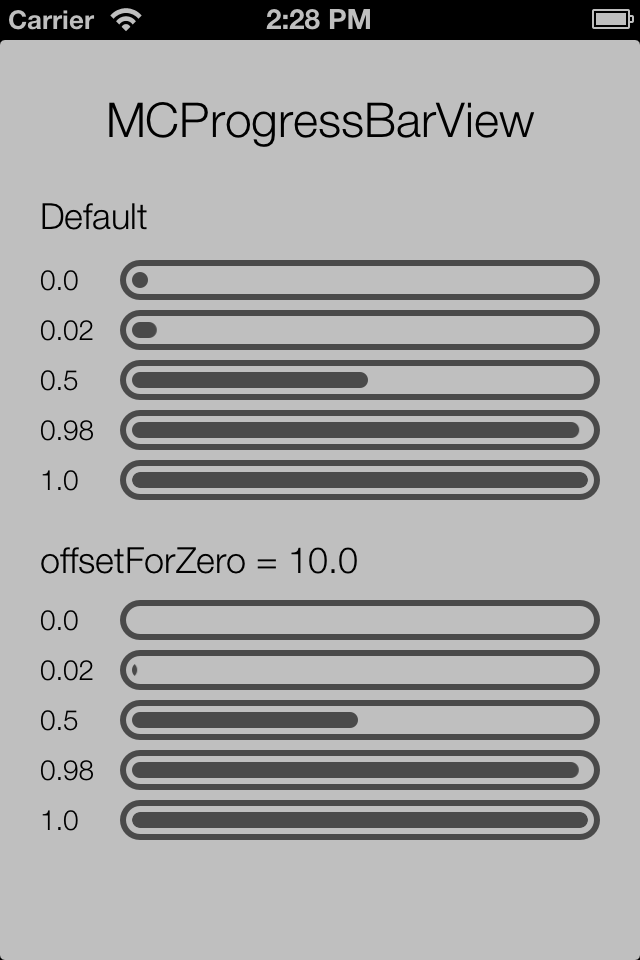
Matt Curtis pointed out that when progress is 0.0, there is still some initial progress indicator shown (see the image above). After some consideration, I've decided that there are situations when that is desirable and some situations when no progress should be shown. To address this, a new property has been added:
Matt Curtis 指出,当进度为0.0时,还是有一些进度显示出来了(看上面的图片)。之后我决定,某些特定的情况下不显示进度条而有时候显示,为了标志这个,我添加了一个新的属性:
@property (nonatomic, assign) CGFloat offsetForZero;
The default value of this property is the sum of the left and the right cap inset for the foreground image. To "taper off" the initial size of the progress indicator, you can set it to a lower value. For the images in the sample project, that value can be set to 10.0:
progressBarView.offsetForZero = 10.0;
See the sample image above to see the effect. That value can vary depending on the images you use in your project.
这个值会严重依赖于你所使用的图片。
[翻译] MCProgressView 使用自定义图片做进度显示的更多相关文章
- android 自定义图片圆形进度条
感觉话一个圆形进度条挺简单的 ,但是却偏偏给了几张图片让你话,说实话我没接触过,感觉好难,还好百度有大把的资源,一番努力下终于画出来了. 代码如下. package com.etong.cpms.wi ...
- easyui源码翻译1.32--Combo(自定义下拉框)
前言 扩展自$.fn.validatebox.defaults.使用$.fn.combo.defaults重写默认值对象.下载该插件翻译源码 自定义下拉框显示一个可编辑的文本框和下拉面板在html页面 ...
- html5 图片上传,支持图片预览、压缩、及进度显示,兼容IE6+及标准浏览器
以前写过上传组件,见 打造 html5 文件上传组件,实现进度显示及拖拽上传,兼容IE6+及其它标准浏览器,对付一般的上传没有问题,不过如果是上传图片,且需要预览的话,就力有不逮了,趁着闲暇时间,给上 ...
- [翻译] SFRoundProgressCounterView 带有进度显示的倒计时视图
SFRoundProgressCounterView 带有进度显示的倒计时视图 https://github.com/simpliflow/SFRoundProgressCounterView A c ...
- iOS View自定义窍门——UIButton实现上显示图片,下显示文字
“UIButton实现上显示图片,下显示文字”这个需求相信大家在开发中都或多或少会遇见.比如自定义分享View的时候.当然,也可以封装一个item,上边imageView,下边一个label.但是既然 ...
- 解决“用PicGo-2.3.0-beta5 + GitHub做博客图床,github仓库图片文件不显示”的问题记录(备忘)
解决"用PicGo-2.3.0-beta5 + GitHub做博客图床,github仓库图片文件不显示"的问题记录(备忘) 历时几个小时百度,终于靠自己理解解决了GitHub仓库图 ...
- [Android] 对自定义图片浏览器经常内存溢出的一些优化
首先关于异步加载图片可以参见 夏安明 的博客:http://blog.csdn.net/xiaanming/article/details/9825113 这篇文章最近有了新的更改,大概看了一下,内容 ...
- 灵活、可高度自定义的——Progress进度圈、弹窗、加载进度、小菊花
DDProgressHUD的介绍 提供了四种类型的展示: 显示无限旋转的加载图(比如小菊花,可以自定义),显示文字信息.网络刷新时经常用到. 显示加载进度的动画,也可以显示文字.网络下载时用的比较多, ...
- Android零基础入门第52节:自定义酷炫进度条
原文:Android零基础入门第52节:自定义酷炫进度条 Android系统默认的ProgressBar往往都不能满足实际开发需要,一般都会开发者自定义ProgressBar. 在Android开发中 ...
随机推荐
- GUC-14 ForkJoin
import java.time.Duration; import java.time.Instant; import java.util.concurrent.ForkJoinPool; impor ...
- Java开发工程师学习路线
贴一个比较出名的Java开发工程师学习路线图 好好学习提升中 这个貌似也不是特别全,算法,设计模式,架构好像都没有
- 009 HDFS的shell命令(里面有一个安全模式)
一:dfs的命令 1.所有的领命 2.解释 -appendToFile <localsrc> ... <dst> :追加文件 -checksum <src> . ...
- git获取帮助
想了解 Git 的各式工具该怎么用,可以阅读它们的使用帮助,方法有三: $ git help <verb> $ git <verb> --help $ man git-< ...
- [CodeForces-606E] Freelancer's Dreams 凸包 模型转换
大致题意: 有一个人想要获得p个经验点和q元钱.现在给出n份工作,每份工作每天能得到Ai的经验值和Bi的钱,问最少需要工作多少天, 能使得总经验值>=p,总钱>=q. 先对给出的n份工作以 ...
- win10 远程桌面远程电脑时每次要输入密码及身份验证错误,要求的函数不受支持问题解决
解决以前每次远程时能能记住密码,更新系统补丁后现在每次登录要输入密码了及远程时提示身份验证错误,要求的函数不受支持问题 解决方法一.卸载更新安装的新补丁,远程桌面正常,能记住密码 解决方法二.修改注册 ...
- 不要62 hdu 2089 dfs记忆化搜索
题目:http://acm.hdu.edu.cn/showproblem.php?pid=2089 题意: 给你两个数作为一个闭区间的端点,求出该区间中不包含数字4和62的数的个数 思路: 数位dp中 ...
- html5那些事儿
一.优势1.标签的改变:<header>,<footer>,<dialog>,<aside>,<figure>,<section> ...
- luoguP4360 [CEOI2004]锯木厂选址
题目链接 luoguP4360 [CEOI2004]锯木厂选址 题解 dis:后缀和 sum:前缀和 补集转化,减去少走的,得到转移方程 dp[i] = min(tot - sumj * disj - ...
- BZOJ 1975: [Sdoi2010]魔法猪学院 大水题 第k短路 spfa
https://www.lydsy.com/JudgeOnline/problem.php?id=1975 我好像到现在了第k短路都不会写,mdzz. 先spfa求出最短路,然后扫点存各种前置路径已经 ...