
TP5使用Composer安装phpoffice/phpspreadsheet,导出Excel文件
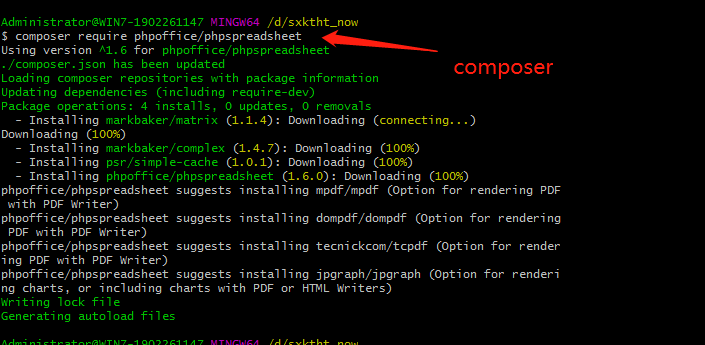
1、composer安装:
composer require phpoffice/phpspreadsheet
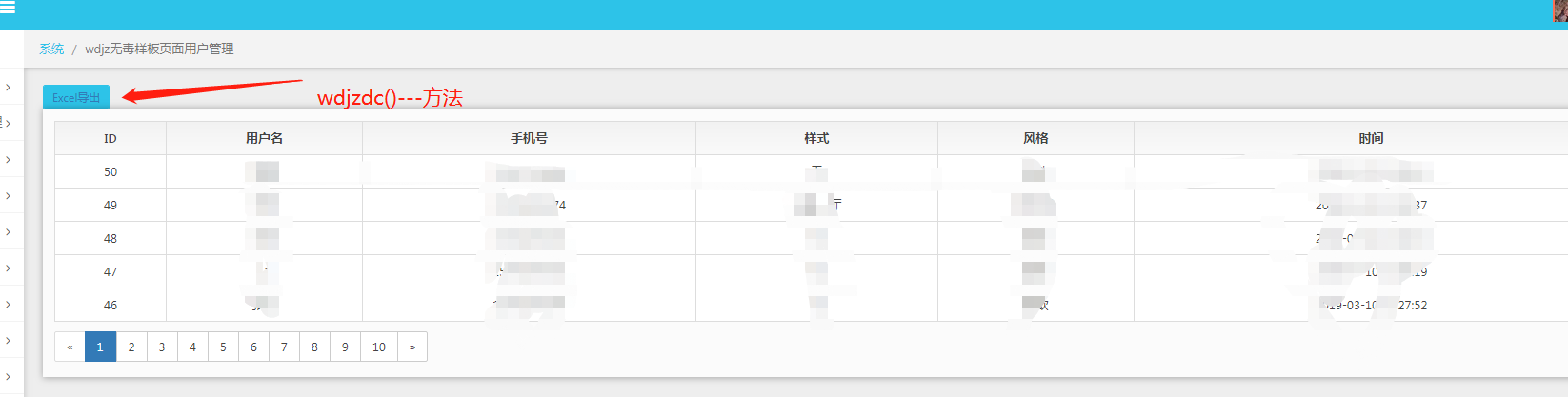
2.点击导出按钮,触发控制器里面的方法 wdjzdc()
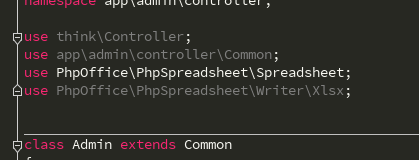
3. 在控制中引入
use PhpOffice\PhpSpreadsheet\Spreadsheet;

use PhpOffice\PhpSpreadsheet\Writer\Xlsx;
//wdjzdc数据导出

    public function wdjzdc()

    {

        $spreadsheet = new Spreadsheet();

        $worksheet = $spreadsheet->getActiveSheet();

//设置工作表标题名称

        $worksheet->setTitle('wdjz客户表');

//表头

//设置单元格内容

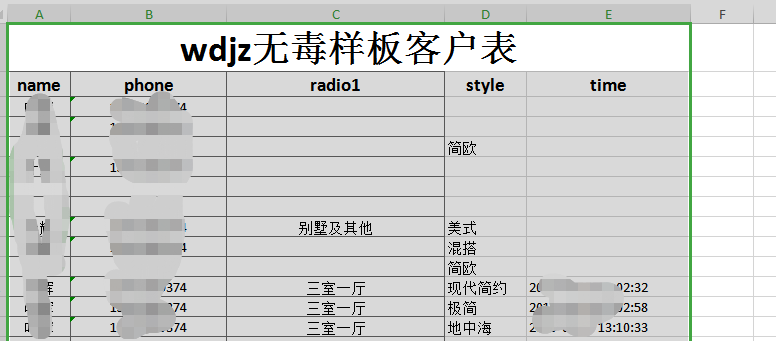
        $worksheet->setCellValueByColumnAndRow(1, 1, 'wdjz无毒样板客户表');

        $worksheet->setCellValueByColumnAndRow(1, 2, 'name');

        $worksheet->setCellValueByColumnAndRow(2, 2, 'phone');

        $worksheet->setCellValueByColumnAndRow(3, 2, 'radio1');

        $worksheet->setCellValueByColumnAndRow(4, 2, 'style');

        $worksheet->setCellValueByColumnAndRow(5, 2, 'time');

//合并单元格

        $worksheet->mergeCells('A1:E1');

        $styleArray = [

            'font' => [

                'bold' => true

            ],

            'alignment' => [

                'horizontal' => \PhpOffice\PhpSpreadsheet\Style\Alignment::HORIZONTAL_CENTER,

            ],

        ];

//设置单元格样式

        $worksheet->getStyle('A1')->applyFromArray($styleArray)->getFont()->setSize(28);

        $worksheet->getStyle('A2:E2')->applyFromArray($styleArray)->getFont()->setSize(14);

        ;

        $jzInfo = db('wdjz')->select();

        $len = count($jzInfo);

        $j = 0;

        for ($i=0; $i < $len; $i++) {

            $j = $i + 3; //从表格第3行开始

            $worksheet->setCellValueByColumnAndRow(1, $j, $jzInfo[$i]['name']);

            $worksheet->setCellValueByColumnAndRow(2, $j, $jzInfo[$i]['phone']);

            $worksheet->setCellValueByColumnAndRow(3, $j, $jzInfo[$i]['radio1']);

            $worksheet->setCellValueByColumnAndRow(4, $j, $jzInfo[$i]['style']);

            $worksheet->setCellValueByColumnAndRow(5, $j, $jzInfo[$i]['time']);

        }

        $styleArrayBody = [

            'borders' => [

                'allBorders' => [

                    'borderStyle' => \PhpOffice\PhpSpreadsheet\Style\Border::BORDER_THIN,

                    'color' => ['argb' => '666666'],

                ],

            ],

            'alignment' => [

                'horizontal' => \PhpOffice\PhpSpreadsheet\Style\Alignment::HORIZONTAL_CENTER,

            ],

        ];

        $total_jzInfo = $len + 2;

//添加所有边框/居中

        $worksheet->getStyle('A1:C'.$total_jzInfo)->applyFromArray($styleArrayBody);

        $filename = 'wdjz无毒样板客户表.xlsx';

        header('Content-Type: application/vnd.openxmlformats-officedocument.spreadsheetml.sheet');

        header('Content-Disposition: attachment;filename="'.$filename.'"');

        header('Cache-Control: max-age=0');

        $writer = \PhpOffice\PhpSpreadsheet\IOFactory::createWriter($spreadsheet, 'Xlsx');

        $writer->save('php://output');

    }
-----------------------------------摘取大神文档---------------------------------------------------------------------
1.设置表头
首先我们引入自动加载PhpSpreadsheet库,然后实例化,设置工作表标题名称为:学生成绩表,接着设置表头内容。表头分为两行,第一行是表格的名称,第二行数表格列名称。最后我们将第一行单元格进行合并,并设置表头内容样式:字体、对齐方式等。
require 'vendor/autoload.php';

use PhpOffice\PhpSpreadsheet\Spreadsheet;

use PhpOffice\PhpSpreadsheet\Writer\Xlsx;

include('conn.php'); //连接数据库

$spreadsheet = new Spreadsheet();

$worksheet = $spreadsheet->getActiveSheet();

//设置工作表标题名称

$worksheet->setTitle('学生成绩表');

//表头

//设置单元格内容

$worksheet->setCellValueByColumnAndRow(1, 1, '学生成绩表');

$worksheet->setCellValueByColumnAndRow(1, 2, '姓名');

$worksheet->setCellValueByColumnAndRow(2, 2, '语文');

$worksheet->setCellValueByColumnAndRow(3, 2, '数学');

$worksheet->setCellValueByColumnAndRow(4, 2, '外语');

$worksheet->setCellValueByColumnAndRow(5, 2, '总分');

//合并单元格

$worksheet->mergeCells('A1:E1');

$styleArray = [

    'font' => [

        'bold' => true

    ],

    'alignment' => [

        'horizontal' => \PhpOffice\PhpSpreadsheet\Style\Alignment::HORIZONTAL_CENTER,

    ],

];

//设置单元格样式

$worksheet->getStyle('A1')->applyFromArray($styleArray)->getFont()->setSize(28);

$worksheet->getStyle('A2:E2')->applyFromArray($styleArray)->getFont()->setSize(14);
2.读取数据
我们连接数据库后,直接读取学生成绩表t_student,然后for循环,设置每个单元格对应的内容,计算总成绩。注意的是表格中的数据是从第3行开始,因为第1,2行是表头占用了。
然后,我们设置整个表格样式,给表格加上边框,并且居中对齐。
$sql = "SELECT id,name,chinese,maths,english FROM `t_student`";

$stmt = $db->query($sql);

$rows = $stmt->fetchAll(PDO::FETCH_ASSOC);

$len = count($rows);

$j = 0;

for ($i=0; $i < $len; $i++) {

    $j = $i + 3; //从表格第3行开始

    $worksheet->setCellValueByColumnAndRow(1, $j, $rows[$i]['name']);

    $worksheet->setCellValueByColumnAndRow(2, $j, $rows[$i]['chinese']);

    $worksheet->setCellValueByColumnAndRow(3, $j, $rows[$i]['maths']);

    $worksheet->setCellValueByColumnAndRow(4, $j, $rows[$i]['english']);

    $worksheet->setCellValueByColumnAndRow(5, $j, $rows[$i]['chinese'] + $rows[$i]['maths'] + $rows[$i]['english']);

}

$styleArrayBody = [

    'borders' => [

        'allBorders' => [

            'borderStyle' => \PhpOffice\PhpSpreadsheet\Style\Border::BORDER_THIN,

            'color' => ['argb' => '666666'],

        ],

    ],

    'alignment' => [

        'horizontal' => \PhpOffice\PhpSpreadsheet\Style\Alignment::HORIZONTAL_CENTER,

    ],

];

$total_rows = $len + 2;

//添加所有边框/居中

$worksheet->getStyle('A1:E'.$total_rows)->applyFromArray($styleArrayBody);
如果仅是为了满足文章开头说的老板的需求,我们这个时候就可以将数据保存为Excel文件,当然这个Excel文件只保存在服务器上,然后再使用邮件等方式将Excel发送给老板就结了。
但是我们更多的应用场景是用户直接将数据下载导出为Excel表格文件,请接着看:
3.下载保存
最后,我们强制浏览器下载数据并保存为Excel文件。
$filename = '成绩表.xlsx';

header('Content-Type: application/vnd.openxmlformats-officedocument.spreadsheetml.sheet');

header('Content-Disposition: attachment;filename="'.$filename.'"');

header('Cache-Control: max-age=0');

$writer = \PhpOffice\PhpSpreadsheet\IOFactory::createWriter($spreadsheet, 'Xlsx');

$writer->save('php://output');
如果你想要保存为.xls文件格式的话,可以改下header代码:
$filename = '成绩表.xlsx';

header('Content-Type: application/vnd.ms-excel');

header('Content-Disposition: attachment;filename="'.$filename.'"');

header('Cache-Control: max-age=0');

$writer = \PhpOffice\PhpSpreadsheet\IOFactory::createWriter($spreadsheet, 'xls');

$writer->save('php://output');
PhpSpreadsheet提供了很多选项设置,接下来的文章我会专门介绍有关生成Excel的设置,如样式:字体、对齐、颜色、行高于列宽,合并与拆分、图片、日期时间、换行、函数使用等等。敬请关注。
TP5使用Composer安装phpoffice/phpspreadsheet,导出Excel文件的更多相关文章
- tp5.0 composer下载phpexcel 实现导出excel 表格
tp5.0 composer下载phpexcel 实现导出excel 表格 1.在下载好的tp5.0 框架里面使用 composer 下载phpexcel 的插件 composer require p ...
- c# listview导出excel文件
首先在工程中需要添加对Microsoft Excel office 11.0 object的引用 生成excel的类代码如下 using System; using System.Collection ...
- HTML导出Excel文件(兼容IE及所有浏览器)
注意:IE浏览器需要以下设置: 打开IE,在常用工具栏中选择“工具”--->Internet选项---->选择"安全"标签页--->选择"自定义级别&q ...
- EasyUI 如何结合JS导出Excel文件
出处:http://blog.csdn.net/jumtre/article/details/41119991 EasyUI 如何结合JS导出Excel文件 分类: 技术 Javascript jQu ...
- 使用vue导出excel文件
今天再开发中遇到一件事情,就是怎样用已有数据导出excel文件,网上有许多方法,有说用数据流的方式,https://www.cnblogs.com/yeqrblog/p/9758981.html,但是 ...
- vue+element 表格导出Excel文件
https://www.cnblogs.com/bobodeboke/p/8867481.html 非常感谢 这个大佬 才让我搞到了Blob.js 和 Export2Excel.js 如果最后运行时 ...
- 纯前端实现数据导出excel文件
一 安装依赖 npm install -S file-saver xlsx npm install -D script-loader 二 新建文件夹 在网上百度引入即可 三 在main.js中引入 ...
- ASP.NET Core导入导出Excel文件
ASP.NET Core导入导出Excel文件 希望在ASP.NET Core中导入导出Excel文件,在网上搜了一遍,基本都是使用EPPlus插件,EPPlus挺好用,但商用需要授权,各位码友若有好 ...
- 前端必读3.0:如何在 Angular 中使用SpreadJS实现导入和导出 Excel 文件
在之前的文章中,我们为大家分别详细介绍了在JavaScript.React中使用SpreadJS导入和导出Excel文件的方法,作为带给广大前端开发者的"三部曲",本文我们将为大家 ...
随机推荐
- Netty 零拷贝(三)Netty 对零拷贝的改进
Netty 零拷贝(三)Netty 对零拷贝的改进 Netty 系列目录 (https://www.cnblogs.com/binarylei/p/10117436.html) Netty 的&quo ...
- 深入浅出 JMS(三) - ActiveMQ 安全机制
深入浅出 JMS(三) - ActiveMQ 安全机制 一.认证 认证(Authentication):验证某个实体或者用户是否有权限访问受保护资源. MQ 提供两种插件用于权限认证: (一).Sim ...
- Maven系列(一)plugin
Maven系列(一)plugin maven-compiler-plugin 使用 mvn compile 命令,出现错误: 编码 GBK 的不可映射字符而不能编译.这是因为代码或注释中存在中文引起的 ...
- jquery 插入节点的方法
方法 描述 示例 append() 向每个匹配的元素内部追加内容 HTML代码: <p>我想说:</p> jQuery代码: $("p").append(& ...
- 【Win】使用ScreenToGif制作gif动态图片
ScreenToGif 经常要写各类教程,有时候需要制作一些演示动画,GIF动画图片是个不错的选择,ScreenToGif是一款GIF录屏软件,下载地址可自行百度. 运行环境 操作系统:windows ...
- 2018.10.08 NOIP模拟 斐波那契(贪心+hash/map)
传送门 签到题. 显然是可以贪心分组的,也就是尽量跟当前的分成一组. 这时我们需要判断a[l]+a[r],a[l+1]+a[r]...a[r−1]+a[r]a[l]+a[r],a[l+1]+a[r]. ...
- 2018.09.16 bzoj1086: [SCOI2005]王室联邦(贪心)
传送门 就是给树分块. 对于一个节点. 如果它的几棵子树加起来超过了下限,就把它们分成一块. 这样每次可能会剩下几个节点. 把它们都加入栈中最顶上那一块就行了. 代码: #include<bit ...
- 解决yum安装时 Cannot retrieve repository metadata (repomd.xml) for repository
打开/etc/yum.repos.d/CentOS6-Base-163.repo 将下面的baseUrl的地址换成网上最新 # CentOS-Base.repo## The mirror system ...
- HDU 2504 又见GCD (最大公因数+暴力)
题意:是中文题. 析:a和c的最大公因数是b,也就是说,a和c除了b就没有公因数了.再说就是互质了. 所以先把a除以b,然后一个暴力n,满足gcd(a, n) =1,就结束,就是n倍的c. 代码如下: ...
- xib创建cell的两种方法
方法一:第一步:[self.collectionView registerNib:[UINib nibWithNibName:@"QGLShareBtnCell" bundle:n ...