
UWP 滚动条私人定制
最近突然发现微软自带的滚动条好挫哦
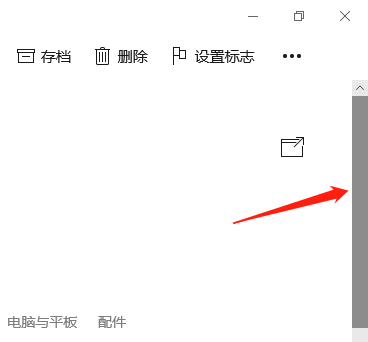
微软哒(棒棒哒)
网上找的(美美哒)
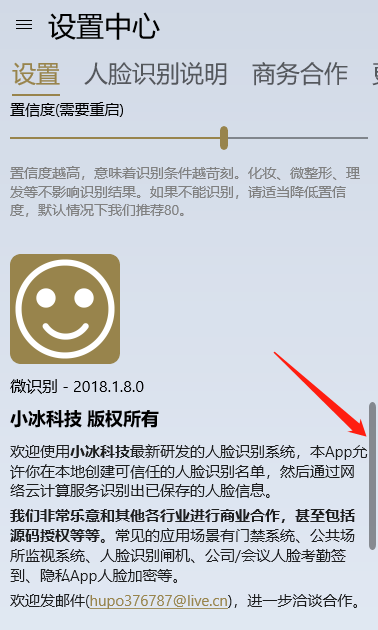
好了。
如果你想要棒棒哒,那么就不用往下看了(手动再见)。
如果你想要美美哒,就需要下面的神秘代码。

<Style TargetType="ScrollBar">
<Setter Property="MinWidth" Value="12" />
<Setter Property="MinHeight" Value="12" />
<Setter Property="Background" Value="Transparent" />
<Setter Property="Foreground" Value="Transparent" />
<Setter Property="BorderBrush" Value="Transparent" />
<Setter Property="IsTabStop" Value="False" />
<Setter Property="Template">
<Setter.Value>
<ControlTemplate TargetType="ScrollBar">
<Grid x:Name="Root">
<Grid.Resources>
<ControlTemplate x:Key="RepeatButtonTemplate" TargetType="RepeatButton">
<Grid x:Name="Root" Background="Transparent">
<VisualStateManager.VisualStateGroups>
<VisualStateGroup x:Name="CommonStates">
<VisualState x:Name="Normal" />
</VisualStateGroup>
</VisualStateManager.VisualStateGroups>
</Grid>
</ControlTemplate>
<ControlTemplate x:Key="HorizontalIncrementTemplate" TargetType="RepeatButton">
<Grid x:Name="Root">
<FontIcon
x:Name="Arrow"
FontFamily="{ThemeResource SymbolThemeFontFamily}"
FontSize="6"
Foreground="{ThemeResource SystemControlForegroundBaseHighBrush}"
Glyph=""
MirroredWhenRightToLeft="True" />
<VisualStateManager.VisualStateGroups>
<VisualStateGroup x:Name="CommonStates">
<VisualState x:Name="Normal" />
<VisualState x:Name="PointerOver">
<Storyboard>
<ObjectAnimationUsingKeyFrames Storyboard.TargetName="Root" Storyboard.TargetProperty="Background">
<DiscreteObjectKeyFrame KeyTime="0" Value="{ThemeResource SystemControlHighlightBaseMediumLowBrush}" />
</ObjectAnimationUsingKeyFrames>
<ObjectAnimationUsingKeyFrames Storyboard.TargetName="Arrow" Storyboard.TargetProperty="Foreground">
<DiscreteObjectKeyFrame KeyTime="0" Value="{ThemeResource SystemControlHighlightAltBaseHighBrush}" />
</ObjectAnimationUsingKeyFrames>
</Storyboard>
</VisualState>
<VisualState x:Name="Pressed">
<Storyboard>
<ObjectAnimationUsingKeyFrames Storyboard.TargetName="Root" Storyboard.TargetProperty="Background">
<DiscreteObjectKeyFrame KeyTime="0" Value="{ThemeResource SystemControlHighlightBaseMediumBrush}" />
</ObjectAnimationUsingKeyFrames>
<ObjectAnimationUsingKeyFrames Storyboard.TargetName="Arrow" Storyboard.TargetProperty="Foreground">
<DiscreteObjectKeyFrame KeyTime="0" Value="{ThemeResource SystemControlHighlightAltAltHighBrush}" />
</ObjectAnimationUsingKeyFrames>
</Storyboard>
</VisualState>
<VisualState x:Name="Disabled">
<Storyboard>
<ObjectAnimationUsingKeyFrames Storyboard.TargetName="Arrow" Storyboard.TargetProperty="Foreground">
<DiscreteObjectKeyFrame KeyTime="0" Value="{ThemeResource SystemControlDisabledBaseHighBrush}" />
</ObjectAnimationUsingKeyFrames>
</Storyboard>
</VisualState>
</VisualStateGroup>
</VisualStateManager.VisualStateGroups>
</Grid>
</ControlTemplate>
<ControlTemplate x:Key="HorizontalDecrementTemplate" TargetType="RepeatButton">
<Grid x:Name="Root">
<FontIcon
x:Name="Arrow"
FontFamily="{ThemeResource SymbolThemeFontFamily}"
FontSize="6"
Foreground="{ThemeResource SystemControlForegroundBaseHighBrush}"
Glyph=""
MirroredWhenRightToLeft="True" />
<VisualStateManager.VisualStateGroups>
<VisualStateGroup x:Name="CommonStates">
<VisualState x:Name="Normal" />
<VisualState x:Name="PointerOver">
<Storyboard>
<ObjectAnimationUsingKeyFrames Storyboard.TargetName="Root" Storyboard.TargetProperty="Background">
<DiscreteObjectKeyFrame KeyTime="0" Value="{ThemeResource SystemControlHighlightBaseMediumLowBrush}" />
</ObjectAnimationUsingKeyFrames>
<ObjectAnimationUsingKeyFrames Storyboard.TargetName="Arrow" Storyboard.TargetProperty="Foreground">
<DiscreteObjectKeyFrame KeyTime="0" Value="{ThemeResource SystemControlHighlightAltBaseHighBrush}" />
</ObjectAnimationUsingKeyFrames>
</Storyboard>
</VisualState>
<VisualState x:Name="Pressed">
<Storyboard>
<ObjectAnimationUsingKeyFrames Storyboard.TargetName="Root" Storyboard.TargetProperty="Background">
<DiscreteObjectKeyFrame KeyTime="0" Value="{ThemeResource SystemControlHighlightBaseMediumBrush}" />
</ObjectAnimationUsingKeyFrames>
<ObjectAnimationUsingKeyFrames Storyboard.TargetName="Arrow" Storyboard.TargetProperty="Foreground">
<DiscreteObjectKeyFrame KeyTime="0" Value="{ThemeResource SystemControlHighlightAltAltHighBrush}" />
</ObjectAnimationUsingKeyFrames>
</Storyboard>
</VisualState>
<VisualState x:Name="Disabled">
<Storyboard>
<ObjectAnimationUsingKeyFrames Storyboard.TargetName="Arrow" Storyboard.TargetProperty="Foreground">
<DiscreteObjectKeyFrame KeyTime="0" Value="{ThemeResource SystemControlDisabledBaseHighBrush}" />
</ObjectAnimationUsingKeyFrames>
</Storyboard>
</VisualState>
</VisualStateGroup>
</VisualStateManager.VisualStateGroups>
</Grid>
</ControlTemplate>
<ControlTemplate x:Key="VerticalIncrementTemplate" TargetType="RepeatButton">
<Grid x:Name="Root">
<FontIcon
x:Name="Arrow"
FontFamily="{ThemeResource SymbolThemeFontFamily}"
FontSize="6"
Foreground="{ThemeResource SystemControlForegroundBaseHighBrush}"
Glyph="" />
<VisualStateManager.VisualStateGroups>
<VisualStateGroup x:Name="CommonStates">
<VisualState x:Name="Normal" />
<VisualState x:Name="PointerOver">
<Storyboard>
<ObjectAnimationUsingKeyFrames Storyboard.TargetName="Root" Storyboard.TargetProperty="Background">
<DiscreteObjectKeyFrame KeyTime="0" Value="{ThemeResource SystemControlHighlightBaseMediumLowBrush}" />
</ObjectAnimationUsingKeyFrames>
<ObjectAnimationUsingKeyFrames Storyboard.TargetName="Arrow" Storyboard.TargetProperty="Foreground">
<DiscreteObjectKeyFrame KeyTime="0" Value="{ThemeResource SystemControlHighlightAltBaseHighBrush}" />
</ObjectAnimationUsingKeyFrames>
</Storyboard>
</VisualState>
<VisualState x:Name="Pressed">
<Storyboard>
<ObjectAnimationUsingKeyFrames Storyboard.TargetName="Root" Storyboard.TargetProperty="Background">
<DiscreteObjectKeyFrame KeyTime="0" Value="{ThemeResource SystemControlHighlightBaseMediumBrush}" />
</ObjectAnimationUsingKeyFrames>
<ObjectAnimationUsingKeyFrames Storyboard.TargetName="Arrow" Storyboard.TargetProperty="Foreground">
<DiscreteObjectKeyFrame KeyTime="0" Value="{ThemeResource SystemControlHighlightAltAltHighBrush}" />
</ObjectAnimationUsingKeyFrames>
</Storyboard>
</VisualState>
<VisualState x:Name="Disabled">
<Storyboard>
<ObjectAnimationUsingKeyFrames Storyboard.TargetName="Arrow" Storyboard.TargetProperty="Foreground">
<DiscreteObjectKeyFrame KeyTime="0" Value="{ThemeResource SystemControlDisabledBaseHighBrush}" />
</ObjectAnimationUsingKeyFrames>
</Storyboard>
</VisualState>
</VisualStateGroup>
</VisualStateManager.VisualStateGroups>
</Grid>
</ControlTemplate>
<ControlTemplate x:Key="VerticalDecrementTemplate" TargetType="RepeatButton">
<Grid x:Name="Root">
<FontIcon
x:Name="Arrow"
FontFamily="{ThemeResource SymbolThemeFontFamily}"
FontSize="6"
Foreground="{ThemeResource SystemControlForegroundBaseHighBrush}"
Glyph="" />
<VisualStateManager.VisualStateGroups>
<VisualStateGroup x:Name="CommonStates">
<VisualState x:Name="Normal" />
<VisualState x:Name="PointerOver">
<Storyboard>
<ObjectAnimationUsingKeyFrames Storyboard.TargetName="Root" Storyboard.TargetProperty="Background">
<DiscreteObjectKeyFrame KeyTime="0" Value="{ThemeResource SystemControlHighlightBaseMediumLowBrush}" />
</ObjectAnimationUsingKeyFrames>
<ObjectAnimationUsingKeyFrames Storyboard.TargetName="Arrow" Storyboard.TargetProperty="Foreground">
<DiscreteObjectKeyFrame KeyTime="0" Value="{ThemeResource SystemControlHighlightAltBaseHighBrush}" />
</ObjectAnimationUsingKeyFrames>
</Storyboard>
</VisualState>
<VisualState x:Name="Pressed">
<Storyboard>
<ObjectAnimationUsingKeyFrames Storyboard.TargetName="Root" Storyboard.TargetProperty="Background">
<DiscreteObjectKeyFrame KeyTime="0" Value="{ThemeResource SystemControlHighlightBaseMediumBrush}" />
</ObjectAnimationUsingKeyFrames>
<ObjectAnimationUsingKeyFrames Storyboard.TargetName="Arrow" Storyboard.TargetProperty="Foreground">
<DiscreteObjectKeyFrame KeyTime="0" Value="{ThemeResource SystemControlHighlightAltAltHighBrush}" />
</ObjectAnimationUsingKeyFrames>
</Storyboard>
</VisualState>
<VisualState x:Name="Disabled">
<Storyboard>
<ObjectAnimationUsingKeyFrames Storyboard.TargetName="Arrow" Storyboard.TargetProperty="Foreground">
<DiscreteObjectKeyFrame KeyTime="0" Value="{ThemeResource SystemControlDisabledBaseHighBrush}" />
</ObjectAnimationUsingKeyFrames>
</Storyboard>
</VisualState>
</VisualStateGroup>
</VisualStateManager.VisualStateGroups>
</Grid>
</ControlTemplate>
<ControlTemplate x:Key="VerticalThumbTemplate" TargetType="Thumb">
<Rectangle
x:Name="ThumbVisual"
Fill="{ThemeResource SystemControlForegroundBaseLowBrush}"
RadiusX="5"
RadiusY="5">
<VisualStateManager.VisualStateGroups>
<VisualStateGroup x:Name="CommonStates">
<VisualState x:Name="Normal" />
<VisualState x:Name="PointerOver">
<Storyboard>
<ObjectAnimationUsingKeyFrames Storyboard.TargetName="ThumbVisual" Storyboard.TargetProperty="Fill">
<DiscreteObjectKeyFrame KeyTime="0" Value="{ThemeResource SystemControlHighlightBaseMediumLowBrush}" />
</ObjectAnimationUsingKeyFrames>
</Storyboard>
</VisualState>
<VisualState x:Name="Pressed">
<Storyboard>
<ObjectAnimationUsingKeyFrames Storyboard.TargetName="ThumbVisual" Storyboard.TargetProperty="Fill">
<DiscreteObjectKeyFrame KeyTime="0" Value="{ThemeResource SystemControlHighlightBaseMediumBrush}" />
</ObjectAnimationUsingKeyFrames>
</Storyboard>
</VisualState>
<VisualState x:Name="Disabled">
<Storyboard>
<DoubleAnimation
Storyboard.TargetName="ThumbVisual"
Storyboard.TargetProperty="Opacity"
To="0"
Duration="0" />
</Storyboard>
</VisualState>
</VisualStateGroup>
</VisualStateManager.VisualStateGroups>
</Rectangle>
</ControlTemplate>
<ControlTemplate x:Key="HorizontalThumbTemplate" TargetType="Thumb">
<Rectangle
x:Name="ThumbVisual"
Fill="{ThemeResource SystemControlForegroundBaseLowBrush}"
RadiusX="5"
RadiusY="5">
<VisualStateManager.VisualStateGroups>
<VisualStateGroup x:Name="CommonStates">
<VisualState x:Name="Normal" />
<VisualState x:Name="PointerOver">
<Storyboard>
<ObjectAnimationUsingKeyFrames Storyboard.TargetName="ThumbVisual" Storyboard.TargetProperty="Fill">
<DiscreteObjectKeyFrame KeyTime="0" Value="{ThemeResource SystemControlHighlightBaseMediumLowBrush}" />
</ObjectAnimationUsingKeyFrames>
</Storyboard>
</VisualState>
<VisualState x:Name="Pressed">
<Storyboard>
<ObjectAnimationUsingKeyFrames Storyboard.TargetName="ThumbVisual" Storyboard.TargetProperty="Fill">
<DiscreteObjectKeyFrame KeyTime="0" Value="{ThemeResource SystemControlHighlightBaseMediumBrush}" />
</ObjectAnimationUsingKeyFrames>
</Storyboard>
</VisualState>
<VisualState x:Name="Disabled">
<Storyboard>
<DoubleAnimation
Storyboard.TargetName="ThumbVisual"
Storyboard.TargetProperty="Opacity"
To="0"
Duration="0" />
</Storyboard>
</VisualState>
</VisualStateGroup>
</VisualStateManager.VisualStateGroups>
</Rectangle>
</ControlTemplate>
</Grid.Resources>
<Grid x:Name="HorizontalRoot" IsHitTestVisible="False">
<Grid.ColumnDefinitions>
<ColumnDefinition Width="Auto" />
<ColumnDefinition Width="Auto" />
<ColumnDefinition Width="Auto" />
<ColumnDefinition Width="*" />
<ColumnDefinition Width="Auto" />
</Grid.ColumnDefinitions>
<Rectangle
x:Name="HorizontalTrackRect"
Grid.ColumnSpan="5"
Height="7"
Margin="0"
Fill="Transparent"
RadiusX="5"
RadiusY="5"
Stroke="{ThemeResource SystemControlForegroundTransparentBrush}"
StrokeThickness="{ThemeResource ScrollBarTrackBorderThemeThickness}" />
<RepeatButton
x:Name="HorizontalSmallDecrease"
Grid.Column="0"
Width="12"
MinHeight="12"
Margin="0"
VerticalAlignment="Center"
Interval="50"
IsTabStop="False"
Opacity="0"
Template="{StaticResource HorizontalDecrementTemplate}" />
<RepeatButton
x:Name="HorizontalLargeDecrease"
Grid.Column="1"
Width="0"
HorizontalAlignment="Stretch"
VerticalAlignment="Stretch"
Interval="50"
IsTabStop="False"
Opacity="0"
Template="{StaticResource RepeatButtonTemplate}" />
<Thumb
x:Name="HorizontalThumb"
Grid.Column="2"
Height="7"
MinWidth="12"
AutomationProperties.AccessibilityView="Raw"
Background="{ThemeResource SystemControlForegroundChromeHighBrush}"
Template="{StaticResource HorizontalThumbTemplate}" />
<RepeatButton
x:Name="HorizontalLargeIncrease"
Grid.Column="3"
HorizontalAlignment="Stretch"
VerticalAlignment="Stretch"
Interval="50"
IsTabStop="False"
Opacity="0"
Template="{StaticResource RepeatButtonTemplate}" />
<RepeatButton
x:Name="HorizontalSmallIncrease"
Grid.Column="4"
Width="12"
MinHeight="12"
Margin="0"
VerticalAlignment="Center"
Interval="50"
IsTabStop="False"
Opacity="0"
Template="{StaticResource HorizontalIncrementTemplate}" />
</Grid>
<Grid x:Name="HorizontalPanningRoot" MinWidth="24">
<Border
x:Name="HorizontalPanningThumb"
Height="2"
MinWidth="32"
Margin="0,2,0,2"
HorizontalAlignment="Left"
VerticalAlignment="Bottom"
Background="{ThemeResource SystemControlForegroundChromeDisabledLowBrush}"
BorderThickness="0" />
</Grid>
<Grid x:Name="VerticalRoot" IsHitTestVisible="False">
<Grid.RowDefinitions>
<RowDefinition Height="Auto" />
<RowDefinition Height="Auto" />
<RowDefinition Height="Auto" />
<RowDefinition Height="*" />
<RowDefinition Height="Auto" />
</Grid.RowDefinitions>
<Rectangle
x:Name="VerticalTrackRect"
Grid.RowSpan="5"
Height="7"
Margin="0"
RadiusX="5"
RadiusY="5"
Stroke="{ThemeResource SystemControlForegroundTransparentBrush}"
StrokeThickness="{ThemeResource ScrollBarTrackBorderThemeThickness}" />
<RepeatButton
x:Name="VerticalSmallDecrease"
Grid.Row="0"
Height="12"
MinWidth="12"
Margin="0"
HorizontalAlignment="Center"
Interval="50"
IsHitTestVisible="False"
IsTabStop="False"
Opacity="0"
Template="{StaticResource VerticalDecrementTemplate}" />
<RepeatButton
x:Name="VerticalLargeDecrease"
Grid.Row="1"
Height="0"
HorizontalAlignment="Stretch"
VerticalAlignment="Stretch"
Interval="50"
IsHitTestVisible="False"
IsTabStop="False"
Opacity="0"
Template="{StaticResource RepeatButtonTemplate}" />
<Thumb
x:Name="VerticalThumb"
Grid.Row="2"
Width="7"
MinHeight="12"
AutomationProperties.AccessibilityView="Raw"
Background="#FFEAEAEA"
Template="{StaticResource VerticalThumbTemplate}" />
<RepeatButton
x:Name="VerticalLargeIncrease"
Grid.Row="3"
HorizontalAlignment="Stretch"
VerticalAlignment="Stretch"
Interval="50"
IsHitTestVisible="False"
IsTabStop="False"
Opacity="0"
Template="{StaticResource RepeatButtonTemplate}" />
<RepeatButton
x:Name="VerticalSmallIncrease"
Grid.Row="4"
Height="12"
MinWidth="12"
Margin="0"
HorizontalAlignment="Center"
Interval="50"
IsHitTestVisible="False"
IsTabStop="False"
Opacity="0"
Template="{StaticResource VerticalIncrementTemplate}" />
</Grid>
<Grid x:Name="VerticalPanningRoot" MinHeight="24">
<Border
x:Name="VerticalPanningThumb"
Width="2"
MinHeight="32"
Margin="2,0,2,0"
HorizontalAlignment="Right"
VerticalAlignment="Top"
Background="#FFEAEAEA"
BorderThickness="0" />
</Grid>
<VisualStateManager.VisualStateGroups>
<VisualStateGroup x:Name="CommonStates">
<VisualState x:Name="Normal" />
<VisualState x:Name="PointerOver" />
<VisualState x:Name="Disabled">
<Storyboard>
<DoubleAnimation
Storyboard.TargetName="Root"
Storyboard.TargetProperty="Opacity"
To="0.5"
Duration="0" />
<ObjectAnimationUsingKeyFrames Storyboard.TargetName="HorizontalTrackRect" Storyboard.TargetProperty="Stroke">
<DiscreteObjectKeyFrame KeyTime="0" Value="{ThemeResource SystemControlDisabledTransparentBrush}" />
</ObjectAnimationUsingKeyFrames>
<ObjectAnimationUsingKeyFrames Storyboard.TargetName="VerticalTrackRect" Storyboard.TargetProperty="Stroke">
<DiscreteObjectKeyFrame KeyTime="0" Value="{ThemeResource SystemControlDisabledTransparentBrush}" />
</ObjectAnimationUsingKeyFrames>
<ObjectAnimationUsingKeyFrames Storyboard.TargetName="HorizontalPanningThumb" Storyboard.TargetProperty="Background">
<DiscreteObjectKeyFrame KeyTime="0" Value="{ThemeResource SystemControlDisabledChromeHighBrush}" />
</ObjectAnimationUsingKeyFrames>
</Storyboard>
</VisualState>
</VisualStateGroup>
<VisualStateGroup x:Name="ScrollingIndicatorStates">
<VisualState x:Name="TouchIndicator">
<Storyboard>
<FadeInThemeAnimation TargetName="HorizontalPanningRoot" />
<FadeInThemeAnimation TargetName="VerticalPanningRoot" />
<FadeOutThemeAnimation TargetName="HorizontalRoot" />
<FadeOutThemeAnimation TargetName="VerticalRoot" />
<ObjectAnimationUsingKeyFrames
Storyboard.TargetName="HorizontalRoot"
Storyboard.TargetProperty="Visibility"
Duration="0">
<DiscreteObjectKeyFrame KeyTime="0">
<DiscreteObjectKeyFrame.Value>
<Visibility>Collapsed</Visibility>
</DiscreteObjectKeyFrame.Value>
</DiscreteObjectKeyFrame>
</ObjectAnimationUsingKeyFrames>
<ObjectAnimationUsingKeyFrames
Storyboard.TargetName="VerticalRoot"
Storyboard.TargetProperty="Visibility"
Duration="0">
<DiscreteObjectKeyFrame KeyTime="0">
<DiscreteObjectKeyFrame.Value>
<Visibility>Collapsed</Visibility>
</DiscreteObjectKeyFrame.Value>
</DiscreteObjectKeyFrame>
</ObjectAnimationUsingKeyFrames>
</Storyboard>
</VisualState>
<VisualState x:Name="MouseIndicator">
<Storyboard>
<FadeInThemeAnimation TargetName="HorizontalRoot" />
<FadeInThemeAnimation TargetName="VerticalRoot" />
<FadeOutThemeAnimation TargetName="HorizontalPanningRoot" />
<ObjectAnimationUsingKeyFrames
Storyboard.TargetName="HorizontalPanningRoot"
Storyboard.TargetProperty="Visibility"
Duration="0">
<DiscreteObjectKeyFrame KeyTime="0">
<DiscreteObjectKeyFrame.Value>
<Visibility>Collapsed</Visibility>
</DiscreteObjectKeyFrame.Value>
</DiscreteObjectKeyFrame>
</ObjectAnimationUsingKeyFrames>
<FadeOutThemeAnimation TargetName="VerticalPanningRoot" />
<ObjectAnimationUsingKeyFrames
Storyboard.TargetName="VerticalPanningRoot"
Storyboard.TargetProperty="Visibility"
Duration="0">
<DiscreteObjectKeyFrame KeyTime="0">
<DiscreteObjectKeyFrame.Value>
<Visibility>Collapsed</Visibility>
</DiscreteObjectKeyFrame.Value>
</DiscreteObjectKeyFrame>
</ObjectAnimationUsingKeyFrames>
<ObjectAnimationUsingKeyFrames Storyboard.TargetName="HorizontalRoot" Storyboard.TargetProperty="IsHitTestVisible">
<DiscreteObjectKeyFrame KeyTime="0">
<DiscreteObjectKeyFrame.Value>
<x:Boolean>True</x:Boolean>
</DiscreteObjectKeyFrame.Value>
</DiscreteObjectKeyFrame>
</ObjectAnimationUsingKeyFrames>
<ObjectAnimationUsingKeyFrames Storyboard.TargetName="VerticalRoot" Storyboard.TargetProperty="IsHitTestVisible">
<DiscreteObjectKeyFrame KeyTime="0">
<DiscreteObjectKeyFrame.Value>
<x:Boolean>True</x:Boolean>
</DiscreteObjectKeyFrame.Value>
</DiscreteObjectKeyFrame>
</ObjectAnimationUsingKeyFrames>
</Storyboard>
</VisualState>
<VisualState x:Name="NoIndicator">
<Storyboard>
<FadeOutThemeAnimation BeginTime="0" TargetName="HorizontalPanningRoot" />
<FadeOutThemeAnimation BeginTime="0" TargetName="VerticalPanningRoot" />
<FadeOutThemeAnimation BeginTime="0" TargetName="HorizontalRoot" />
<FadeOutThemeAnimation BeginTime="0" TargetName="VerticalRoot" />
</Storyboard>
</VisualState>
</VisualStateGroup>
</VisualStateManager.VisualStateGroups>
</Grid>
</ControlTemplate>
</Setter.Value>
</Setter>
</Style>
这段神秘代码可以应用在ScrollViewer, ListView, TextBox(多行),GridView等等。
UWP 滚动条私人定制的更多相关文章
- UWP TextBox私人定制
这次私人定制的是背景透明的TextBox,普通的TextBox在获取焦点后,背景色就变白色了. 下面的代码可以让TextBox的背景始终是透明的. 其实很简单,就修改了 <Setter Prop ...
- 私人定制自己的linux小系统
私人定制自己的linux小系统 一.前言 linux操作系统至1991.10.5号诞生以来,就源其开源性和自由性得到了很多技术大牛的青睐,每个linux爱好者都为其贡献了自己的一份力,不管是在 ...
- 高级私人定制西服品牌:XUAN PRIVE 为定制而生_乐活_onlylady女人志
高级私人定制西服品牌:XUAN PRIVE 为定制而生_乐活_onlylady女人志 高级私人定制西服品牌:XUAN PRIVE 为定制而生
- OSX: 私人定制Dock默认程序图标
不论什么一个新用户第一次登陆后,OSX都会自己主动地在用户的Dock中列出系统默认的应用程序图标,这些图标随着OSX版本号的不同而不同. 系统管理员有的时候须要改变这些系统默认图标,或者加入自己的或者 ...
- 去英国Savile Row 做件私人定制手工西装_GQ男士网
去英国Savile Row 做件私人定制手工西装_GQ男士网 去英国Savile Row 做件私人定制手工西装
- 绫致时装讲述O2O细节:野心在“私人定制” - 移动购物 - 亿邦动力网
绫致时装讲述O2O细节:野心在"私人定制" - 移动购物 - 亿邦动力网 绫致时装讲述O2O细节:野心在"私人定制" 作者: 亿邦动力网来源: 亿邦动力网201 ...
- 私人定制javascript事件处理机制(浅谈)
看到园子里关于事件监听发表的文章,我都有点不好意思写了.不过想想我的题目以私人定制作开头也就妥妥地写吧. 事件相关概念 1.事件类型 发生事件的字符串 有传统事件类型 比如表单.window事件等 D ...
- 旅行app(游记、攻略、私人定制) | 顺便游旅行H5移动端实例
<顺便游旅行>是一款H5移动端旅行app,提供目的地(国内.国外.周边)搜索.旅游攻略查询.游记分享.私人定制4大模块,类似携程.同程.去哪儿.马蜂窝移动端,只不过顺便游app界面更为简洁 ...
- JWinner:一个私人定制的快速开发框架,为理想而生
关于JWinner JWinner是一个JAVA项目的快速开发框架,他已经实现了大多数项目开发之前需要进行的一些必备工作,还有很多在开发过程中可能会用到的工具集. JWinner的诞生并不是一蹴而就的 ...
随机推荐
- Mysql--通俗易懂的左连接、右连接、内连接
刚开始看书的时候花了好长时间理解 先通俗易懂的描述下: left join(左联接): 返回包括左表中的所有记录和右表中联结字段相等的记录. right join(右联接): 返回包括右表中的所有记录 ...
- mysql8.0 安装
之前一直使用的是zabbix3.4和mariadb5.5;感觉良好!!!但是...因其他原因需要重新部署 这次规划使用zabbix4.0和mysql8.0结合使用:嗯~~应该不会错吧!!! zabbi ...
- 用eval似乎会执行结果一次性返回,结果显示的是一行
with open(r'商品资料','r',encoding='utf-8') as f1: lis_goods = eval(f1.read()) # 用eval似乎会执行结果一次性返回,结果显示的 ...
- 两周以来的学习成果&遇到的问题及解决:
1.学习java的基本内容,看慕课网上的java入门三季,与韩顺平老师的java视频 刚开始是看韩顺平老师的视频,边看边实战,内容很细,也很快熟练,但是进度太慢.后来就先看了慕课网上的java 入门的 ...
- Notepad++调用python
***首先确保在cmd下能直接运行python*** (博主的环境:win10 下2和3共存) 接下来进入主题,用Notepad++打开py文件,然后按 F5 键弹出运行窗口,输入以下内容: pyth ...
- css3画图那些事(三角形、圆形、梯形等)
闲来无事,写写图形.当时巩固一下css3吧..前端小白,写的不好还请前辈多指教. 三角形 { width:; height:; border-bottom: 140px solid red ; bor ...
- 51nod 1444 破坏道路(bfs+枚举)
1444 破坏道路 题目来源: CodeForces 基准时间限制:1.5 秒 空间限制:131072 KB 分值: 80 难度:5级算法题 收藏 关注 在某一个国家,那儿有n个城市,他们通过m条双向 ...
- 自定义控件(视图)2期笔记14:自定义视图之View事件分发 dispatchTouchEvent,onTouch,onTouchEvent,onClick逻辑顺序过程
1. 这里我们先从案例角度说明dispatchTouchEvent,onTouch,onTouchEvent,onClick逻辑顺序过程: (1)首先我们重写一个MyButton 继承自 Button ...
- Type Safety and Type Inference
Swift is a type-safe language. A type safe language encourages you to be clear about the types of va ...
- node-webkit,nwjs 系统托盘【Tray】实践
参照自:https://www.cnblogs.com/xuanhun/p/3678943.html Tray包含title.tooltip.icon.menu.alticon五个属性. title属 ...