
【转载】Leaflet 中文api
L.Map
API各种类中的核心部分,用来在页面中创建地图并操纵地图.
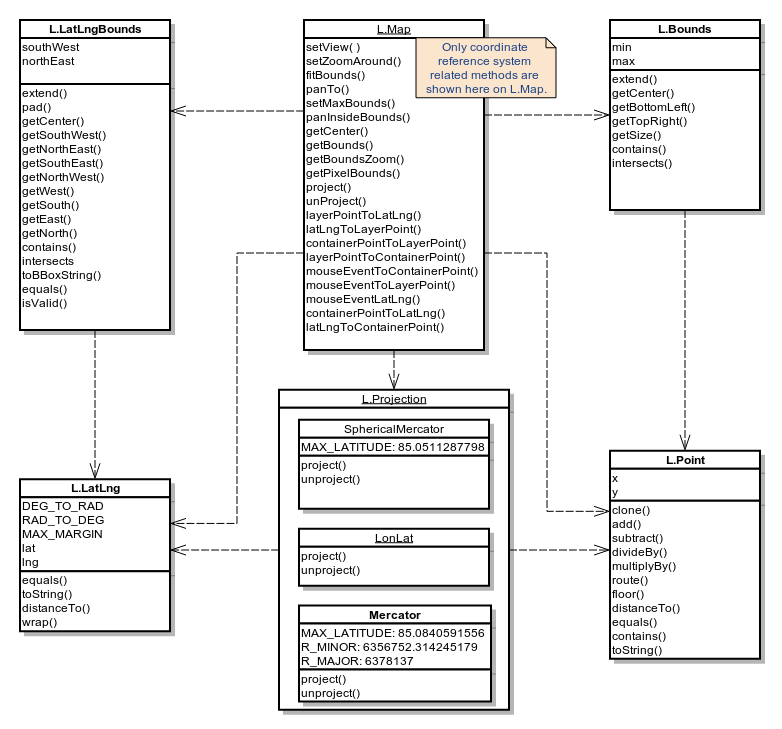
使用 example
// initialize the map on the "map" div with a given center and zoom

var map = L.map('map', {

	center: [51.505, -0.09],

	zoom: 13

});
构造器
| 构造器 | 使用 | 描述 |
|---|---|---|
L.Map( <HTMLElement|String> id, <Map options> options? ) |
new L.Map(…)L.map(…) |
通过div元素和带有地图选项的描述的文字对象来实例化一个地图对象,其中文字对象是可选的。 |
Options
Map State Options
| 选项 | 类型 | 默认值 | 描述 |
|---|---|---|---|
center |
LatLng |
null |
初始化地图的地理中心. |
zoom |
Number |
null |
初始化地图的缩放. |
layers |
ILayer[] |
null |
初始化后加载到地图上的图层. |
minZoom |
Number |
null |
地图的最小视图。可以重写地图图层的minZoom. |
maxZoom |
Number |
null |
地图的最大视图。可以重写地图图层的maxZoom. |
maxBounds |
LatLngBounds |
null |
当这个选项被设置后,地图被限制在给定的地理边界内,当用户平移将地图拖动到视图以外的范围时会出现弹回的效果, 并且也不允许缩小视图到给定范围以外的区域(这取决于地图的尺寸)。 使用setMaxBounds方法可以动态地设置这种约束. |
crs |
CRS |
L.CRS. |
使用的坐标系,当你不确定坐标系是什么时请不要更改. |
Interaction Options
| 选项 | 类型 | 默认值 | 描述 |
|---|---|---|---|
dragging |
Boolean |
true |
决定地图是否可被鼠标或触摸拖动. |
touchZoom |
Boolean |
true |
决定地图是否可被两只手指触摸拖拽缩放. |
scrollWheelZoom |
Boolean |
true |
决定地图是否被被鼠标滚轮滚动缩放. |
doubleClickZoom |
Boolean |
true |
决定地图是否可被双击缩放. |
boxZoom |
Boolean |
true |
决定地图是否可被缩放到鼠标拖拽出的矩形的视图,鼠标拖拽时需要同时按住shift键. |
tap |
Boolean |
true |
Enables mobile hacks for supporting instant taps (fixing 200ms click delay on iOS/Android) and touch holds (fired as contextmenu events). |
tapTolerance |
Number |
15 |
The max number of pixels a user can shift his finger during touch for it to be considered a valid tap. |
trackResize |
Boolean |
true |
确定地图在窗口尺寸改变时是否可以自动处理浏览器以更新视图. |
worldCopyJump |
Boolean |
false |
当这个选项可用时,当你平移地图到其另一个领域时会被地图捕获到,并无缝地跳转到原始的领域以保证所有标注、矢量图层之类的覆盖物仍然可见. |
closePopupOnClick |
Boolean |
true |
当你不想用户点击地图关闭消息弹出框时,请将其设置为false . |
Keyboard Navigation Options
| 选项 | 类型 | 默认值 | 描述 |
|---|---|---|---|
keyboard |
Boolean |
true |
聚焦到地图且允许用户通过键盘的方向键和+/-键来漫游地图. |
keyboardPanOffset |
Number |
80 |
确定按键盘方向键时地图平移的像素. |
keyboardZoomOffset |
Number |
1 |
确定键盘+ or -键对于的缩放级数. |
Panning Inertia Options
| 选项 | 类型 | 默认值 | 描述 |
|---|---|---|---|
inertia |
Boolean |
true |
如果该选项可用,在拖动和在某一时间段内持续朝同一方向移动建有动力的地图时,会有惯性的效果. |
inertiaDeceleration |
Number |
3000 |
确定惯性移动减速的速率,单位是像素每秒的二次方2. |
inertiaMaxSpeed |
Number |
1500 |
惯性移动的最大速度,单位是像素每秒. |
inertiaThreshold |
Number |
depends |
放开鼠标或是触摸来停止惯性移动与移动停止之间的毫秒数. |
Control options
| 选项 | 类型 | 默认值 | 描述 |
|---|---|---|---|
zoomControl |
Boolean |
true |
确定zoom control是否默认加载在地图上 . |
attributionControl |
Boolean |
true |
确定attribution control是否默认加载在地图上. |
Animation options
| 选项 | 类型 | 默认值 | 描述 |
|---|---|---|---|
fadeAnimation |
Boolean |
depends | 确定瓦片淡出动画是否可用。通常默认在所有浏览器中都支持CSS3转场,android例外. |
zoomAnimation |
Boolean |
depends | 确定瓦片缩放动画是否可用。通常默认在所有浏览器中都支持CSS3转场,android例外. |
zoomAnimationThreshold |
Number |
4 | Won't animate zoom if the zoom difference exceeds this value. |
markerZoomAnimation |
Boolean |
depends | 确定注记的缩放是否随地图缩放动画而播放,如果被禁用,注记在动画中拉长时会消失。通常默认在所有浏览器中都支持CSS3转场,android例外. |
Events
You can subscribe to the following events using these methods.
| Event | Data | 描述 |
|---|---|---|
click |
MouseEvent |
用户点击或触摸地图时触发. |
dblclick |
MouseEvent |
用户双击或连续两次触摸地图时触发. |
mousedown |
MouseEvent |
用户按下鼠标按键时触发. |
mouseup |
MouseEvent |
用户按下鼠标按键时触发. |
mouseover |
MouseEvent |
鼠标进入地图时触发. |
mouseout |
MouseEvent |
鼠标离开地图时触发. |
mousemove |
MouseEvent |
鼠标在地图上移动时触发. |
contextmenu |
MouseEvent |
当用户在地图上按下鼠标右键时触发,如果有监听器在监听这个时间,则浏览器默认的情景菜单被禁用. |
focus |
Event |
当用户在地图上进行标引、点击或移动时进行聚焦. |
blur |
Event |
当地图失去焦点时触发. |
preclick |
MouseEvent |
当鼠标在地图上点击之前触发。有时会在点击鼠标时,并在已存在的点击事件开始处理之前想要某件事情发生时用得到. |
load |
Event |
当地图初始化时触发。(当地图的中心点和缩放初次设置时). |
unload |
Event |
Fired when the map is destroyed with remove method. |
viewreset |
Event |
当地图需要重绘内容时触发。(通常在地图缩放和载入时发生)这对于创建用户自定义的叠置图层非常有用. |
movestart |
Event |
地图视图开始改变时触发。(比如用户开始拖动地图). |
move |
Event |
所有的地图视图移动时触发. |
moveend |
Event |
当地图视图结束改变时触发。(比如用户停止拖动地图). |
dragstart |
Event |
用户开始拖动地图时触发. |
drag |
Event |
用户拖动地图时不断重复地触发. |
dragend |
Event |
用户停止拖动时触发. |
zoomstart |
Event |
当地图缩放即将发生时触发。(比如缩放动作开始前). |
zoomend |
Event |
当地图缩放时触发. |
zoomlevelschange |
Event |
Fired when the number of zoomlevels on the map is changed due to adding or removing a layer. |
resize |
ResizeEvent |
Fired when the map is resized. |
autopanstart |
Event |
打开弹出窗口时地图开始自动平移时触发. |
layeradd |
LayerEvent |
当一个新的图层添加到地图上时触发. |
layerremove |
LayerEvent |
当一些图层从地图上移除时触发. |
baselayerchange |
LayerEvent |
当通过layer control改变基础图层时触发. |
overlayadd |
LayerEvent |
Fired when an overlay is selected through the layer control. |
overlayremove |
LayerEvent |
Fired when an overlay is deselected through the layer control. |
locationfound |
LocationEvent |
当地理寻址成功时触发(使用locate方法) |
locationerror |
ErrorEvent |
当地理寻址错误时触发(使用locate方法) |
popupopen |
PopupEvent |
当弹出框打开时触发(使用openPopup方法) |
popupclose |
PopupEvent |
当弹出框关闭时触发(使用closePopup方法) |
地图状态修改
| 方法 | 返回值 | 描述 |
|---|---|---|
setView( <LatLng> center, |
this |
设定地图(设定其地理中心和缩放). |
setZoom( <Number> zoom, <zoom |
this |
设定地图的缩放. |
zoomIn( <Number> delta?, <zoom |
this |
通过delta变量放大地图的级别,1是delta的默认值. |
zoomOut( <Number> delta?, <zoom |
this |
通过delta变量缩小地图的级别,1是delta的默认值. |
setZoomAround( <LatLng> latlng, |
this |
Zooms the map while keeping a specified point on the map stationary (e.g. used internally for scroll zoom and double-click zoom). |
fitBounds( <LatLngBounds> bounds, |
this |
将地图视图尽可能大地设定在给定的地理边界内. |
fitWorld( <fitBounds |
this |
将地图视图尽可能大地设定在包含全部地域的级别上. |
panTo( <LatLng> latlng, |
this |
将地图平移到给定的中心。如果新的中心点在屏幕内与现有的中心点不同则产生平移动作. |
panInsideBounds( <LatLngBounds> bounds ) |
this |
平移地图到坐落于给定边界最接近的视图内. |
panBy( <Point> point, |
this |
通过给定的像素值对地图进行平移. |
invalidateSize( <Boolean> options?, <zoom/pan |
this |
检查地图容器的大小是否改变并更新地图,如果是这样的话,在动态改变地图大小后调用,如果animate是true的话,对地图进行更新. |
setMaxBounds( <LatLngBounds> bounds, |
this |
将地图限定在给定的边界内 (map maxBounds). |
locate( <Locate |
this |
用地理定位接口Geolocation API获取用户位置信息,在成功定位或定位出错产生locationerror后解除location-found事件与定位数据,且将地图视图设定到检测的确切的用户的位置(如果定位失败则回到地域视图)。在Locate options中有更多详细内容。 |
stopLocate() |
this |
Stops watching location previously initiated by map.locate({watch: true}) and aborts resetting the map view if map.locate wascalled with {setView: true}. |
remove() |
this |
Destroys the map and clears all related event listeners. |
获取地图状态
| 方法 | 返回值 | 描述 |
|---|---|---|
getCenter() |
LatLng |
返回地图视图的地理中心. |
getZoom() |
Number |
获取地图视图现在所处的缩放级别. |
getMinZoom() |
Number |
返回地图最小的缩放级别. |
getMaxZoom() |
Number |
返回地图最大的缩放级别. |
getBounds() |
LatLngBounds |
返回地图视图的经纬度边界. |
getBoundsZoom( <LatLngBounds> bounds, |
Number |
返回适应整个地图视图边界的最大缩放级别。如果inside的设置时true,这个方法返回适应整个地图视图边界的最小缩放级别. |
getSize() |
Point |
返回现有地图容器的大小. |
getPixelBounds() |
Bounds |
返回地图视图在像素投影坐标系下的边界。(很多时候对用户自定义图层和叠加很有用). |
getPixelOrigin() |
Point |
返回地图图层像素投影坐标系下的左上角的点。(很多时候对用户自定义图层和叠加很有用). |
图层控制/h3>
| 方法 | 返回值 | 描述 |
|---|---|---|
addLayer( <ILayer> layer, |
this |
将图层添加到地图上。如果insertAtTheBottom的选项为true,图层添加时在所以图层之下。(在切换基底图时比较有用). |
removeLayer( <ILayer> layer ) |
this |
将图层在地图上移除. |
hasLayer( <ILayer> layer ) |
Boolean |
如果添加的图层是当前图层则返回true. |
openPopup( <Popup> popup ) |
this |
当关闭前一个弹出框时弹出指定的对话框。(确定在同一时间只有一个打开并可用). |
openPopup( <String> html | <HTMLElement> el, <LatLng> latlng, |
this |
Creates a popup with the specified options and opens it in the given point on a map. |
closePopup( <Popup> popup? ) |
this |
关闭openPopup打开的弹出框. |
addControl( <IControl> control ) |
this |
在地图上添加控制选项. |
removeControl( <IControl> control ) |
this |
在地图上移除控制选项. |
转换方法
| 方法 | 返回值 | 描述 |
|---|---|---|
latLngToLayerPoint( <LatLng> latlng ) |
Point |
返回地图图层上与地理坐标相一致的点。(在地图上进行位置叠加时比较有用). |
layerPointToLatLng( <Point> point ) |
LatLng |
返回给定地图上点的地理坐标系. |
containerPointToLayerPoint( <Point> point ) |
Point |
将于地图容器相关的点转换为地图图层相关的点. |
layerPointToContainerPoint( <Point> point ) |
Point |
将地图图层相关的点转换为地图容器相关的点. |
latLngToContainerPoint( <LatLng> latlng ) |
Point |
返回与给定地理坐标系相符的地图容器的点. |
containerPointToLatLng( <Point> point ) |
LatLng |
返回给定地理容器点的地理坐标. |
project( <LatLng> latlng, |
Point |
将地理坐标投影到指定缩放级别的像素坐标系中. |
unproject( <Point> point, |
LatLng |
将像素坐标系投影到指定缩放级别的地理坐标系中。(默认为当前的缩放级别). |
mouseEventToContainerPoint( <MouseEvent> event ) |
Point |
返回鼠标点击事件对象的像素坐标(与地图左上角相关). |
mouseEventToLayerPoint( <MouseEvent> event ) |
Point |
返回鼠标点击事件对象的像素坐标(与地图图层相关). |
mouseEventToLatLng( <MouseEvent> event ) |
LatLng |
返回鼠标点击事件对象的地理坐标. |
其他方法
| 方法 | 返回值 | 描述 |
|---|---|---|
getContainer() |
HTMLElement |
返回地图容器对象. |
getPanes() |
MapPanes |
返回不同地图对象的边框(叠加渲染). |
whenReady( <Function> fn, <Object> context? ) |
this |
当地图的位置和缩放初始化好或是时间发生之后,运行给定的回调方法,通常传递一个函数内容. |
位置选项
| 选项 | 类型 | 默认值 | 描述 |
|---|---|---|---|
watch |
Boolean |
false |
如果该值为真,则开始利用W3C的watchPosition方法监听位置变化情况(而不是指监听一次)。你可以通过map.stoplocate()方法来停止监听. |
setView |
Boolean |
false |
如果该值为真,则通过自动将地图视图定位到用户一定精度范围内的位置,如果地理定位失败则显示全部地图. |
maxZoom |
Number |
Infinity |
在使用setView选项时视图缩放的最大级别. |
timeout |
Number |
10000 |
在触发locationerror事件之前等待地理定位的毫秒为单位的时间. |
maximumAge |
Number |
0 |
位置监听的最大生命周期。如果比最后定位回复后毫秒用时短,则locate返回一个缓存位置. |
enableHighAccuracy |
Boolean |
false |
开启高精度,参加 W3C SPEC的描述. |
Zoom/pan options
| 选项 | 类型 | 默认值 | 描述 |
|---|---|---|---|
reset |
Boolean |
false |
If true, the map view will be completely reset (without any animations). |
pan |
pan options |
- |
Sets the options for the panning (without the zoom change) if it occurs. |
zoom |
zoom options |
- |
Sets the options for the zoom change if it occurs. |
animate |
Boolean |
- |
An equivalent of passing animate to both zoom and pan options (see below). |
Pan options
| 选项 | 类型 | 默认值 | 描述 |
|---|---|---|---|
animate |
Boolean |
- |
If true, panning will always be animated if possible. If false,it will not animate panning, either resetting the map view if panning more than a screen away, or just setting a new offset for the map pane (except for `panBy` which always does the latter). |
duration |
Number |
0.25 |
Duration of animated panning. |
easeLinearity |
Number |
0.25 |
The curvature factor of panning animation easing (third parameter of the Cubic Bezier curve). 1.0 means linear animation, the less the more bowed the curve. |
noMoveStart |
Boolean |
false |
If true, panning won't fire movestart event on start (used internallyfor panning inertia). |
Zoom options
| 选项 | 类型 | 默认值 | 描述 |
|---|---|---|---|
animate |
Boolean |
- |
If not specified, zoom animation will happen if the zoom origin is inside the current view. If true, the map will attempt animating zoom disregardingwhere zoom origin is. Setting false will make it always reset the view completely without animation. |
fitBounds options
The same as zoom/pan options and additionally:
| 选项 | 类型 | 默认值 | 描述 |
|---|---|---|---|
paddingTopLeft |
Point |
|
Sets the amount of padding in the top left corner of a map container that shouldn't be accounted for when setting the view to fit bounds. Useful if you have some control overlays on the map like a sidebar and you don't want them to obscure objects you're zooming to. |
paddingBottomRight |
Point |
|
The same for bottom right corner of the map. |
padding |
Point |
|
Equivalent of setting both top left and bottom right padding to the same value. |
Properties
M地图属性包括互动操作,允许你在运行环境中互动地控制地图行为,比如通过拖拽和点击缩放级别显示和不显示某要素. Example:
map.doubleClickZoom.disable();You can also access default map controls like attribution control through map properties:
map.attributionControl.addAttribution("Earthquake data © GeoNames");| Property | 类型 | 描述 |
|---|---|---|
dragging |
IHandler |
地图拖拽处理程序,可以通过鼠标和触摸的形式. |
touchZoom |
IHandler |
触摸地图缩放处理程序. |
doubleClickZoom |
IHandler |
双击缩放处理程序. |
scrollWheelZoom |
IHandler |
滚动缩放处理程序. |
boxZoom |
IHandler |
矩形框(利用鼠标拖动)缩放处理程序. |
keyboard |
IHandler |
键盘导向处理程序. |
tap |
IHandler |
Mobile touch hacks (quick tap and touch hold) handler. |
zoomControl |
Control.Zoom |
缩放控制. |
attributionControl |
Control.Attribution |
属性控制. |
地图窗口
望文思义,这是一个包括可以用来放置自定义图层的不同的地图窗口的对象。最大的区别是图层的叠置.
| Property | 类型 | 描述 |
|---|---|---|
mapPane |
HTMLElement |
包含其他地图窗口的窗口. |
tilePane |
HTMLElement |
切片图层的窗口. |
objectsPane |
HTMLElement |
包含除切片窗口以外所有窗口的窗口. |
shadowPane |
HTMLElement |
用来隐藏图层的窗口(如标注的隐藏). |
overlayPane |
HTMLElement |
这线段和多边形一类图层的窗口. |
markerPane |
HTMLElement |
标注图标的窗口. |
popupPane |
HTMLElement |
弹出的窗口. |
【转载】Leaflet 中文api的更多相关文章
- leaflet 中文API
LeafLet js 官网:http://leafletjs.com/index.html LeafLet js 官网demo: http://leafletjs.com/examples.html ...
- [转载]fullPage.js中文api 配置参数~
fullPage.js中文api 配置参数 选项 类型 默认值 说明 verticalCentered 字符串 true 内容是否垂直居中 resize 布尔值 false 字体是否随着窗口缩放而缩放 ...
- Android 中文 API (40) —— RatingBar
Android 中文 API (40) —— RatingBar 前言 本章内容是 android.widget.RatingBar,译为"评分条",版本为Android 2.2 ...
- (转)jQuery验证控件jquery.validate.js使用说明+中文API
官网地址:http://bassistance.de/jquery-plugins/jquery-plugin-validation jQuery plugin: Validation 使用说明 转载 ...
- [转载]各种在线api地址
J2SE1.7英文api地址: http://download.oracle.com/javase/7/docs/api/J2SE1.6英文api地址: http://download.oracle ...
- Android 中文API (70) —— BluetoothDevice[蓝牙]
前言 本章内容是 android.bluetooth.BluetoothDevice,为Android蓝牙部分的章节翻译.蓝牙设备类,代表了蓝牙通讯国足中的远端设备.版本为 Android 2.3 ...
- Android 中文API (69) —— BluetoothAdapter[蓝牙]
前言 本章内容是 android.bluetooth.BluetoothAdapter,为Android蓝牙部分的章节翻译.本地蓝牙设备的适配类,所有的蓝牙操作都要通过该类完成.版本为 Androi ...
- Android 中文API (68) —— BluetoothClass.Service
前言 本章内容是 android.bluetooth.BluetoothClass.Service,为Android蓝牙部分的章节翻译,版本为 Android 2.3 r1,翻译来自中山大学的&q ...
- Android 中文API (67) —— BluetoothClass.Device.Major
前言 本章内容是android.bluetooth.BluetoothClass.Device.Major,为Android蓝牙部分的章节翻译,版本为Android 2.3 r1,翻译来自中山大学 ...
随机推荐
- IOS UI-控制器的创建和控制器的View的创建
一.控制器的创建和控制器的View的创建 说明:控制器有三种创建方式,下面一一进行说明. 一.第一种创建方式(使用代码直接创建) 1.创建一个空的IOS项目. 2.为项目添加一个控制器类. 3.直接在 ...
- JavaScript---forEach( ) 、map( )和 filter()
循环数组,最先想到的就是for循环: for(var i=0;i<count;i++) { //逻辑代码} 除此之外,就是forEach()方法了. Firefox 和Chrome 的Arra ...
- [Web UI]对比Angular/jQueryUI/Extjs:没有一个框架是万能的
Angular不能做什么?对比Angular/jQueryUI/Extjs 框架就好比兵器,你得明白你手里拿的是屠龙刀还是倚天剑,刀法主要是砍,剑法主要是刺.对于那些职业喷子和脑残粉,小僧送你们两个字 ...
- LeetCode OJ:Search in Rotated Sorted Array(翻转排序数组的查找)
Suppose a sorted array is rotated at some pivot unknown to you beforehand. (i.e., 0 1 2 4 5 6 7 migh ...
- Python3安装(二)
因为Python是跨平台的,它可以运行在Windows.Mac和各种Linux/Unix系统上.在Windows上写Python程序,放到Linux上也是能够运行的. 要开始学习Python编程,首先 ...
- cookies分类
Cookie总是保存在客户端中,按在客户端中的存储位置,可分为内存Cookie和硬盘Cookie. 内存Cookie由浏览器维护,保存在内存中,浏览器关闭后就消失了,其存在时间是短暂的.硬盘Cooki ...
- (转)MapReduce Design Patterns(chapter 6 (part 2))(十二)
Chain Folding 这是对job 链的一种优化.基本上是一种大体规则:每条记录都会提交给多个mapper,或者给reducer然后给mapper.这种综合处理方法会节省很多读文件和传输数据的时 ...
- 一段处理json的C#代码
服务器端: using Newtonsoft.Json; using Newtonsoft.Json.Linq; public ActionResult GetGatherData() { IList ...
- Vue学习笔记 ——computed VS methods
对于最终的结果,两种方式确实是相同的.然而,不同的是计算属性是基于它们的依赖进行缓存的.计算属性只有在它的相关依赖发生改变时才会重新求值.这就意味着只要 message 还没有发生改变,多次访问 re ...
- HDU 2268
http://acm.hdu.edu.cn/showproblem.php?pid=2268 小学四年级应用题,让我找回了儿时的快乐... #include <iostream> #inc ...