
clientHeight , scrollHeight , offsetHeight之间的区别及兼容方案
clientHeight , scrollHeight , offsetHeight相信每个人都用过,可是每次用都要查一下到底哪个是文档大小哪个是视口大小,还有头疼的兼容问题。
先来官方的了解一下这三个属性:
- clientHeight:元素客户区的大小,指的是元素内容及其边框所占据的空间大小(经过实践取出来的大多是视口大小)
- scrollHeight: 滚动大小,指的是包含滚动内容的元素大小(元素内容的总高度)
- offsetHeight: 偏移量,包含元素在屏幕上所用的所有可见空间(包括所有的内边距滚动条和边框大小,不包括外边距
看起来解释很清晰,可是用起来好像没有这么容易啊,当然,各个浏览器的表达方式不同确实要背锅,不过,当用这些个属性的时候免不了要面对这两个东西的差异,document.body和document.documentElement,同样的属性用document.body和document.documentElemen表达出来可能会截然不同。
documentElement 和 body 相关说明:
body是DOM对象里的body子节点,即 <body> 标签;
documentElement 是整个节点树的根节点root,即<html> 标签;
DOM把层次中的每一个对象都称之为节点,就是一个层次结构,你可以理解为一个树形结构,就像我们的目录一样,一个根目录,根目录下有子目录,子目录下还有子目录。
以HTML超文本标记语言为例:整个文档的一个根就是,在DOM中可以使用document.documentElement来访问它,它就是整个节点树的根节点。而body是子节点,要访问到body标签,在脚本中可以写:document.body。
除了documentElement,body在浏览器下表现方式的不同和各个浏览器对这三个属性的解释不同,ie下的混杂模式和标准模式也来插了一脚。
下面我们就来总结一下各个浏览器在这些个东西的作怪下对这三个属性表达:
- chrome:
document.body.clientHeight

document.body.scrollHeight     ->   这三个都会返回文档的大小

document.body.offsetHeight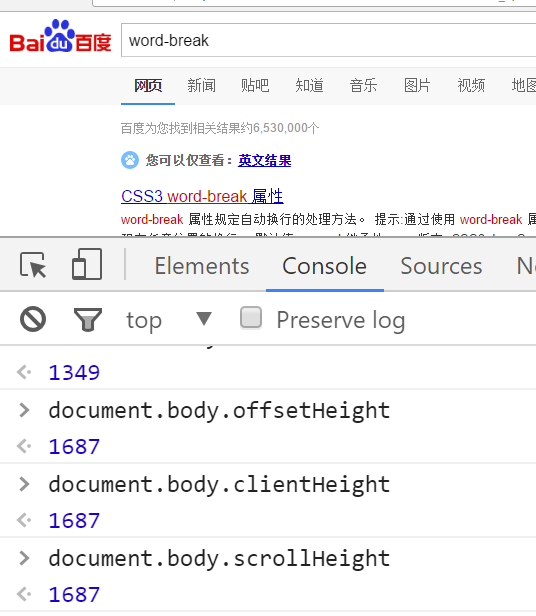
document.documentElement.clientHeight    ->   视口的大小

document.documentElement.scrollHeight   ->   文档的大小

document.documentElement.offsetHeight   ->   文档的大小
火狐
console.log(document.documentElement.scrollHeight);   -> 文档大小

console.log(document.documentElement.clientHeight);  ->  文档大小    (三个值相同,包含滚动条)

console.log(document.documentElement.offsetHeight);  ->  文档大小

console.log(document.body.clientHeight);      ->   视口大小

console.log(document.body.offsetHeight);      ->   文档大小(不含padding border)比scrollHeght略小

console.log(document.body.scrollHeight);      ->   文档大小 和 documentElement 三个取到的值一样
在eage下模仿ie9(标准模式下)
document.body.clientHeight   -> 0

document.body.scrollHeight   ->  视口的大小

document.body.offsetHeight  ->  0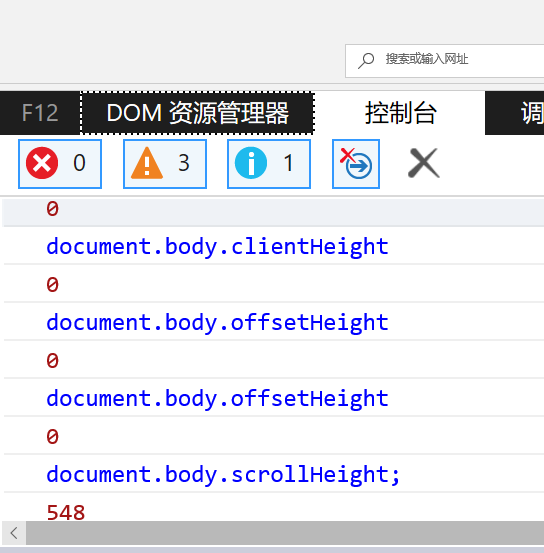
document.documentElement.clientHeight    ->   视口的大小

document.documentElement.scrollHeight   ->   文档的大小

document.documentElement.offsetHeight   ->   文档的大小(包括边框)
- edge模拟ie8的混杂模式document.compatMode === "BackCompat"
document.documentElement.offsetHeight   ->  文档大小

document.documentElement.offsetHeight   ->  文档大小

document.documentElement.clientHeight   ->   视口大小
document.body.clientHeight    ->  视口大小

document.body.offsetHeight    ->  文档大小(包括padding 和 border)

document.body.scrollHeight    ->   文档大小
想必已经对这个属性厌恶至极了,各个因素的影响导致想要获取视口大小和文档大小变成一个头疼的问题,最后下面两个函数解决了这个问题,兼容了不同的浏览器。
/*视口的大小,部分移动设备浏览器对innerWidth的兼容性不好,需要

 *document.documentElement.clientWidth或者document.body.clientWidth

 *来兼容(混杂模式下对document.documentElement.clientWidth不支持)。

 *使用方法 : getViewPort().width;

 */

function getViewPort () {

    if(document.compatMode == "BackCompat") {   //浏览器嗅探,混杂模式

        return {

            width: document.body.clientWidth,

            height: document.body.clientHeight

        };

    } else {

        return {

            width: document.documentElement.clientWidth,

            height: document.documentElement.clientHeight

        };

    }

}
//获得文档的大小(区别与视口),与上面获取视口大小的方法如出一辙

function getDocumentPort () {

    if(document.compatMode == "BackCompat") {

        return {

            width: document.body.scrollWidth,

            height: document.body.scrollHeight

        };

    } else {

        return {

            width: Math.max(document.documentElement.scrollWidth,document.documentElement.clientWidth),

            height: Math.max(document.documentElement.scrollHeight,document.documentElement.clientHeight)

        }

    }

}
关于Width的和上面的没有太大差异,参考上面的解释。
clientHeight , scrollHeight , offsetHeight之间的区别及兼容方案的更多相关文章
- clientHeight , scrollHeight , offsetHeight之间的区别
clientHeight:元素客户区的大小,指的是元素内容及其边框所占据的空间大小(经过实践取出来的大多是视口大小) scrollHeight: 滚动大小,指的是包含滚动内容的元素大小(元素内容的总高 ...
- height clientHeight scrollHeight offsetHeight的大致区别
这主要是针对火狐浏览器来讲的: height:就是div的高度,就是style中设置的高度:在chrome中clientHeight是包含padding的,offsetHeight和clientHei ...
- clientHeight—scrollHeight—offsetHeight三者的区别
clientHeight,scrollHeight,offsetHeight 这三个dom属性有时让人觉得相似但又不相似 以前对它们的理解也有一些模糊,现在总结一下,方便以后复习 clientHeig ...
- JS clientHeight,scrollHeight,offsetHeight,scrollTop,offsetTop概念
JS滚动页面到某一位置时触发指定事件能够增强用户体验或是提高性能,其中使用最多的场景是加载更多,当鼠标滚动至页面下方时,自动加载下一页的内容.另一个常用的场景是当用户滚动至页面某一地方时,页面会给出提 ...
- clientHeight scrollHeight offsetHeight
<div style="height:200px;padding:10px;border:1px solid green;"></div> 对于上面的di ...
- clientHeight / scrollHeight / offsetHeight 等属性的区别图
网页(内容)可见区域宽:document.body.clientWidth 网页(内容)可见区域高:document.body.clientHeight 即页面浏览器中可以看到内容的这个区域的高度,一 ...
- offsetTop,offsetHeight,clientHeight,scrollHeight,scrollTop区别
这些高度相信很多同学都搞不清楚吧.这里我通过本地测试,发现了区别. 以聊天窗口为例. 元素(class='content')高度444px,其中上下padding分别是10px,margin为0.距离 ...
- jquery 对象的 height、innerHeight、outerHeight 的区别以及DOM 元素的 clientHeight、offsetHeight、scrollHeight、offsetTop、scrollTop
前言:jquery 对象的 height.innerHeight.outerHeight,还有 DOM 元素的 clientHeight.offsetHeight.scrollHeight.offse ...
- height、clientHeight、offsetHeight、scrollHeight、height()、 innerHeight()、outerHeight()等的区别
1.height height是css属性,这个属性定义元素内容区的高度,在内容区外面可以增加内边距.边框和外边距. 当 box-sizing: content-box 时,高度应用到元素的内容框. ...
随机推荐
- Redis--初入
安装 .下载源码,解压缩后编译源码 $ wget http://download.redis.io/releases/redis-4.0.1.tar.gz $ tar xzf redis-4.0.1 ...
- C++面向对象高级编程(一)基础篇
技术在于交流.沟通,转载请注明出处并保持作品的完整性. 概要: 知识点1 构造函数与析构函数 知识点2 参数与返回值 知识点3 const 知识点4 函数重载(要与重写区分开) 知识点5 友元 先以C ...
- 20165210 《网络对抗技术》week1 exp0 kali安装与配置
20165210 <网络对抗技术>week1 exp0 kali安装与配置 1. 安装过程: 从kali官网上下载如下图所示: 下载完成后打开VMware 点击创建新的虚拟机 弹出新虚拟机 ...
- React之前端路由
通过之前的博客介绍,对于react,我们已经可以写单个组件.复合组件/单个页面了,接下来就是实现页面的跳转了,这个时候,我们就需要前端路由了. 一.react-router-dom 安装这个依赖,th ...
- GPU编程自学6 —— 函数与变量类型限定符
深度学习的兴起,使得多线程以及GPU编程逐渐成为算法工程师无法规避的问题.这里主要记录自己的GPU自学历程. 目录 <GPU编程自学1 -- 引言> <GPU编程自学2 -- CUD ...
- 创建你的第一个Flutter应用程序
前言 Flutter,Google推出的跨平台开发框架.就在前几天,Flutter的首个发布预览版(Release Preview 1)正式发布! 即将迎来Flutter 正式版(1.0).本篇将带你 ...
- [持续更新]Python 笔记
本文以 Python 2.7 为基础. lambda 函数实现递归 方法一:传递一个 self 参数 求阶乘: frac = lambda self, x: self(self, x - 1) * x ...
- 复选框checkbox样式修改
该方法只兼容IE9及以上 将checkbox和label关联起来, 将checkbox隐藏掉,通过点击label来点击checkbox,label的样式即可自定义. 通过checkbox:checke ...
- python3 scrapy main运行调式
from scrapy.cmdline import execute import sys import os sys.path.append(os.path.dirname(os.path.absp ...
- Flask第六篇——项目配置文件
我们在开发中,通常将一些需要用到的配置选项单独放在一个文件中,比如叫configs.py中.然后通过一些方式加载. 现在将加载配置文件的方法罗列如下: 1.先新建文件configs.py,文件代码: ...