
AngularJS API之copy深拷贝
angular提供了一个可以复制对象的api——copy(source,destination),它会对source对象执行深拷贝。
使用时需要注意下面几点:
- 如果只有一个参数(没有指定拷贝的对象),则返回一个拷贝对象
- 如果指定了destination,则会深拷贝对象复制给destination
- 如果source是null或者undefined,那么会直接返回source
- 如果source就是desitination,那么会报错。
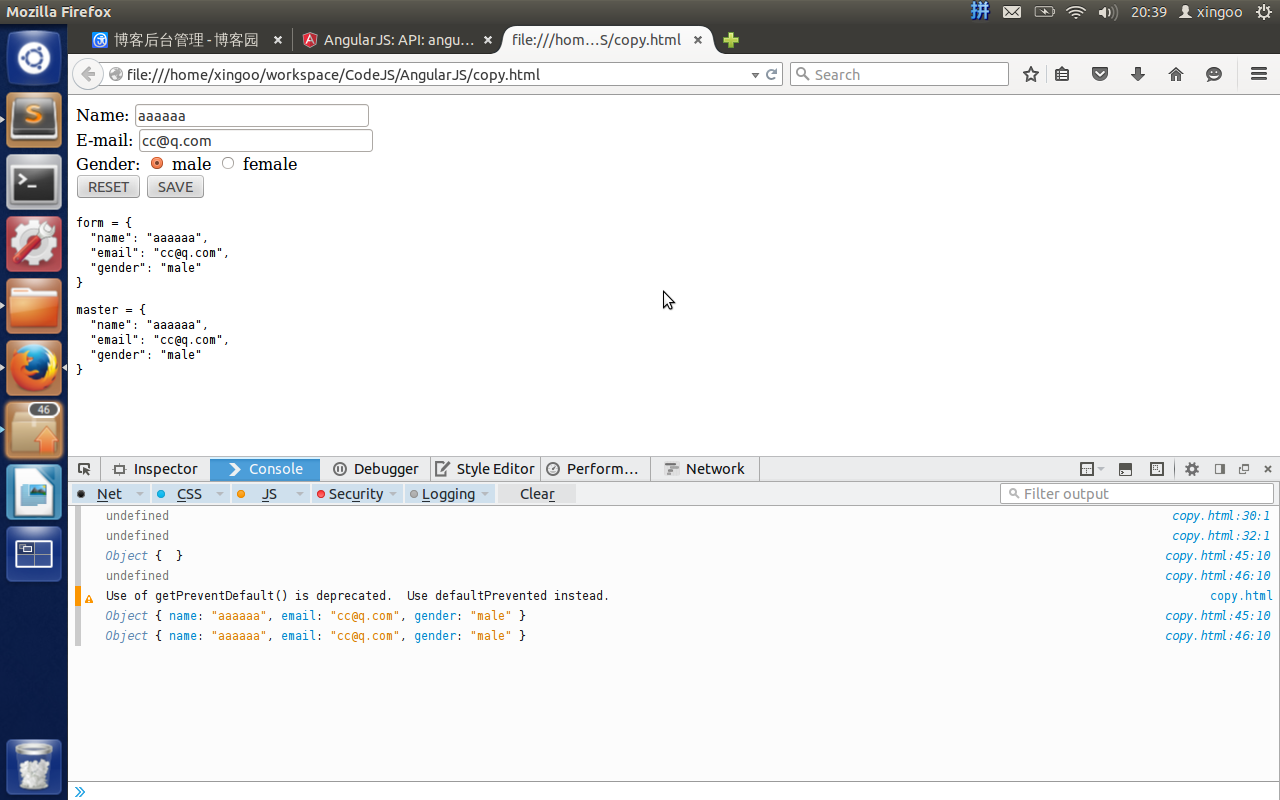
下面看看使用样例:
<html>

<head>

	<meta http-equiv="Content-Type" content="text/html; charset=utf-8" />

	<script src="http://apps.bdimg.com/libs/angular.js/1.2.16/angular.min.js"></script>

</head>

<body ng-app="copyExample">

	<div ng-controller="ExampleController">

		<form novalidate class="simple-form">

			Name: <input type="text" ng-model="user.name" /><br />

			E-mail: <input type="email" ng-model="user.email" /><br />

			Gender:

			<input type="radio" ng-model="user.gender" value="male" />

			male

			<input type="radio" ng-model="user.gender" value="female" />

			female

			<br />

			<button ng-click="reset()">RESET</button>

			<button ng-click="update(user)">SAVE</button>

		</form>

		<pre>form = {{user | json}}</pre>

		<pre>master = {{master | json}}</pre>

	</div>

	<script>

	angular.module('copyExample', [])

	.controller('ExampleController', ['$scope', function($scope) {

		$scope.master= {};

		var test1;

		console.log(angular.copy(test1));//undefined

		var test3=null;

		console.log(angular.copy(test2));//undefined

		var test2 = "a";

		// console.log(angular.copy(test2,test2));//error!!

		$scope.update = function(user) {

	       // Example with 1 argument

	       $scope.master= angular.copy(user);

	    };

	    $scope.reset = function() {

	        // Example with 2 arguments

	        angular.copy($scope.master, $scope.user);

	        console.log($scope.master);

	        console.log($scope.user);

   		};

	   $scope.reset();

	}]);

	</script>

</body>

</html>
AngularJS API之copy深拷贝的更多相关文章
- JS Object Deep Copy & 深拷贝 & 浅拷贝
JS Object Deep Copy & 深拷贝 & 浅拷贝 https://developer.mozilla.org/zh-CN/docs/Web/JavaScript/Refe ...
- 搭建angularjs API文档站点
提供一个国内可以访问的 angularjs API文档站点 http://i.frllk.com/ 文档直接在 github 上下载的: https://github.com/angular-cn/n ...
- 【16】AngularJS API
AngularJS API API 意为 Application Programming Interface(应用程序编程接口). AngularJS 全局 API AngularJS 全局 API ...
- JS Object Deep Copy & 深拷贝
JS Object Deep Copy & 深拷贝 针对深度拷贝,需要使用其他方法 JSON.parse(JSON.stringify(obj));,因为 Object.assign() 拷贝 ...
- AngularJS API
AngularJS 全局 API 用于执行常见任务的 JavaScript 函数集合 angular.lowercase() 转换字符串为小写 angular.uppercase() 转换字符串为大写 ...
- AngularJS API之$injector ---- 依赖注入
在AngularJS中也有依赖注入的概念,像spring中的依赖注入,但是又有所不同.Spring中使用构造注入或者设值注入的方式,还需要做一些额外的操作,但是angular中只需要在需要的地方声明一 ...
- AngularJS API之bootstrap启动
对于一般的使用者来说,AngularJS的ng-app都是手动绑定到某个dom元素.但是在一些应用中,这样就显得很不方便了. 绑定初始化 通过绑定来进行angular的初始化,会把js代码侵入到htm ...
- AngularJS API之extend扩展对象
angular.extend(dst,src),在我实验的1.2.16版本上是支持深拷贝的.但是最新的API显示,这个方法是不支持深拷贝的. 另外,第二个参数src支持多个对象. 第一种使用方式 va ...
- [CareerCup] 13.4 Depp Copy and Shallow Copy 深拷贝和浅拷贝
13.4 What is the difference between deep copy and shallow copy? Explain how you would use each. 这道题问 ...
随机推荐
- Windows批处理以服务的方式启动解决思路(ShadowsockR注册成Windows Service)
我以ShadowsockR的server启动来解释: 由于这东西是python,如果要启动,可以写一个批处理(python.exe server.py)来启动,但是我观察发现启动的时候是附带pytho ...
- 数据结构算法C语言实现(六)---2.4一元多项式的表示及相加
一.简述 利用链表表示稀疏多项式,并基于之前的一些操作(编程实现上还是有所不同的)组合新的操作实现一元多项式的表示及相加. 二.ADT 抽象数据类型一元多项式的定义 ADT Polyomail{ 数据 ...
- AngularJs angular.injector、angular.module
angular.injector 创建一个injector对象, 调用injector对象的方法可用于获取服务以及依赖注入. 格式:angular.injector(modules); modules ...
- Codeforces Intel Code Challenge Final Round (Div. 1 + Div. 2, Combined) B. Batch Sort(暴力)
传送门 Description You are given a table consisting of n rows and m columns. Numbers in each row form a ...
- BZOJ3393:[USACO LPHONE] 激光通讯
分层图+堆优化的dijkstra 将原图分为4层,分别是只向上,向下,向左,向右建立边,然后层与层之间的转移很好处理.稠密图,应该用堆优化的dijkstra. //OJ 1845 //by Cydia ...
- POJ1080Human Gene Functions(LCS变形)
题目链接 题目:给出两个串,每匹配一种有一种权值,求权值最大的匹配串 就是 最长公共子序列的 的思想: 首先对于 i 和 j 来比较, 一种情况是i和j匹配,此时 dp[i][j] = dp[i - ...
- iOS开发-二维码
二维码 从ios7开始集成了二维码的生成和读取功能 此前被广泛使用的zbarsdk目前不支持64位处理器 生成二维码的步骤: 倒入CoreImage框架 通过滤镜CIFilter生成二维码 二维码的内 ...
- 【原】redux学习笔记
上周学习了flux,这周研究了一下redux,其实很早之前都已经在研究他们了,只是之前一直没搞懂,最近这两周可能打通了任督二脉,都算入门了. 写博客的目的主要是做一下笔记,总结一下思路,以及和大家交流 ...
- boolean 和 Boolean 类型数据的差别
工作中遇到页面传递布尔类型的数据问题,需要在代码中判断不能为null,就此思考一下,boolean和Boolean之间的区别?boolean是基本数据类型Boolean是它的封装类,和其他类一样,有属 ...
- 功能完善的Java连接池调用实例
/** * Title: ConnectPool.java * Description: 连接池管理器 * Copyright: Copyright © 2002/12/25 * Company: * ...