
google protobuf ios开发使用
简介:
protobuf 即 google protocol buffer 是一种数据封装格式协议;
比如其他经常用的xml,json等格式;protobuf的优势是效率高,同样的一份数据使用protobuf存储的时候更小,更加方便;
官网:
https://developers.google.com/protocol-buffers/
https://github.com/google/protobuf
在iOS上的使用
目前最新的版本需要xcode7.0+,以及不支持ARC
1. 从github上面下载全部代码
2. 在mac上编译protobuf 可能还需要 autoconf,libtool,automake,
请先在mac上安装这三个依赖库;使用brew安装就行
brew install autoconf
brew install libtool
brew install automake
automake的安装可能会连接到被墙的网站,这时从网上找一份谷歌host即可;
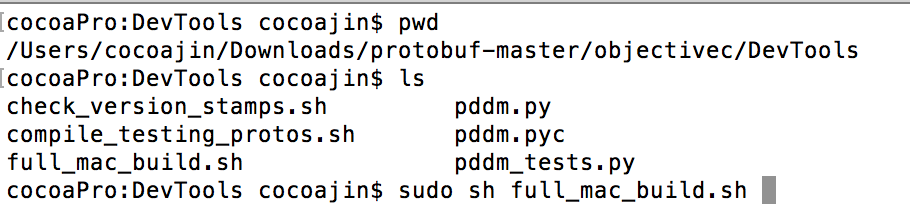
3. 解压下载的 protobuf-master, 并打开终端入 /protobuf-master/objectivec/DevTools/ 目录
执行 sudo sh full_mac_build.sh
等待编译完成,如果遇到错误可能是上面3个依赖或是别的依赖没有安装,排查一下就好
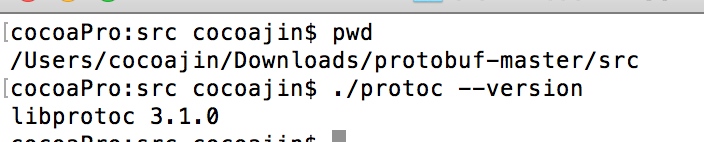
4. 安装完成之后,即会在 protobuf-master/src/ 目录下生成 protoc 可执行程序
以后我们需要用该生成把 .proto文件生成对应平台的代码;
5. 如下安装protobuf定义的proto3语法生成一份测试用的数据格式,Person.proto文件
syntax = "proto3";

message Person {

  string name = ;

  int32 age = ;

  string address = ;

}
6. 使用 protoc 将 .proto文件 生成对应平台的代码;这里生成oc的代码
如下protoc命令的帮助
Parse PROTO_FILES and generate output based on the options given:

  -IPATH, --proto_path=PATH   Specify the directory in which to search for

                              imports.  May be specified multiple times;

                              directories will be searched in order.  If not

                              given, the current working directory is used.

  --version                   Show version info and exit.

  -h, --help                  Show this text and exit.

  --encode=MESSAGE_TYPE       Read a text-format message of the given type

                              from standard input and write it in binary

                              to standard output.  The message type must

                              be defined in PROTO_FILES or their imports.

  --decode=MESSAGE_TYPE       Read a binary message of the given type from

                              standard input and write it in text format

                              to standard output.  The message type must

                              be defined in PROTO_FILES or their imports.

  --decode_raw                Read an arbitrary protocol message from

                              standard input and write the raw tag/value

                              pairs in text format to standard output.  No

                              PROTO_FILES should be given when using this

                              flag.

  -oFILE,                     Writes a FileDescriptorSet (a protocol buffer,

    --descriptor_set_out=FILE defined in descriptor.proto) containing all of

                              the input files to FILE.

  --include_imports           When using --descriptor_set_out, also include

                              all dependencies of the input files in the

                              set, so that the set is self-contained.

  --include_source_info       When using --descriptor_set_out, do not strip

                              SourceCodeInfo from the FileDescriptorProto.

                              This results in vastly larger descriptors that

                              include information about the original

                              location of each decl in the source file as

                              well as surrounding comments.

  --dependency_out=FILE       Write a dependency output file in the format

                              expected by make. This writes the transitive

                              set of input file paths to FILE

  --error_format=FORMAT       Set the format in which to print errors.

                              FORMAT may be 'gcc' (the default) or 'msvs'

                              (Microsoft Visual Studio format).

  --print_free_field_numbers  Print the free field numbers of the messages

                              defined in the given proto files. Groups share

                              the same field number space with the parent

                              message. Extension ranges are counted as

                              occupied fields numbers.

  --plugin=EXECUTABLE         Specifies a plugin executable to use.

                              Normally, protoc searches the PATH for

                              plugins, but you may specify additional

                              executables not in the path using this flag.

                              Additionally, EXECUTABLE may be of the form

                              NAME=PATH, in which case the given plugin name

                              is mapped to the given executable even if

                              the executable's own name differs.

  --cpp_out=OUT_DIR           Generate C++ header and source.

  --csharp_out=OUT_DIR        Generate C# source file.

  --java_out=OUT_DIR          Generate Java source file.

  --javanano_out=OUT_DIR      Generate Java Nano source file.

  --js_out=OUT_DIR            Generate JavaScript source.

  --objc_out=OUT_DIR          Generate Objective C header and source.

  --php_out=OUT_DIR           Generate PHP source file.

  --python_out=OUT_DIR        Generate Python source file.

  --ruby_out=OUT_DIR          Generate Ruby source file.
生成OC代码格式命令
D/protoc --proto_path=A --objc_out=B C/Person.proto
D: 表示 protoc 可执行程序的目录
A:表示处理proto文件需要的目录,和生成目录一样就行
B:表示生成代码的文件,oc会成生.h和.m 这里就是指生成文件需要放的目录
C:表示需要的.proto文件,即protoc会根据此文件里面定义的格式生成相应平台代码文件
生成之后的oc,.h 和 .m 就可以放到xcode工程里面使用了,不支持ARC,ARC的工程对此.m添加 -fno-objc-arc
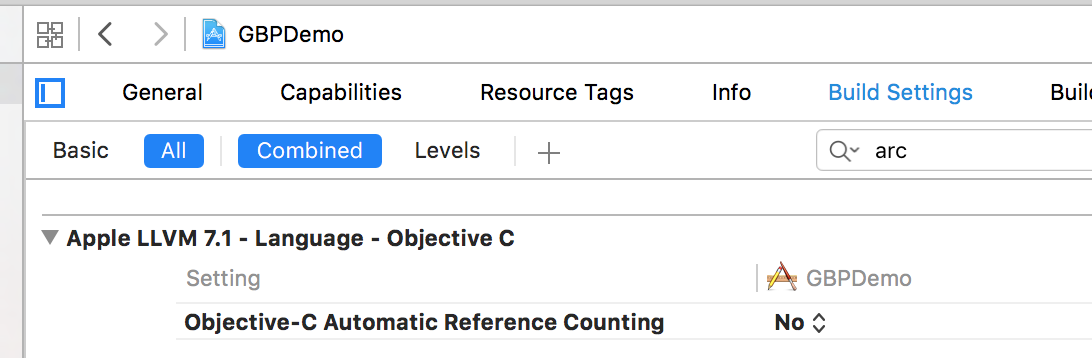
7. 这里使用xcode7.3创建了DEMO工程,GPBDemo,并设置工程为 mrc
把第6步生成的Person.pbobjc.h,Person.pbobjc.m 导入工程
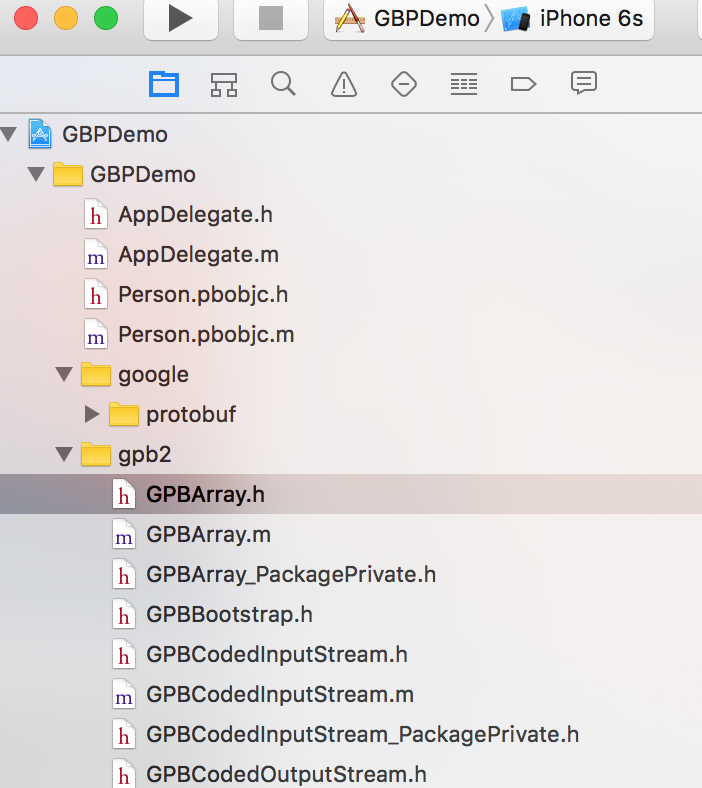
把 protobuf-master/objectivec/ 目录下面所有的 .h 和.m 手动导入工程,把该目录下的google文件也会部导入工程
在工程设置 header search path 添加 $(PROJECT_DIR)/GBPDemo , 不然导入上面的google文件夹之后编译会出头文件连接错误;
把GPBProtocolBuffers.m 从工程里面删除掉(这里是官网说的https://github.com/google/protobuf/tree/master/objectivec)
导入之后的工程结构如下
以上配置完成之后,编译就正常通过了
8. 测试使用protobuf
在工程ViewController.m 里面导入
#import "GPBProtocolBuffers.h"
#import "Person.pbobjc.h"
如下代码
    Person *pe = [[Person alloc]init];

    pe.name = @"jobs";

    pe.age = ;

    pe.address = @"Beijing";

    //以下是效率对比

    //protocbufer

    NSLog(@"protocbufer: %@",pe);

    NSLog(@"%lu",[pe data].length);

    //json

    NSDictionary *pj = @{@"name":@"jobs",

                           @"age":@,

                           @"address":@"Beijing"};

    NSData *jsd = [NSJSONSerialization dataWithJSONObject:pj options: error:nil];

    NSLog(@"JSON: %@",pj);

    NSLog(@"%lu", jsd.length);

    //xml

    NSString *xml = @"<name>jobs</name><age>86</age><address>Beijing</address>";

    NSData *xmlData = [xml dataUsingEncoding:NSUTF8StringEncoding];

    NSLog(@"XML: %@",xml);

    NSLog(@"%lu",xmlData.length);

    [pe release];
执行结果:
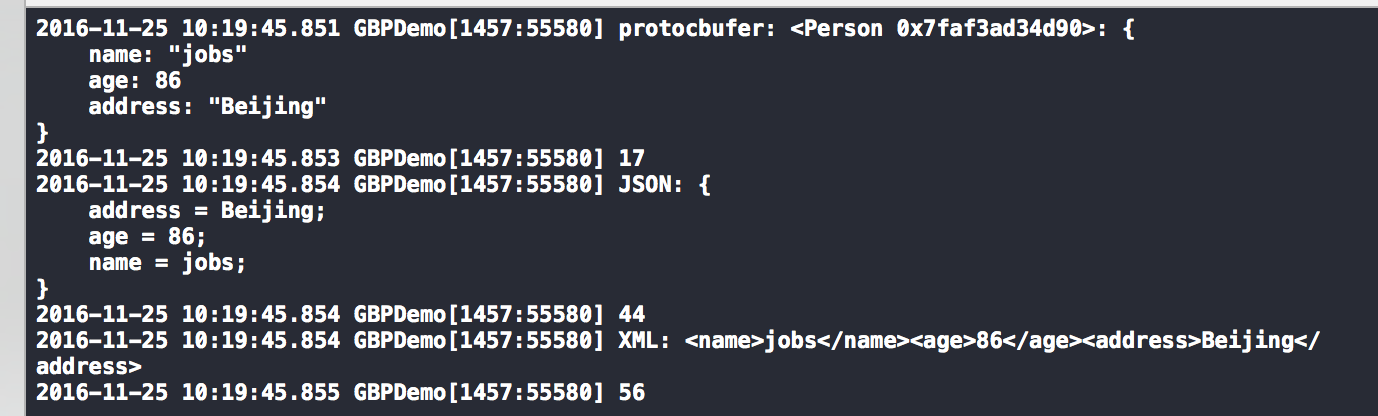
从上可以看出:
同样的数据:
protubuf:占17个字节
json: 44个字节
xml:56个字节
以上就是效率上的测试使用
9. 总结
数据按照protobuf封装可以通过网络传给后台,后台同样使用protobuf处理;
会非常的方便的高效;后台定义一份proto数据格式,然后生成其他平台的代码,集成调用非常的方便,也偏于维护和扩展;
更新关于protobuf的数据格式,组合语法可以参考官方文档说明
10:上述的 iOS 示例工程
https://github.com/cocoajin/TDDDemo/tree/master/GBPDemo
protobuf静态类库方式 demo https://github.com/cocoajin/TDDDemo/tree/master/PGBlibT
参考:
https://github.com/google/protobuf
http://www.ibm.com/developerworks/cn/linux/l-cn-gpb/
https://my.oschina.net/kgdugyiy/blog/538333
google protobuf ios开发使用的更多相关文章
- (中级篇 NettyNIO编解码开发)第八章-Google Protobuf 编解码-2
8.1.2 Protobuf编解码开发 Protobuf的类库使用比较简单,下面我们就通过对SubscrjbeReqProto进行编解码来介绍Protobuf的使用. 8-1 Protob ...
- (中级篇 NettyNIO编解码开发)第八章-Google Protobuf 编解码-1
Google的Protobuf在业界非常流行,很多商业项目选择Protobuf作为编解码框架,这里一起回顾一下Protobuf 的优点.(1)在谷歌内部长期使用,产品成熟度高:(2)跨语言,支持 ...
- netty 的 Google protobuf 开发
根据上一篇博文 Google Protobuf 使用 Java 版 netty 集成 protobuf 的方法非常简单.代码如下: server package protobuf.server.imp ...
- GOOGLE PROTOBUF开发者指南
原文地址:http://www.cppblog.com/liquidx/archive/2009/06/23/88366.html 译者: gashero 目录 1 概览 1.1 什么是pro ...
- iOS:iOS开发非常全的三方库、插件等等
iOS开发非常全的三方库.插件等等 github排名:https://github.com/trending, github搜索:https://github.com/search. 此文章转自git ...
- iOS开发--iOS及Mac开源项目和学习资料
文/零距离仰望星空(简书作者)原文链接:http://www.jianshu.com/p/f6cdbc8192ba著作权归作者所有,转载请联系作者获得授权,并标注“简书作者”. 原文出处:codecl ...
- iOS开发常用第三方库
UI 动画 网络相关 Model 其他 数据库 缓存处理 PDF 图像浏览及处理 摄像照相视频音频处理 响应式框架 消息相关 版本新API的Demo 代码安全与密码 测试及调试 AppleWatch ...
- iOS开发之资料收集
github排名:https://github.com/trending, github搜索:https://github.com/search. 此文章转自github:https://github ...
- 在UnrealEngine4中使用Google Protobuf
转自:https://blog.csdn.net/or_7r_ccl/article/details/54986393 在UnrealEngine4中使用Google Protobuf ...
随机推荐
- 从oracle数据表中读取表结构
drop table aa_tab;create table aa_tab asselect A.TABLE_NAME 表名, A.column_name 字段名,A.data_type 数据 ...
- 前端开发利器-Brackets IDE
是什么? http://brackets.io/ A modern, open source text editor that understands web design. 现代, 开源的文本编辑器 ...
- java 8 新特性
最近在IDEA的️驱使下,看了点java8的东西,链接贴一下,,,,, 1.Java 8新特性概述2.Java 8中的 Stream API 详解[3.Java 8新特性终极指南] 简单的使用看完新特 ...
- 一般处理程序返回json
一般处理程序: public void ProcessRequest(HttpContext context) { string action = con ...
- Oracle配置本地网络服务名
Oracle安装完成后,可以使用客户端自带的的网络配置向导(Net Configuration Assistant)进行配置 1.启动Net Configuration Assistant.选择&qu ...
- !! 据说年薪30万的Android程序员必须知道事
http://www.th7.cn/Program/Android/201512/742423.shtml Android中国开发精英 目前包括: Android开源项目第一篇——个性化控件(View ...
- BJFU 1034
描述 对于任意的两个非负整数a,b(0<=a,b<10000),请计算a^b各位数字的和的各位数字的和-- 输入 输入两个非负整数a,b(0<=a,b<10000),注意哦,输 ...
- servletFileUpload
引用:http://bbs.csdn.net/topics/390290685?page=1 Java code? 1 2 3 4 5 6 7 8 9 10 11 12 13 14 15 16 17 ...
- mfc ui3
引用:http://www.cnblogs.com/rainbowzc/archive/2010/06/02/1749872.html 本文专题讨论VC中的界面美化,适用于具有中等VC水平的读者.读者 ...
- AjaxFormSubmit使用demo
官网:http://jquery.malsup.com/form/#download 下载地址 $("#form1").ajaxSubmit({ success: function ...