
Spring Cloud Config
1.config服务端配置
1.1 引入依赖
        <dependency>

            <groupId>org.springframework.boot</groupId>

            <artifactId>spring-boot-starter-web</artifactId>

        </dependency>

        <dependency>

            <groupId>org.springframework.cloud</groupId>

            <artifactId>spring-cloud-starter-zookeeper-discovery</artifactId>

            <exclusions>

                <exclusion>

                    <groupId>commons-logging</groupId>

                    <artifactId>commons-logging</artifactId>

                </exclusion>

            </exclusions>

        </dependency>
1.2 配置项application.yml
spring:

  cloud:

    zookeeper:

      connect-string: 192.168.220.128:2181

    config:

      server:

        git:

          uri: https://gitee.com/lm970585581/cloud-config

          username: lm970585581

          password: *****   #密码
1.3 启动类配置
@EnableConfigServer 启用服务配置
测试说明:
/{label}/{name}-{profiles}.yml
/{name}-{profiles}.yml
name git的文件名称不包括后缀
profiles 环境
label 分支(branch)
2、客户配置:provider应用
2.1 引入依赖
        <dependency>

            <groupId>org.springframework.cloud</groupId>

            <artifactId>spring-cloud-config-client</artifactId>

        </dependency>
2.2 配置项bootstrap.yml
spring:

  cloud:

    zookeeper:

      connect-string: 192.168.220.128:2181

    config:

      discovery:

        enabled: true

        service-id: config #配置服务项目名

      profile: dev

  application:

    name: provider
Spring Cloud Bus 手动实现刷配置(不重启项目情况下)
1.安装RabbitMQ
详见:https://www.cnblogs.com/lm970585581/p/9873391.html
2.配置端引入依赖
        <!--加入spring cloud bus + rabbitmq-->

        <dependency>

            <groupId>org.springframework.cloud</groupId>

            <artifactId>spring-cloud-starter-bus-amqp</artifactId>

        </dependency>
3.配置端配置application.yml
spring:

    rabbitmq:

        port: 5672

        host: 192.168.220.128

        username: test

        password: root

management:

  endpoints:

    web:

      exposure:

        include: '*'  # 开启所有配置url
4.在controller上启用读取刷新数据注解@RefreshScope
此时,当git上的配置修改后,配置应用的内容会同步修改
客户端应用的配置需要手动使用Post方式刷新,即可同步修改,无需重启服务,格式如下:地址是配置应用的地址
http://localhost:8080/actuator/bus-refresh
Spring Cloud Bus 实现自动刷配置(不重启项目情况下)+WebHooks
加入依赖
        <!--添加支持gitlab,github,gitee webhooks依赖-->

        <dependency>

            <groupId>org.springframework.cloud</groupId>

            <artifactId>spring-cloud-config-monitor</artifactId>

        </dependency>
想办法把自己机器变为服务器,可以使用netaap
在gitee里面配置webhook
通过/monitor 接口回调目标服务对应的服务
注意:自动刷新方式有BUG存在,可能会失败,等官方修复吧!
具体实例详见:https://gitee.com/lm970585581/cloud-config
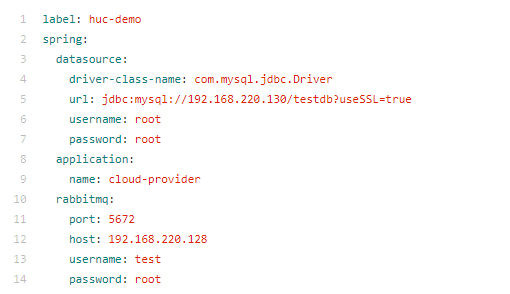
码云上的配置信息
Spring Cloud Config的更多相关文章
- Spring Cloud面试题万字解析(2020面试必备)
1.什么是 Spring Cloud? Spring cloud 流应用程序启动器是 于 Spring Boot 的 Spring 集成应用程序,提供与外部系统的集成.Spring cloud Tas ...
- 什么是 Spring Cloud Bus?我们需要它吗?
考虑以下情况:我们有多个应用程序使用 Spr ng Cloud Config 读取属性,而S ring Cloud Config 从GIT 读取这些属性. 下面的例子中多个员工生产者模块从 Employe ...
- Spring Cloud Greenwich 新特性和F升级分享
2019.01.23 期待已久的Spring Cloud Greenwich 发布了release版本,作为我们团队也第一时间把RC版本替换为release,以下为总结,希望对你使用Spring Cl ...
- Spring Cloud 学习 之 Spring Cloud Bus实现修改远程仓库后配置自动刷新
版本号: Spring Boot:2.1.3.RELEASE Spring Cloud:G版 开发工具:IDEA 搭建配置中心,这里我们搭建一个简单版的就行 POM: <?xml ...
- Kafka及Spring Cloud Stream
安装 下载kafka http://mirrors.hust.edu.cn/apache/kafka/2.0.0/kafka_2.11-2.0.0.tgz kafka最为重要三个配置依次为:broke ...
- Microservices Reference Architecture - with Spring Boot, Spring Cloud and Netflix OSS--转
原文地址:https://www.linkedin.com/pulse/microservices-reference-architecture-spring-boot-cloud-anil-alle ...
- Building microservices with Spring Cloud and Netflix OSS, part 2
In Part 1 we used core components in Spring Cloud and Netflix OSS, i.e. Eureka, Ribbon and Zuul, to ...
- Spring cloud项目实践(一)
链接地址:http://sail-y.github.io/2016/03/21/Spring-cloud%E9%A1%B9%E7%9B%AE%E5%AE%9E%E8%B7%B5/ 什么是Spring ...
- 【译文】用Spring Cloud和Docker搭建微服务平台
by Kenny Bastani Sunday, July 12, 2015 转自:http://www.kennybastani.com/2015/07/spring-cloud-docker-mi ...
随机推荐
- 20155313 2016-2017-2 《Java程序设计》第九周学习总结
20155313 2016-2017-2 <Java程序设计>第九周学习总结 教材学习内容总结 第16章 JDBC(Java DataBase Connectivity)即java数据库连 ...
- echarts x轴文字换行显示
xAxis : [ { splitLine:{show:false}, type : 'category', data : ['社交人际','沟通交流','心理认知','游戏玩耍','大小运动','生 ...
- WPF中使用WindowChrome自定义窗口中遇到的最大化问题
FrameWork 4.5 之后,内置了WindowChrome类,官方文档: https://msdn.microsoft.com/en-us/library/system.windows.shel ...
- 浅入tcp
1.认识TCP tcp协议是传输层协议,它的最主要的3个特点是面向连接.可靠保证.基于字节流.当应用层把数据给tcp层时,注意如果数据大于MSS是要在tcp层进行分段的.tcp协议为了保证不丢包会给每 ...
- gdb调试带参数程序
一般来说GDB主要调试的是C/C++的程序.要调试C/C++的程序,首先在编译时,我们必须要 把调试信息加到可执行文件中.使用编译 器(cc/gcc/g++)的 -g 参数可以做到这一点.如: > ...
- 【LG4148】简单题
[LG4148]简单题 题面 洛谷 题解 \(kdt\)模板题呀... #include <iostream> #include <cstdio> #include <c ...
- Apache入门篇(一)之安装部署apache
一.HTTPD特性 (1)高度模块化:core(核心) + modules(模块) = apache(2)动态模块加载DSO机制: Dynamic Shared Object(动态共享对象)(3)MP ...
- eclipse中编译出现错误undefined reference to `_sbrk'
1. 在eclipse中使用gcc-arm-none-eabi-7-2017-q4-major-win32编译代码的时候出现了undefined reference to `_sbrk' e:/pro ...
- 一个web应用的诞生(5)--数据表单
下面把角色分为两种,普通用户和管理员用户,至少对于普通用户来说,直接修改DB是不可取的,要有用户注册的功能,下面就开始进行用户注册的开发. 用户表 首先要想好用户注册的时候需要提供什么信息:用户名.密 ...
- Batch Normalization: Accelerating Deep Network Training by Reducing Internal Covariate Shift
1. 摘要 训练深层的神经网络非常困难,因为在训练的过程中,随着前面层数参数的改变,每层输入的分布也会随之改变.这需要我们设置较小的学习率并且谨慎地对参数进行初始化,因此训练过程比较缓慢. 作者将这种 ...