
Spring Cloud 学习 之 Spring Cloud Bus实现修改远程仓库后配置自动刷新
版本号:
Spring Boot:2.1.3.RELEASE
Spring Cloud:G版
开发工具:IDEA
搭建配置中心,这里我们搭建一个简单版的就行
POM:
<?xml version="1.0" encoding="UTF-8"?>

<project xmlns="http://maven.apache.org/POM/4.0.0" xmlns:xsi="http://www.w3.org/2001/XMLSchema-instance"

         xsi:schemaLocation="http://maven.apache.org/POM/4.0.0 http://maven.apache.org/xsd/maven-4.0.0.xsd">

    <modelVersion>4.0.0</modelVersion>

    <parent>

        <groupId>com.study.cloud</groupId>

        <artifactId>spring_cloud</artifactId>

        <version>1.0-SNAPSHOT</version>

    </parent>

    <artifactId>config-server</artifactId>

    <version>0.0.1-SNAPSHOT</version>

    <name>config-server</name>

    <description>Demo project for Spring Boot</description>

    <properties>

        <java.version>1.8</java.version>

        <spring-cloud.version>Greenwich.SR1</spring-cloud.version>

    </properties>

    <dependencies>

        <dependency>

            <groupId>org.springframework.cloud</groupId>

            <artifactId>spring-cloud-config-server</artifactId>

        </dependency>

        <dependency>

            <groupId>org.springframework.boot</groupId>

            <artifactId>spring-boot-starter-test</artifactId>

            <scope>test</scope>

        </dependency>

    </dependencies>

    <dependencyManagement>

        <dependencies>

            <dependency>

                <groupId>org.springframework.cloud</groupId>

                <artifactId>spring-cloud-dependencies</artifactId>

                <version>${spring-cloud.version}</version>

                <type>pom</type>

                <scope>import</scope>

            </dependency>

        </dependencies>

    </dependencyManagement>

    <build>

        <plugins>

            <plugin>

                <groupId>org.springframework.boot</groupId>

                <artifactId>spring-boot-maven-plugin</artifactId>

            </plugin>

        </plugins>

    </build>

</project>
启动类:
@SpringBootApplication

@EnableConfigServer

public class ConfigServerApplication {

    public static void main(String[] args) {

        SpringApplication.run(ConfigServerApplication.class, args);

    }

}
spring:

  cloud:

    config:

      server:

        git:

          uri: https://github.com/daimingzhi/config

          skipSslValidation: true

          timeout: 5

          clone-on-start: true

#          username:

#          password:

server:

  port: 8888
搭建客户端
POM:
<?xml version="1.0" encoding="UTF-8"?>

<project xmlns="http://maven.apache.org/POM/4.0.0" xmlns:xsi="http://www.w3.org/2001/XMLSchema-instance"

         xsi:schemaLocation="http://maven.apache.org/POM/4.0.0 http://maven.apache.org/xsd/maven-4.0.0.xsd">

    <modelVersion>4.0.0</modelVersion>

    <parent>

        <groupId>com.study.cloud</groupId>

        <artifactId>spring_cloud</artifactId>

        <version>1.0-SNAPSHOT</version>

    </parent>

    <artifactId>eureka_client</artifactId>

    <version>0.0.1-SNAPSHOT</version>

    <name>eureka_client</name>

    <description>Demo project for Spring Boot</description>

    <properties>

        <java.version>1.8</java.version>

        <spring-cloud.version>Greenwich.SR1</spring-cloud.version>

    </properties>

    <dependencies>

        <dependency>

            <groupId>org.springframework.cloud</groupId>

            <artifactId>spring-cloud-starter-netflix-eureka-client</artifactId>

        </dependency>

        <dependency>

            <groupId>org.springframework.boot</groupId>

            <artifactId>spring-boot-starter-test</artifactId>

            <scope>test</scope>

        </dependency>

        <dependency>

            <groupId>com.stuyd.cloud</groupId>

            <artifactId>api</artifactId>

            <version>0.0.1-SNAPSHOT</version>

        </dependency>

        <dependency>

            <groupId>org.springframework.boot</groupId>

            <artifactId>spring-boot-starter-web</artifactId>

        </dependency>

		<!--引入actuator依赖-->

        <dependency>

            <groupId>org.springframework.boot</groupId>

            <artifactId>spring-boot-starter-actuator</artifactId>

        </dependency>

        <dependency>

            <groupId>org.springframework.cloud</groupId>

            <artifactId>spring-cloud-config-client</artifactId>

        </dependency>

    </dependencies>

</project>
spring:

  application:

    name: application

  http:

    log-request-details: true

  cloud:

    config:

      label: master

      profile: dev

      uri: http://localhost:8888

server:

  port: ${port}

management:

  endpoints:

    web:

      exposure:

        include: "*"
启动类:
@SpringBootApplication

@EnableDiscoveryClient

public class EurekaClientApplication implements ApplicationRunner {

    @Value("${myname}")

    String name;

    public static void main(String[] args) {

        SpringApplication.run(EurekaClientApplication.class, args);

    }

    @Override

    public void run(ApplicationArguments args) throws Exception {

        System.out.println(name);

    }

}
启动配置中心
分别用不同的启动参数启动两个客户端-----Dport=10020,-Dport=10010
我的Git仓库中配置了一个键值对:
可以看到启动配置中心后,我们拿到了这个配置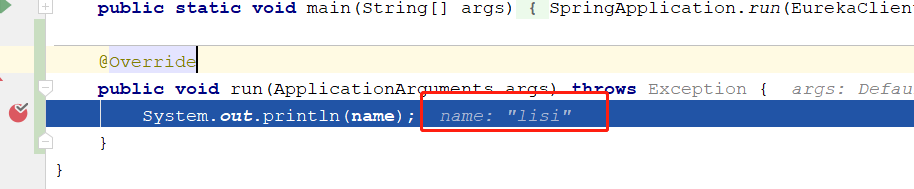
我们现在想要实现的是,当我们在git上修改了配置后,能够实现配置的自动刷新,并且我们两个客户端都能实现配置的自动刷新,我们可以分几步进行
我们先实现单个客户端配置的刷新
假设我们要实现端口为10010的服务的配置刷新,这个时候我们需要做这么几件事
添加
@RefreshScope注解@SpringBootApplication
@EnableDiscoveryClient
// 添加这个注解
@RefreshScope
@RestController
@RequestMapping("/config")
public class EurekaClientApplication { @Value("${myname}")
String name; public static void main(String[] args) {
SpringApplication.run(EurekaClientApplication.class, args);
} @RequestMapping("/get")
public String run(){
return name;
}
}
重新启动服务
访问get方法
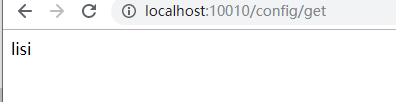
修改git中的键值对为myname=zhazha
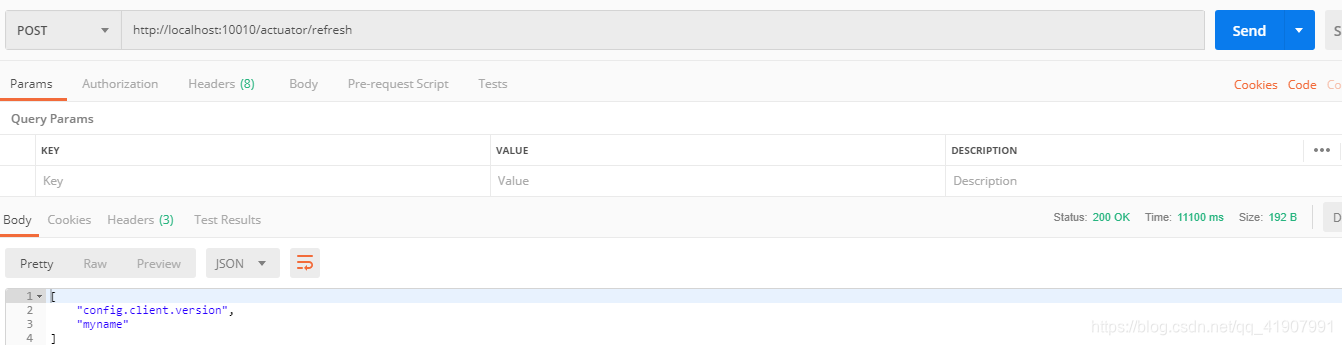
用POST方法对http://localhost:10010/actuator/refresh发送请求
访问get方法
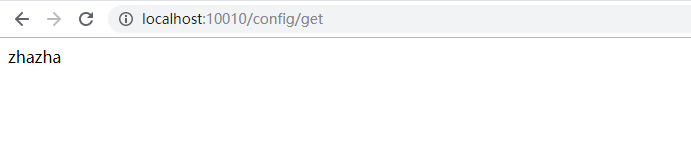
可以看到配置已经被刷新了
虽然这种方式可以实现配置的刷新,但是当我们的系统发展壮大后,维护一个刷新清单将会成为一个非常大的负担,而且很容易犯错,那么有什么办法可以解决这个复杂度呢?这里就要用到我们在开篇中说过的Spring Cloud Bus(消息总线)
在了解消息总线之前,我们先需要了解下RibbitMQ,这里可以参考我之前的文章:
https://blog.csdn.net/qq_41907991/article/details/89050473
https://blog.csdn.net/qq_41907991/article/category/8833517
这里对RibbitMQ就不在多赘述了。
整合Spring Cloud Bus,我们需要引入下面这个依赖
<dependency>

    <groupId>org.springframework.cloud</groupId>

    <artifactId>spring-cloud-starter-bus-amqp</artifactId>

</dependency>
修改配置文件,新增这段配置:
spring:

    rabbitmq:

      host: 192.168.10.83

      port: 5672

      username: admin

      password: admin

      virtual-host: my_vhost
这个时候,我们再修改git中的配置:myname=大神
这里我碰到了一个问题,就是配置中心读取到的配置会乱码,解决方式如下:
新增一个类:
/**

 * 解决配置中心中文乱码

 * @author dmz

 * @date Create in 15:43 2019/6/29

 */

public class MyPropertiesHandler implements PropertySourceLoader {

    private Logger logger = LoggerFactory.getLogger(MyPropertiesHandler.class);

    @Override

    public String[] getFileExtensions() {

        return new String[]{"properties", "xml"};

    }

    @Override

    public List<PropertySource<?>> load(String name, Resource resource) throws IOException {

        Properties properties = new Properties();

        InputStream inputStream = null;

        try {

            inputStream = resource.getInputStream();

            properties.load(new InputStreamReader(inputStream, StandardCharsets.UTF_8));

        } catch (IOException ioEx) {

            logger.error("load inputStream failed", ioEx);

            throw ioEx;

        } catch (Exception e) {

            logger.error("load inputStream failed", e);

        } finally {

            if (inputStream != null) {

                inputStream.close();

            }

        }

        List<PropertySource<?>> propertySourceList = null;

        if (!properties.isEmpty()) {

            PropertiesPropertySource propertiesPropertySource = new PropertiesPropertySource(name, properties);

            propertySourceList = new ArrayList<>();

            propertySourceList.add(propertiesPropertySource);

        }

        return propertySourceList;

    }

}
在resources目录下新建META-INF\spring.factories文件,并配置:
org.springframework.boot.env.PropertySourceLoader=com.study.cloud.configserver.config.MyPropertiesHandler
POST方式访问:http://localhost:10010/actuator/refresh
之后分别访问http://localhost:10010/config/get,http://localhost:10020/config/get
可以看到配置已经被刷新。到这里我们已经实现了通过一次接口调用刷新同一个服务所有实例配置的需求,现在我们要做就是能实现一次接口调用刷新所有服务配置
其实要实现这个目的很简单,只需要将刷新的请求发送到配置中心就行了,而不是发送到我们的服务实例上,
这里我们需要做的就是,在配置中心中新增我们之前新增的配置跟依赖,这里就不重复多说了。
接下来,我们还剩最后一件事,现在我们都需要手动调用接口去刷新配置,那么能不能实现,只要我们在git上修改了配置就自动刷新呢?答案显然是可以的,这里需要我们去接入GIT的webhook。具体的接入就不说了,很简单,大家可以参考https://blog.csdn.net/qq_38423105/article/details/88080464
Spring Cloud 学习 之 Spring Cloud Bus实现修改远程仓库后配置自动刷新的更多相关文章
- Spring Cloud 学习 之 Spring Cloud Eureka(源码分析)
Spring Cloud 学习 之 Spring Cloud Eureka(源码分析) Spring Boot版本:2.1.4.RELEASE Spring Cloud版本:Greenwich.SR1 ...
- Spring Cloud 学习 之 Spring Cloud Eureka(搭建)
Spring Boot版本:2.1.4.RELEASE Spring Cloud版本:Greenwich.SR1 文章目录 搭建服务注册中心: 注册服务提供者: 高可用注册中心: 搭建服务注册中心: ...
- Spring Cloud学习笔记--Spring Boot初次搭建
1. Spring Boot简介 初次接触Spring的时候,我感觉这是一个很难接触的框架,因为其庞杂的配置文件,我最不喜欢的就是xml文件,这种文件的可读性很不好.所以很久以来我的Spring学习都 ...
- spring cloud学习(六)Spring Cloud Config
Spring Cloud Config 参考个人项目 参考个人项目 : (希望大家能给个star~) https://github.com/FunriLy/springcloud-study/tree ...
- Spring Cloud 学习 (九) Spring Security, OAuth2
Spring Security Spring Security 是 Spring Resource 社区的一个安全组件.在安全方面,有两个主要的领域,一是"认证",即你是谁:二是& ...
- Spring Cloud 学习 (六) Spring Cloud Config
在实际开发过程中,每个服务都有大量的配置文件,例如数据库的配置.日志输出级别的配置等,而往往这些配置在不同的环境中也是不一样的.随着服务数量的增加,配置文件的管理也是一件非常复杂的事 在微服务架构中, ...
- Spring Cloud 入门教程(三): 配置自动刷新
之前讲的配置管理, 只有在应用启动时会读取到GIT的内容, 之后只要应用不重启,GIT中文件的修改,应用无法感知, 即使重启Config Server也不行. 比如上一单元(Spring Cloud ...
- Spring框架学习03——Spring Bean 的详解
1.Bean 的配置 Spring可以看做一个大型工厂,用于生产和管理Spring容器中的Bean,Spring框架支持XML和Properties两种格式的配置文件,在实际开发中常用XML格式的配置 ...
- Spring框架学习02——Spring IOC 详解
1.Spring IOC的基本概念 IOC(Inverse of Control)反转控制的概念,就是将原本在程序中手动创建对象的控制权,交由Spring框架管理.当某个Java对象(调用者)需要调用 ...
随机推荐
- js使用经验--遍历
目的 在平常的前端开发中,一般需要处理数据(数组和对象居多),特别是复杂功能的页面,通常是一到两个对象数组(有时数组里面还有数组).大多数前端开发的难点就是这里,耗时大.以前我在工作中,遇到的支付方式 ...
- 恶劣的网络环境下,Netty是如何处理写事件的?
更多技术分享可关注我 前言 前面,在Netty在接收完新连接后,默认为何要为其注册读事件,其处理I/O事件的优先级是什么?这篇文章,分析到了Netty处理I/O事件的优先级——读事件优先,写事件仅仅是 ...
- Python的深浅copy详解
Python的深浅copy详解 目录 Python的深浅copy详解 一.浅copy的原理 1.1 浅copy的定义 1.2 浅copy的方法 二.深copy的原理 2.1 深copy的定义 2.2 ...
- 编写高质量Python程序(四)库
本系列文章为<编写高质量代码--改善Python程序的91个建议>的精华汇总. 按需选择 sort() 或者 sorted() Python 中常用的排序函数有 sort() 和 sort ...
- Key Set HDU - 5363
这个题目套公式 2^(n-1)-1,再来个快速幂基本上就可以AC了 写这个题目的: 公式容易推到错: 容易写成 2^n-1/2...这样写出来结果也不错 但是一直哇 AC: #include< ...
- Nginx知多少系列之(七)负载均衡策略
目录 1.前言 2.安装 3.配置文件详解 4.工作原理 5.Linux下托管.NET Core项目 6.Linux下.NET Core项目负载均衡 7.负载均衡策略 8.加权轮询(round rob ...
- web form常用控件
表单元素一共12个分三大类 文本类<input type="text" /> 文本框<input type="password& ...
- PHP代码审计理解(一)----Metinfo5.0变量覆盖
0x01 漏洞简介 这个漏洞是metinfo5.0变量覆盖漏洞,并且需要结合文件包含.我使用的cms版本是5.3,事实上已经修复了这个漏洞(5.0的cms源码已经找不到了哈),但是我们可以借他来学习理 ...
- Spring Cloud Gateway+Nacos,yml+properties两种配置文件方式搭建网关服务
写在前面 网关的作用不在此赘述,举个最常用的例子,我们搭建了微服务,前端调用各服务接口时,由于各服务接口不一样,如果让前端同事分别调用,前端同事会疯的.而网关就可以解决这个问题,网关屏蔽了各业务服务的 ...
- php utf-8
header(”Content-Type: text/html; charset=UTF-8″) 控制器控释模板输出: 值: array (size=8) 1 => array (size=4) ...