
Android 启动界面的实现(转载)
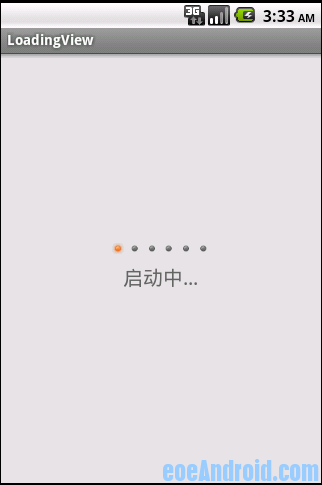
|
1
2
3
4
5
6
7
8
9
10
11
12
13
14
15
16
17
18
19
20
21
22
23
24
25
26
27
28
29
30
31
32
33
34
35
36
37
38
39
40
41
42
43
44
45
46
47
48
49
50
51
52
53
54
55
56
57
58
59
60
61
62
63
64
65
66
67
68
69
70
71
72
73
74
75
76
77
|
package wht.android.loading;import android.content.Context;import android.graphics.Canvas;import android.util.AttributeSet;import android.widget.ImageView;public class LoadingView extends ImageView implements Runnable{ private boolean isStop = false; private int[] imageIds; private int index = 0; private int length = 1; public LoadingView(Context context) { this(context, null); } public LoadingView(Context context, AttributeSet attrs) { super(context, attrs); } public void setImageIds(int[] imageId) { this.imageIds = imageId; if(imageIds != null && imageIds.length > 0) { length = imageIds.length; } } @Override protected void onDetachedFromWindow() { // TODO Auto-generated method stub super.onDetachedFromWindow(); isStop = true; } @Override protected void onDraw(Canvas canvas) { // TODO Auto-generated method stub super.onDraw(canvas); if(imageIds != null && imageIds.length > 0) { this.setImageResource(imageIds[index]); } } @Override public void run() { while(!isStop) { index = ++index % length; postInvalidate(); try { Thread.sleep(400); } catch (InterruptedException e) { e.printStackTrace(); } } } public void startAnim() { new Thread(this).start(); }} |
|
1
2
3
4
5
6
7
8
9
10
11
12
13
14
15
16
17
18
19
20
21
22
23
24
25
26
27
28
29
30
31
32
33
34
35
36
37
38
39
40
41
42
|
package wht.android.loading;import android.app.Activity;import android.os.Bundle;public class MainActivity extends Activity{ private LoadingView main_imageview; @Override public void onCreate(Bundle savedInstanceState) { super.onCreate(savedInstanceState); setContentView(R.layout.main); main_imageview = (LoadingView)findViewById(R.id.main_imageview); initLoadingImages(); new Thread() { @Override public void run() { main_imageview.startAnim(); } }.start(); } private void initLoadingImages() { int[] imageIds = new int[6]; imageIds[0] = R.drawable.loader_frame_1; imageIds[1] = R.drawable.loader_frame_2; imageIds[2] = R.drawable.loader_frame_3; imageIds[3] = R.drawable.loader_frame_4; imageIds[4] = R.drawable.loader_frame_5; imageIds[5] = R.drawable.loader_frame_6; main_imageview.setImageIds(imageIds); }} |
|
1
2
3
4
5
6
7
8
9
10
11
12
13
14
15
16
17
18
19
20
|
<?xml version="1.0" encoding="utf-8"?><LinearLayout xmlns:android="http://schemas.android.com/apk/res/android" android:orientation="vertical" android:layout_width="fill_parent" android:layout_height="fill_parent" android:background="#e1e1e1"> <wht.android.loading.LoadingView android:layout_gravity="center_horizontal" android:layout_height="wrap_content" android:id="@+id/main_imageview" android:src="@drawable/loader_frame_1" android:layout_marginTop="190dp" android:layout_width="wrap_content" ></wht.android.loading.LoadingView><TextView android:layout_width="wrap_content" android:layout_height="wrap_content" android:text="启动中..." android:layout_marginTop="10dip" android:textColor="#666666" android:layout_gravity="center_horizontal" android:textSize="20sp"/></LinearLayout> |
Android 启动界面的实现(转载)的更多相关文章
- android启动界面
/** * 应用程序启动类:显示欢迎界面并跳转到主界面 * <a href="http://my.oschina.net/arthor" target="_bl ...
- $Android启动界面(Splash)的两种实现方法
(一)用2个Activity实现 用Handler对象的postDelayed方法来实现延迟跳转的目的. 补充:Handler的常用方法: // 立即执行Runnable对象 public final ...
- Android 启动界面的制作
直接看实例吧 package com.example.textview; import android.app.Activity; import android.content.Intent; imp ...
- Android 设置启动界面
启动界面的意义是为了让后台处理耗时的复杂工作,当工作处理完成后,即可进入主界面.相比让用户等待布局加载完成,使用一张图片作为启动背景,会带来更好的体验. 首先,需要建立一个简单的布局: <?xm ...
- Android(java)学习笔记162:Android启动过程(转载)
转载路径为: http://blog.jobbole.com/67931/ 1. 关于Android启动过程的问题: 当按下Android设备电源键时究竟发生了什么? Android的启动过程是怎么样 ...
- Android应用--新浪微博客户端新特性滚动视图和启动界面实现
新浪微博客户端新特性滚动视图和启动界面实现 2013年8月20日新浪微博客户端开发之启动界面实现 前言: 使用过新浪微博客户端的童鞋都清楚,客户端每一次升级之后第一次启动界面就会有新特性的介绍,用户通 ...
- Android 启动APP时黑屏白屏的三个解决方案(转载)
你会很奇怪,为什么有些app启动时,会出现一会儿的黑屏或者白屏才进入Activity的界面显示,但是有些app却不会如QQ手机端,的确这里要做处理一下.这里先了解一下为什么会出现这样的现象,其实很简单 ...
- Android开发(25)--framebyframe帧动画并实现启动界面到主界面的跳转
Drawable animation可以加载Drawable资源实现帧动画.AnimationDrawable是实现Drawable animations的基本类.推荐用XML文件的方法实现Drawa ...
- 在AndroidManifest.xml文件中设置Android程序的启动界面方法
从网上搜集了一堆的Android代码,比如Android的Login程序和Android的Helloworld程序,但是却总不能正确运行一个正确的程序,郁闷了很久,终于在一次一次的测试后成功的在And ...
随机推荐
- Android6.0指纹识别开发
近期在做android指纹相关的功能,谷歌在android6.0及以上版本号对指纹识别进行了官方支持.当时在FingerprintManager和FingerprintManagerCompat这两个 ...
- Win7如何修改文件夹的默认视图,如何把详细信息改为平铺视图
先任意进入一个文件夹,右击选择平铺视图. 然后点击左上角的组织,文件夹和搜索选项,在文件夹选项的查看中点击"应用到文件夹",然后点击确定,弹出对话框,再确定. 随后再浏览别 ...
- phpMailer中文说明[转]
A开头: $AltBody--属性出自:PHPMailer::$AltBody文件:class.phpmailer.php说明:该属性的设置是在邮件正文不支持HTML的备用显示 AddAddress- ...
- 基于paramiko进行远程执行Linux命令
直接贴一段代码import paramiko class remote_start(object): def __init__(self,host,username,pwd): self.ssh = ...
- [Mybatis - 1A] - Cause: java.sql.SQLException: Column count doesn't match value count at row 1
严重: Servlet.service() for servlet [springMVC] in context with path [/ExceptionManageSystem] threw ex ...
- windows下更换jdk运行当前jar包处理命令一则
可在文本文档中新建以下内容 set JAVA_HOME=C:\jdk1.7.0_67set CLASSPATH=.;%JAVA_HOME%\lib\dt.jar;%JAVA_HOMe%\lib\too ...
- 代码自动生成工具 MyGeneration
MyGeneration 是一款不错的ORM和代码生成工具,它基于模板(Template)工作,安装好MyGeneration 后自带了很多模板,并且提供在线模板库提供模板升级和允许用户自定义模板.M ...
- 一个可变布局列表,有9种布局item大小,每个item可拖拽切换位置
代码地址如下:http://www.demodashi.com/demo/11271.html 一.准备工作 准备一台安卓设备手机,4.4以上版本 本例子实现,一个可变布局列表,有9种布局item大小 ...
- linux磁盘满时,如何定位并删除文件
原文链接: http://www.cnblogs.com/yinxiangpei/articles/4211743.html @1.一般情况 一般情况下先df看一下,然后cd到要满的盘,执行: d ...
- leetcode——Lowest Common Ancestor of a Binary Tree
题目 Given a binary tree, find the lowest common ancestor (LCA) of two given nodes in the tree. 思路 这一次 ...