
用原生JS写一个网页版的2048小游戏(兼容移动端)
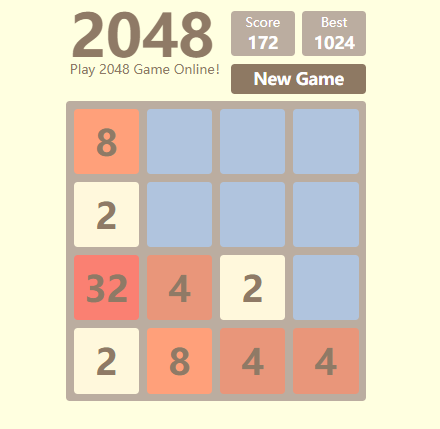
这个游戏JS部分全都是用原生JS代码写的,加有少量的CSS3动画,并简单的兼容了一下移动端。
先看一下在线的demo:https://yuan-yiming.github.io/2048-online-game/
github地址:https://github.com/Yuan-Yiming/2048-online-game
====================================================================
下面简单分析一下JS代码:
1.游戏中包含的主要事件:
new game按钮的click事件:点击后重新开始一次新的游戏;
game over后重新开始按钮的click事件:点击后重新开始一次新的游戏;
桌面端键盘上的方向键keydown的事件:按下方向键后数字会向相应的方向移动;
移动端的touch事件:通过计算touchstart和touchend的坐标变化,判断手指在移动端屏幕的滑动方向;
2.业务逻辑
2.1 重新开始一次游戏:
需要清空游戏盘,并且随机给一个格子生成一个数字2,每次生成不同数字都会给格子配相应的背景颜色;
2.2 按下方向盘或滑动屏幕时格子移动情况(核心部分)
游戏面板有4 x 4的格子,遍历每一行的每一个格子,若为空格则不作处理,非空格则要判断其下一步(注意每次只判断一步的动作,方法howToGo())的运动情况,即:
a:空格,不作处理
b:非空格,进一步判断下一步动作,有3种情况:
b1:若需要移动的格子前面是没有数字的空格,则格子往前移动一个,即将数字插入到前面格子内,原本格子中的数字销毁,然后从b开始循环再次判断;
b2:若需要移动的格子前面不是空格,且与前面格子包含的数字不相等,则格子无需移动,该格子运动判断完毕,进行下一个格子的运动判断;
b3:若需要移动的格子前面不是空格,且与前面格子包含的数字相等,则将前面格子内的数字 x 2,原本格子中的数字销毁,该格子运动判断完毕,进行下一个格子的运动判断;
注意:由于是每次运动都是由运动方向的最前面格子开始运动的,即b2,b3两种情况碰到前面有格子时,说明前面的格子已经完成运动,前面没有空位了,所以当前格子运动完成,继续移动后面的格子。
以下使用图片来说明格子运动的情况:
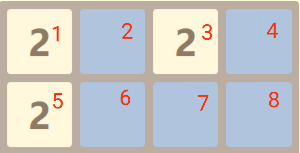
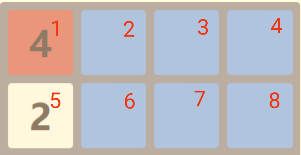
上面有两行格子,如果是向左运动,首先遍历第1行,对1~4号格子依次判断其运动情况,首先1号格子先运动,由于是1号格子靠边,可认为其前面是包含不同数字的格子,运动情况为b2,无需运动;2号格子为空格,运动情况为a;3号格子前面为空格,首先运动情况为b1,运动后3号格子的数字插到2号格子,3号格子数字销毁成为空格,然后需要对2号格子再次判断,再进行一次运动,即b3,使得1号格子数字变成4,2号格子成为空格;后面4号格子为空格不作处理。遍历第2行,对5~8号格子依次判断其运动情况,5号格子与1号格子情况相同,6、7、8号格子为空格,无需处理。
向左运动后的格子:
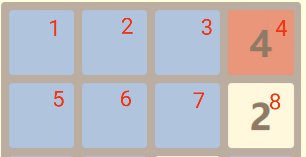
如果是向右运动,遍历第1行要从右边开始,4~1号格子依次运动,首先4号格子空格无需处理;然后3号格子运动情况b1,向前移动一格,数字2插入到4号格子内;2号空格无需处理;1号空格先连续进行两次b1运动,再进行一次b3运动,碰到4号格子内数字相同,最终使得4号格子内数字变成4。遍历第2行,8~5号格子依次运动,8、7、6号为空格均无需处理,5号格子连续3次b1运动,使得8号格子内数字变成2。
向右运动后的格子:
向上或者向下运动同理。
=====================================================================
下面废话不说,直接上代码。
HTML代码:index.html
<!DOCTYPE html>

<html>

<head>

	<meta charset="utf-8">

	<meta name="viewport" content="width=device-width, initial-scale=1.0, maximum-scale=1.0, user-scalable=no">

	<title>Play 2048 Game Online!</title>

	<link rel="stylesheet" type="text/css" href="desktop.css">

	<link media="(max-width: 860px)" rel="stylesheet" type="text/css" href="mobile.css">

	<link rel="icon" href="icon.png">

</head>

<body>

	<!-- <div class="github"><a href="https://www.baidu.com"></a></div> -->

	<div class="wrapper">

		<div class="header">

			<div class="title">

				<strong>2048</strong>

			</div>

			<div class="slogan">

				<p>Play 2048 Game Online!</p>

			</div>

			<div class="score">

				<span>Score</span><br><span class="number">0</span><span class="score-animation">+12</span>

			</div>

			<div class="best">

				<span>Best</span><br><span class="number">1024</span><span class="best-animation">+12</span>

			</div>

			<div class="new-game">

				<span>New Game</span>

			</div>

		</div>

		<div class="game-board">

			<div class="grid grid-11 row1 col1"><span></span></div>

			<div class="grid grid-12 row1 col2"><span></span></div>

			<div class="grid grid-13 row1 col3"><span></span></div>

			<div class="grid grid-14 row1 col4"><span></span></div>

			<div class="grid grid-21 row2 col1"><span></span></div>

			<div class="grid grid-22 row2 col2"><span></span></div>

			<div class="grid grid-23 row2 col3"><span></span></div>

			<div class="grid grid-24 row2 col4"><span></span></div>

			<div class="grid grid-31 row3 col1"><span></span></div>

			<div class="grid grid-32 row3 col2"><span></span></div>

			<div class="grid grid-33 row3 col3"><span></span></div>

			<div class="grid grid-34 row3 col4"><span></span></div>

			<div class="grid grid-41 row4 col1"><span></span></div>

			<div class="grid grid-42 row4 col2"><span></span></div>

			<div class="grid grid-43 row4 col3"><span></span></div>

			<div class="grid grid-44 row4 col4"><span></span></div>

		</div>

		<div class="popup">

			<div class="game-over">

				<p>Game is over...</p>

				<p class="try-again">Try again?</p>

			</div>

			<div class="win">

				<p>You win the game!! </p><p>Congratulation!!</p>

				<p class="try-again">Try again?</p>

			</div>

		</div>

	</div>

	<script type="text/javascript" src="2048.js"></script>

</body>

</html>
CSS桌面版代码:desktop.css
* {

	list-style: none;

	color: #8f7a66;

	padding: 0;

	margin: 0;

	box-sizing: border-box;

}

body {

	background-color: #ffffe0;

}

.wrapper {

	position: relative;

	width: 400px;

	height: 540px;

	/*border: 1px solid red;*/

	margin: 0 auto;

}

/*头部*/

.header {

	width: 400px;

	height: 140px;

	/*border: 1px solid green;*/

	position: relative;

	/*opacity: 0.4;*/

}

.title, .slogan, .score, .best, .new-game, .github>a {

	position: absolute;

}

.title strong {

	display: inline-block;

	width: 260px;

	height: 100px;

	font-size: 78px;

	line-height: 100px;

	/*text-align: center;*/

	padding: 0 5px;

	/*border: 1px solid black;*/

}

.slogan {

	padding: 0 5px;

	top: 85px;

	/*border: 1px solid black;*/

}

.github>a {

	display: inline-block;

	width: 50px;

	height: 50px;

	/*border: 1px solid red;*/

	top: 8%;

	right: 5%;

	/*margin: 5px;*/

	background: url("Git.png") no-repeat 0 0;

	border-radius: 50%;

	background-size: 100%;

}

.github>span>span {

	display: inline-block;

	width: 100px;

	height: 16px;

	line-height: 16px;

	position: absolute;

	bottom: -24px;

	left: -25px;

	text-align: center;

	color: #2c2c2c;

}

/*分数*/

/* 分数动画 */

.score-animation, .best-animation{

	display: none;

	position: absolute;

	top: 25px;

	left: 10px;

	width: 65px;

	height: 30px;

	font-size: 24px;

	font-weight: bold;

}

.score {

	left: 220px;

}

.best {

	left: 315px;

}

.score, .best {

	position: absolute;

	width: 85px;

	height: 60px;

	line-height: 28px;

	top: 20px;

	background-color: #bbada0;

}

.score span, .best span, .new-game span {

	color: #ffffff;

}

.score, .best, .new-game, .game-board, .grid {

	text-align: center;

	border-radius: 5px;

}

.best .number, .score .number, .new-game {

	font-size: 22px;

	font-weight: bold;

}

.new-game {

	width: 180px;

	height: 40px;

	line-height: 40px;

	left: 220px;

	top: 90px;

	text-align: center;

	background-color: #8e7963;

	cursor: pointer;

}

.new-game:hover {

	width: 182px;

	height: 42px;

	line-height: 42px;

	left: 219px;

	top: 89px;

	font-size: 24px;

}

/*游戏主面板*/

.game-board {

	width: 400px;

	height: 400px;

	padding: 5px 5px;

	background-color: #bbada0;

	/*opacity: 0.4;*/

}

.grid {

	position: relative;

	float: left;

	width: 87.5px;

	height: 87.5px;

	line-height: 87.5px;

	/*font-size: 48px;*/

	font-weight: bold;

	margin: 5px;

	background-color: #b0c4de;

}

.game-board .grid span {

	/*color: */

}

/*game over or win the game弹出页面*/

.popup .game-over, .popup .win {

	position: absolute;

	left: 60px;

	text-align: center;

	width: 280px;

	height: 160px;

	border-radius: 5px;

	/*border: 1px solid red;*/

	opacity: 1.0;

}

.popup p {

	color: #8f7a66;

}

.popup .game-over {

	display: none;

	top: 230px;

	font-size: 36px;

	font-weight: bold;

}

.popup .win {

	display: none;

	top: 220px;

	font-size: 28px;

	font-weight: bold;

}

p.try-again {

	color: #fff;

	font-size: 22px;

	width: 150px;

	height: 50px;

	line-height: 50px;

	border-radius: 5px;

	margin: 0 auto;

	background-color: #8f7a66;

	cursor: pointer;

}

.header, .game-board {

	/*opacity: 0.4;*/

}

.new-grid {

	background-color: #b0c4de !important;

}

/* 生成新格子动画 */

@keyframes tempgrid {

	from {width: 45px; height: 45px; top: 24px;left: 24px; font-size: 18px; line-height: 45px;display: block;}

	to {width: 87.5px; height: 87.5px; top: 0px;left: 0px; font-size: 48px; line-height: 87.5px;display: none;}

}

@-webkit-keyframes tempgrid {

	from {width: 45px; height: 45px; top: 24px;left: 24px; font-size: 18px; line-height: 45px;display: block;}

	to {width: 87.5px; height: 87.5px; top: 0px;left: 0px; font-size: 48px; line-height: 87.5px;display: none;}

}

@-moz-keyframes tempgrid {

	from {width: 45px; height: 45px; top: 24px;left: 24px; font-size: 18px; line-height: 45px;display: block;}

	to {width: 87.5px; height: 87.5px; top: 0px;left: 0px; font-size: 48px; line-height: 87.5px;display: none;}

}

.temp-grid {

	animation: tempgrid 0.15s ease-in forwards;

	-webkit-animation: tempgrid 0.15s ease-in forwards;

	-ms-animation: tempgrid 0.15s ease-out forwards;

	-moz-animation: tempgrid 0.15s ease-out forwards;

}
CSS移动端兼容代码:mobile.css
body {

	background-color: #fffadd;

}

.wrapper {

	width: 100%;

	/*height: 540px;*/

	/*border: 1px solid red;*/

	/*margin: 0 auto;*/

}

/*头部*/

.header {

	width: 100%;

	/*height: 140px;*/

	position: relative;

}

.title, .slogan, .score, .best, .new-game {

	position: absolute;

	float: left;

	text-align: center;

}

.title, .slogan {

	width: 100%;

}

.title strong {

	display: inline-block;

	width: 100%;

	/*height: 260px;*/

	font-size: 487%;  /* 100% 16px */

	/*line-height: 192%;*/

	text-align: center;

	/*padding: 0 5px;*/

	/*border: 1px solid black;*/

}

.slogan {

	/*margin-top: 10px;*/

	top: 65%;

}

/* github */

/*.github>a {

	top: 4%;

	right: 6.25%;

}*/

/*分数*/

.score, .best, .new-game {

	width: 25%;

	/*border: 1px solid green;*/

}

/* 分数动画 */

.score-animation, .best-animation{

	display: none;

	/*position: absolute;*/

	top: 25px;

	left: 10px;

	width: 65px;

	height: 30px;

	font-size: 24px;

	font-weight: bold;

}

.score, .best {

	/*position: absolute;*/

	line-height: 28px;

	top: 90%;

	background-color: #bbada0;

}

.score {

	left: 47.5%;

}

.best {

	left: 75%;

}

.new-game {

	width: 45%;

	height: 60px;

	line-height: 60px;

	left: 0;

	top: 90%;

	text-align: center;

	background-color: #8e7963;

	cursor: pointer;

	/*padding-bottom: 2em;*/

	font-size: 28px;

}

.new-game:hover {

	width: 45%;

	/*height: 42px;*/

	/*line-height: 42px;*/

	height: 60px;

	line-height: 60px;

	left: 0;

	top: 90%;

	/*line-height: 2e;*/

	font-size: 28px;

}

.score span, .best span, .new-game span {

	color: #ffffff;

}

.score, .best, .new-game, .game-board, .grid {

	text-align: center;

	border-radius: 5px;

}

.best .number, .score .number {

	font-size: 22px;

	font-weight: bold;

}

/*游戏主面板*/

.game-board {

	position: absolute;

	/*display: none;*/

	width: 100%;

	height: auto;

	/*height: 400px;*/

	/*padding: 10px 10px;*/

	background-color: #bbada0;

	/*opacity: 0.4;*/

	top: 36%;

}

.grid {

	/*position: relative;*/

	float: left;

	width: 22%;

	/*height: */

	/*padding-bottom: 21.95%;*/

	/*height: 100%;*/

	line-height: 80px;

	/*font-size: 48px;*/

	font-weight: bold;

	/*padding-bottom: 410px;*/

	padding: 1.5%;

	background-color: #b0c4de;

}

/* 生成新格子动画 */

@keyframes tempgrid {

	from {width: 50%; height: 50%; top: 25%;left: 25%; font-size: 24px; line-height: 192%;display: block;}

	to {width: 100%; height: 100%; top: 0px;left: 0px; font-size: 48px; line-height: 192%;display: none;}

}

@-webkit-keyframes tempgrid {

	from {width: 50%; height: 50%; top: 25%;left: 25%; font-size: 24px; line-height: 192%;display: block;}

	to {width: 100%; height: 100%; top: 0px;left: 0px; font-size: 48px; line-height: 192%;display: none;}

}

@-moz-keyframes tempgrid {

	from {width: 50%; height: 50%; top: 25%;left: 25%; font-size: 24px; line-height: 192%;display: block;}

	to {width: 100%; height: 100%; top: 0px;left: 0px; font-size: 48px; line-height: 192%;display: none;}

}
js代码:2048.js
// 页面加载时

window.onload = function () {

	// var temp = tempGrid(2);

	giveNumber(2);

	newGameBotton();

	getReady();

	backgroundColorToNumber();

	scaleWidth();

	touch();

}

// 在移动端使得格子宽高比例1:1

function scaleWidth() {

	// 获取格子的宽度

	var grid = document.getElementsByClassName("grid"),

		width = window.getComputedStyle(grid[0], null)["width"];

		// width = grid[0].style.width;

	//给格子高度赋值

	for (var i = 0; i < 16; i++) {

		grid[i].style.height = width;

	}

}

// 创建一个临时的格子

function createTempGrid(num) {

		var temp = document.createElement("div");

		temp.innerHTML = "<span>" + num + "</span>";

		temp.style.position = "absolute";

		temp.style.backgroundColor = "#fff8dc";

		temp.style.width = "87.5px";

		temp.style.height = "87.5px";

		temp.style.lineHeight = "87.5px";

		temp.style.fontWeight = "bold";

		temp.style.fontSize = "48px";

		temp.style.borderRadius = "5px";

		temp.style.top = "0";

		temp.style.left = "0";

		// temp.style.display = "none";

		// console.log(temp);

		temp.classList.add("temp-grid");

		return temp;

	};

// 删除临时格子

function deleteTempGrid() {

	var temp = document.getElementsByClassName("temp-grid");

	for (var i = 0; i < temp.length; i ++) {

		temp[i].remove();

	}

	var newGrid = document.getElementsByClassName("new-grid");

		// console.log(newGrid);

	if (newGrid) {

		// console.log(newGrid.length);

		for (var i = 0; i < newGrid.length; i ++) {

			newGrid[i].classList.remove("new-grid");

			// console.log(newGrid.length);

		}

	}

}

// giveNumber:随机生成一个空格子,每个空格子里面放一个数字num

function giveNumber(num) {

	// console.log("give!!!!");

	var x, y, newGrid, tempGrid;

	tempGrid = createTempGrid(num);

	while (true) {

		// if (tempGrid && tempGrid.parentElement) {

		// 	tempGrid.parentElement.removeChild(tempGrid);

		// }

		x = Math.floor(Math.random() * 4) + 1;

		y = Math.floor(Math.random() * 4) + 1;

		newGrid = document.getElementsByClassName("grid-" + x + y)[0];

		// newGrid.style.backgroundColor = "#b0c4de";

		if (newGrid.innerHTML == "<span></span>") {

			newGrid.classList.add("new-grid");

			newGrid.innerHTML = "<span>" + num + "</span>";

			newGrid.appendChild(tempGrid);

			break;

		}

	}

	// return blankGrid;

}

// clearGrid:清空格子及分数归零

function clearGrid() {

	var grid = document.getElementsByClassName("grid"),

		score = document.getElementsByClassName("score")[0].children[2];

	score.innerText = "0";

	for (var i = 0; i < grid.length; i ++) {

		grid[i].innerHTML = "<span></span>";

		// grid[i].style.backgroundColor = "#b0c4de";

	}

	backgroundColorToNumber();

}

// 重新开始一次游戏

function newGame() {

	clearGrid();

	giveNumber(2);

	backgroundColorToNumber();

	return true;

}

// 触发新一次游戏的按钮

function newGameBotton() {

	var newGameBtn = document.getElementsByClassName("new-game")[0];

	newGameBtn.addEventListener("click", function () {

		newGame();

	}, false);

	newGameBtn.addEventListener("touchend", function () {

		newGame();

	}, false);

}

// backgroundColorToNumber:数字跟背景颜色/数字大小对应

function backgroundColorToNumber() {

	var gridNum,

		// child,

		grid = document.getElementsByClassName("grid");

	for (var i = 0; i < grid.length; i ++) {

		gridNum = getGridNum(grid[i]);

		// child = grid[i].children[0];

		grid[i].style.fontSize = "48px";

		// if ((" " + grid[i].className + " ").indexOf(" " + "new-grid" + " ") == -1) {

			switch (gridNum) {

				case 2:

					grid[i].style.backgroundColor = "#fff8dc";

					// grid[i].children[0].style.color = "#fff";   // 这句代码会使得页面瘫痪!!

					break;

				case 4:

					grid[i].style.backgroundColor = "#e9967a";

					// grid[i].children[0].style.color = "#8f7a66";

					break;

				case 8:

					grid[i].style.backgroundColor = "#FFA07A";

					break;

				case 16:

					grid[i].style.backgroundColor = "#F4A460";

					break;

				case 32:

					grid[i].style.backgroundColor = "#FA8072";

					break;

				case 64:

					grid[i].style.backgroundColor = "#ff7f50";

					break;

				case 128:

					grid[i].style.backgroundColor = "#FF6347";

					grid[i].style.fontSize = "40px";

					break;

				case 256:

					grid[i].style.backgroundColor = "#FF8800";

					grid[i].style.fontSize = "40px";

					break;

				case 512:

					grid[i].style.backgroundColor = "#FF6600";

					grid[i].style.fontSize = "40px";

					break;

				case 1024:

					grid[i].style.backgroundColor = "#F53";

					grid[i].style.fontSize = "32px";

					break;

				case 2048:

					grid[i].style.backgroundColor = "#F40";

					grid[i].style.fontSize = "32px";

					break;

				default:

					grid[i].style.backgroundColor = "#b0c4de";

					// grid[i].children[0].style.color = "#fff";

			}

		// }

	}

}

// 游戏主入口

function getReady() {

	window.onkeydown = function(e) {

		deleteTempGrid();  // 在其他位置

		keyDown(e.keyCode);

		// backgroundColorToNumber();

	}

}

// getGridNum(ele):传入div元素,返回格子里面的数字

function getGridNum(ele) {

	return parseInt(ele.children[0].innerText);  // 空格返回NaN

}

// 各个方向的prevGrid,即所对应方向的前一个格子

function getPrevGrid(ele, direction) {

	var prevEle,

		count = 0;

	// 各个方向

	if (direction == "left") {

		return ele.previousElementSibling || null;

	} else if (direction == "right") {

		return ele.nextElementSibling || null;

	} else if (direction == "up") {

		for (var i = 0; i < 4; i ++) {

			ele = ele.previousElementSibling;

			if (!ele) {

				return null;

			}

		}

		return ele;

	} else if (direction == 'down') {

		for (var i = 0; i < 4; i ++) {

			ele = ele.nextElementSibling;

			if (!ele) {

				return null;

			}

		}

		return ele;

	}

}

// #滑块移动#

// 桌面版通过监听方向键来控制滑块移动方向

function keyDown(keyCode) {

	var dir,

		arr,

		go,

		count = 0,   // 用于叠加每次运动得到的分数

		signal = 0;  // 用于判断格子是否运动

	switch (keyCode) {

		case 37:

			dir = "left";

			break;

		case 38:

			dir = "up";

			break;

		case 39:

			dir = "right";

			break;

		case 40:

			dir = "down";

			break;

	}

	for (var i = 1; i < 5; i ++) {

		if (dir == "up" || dir == "down") {

			arr = document.getElementsByClassName("col" + i);

		}else if (dir == "left" || dir == "right") {

			arr = document.getElementsByClassName("row" + i);

		}

		if (dir == "up" || dir == "left") {

			for (var j = 1; j <= 3; j ++) {

				// console.log(col[j]);

				max = j;

				go = howToGo(arr[j], dir, max); // 叠加返回得分

				// console.log("go2:" + go);

				signal += go;

				if (go > 1) {

					count += go;   // 累计每一次运动的得分

				}

			}

		} else if (dir == "down" || dir == "right") {

			for (var j = 2; j >= 0; j --) {

				max = 3 - j;

				go = howToGo(arr[j], dir, max);

				// gridMove(arr[j], dir, 1);

				// console.log("go:" + go);

				signal += go;

				if (go > 1) {

					count += go;   // 累计每一次运动的得分

				}

			}

		}

	}

	// 格子有运动signal > 0

	if (signal > 0) {

		// console.log("signal:" + signal);

		giveNumber(2);

		backgroundColorToNumber();

		testGameOver();

	}

	// 格子移动,且得分>0

	if (count > 0) {

		addScore(count);

	}

	return count;

}

// 移动端使用touch事件来监听滑块移动

function touch() {

	var gameBoard = document.getElementsByClassName("game-board")[0];

	gameBoard.addEventListener("touchstart",function (e) {

		// e.preventDefault();

		startX = e.changedTouches[0].pageX;

	    startY = e.changedTouches[0].pageY;

	},false);

	gameBoard.addEventListener('touchend',function(e){

		e.preventDefault();  // 阻止浏览器的默认行为,例如滚动、跳转等!!

		//获取滑动屏幕时的X,Y

		endX = e.changedTouches[0].pageX,

		endY = e.changedTouches[0].pageY;

		//获取滑动距离

		distanceX = endX-startX;

		distanceY = endY-startY;

		//判断滑动方向,滑动角度大于15°

		if(Math.abs(distanceX) / Math.abs(distanceY) > 1.73 && distanceX > 0){

		    deleteTempGrid();

		    keyDown(39);

		}else if(Math.abs(distanceX) / Math.abs(distanceY) > 1.73 && distanceX < 0){

		    deleteTempGrid();

		    keyDown(37);

		}else if(Math.abs(distanceY) / Math.abs(distanceX) > 1.73 && distanceY < 0){

		    deleteTempGrid();

		    keyDown(38);

		}else if(Math.abs(distanceY) / Math.abs(distanceX) > 1.73 && distanceY > 0){

		    deleteTempGrid();

		    keyDown(40);

		}else{

		    // console.log('点击未滑动');

		}

	});

}

// 3.记录分数,分数会增加,

function addScore(score) {

	var span = document.getElementsByClassName("number"),

		currentScore = parseInt(span[0].innerText),

		bestScore = parseInt(span[1].innerText);

	span[0].innerText = score + currentScore;

	scoreUpAnimaton("score", score);

	if (span[0].innerText > bestScore) {

		scoreUpAnimaton("best", score);

		span[1].innerText = span[0].innerText;

	}

}

// howToGoLeft(ele, direction, max):该函数判断单个格子怎么移动

function howToGo(ele, direction, max, testMode) {

	var prevGrid,

		prevGridNum,

		gridNum = 0,

		go,

		addNum,

		numLen,

		doubleNumGrid;

		// console.log(prevGrid);

	// 各个方向

	prevGrid = getPrevGrid(ele, direction);

	gridNum = getGridNum(ele);

	if (prevGrid) {

		prevGridNum = getGridNum(prevGrid);

	} else {

		prevGridNum = "null";

	}

	// 前面是空格,要继续判断。。。。。。。。。。。。。。。。。。。。。

	if (gridNum && !prevGridNum) {

		prevGrid.innerHTML = ele.innerHTML;

		ele.children[0].innerText = "";

		max -= 1;

		// gridMove(ele, direction, 1);

		if (max) {

			go = howToGo(prevGrid, direction, max);

			// 0、double、continue

		}

		// 返回1

		// console.log("go:" + (go || 1));

		// if (max == 0) {

		// 	console.log("before:" + typeof(go));

		// 	go = 1;

		// 	console.log("after" + typeof(go));

		// }

		return go || 1;

		// 若go = 0,返回1;go = double,返回double,go = underfied,返回1

	// 和前面数字相同

	} else if (gridNum == prevGridNum) {

		if (!testMode) {

			gridNum *= 2;

			// addScore(gridNum);

			// gridMove(ele, direction, 1);

			prevGrid.children[0].innerText = gridNum + "";

			// 在这里添加数字变大的动画:

			// numLen = (gridNum + "").length;

			ele.children[0].innerText = "";

			// console.log('gridNum:' + gridNum)

			if (gridNum == 2048) {

				popup("win");

			}

			// 如果数字叠加,就返回得分,且得分≥4

		}

		// console.log("gridNum:  " + gridNum);

		return gridNum;

	} else {

		// 格子没动,返回0

		return 0;

	}

}

// 4.怎么判断game over,或者达到2048为winner

// test geme over

function testGameOver() {

	var content,

		leftTest,

		rightTest,

		upTest,

		downTest,

		count = 0;

		grid = document.getElementsByClassName("grid");

	for (var i = 0; i < grid.length; i ++) {

		content = grid[i].innerHTML;

		if (content != "<span></span>") {

			count += 1;

		}

	}

	// console.log("count:" + count);

	if (count == 16) {

		if (getGridNum(grid[3]) == getGridNum(grid[4])) {

			count -= 2;

		}

		if (getGridNum(grid[7]) == getGridNum(grid[8])) {

			count -= 2;

		}

		if (getGridNum(grid[11]) == getGridNum(grid[12])) {

			count -= 2;

		}

		for (var i = 0; i < grid.length; i ++) {

			if(!howToGo(grid[i], "left", 1, true) && !howToGo(grid[i], "right", 1, true) && !howToGo(grid[i], "up", 1, true) && !howToGo(grid[i], "down", 1, true)) {

				count --;

				if (count == 0) {

					popup("game-over");

					return true;

				}

			}

		}

	}

	return false;

}

// game over 后弹出

function popup(popType) {

	var num,

		tryAgainEle,

		ele = document.getElementsByClassName(popType)[0],

		headerEle = document.getElementsByClassName("header")[0],

		gameBoardEle = document.getElementsByClassName("game-board")[0];

	ele.style.display = "block";

	headerEle.style.opacity = "0.4";

	gameBoardEle.style.opacity = "0.4";

	// tryAgain(num);

	if (popType == "game-over") {

		num = 0;

	}

	if (popType == "win") {

		num = 1;

	}

	tryAgainEle = document.getElementsByClassName("try-again")[num];

	tryAgainEle.addEventListener("click", function () {

		tryAgain(ele, headerEle, gameBoardEle);

	}, false);

	tryAgainEle.addEventListener("touchend", function () {

		tryAgain(ele, headerEle, gameBoardEle);

	}, false);

}

// 再来一次

function tryAgain(ele, headerEle, gameBoardEle) {

	ele.style.display = "none";

	headerEle.style.opacity = "1.0";

	gameBoardEle.style.opacity = "1.0";

	newGame();

}

// 5.测试

function test() {

	var randomInt,

		timer;

	timer = setInterval(function() {

		randomInt = Math.floor(Math.random() * 4) + 37;

		keyDown(randomInt);

		// console.log(randomInt);

		if (testGameOver()) {

			clearInterval(timer);

		}

	}, 300);

}

// 分数增加的动画

function scoreUpAnimaton(type, score) {

	var ele,

		score,

		timer,

		count = 0;

	if (type == "score") {

		ele = document.getElementsByClassName("score-animation")[0];

	} else if (type == "best") {

		ele = document.getElementsByClassName("best-animation")[0];

	}

	score = "+" + score;

	ele.innerText = score;

	ele.style.top = "25px";

	ele.style.color = "#8f7a66";

	ele.style.opacity = "1.0"

	timer = setInterval(function() {

		count ++;

		ele.style.display = "inline-block";

		ele.style.top = parseInt(ele.style.top) - 8 + "px";

		ele.style.opacity = parseFloat(ele.style.opacity) - 0.1;

		if (count == 6) {

			clearInterval(timer);

			ele.style.display = "none";

		}

	}, 80);

}
用原生JS写一个网页版的2048小游戏(兼容移动端)的更多相关文章
- 用原生js写一个"多动症"的简历
用原生js写一个"多动症"的简历 预览地址源码地址 最近在知乎上看到@方应杭用vue写了一个会动的简历,觉得挺好玩的,研究一下其实现思路,决定试试用原生js来实现. 会动的简历实现 ...
- 原生js写一个无缝轮播图插件(支持vue)
轮播图插件(Broadcast.js) 前言:写这个插件的原因 前段时间准备用vue加上网易云的nodejs接口,模拟网易云音乐移动端.因为想自己写一遍所有的代码以及加固自己的flex布局,所以没有使 ...
- 自己写一个网页版的Markdown实时编辑器
这几天忙着使用Python+Django+sqlite 搭建自己的博客系统,但是单纯的使用H5的TextArea,简直太挫了有木有.所以,就想模仿一下人家内嵌到网页上的Markdown编辑器,从而让自 ...
- 原生js写的贪吃蛇网页版游戏特效
<meta http-equiv="Content-Type" content="text/html; charset=utf-8"> <bo ...
- 分享:计算机图形学期末作业!!利用WebGL的第三方库three.js写一个简单的网页版“我的世界小游戏”
这几天一直在忙着期末考试,所以一直没有更新我的博客,今天刚把我的期末作业完成了,心情澎湃,所以晚上不管怎么样,我也要写一篇博客纪念一下我上课都没有听,还是通过强大的度娘完成了我的作业的经历.(当然作业 ...
- 原生 js 写分页
欢迎留言或者加本人QQ172360937咨询 这段代码是用原生 js 写的一个分页的效果 <!doctype html> <html lang="en"> ...
- 用原生JS写移动动画案例及实际应用
js很强大 相信很多人都知道,那么它有哪些强大之处呢?有兴趣的人可以去查查,这里就不赘述了,因为不在本片文章讨论的范围. 我们要讲的是怎么用原生JS写移动动画?我们先举一个最简单的动画例子,很多网站的 ...
- 转---写一个网页进度loading
作者:jack_lo www.jianshu.com/p/4c93f5bd9861 如有好文章投稿,请点击 → 这里了解详情 loading随处可见,比如一个app经常会有下拉刷新,上拉加载的功能,在 ...
- 原生js写Ajax
//原生js写ajax就像打电话 //打电话分下面4步//1.拿出手机//2.拨号//3.说话//4.挺对方说话 //ajax也分下面4步//1.创建ajax对象//2.连接到服务器//3.发送请求( ...
随机推荐
- hdu 1010 Tempter of the Bone(dfs)
Tempter of the Bone Time Limit: 2000/1000 MS (Java/Others) Memory Limit: 65536/32768 K (Java/Othe ...
- qt MessageBOX 消息
void MessageBox::slotQuestion() { switch(QMessageBox::question(this,"Question",tr("It ...
- 如何解决 Linux 虚拟机磁盘设备名不一致的问题
问题描述 在 Linux 虚拟机内,将附加的多块数据磁盘以设备名(/dev/sdxx)的方式创建文件系统,并将之写入 /etc/fstab 文件中实现启动自动挂载功能.但是在虚拟机重启之后,会随机出现 ...
- Connection Manager ->> Multiple Flat File Connection & Multiple File Connection
遍历一个文件夹下的所有文件的方法有两钟:1)使用Multiple Flat File Connection,把所有我们要的文件用"|"作为连接符拼凑出一条connection st ...
- yii2.0的gradview点击按钮通过get方式传参
1.直接看views层里的代码就可以了 , <!--?= GridView::widget([ 'dataProvider' =--> $dataProvider, 'filterMode ...
- January 14 2017 Week 2nd Saturday
Don't try so hard, the best things come when you least expect them to. 不要着急,最好的总会在最不经意时出现. The secon ...
- 可跨域的单点登录(SSO)实现方案
可跨域的单点登录(SSO)实现方案 SSO简介 定义: 传统的单站点登录访问授权机制是:登录成功后将用户信息保存在session中,sessionId保存在cookie中,每次访问需要登录访问的资源( ...
- awk的简单使用
awk是一个强大的文本分析工具,相对于grep的查找,sed的编辑,awk在其对数据分析并生成报告时,显得尤为强大.简单来说awk就是把文件逐行的读入,以空格为默认分隔符将每行切片,切开的部分再进行各 ...
- Chosen三级联动
上一篇介绍了 Chosen 的使用,这篇介绍联动.看代码: var addressResolve = function (options) { //检测用户传进来的参数是否合法 if (!isVal ...
- win10 x64 注册ZQDeviceOcx.ocx控件
正常的方式在32位系统下可行, 但是在64位系统下是不可行的. 在64位系统中正确的注册步骤是: 1. 将对应的ocx和dll放到C:\Windows\SysWOW64目录下. 2. 然后找到C:\W ...