
Android蓝牙通信总结
BluetoothAdapter- Represents the local Bluetooth adapter (Bluetooth radio). The
BluetoothAdapteris the entry-point for all Bluetooth interaction. Using this, you can discover other Bluetooth devices, query a list of bonded (paired) devices, instantiate aBluetoothDeviceusing a known MAC address, and create aBluetoothServerSocketto listen for communications from other devices.
BluetoothDevice- Represents a remote Bluetooth device. Use this to request a connection with a remote device through a
BluetoothSocketor query information about the device such as its name, address, class, and bonding state.
BluetoothSocket- Represents the interface for a Bluetooth socket (similar to a TCP
Socket). This is the connection point that allows an application to exchange data with another Bluetooth device via InputStream and OutputStream.
private class ConnectThread extends Thread {

    private final BluetoothSocket mmSocket ;

    private final BluetoothDevice mmDevice ;

    public ConnectThread(BluetoothDevice device, boolean secure) {

      mmDevice = device;

      BluetoothSocket tmp = null ;

      // Get a BluetoothSocket for a connection with the

      // given BluetoothDevice

      try {

        tmp = device.createRfcommSocketToServiceRecord( MY_UUID );

      } catch (IOException e) {

        Log. e( TAG,e);

      }

      mmSocket = tmp;

    }

    public void run() {

      // Always cancel discovery because it will slow down a connection

      mAdapter.cancelDiscovery();

      try {

        mmSocket .connect();

      } catch (IOException e) {

        // Close the socket

        try {

          mmSocket .close();

        } catch (IOException e2) {

          Log. e( TAG,e2);

        }

        connectionFailed();

        return ;

      }

      synchronized (BluetoothService. this ) {

        mConnectThread = null ;

      }

      // Start the connected thread

      connected(mmSocket);

    }

    public void cancel() {

      try {

        mmSocket .close();

      } catch (IOException e) {

        Log. e( TAG, "close() of connect " + mSocketType + " socket failed", e);

      }

    }

  }
BluetoothServerSocket- Represents an open server socket that listens for incoming requests (similar to a TCP
ServerSocket). In order to connect two Android devices, one device must open a server socket with this class. When a remote Bluetooth device makes a connection request to the this device, theBluetoothServerSocketwill return a connectedBluetoothSocketwhen the connection is accepted.
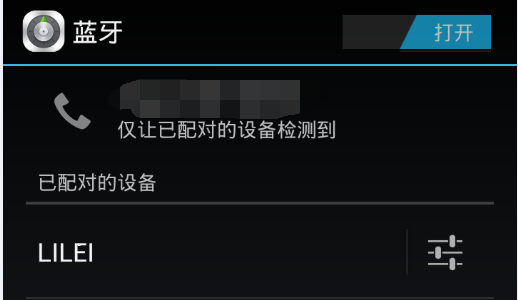
public class MainActivity extends Activity implements View.OnClickListener {

  private BluetoothAdapter mBluetoothAdapter = null;

  private BluetoothService mService = null;

  private BluetoothDevice mOnePairedDevice;

  private final String DeviceName = "LILEI" ;

  @Override

  protected void onCreate(Bundle savedInstanceState) {

    super.onCreate(savedInstanceState);

    setContentView(R.layout. activity_main);

    mBluetoothAdapter = BluetoothAdapter. getDefaultAdapter();

    if ( mBluetoothAdapter == null ) {

      Toast.makeText(this, "Bluetooth is not available", Toast.LENGTH_LONG ).show();

      finish();

    }

    ....

    }

  @Override

  public void onStart() {

    super.onStart();

    if (! mBluetoothAdapter.isEnabled()) {

      // Enable Bluetooth function

      Intent enableIntent = new Intent(BluetoothAdapter.ACTION_REQUEST_ENABLE );

      startActivityForResult(enableIntent, REQUEST_ENABLE_BT);

    } else if (mService == null) {

      setupBluetoothService();

    }

  }

  @Override

  public void onResume() {

    super.onResume();

    // Performing this check in onResume() covers the case in which BT was

    // not enabled during onStart(), so we were paused to enable it...

    // onResume() will be called when ACTION_REQUEST_ENABLE activity returns.

    if ( mService != null ) {

      // Only if the state is STATE_NONE, do we know that we haven't started already

      if ( mService.getState() == BluetoothService.STATE_NONE) {

        if (mOnePairedDevice == null) {

          mOnePairedDevice = getASpecificPairedDevice(DeviceName );

        }

        if (mOnePairedDevice != null) {

          mService.start(mOnePairedDevice );

        } else {

          Toast. makeText(this, "Not Found the paired Device." , Toast.LENGTH_LONG ).show();

        }

      }

    }

  }

  @Override

  public void onDestroy() {

    super.onDestroy();

    if ( mService != null ) {

      mService.stop();

    }

  }

  @Override

  public void onActivityResult(int requestCode, int resultCode, Intent data) {

    switch (requestCode) {

      case REQUEST_ENABLE_BT:

        // When the request to enable Bluetooth returns

        if (resultCode == Activity.RESULT_OK) {

          setupBluetoothService();

        } else {

          // User did not enable Bluetooth or an error occurred

          Log. d(TAG, "BT not enabled");

          Toast. makeText(this, R.string. bt_not_enabled_leaving, Toast.LENGTH_SHORT ).show();

          finish();

        }

    }

  }

  public void setupBluetoothService() {

    mService = new BluetoothService(mHandler );

  }

  private BluetoothDevice getASpecificPairedDevice(String name) {

    Set<BluetoothDevice> pairedDevices = mBluetoothAdapter.getBondedDevices();

    // If there are paired devices

    if (pairedDevices.size() > 0) {

      // Loop through paired devices

      for (BluetoothDevice device : pairedDevices) {

        if (name.equals(device.getName())) {

          return device;

        }

      }

    }

    return null;

  }

    ...

   }
public class BluetoothService {

    private static final String TAG = "BluetoothService" ;

    private static final UUID MY_UUID = UUID.fromString( "00001101-0000-1000-8000-00805F9B34FB");

    // Constants that indicate the current connection state

    public static final int STATE_NONE = 0; // we're doing nothing

    public static final int STATE_LISTEN = 1; // now listening for incoming connections

    public static final int STATE_CONNECTING = 2; // now initiating an outgoing connection

    public static final int STATE_CONNECTED = 3; // now connected to a remote device

    private final BluetoothAdapter mAdapter ;

    private Handler mHandler ;

    private ConnectThread mConnectThread ;

    private ConnectedThread mConnectedThread ;

    private int mState ;

    public BluetoothService(Handler handler) {

        mAdapter = BluetoothAdapter.getDefaultAdapter();

        mHandler = handler;

        mState = STATE_NONE ;

    }

    public void setHandler(Handler handler) {

        mHandler = handler;

    }

    public void start(BluetoothDevice remoteDevice) {

        connect(remoteDevice, false );

    }

    public int getState() {

        return mState ;

    }

    public void stop() {

        Log. d( TAG, "stop" );

        if (mConnectThread != null) {

            mConnectThread .cancel();

            mConnectThread = null ;

        }

        if (mConnectedThread != null) {

            mConnectedThread .cancel();

            mConnectedThread = null ;

        }

        setState( STATE_NONE );

    }

    /**

     * This thread runs while attempting to make an outgoing connection with a device. It runs

     * straight through; the connection either succeeds or fails.

     */

    private class ConnectThread extends Thread {

        private final BluetoothSocket mmSocket;

        private final BluetoothDevice mmDevice;

        private String mSocketType ;

        public ConnectThread(BluetoothDevice device, boolean secure) {

            mmDevice = device;

            BluetoothSocket tmp = null ;

            mSocketType = secure ? "Secure" : "Insecure";

            // Get a BluetoothSocket for a connection with the

            // given BluetoothDevice

            try {

                tmp = device.createRfcommSocketToServiceRecord( MY_UUID );

            } catch (IOException e) {

                Log. e( TAG, "Socket Type: " + mSocketType + "create() failed", e);

            }

            mmSocket = tmp;

        }

        public void run() {

            Log. i( TAG, "BEGIN mConnectThread SocketType:" + mSocketType );

            setName( "ConnectThread" + mSocketType );

            // Always cancel discovery because it will slow down a connection

            mAdapter .cancelDiscovery();

            // Make a connection to the BluetoothSocket

            try {

                // This is a blocking call and will only return on a

                // successful connection or an exception

                mmSocket .connect();

            } catch (IOException e) {

                // Close the socket

                try {

                    mmSocket .close();

                } catch (IOException e2) {

                    Log. e( TAG, "unable to close() " + mSocketType

                            + " socket during connection failure" , e2);

                }

                connectionFailed();

                return ;

            }

            // Reset the ConnectThread because we're done

            synchronized (BluetoothService. this) {

                mConnectThread = null ;

            }

            // Start the connected thread

            connected( mmSocket , mmDevice , mSocketType );

        }

        public void cancel() {

            try {

                mmSocket .close();

            } catch (IOException e) {

                Log. e( TAG, "close() of connect " + mSocketType + " socket failed", e);

            }

        }

    }

    /**

     * Indicate that the connection attempt failed and notify the UI Activity.

     */

    private void connectionFailed() {

        // Send a failure message back to the Activity

        Message msg = mHandler .obtainMessage(Constants. MESSAGE_TOAST);

        Bundle bundle = new Bundle();

        bundle.putString(Constants. TOAST , "Unable to connect device" );

        msg.setData(bundle);

        mHandler .sendMessage(msg);

    }

    /**

     * Set the current state of the chat connection

     *

     * @param state An integer defining the current connection state

     */

    private synchronized void setState( int state) {

        Log. d( TAG, "setState() " + mState + " -> " + state);

        mState = state;

        // Give the new state to the Handler so the UI Activity can update

        mHandler .obtainMessage(Constants. MESSAGE_STATE_CHANGE, state, -1).sendToTarget();

    }

    /**

     * Start the ConnectedThread to begin managing a Bluetooth connection

     *

     * @param socket The BluetoothSocket on which the connection was made

     * @param device The BluetoothDevice that has been connected

     */

    public synchronized void connected(BluetoothSocket socket, BluetoothDevice device,

            final String socketType) {

        Log. d( TAG, "connected, Socket Type:" + socketType);

        // Cancel the thread that completed the connection

        if (mConnectThread != null) {

            mConnectThread .cancel();

            mConnectThread = null ;

        }

        // Cancel any thread currently running a connection

        if (mConnectedThread != null) {

            mConnectedThread .cancel();

            mConnectedThread = null ;

        }

        // Start the thread to manage the connection and perform transmissions

        mConnectedThread = new ConnectedThread(socket, socketType);

        mConnectedThread .start();

        // Send the name of the connected device back to the UI Activity

        Message msg = mHandler .obtainMessage(Constants. MESSAGE_DEVICE_NAME);

        Bundle bundle = new Bundle();

        bundle.putString(Constants. DEVICE_NAME , device.getName());

        msg.setData(bundle);

        mHandler .sendMessage(msg);

        setState( STATE_CONNECTED );

    }

    /**

     * This thread runs during a connection with a remote device. It handles all incoming and

     * outgoing transmissions.

     */

    private class ConnectedThread extends Thread {

        private final BluetoothSocket mmSocket;

        private final InputStream mmInStream;

        private final OutputStream mmOutStream;

        public ConnectedThread(BluetoothSocket socket, String socketType) {

            Log. d( TAG, "create ConnectedThread: " + socketType);

            mmSocket = socket;

            InputStream tmpIn = null ;

            OutputStream tmpOut = null ;

            // Get the BluetoothSocket input and output streams

            try {

                tmpIn = socket.getInputStream();

                tmpOut = socket.getOutputStream();

            } catch (IOException e) {

                Log. e( TAG, "temp sockets not created" , e);

            }

            mmInStream = tmpIn;

            mmOutStream = tmpOut;

        }

        public void run() {

            Log. i( TAG, "BEGIN mConnectedThread" );

            byte [] buffer = new byte[3024];

            int bytes;

            // Keep listening to the InputStream while connected

            while (true ) {

                try {

                    // Read from the InputStream

                    bytes = mmInStream .read(buffer);

                    // Send the obtained bytes to the UI Activity

                    mHandler .obtainMessage(Constants. MESSAGE_READ, bytes, -1, buffer)

                            .sendToTarget();

                } catch (IOException e) {

                    Log. e( TAG, "disconnected" , e);

                    connectionLost();

                    break ;

                }

            }

        }

        /**

         * Write to the connected OutStream.

         *

         * @param buffer The bytes to write

         */

        public void write( byte[] buffer) {

            try {

                mmOutStream .write(buffer);

                // Share the sent message back to the UI Activity

                mHandler .obtainMessage(Constants. MESSAGE_WRITE, -1, -1, buffer).sendToTarget();

            } catch (IOException e) {

                Log. e( TAG, "Exception during write" , e);

            }

        }

        public void writeFileMessage( byte[] buffer) {

            try {

                mmOutStream .write(buffer);

            } catch (IOException e) {

                Log. e( TAG, "Exception during write" , e);

            }

        }

        public void writeFileStream (InputStream input) {

            byte [] buffer = new byte[1024];

            int readLengh;

            try {

                while ((readLengh = input.read(buffer)) != -1) {

                    mmOutStream .write(buffer, 0, readLengh);

                }

                mHandler

                        .obtainMessage(Constants. MESSAGE_WRITE , -1, -1,

                                "Finish send file to remoteDevice." )

                        .sendToTarget();

            } catch (IOException e) {

                Log. e( TAG, "Exception during write" , e);

                mHandler .obtainMessage(Constants. MESSAGE_WRITE, -1, -1,

                        "Error when send file to remoteDevice").sendToTarget();

            }

        }

        public void cancel() {

            try {

                mmSocket .close();

            } catch (IOException e) {

                Log. e( TAG, "close() of connect socket failed" , e);

            }

        }

    }

    /**

     * Indicate that the connection was lost and notify the UI Activity.

     */

    private void connectionLost() {

        // Send a failure message back to the Activity

        Message msg = mHandler .obtainMessage(Constants. MESSAGE_TOAST);

        Bundle bundle = new Bundle();

        bundle.putString(Constants. TOAST , "Device connection was lost" );

        msg.setData(bundle);

        mHandler .sendMessage(msg);

        // Start the service over to restart listening mode

    }

    /**

     * Start the ConnectThread to initiate a connection to a remote device.

     *

     * @param device The BluetoothDevice to connect

     * @param secure Socket Security type - Secure (true) , Insecure (false)

     */

    public synchronized void connect(BluetoothDevice device, boolean secure) {

        Log. d( TAG, "connect to: " + device);

        // Cancel any thread attempting to make a connection

        if (mState == STATE_CONNECTING) {

            if (mConnectThread != null) {

                mConnectThread .cancel();

                mConnectThread = null ;

            }

        }

        // Cancel any thread currently running a connection

        if (mConnectedThread != null) {

            mConnectedThread .cancel();

            mConnectedThread = null ;

        }

        // Start the thread to connect with the given device

        mConnectThread = new ConnectThread(device, secure);

        mConnectThread .start();

        setState( STATE_CONNECTING );

    }

    /**

     * Write to the ConnectedThread in an unsynchronized manner

     *

     * @param out The bytes to write

     * @see ConnectedThread#write(byte[])

     */

    public void write( byte[] out, boolean isFile) {

        // Create temporary object

        ConnectedThread r;

        // Synchronize a copy of the ConnectedThread

        synchronized (this ) {

            if (mState != STATE_CONNECTED)

                return ;

            r = mConnectedThread ;

        }

        // Perform the write unsynchronized

        if (isFile) {

            r.writeFileMessage(out);

        } else {

            r.write(out);

        }

    }

    public void write(InputStream in) {

        // Create temporary object

        ConnectedThread r;

        // Synchronize a copy of the ConnectedThread

        synchronized (this ) {

            if (mState != STATE_CONNECTED)

                return ;

            r = mConnectedThread ;

        }

        // Perform the write unsynchronized

        r. writeFileStream(in);

    }

}
Android蓝牙通信总结的更多相关文章
- Qt on Android 蓝牙通信开发
版权声明:本文为MULTIBEANS ORG研发跟随文章,未经MLT ORG允许不得转载. 最近做项目,需要开发安卓应用,实现串口的收发,目测CH340G在安卓手机上非常麻烦,而且驱动都是Java版本 ...
- Android蓝牙通信具体解释
蓝牙通信的大概过程例如以下: 1.首先开启蓝牙 2,搜索可用设备 3,创建蓝牙socket.获取输入输出流 4,读取和写入数据 5.断开连接关闭蓝牙 还要发送配对码发送进行推断! 以下是全部的源码:不 ...
- Android蓝牙通信
Android为蓝牙设备之间的通信封装好了一些调用接口,使得实现Android的蓝牙通信功能并不困难.可通过UUID使两个设备直接建立连接. 具体步骤: 1. 获取BluetoothAdapter实例 ...
- (转)android 蓝牙通信编程
转自:http://blog.csdn.net/pwei007/article/details/6015907 Android平台支持蓝牙网络协议栈,实现蓝牙设备之间数据的无线传输. 本文档描述了怎样 ...
- Android蓝牙通信功能开发
1. 概述 Bluetooth 是几乎现在每部手机标准配备的功能,多用于耳机 mic 等设备与手机的连接,除此之外,还可以多部手机之间建立 bluetooth 通信,本文就通过 SDK 中带的一个聊天 ...
- android 蓝牙通信编程讲解
以下是开发中的几个关键步骤: 1,首先开启蓝牙 2,搜索可用设备 3,创建蓝牙socket,获取输入输出流 4,读取和写入数据 5,断开连接关闭蓝牙 下面是一个demo 效果图: SearchDevi ...
- android 蓝牙 通信 bluetooth
此例子基于 android demo Android的蓝牙开发,虽然不多用,但有时还是会用到, Android对于蓝牙开发从2.0版本的sdk才开始支持,而且模拟器不支持,测试需要两部手机: ...
- Android 蓝牙通信——AndroidBluetoothManager
转载请说明出处! 作者:kqw攻城狮 出处:个人站 | CSDN To get a Git project into your build: Step 1. Add the JitPack repos ...
- Android BLE设备蓝牙通信框架BluetoothKit
BluetoothKit是一款功能强大的Android蓝牙通信框架,支持低功耗蓝牙设备的连接通信.蓝牙广播扫描及Beacon解析. 关于该项目的详细文档请关注:https://github.com/d ...
随机推荐
- vs调试时报503错误
开发中遇到了一个神问题,困扰了几个月没解决. 在本机调试,或者用iis服务器直接指向项目目录,访问网页任何页面都是报503. 一直找不到原因,配置文件也修改了,还是解决不了. 今天20170110一次 ...
- Windows7系统目录迁移:Users,Progr…
微软设计了比如:我的文档.我的OOXX,之类的东西,在WIN7下面更连游戏.下载等等目录都设计好了,我也很乖巧的把各种文件都分门别类的放进去了. 同时也很厉害的设计在了“%HOMEDRIVE%”里面, ...
- springBoot定制内嵌的Tomcat
此篇仅介绍配置方式,详细配置内容百度查阅 工程结构: 可以通过配置的方式设置参数,如下 application.properties #配置tomcat端口 # server.port= 8888 # ...
- asp.net AES加密跟PHP的一致,将加密的2进制byte[]转换为16进制byte[] 的字符串获得
<?php class AESUtil { public static function encrypt($input, $key) { $size = mcrypt_get_block_siz ...
- Android 通知机制 Toast和Notification
Android常用的反馈系统状态信息的方式主要有三种 Toast提醒 通知栏提醒 对话框提醒 三种提醒分别适用于页面的提示.系统交互事件的通知和非常重要的提醒: 一.Toast Toast toast ...
- BZOJ3173:[TJOI2013]最长上升子序列 & HDU3564:Another LIS——题解
https://www.lydsy.com/JudgeOnline/problem.php?id=3173 http://acm.hdu.edu.cn/showproblem.php?pid=3564 ...
- BZOJ3998:[TJOI2015]弦论——题解
https://www.lydsy.com/JudgeOnline/problem.php?id=3998 https://www.luogu.org/problemnew/show/P3975 对于 ...
- BZOJ2597 [Wc2007]剪刀石头布 【费用流】
题目链接 BZOJ2597 题解 orz思维差 既然是一张竞赛图,我们选出任意三个点都可能成环 总方案数为 \[{n \choose 3}\] 如果三个点不成环,会发现它们的度数是确定的,入度分别为\ ...
- 常见的shell命令总结
1.查看一个程序是否运行 ps –ef|grep tomcat 查看所有有关tomcat的进程 2.终止线程 kill -9 2222 3.查看文件,包含隐藏文件 ls -al 4.当前 ...
- [学习笔记]2-SAT 问题
(本文语言不通,细节省略较多,不适合初学者学习) 解决一类简单的sat问题. 每个变量有0/1两种取值,m个限制条件都可以转化成形如:若x为0/1则y为0/1等等(x可以等于y) 具体: 每个变量拆成 ...