
java-web中的Filter&Listener
Filter过滤器
当访问服务器资源的时候,过滤器可以将i气你个球拦截下来,完成一些特殊的功能
过滤器的作用:
一般用于完成通用的操作,如验证登陆,统一的编码处理,敏感字符过滤。就是打游戏骂人,会出现****
快速入门
步骤:1定义一个类,实现接口Filter
2 复写方法
3 配置拦截资源,包括注解配置和,web.xml配置
1111
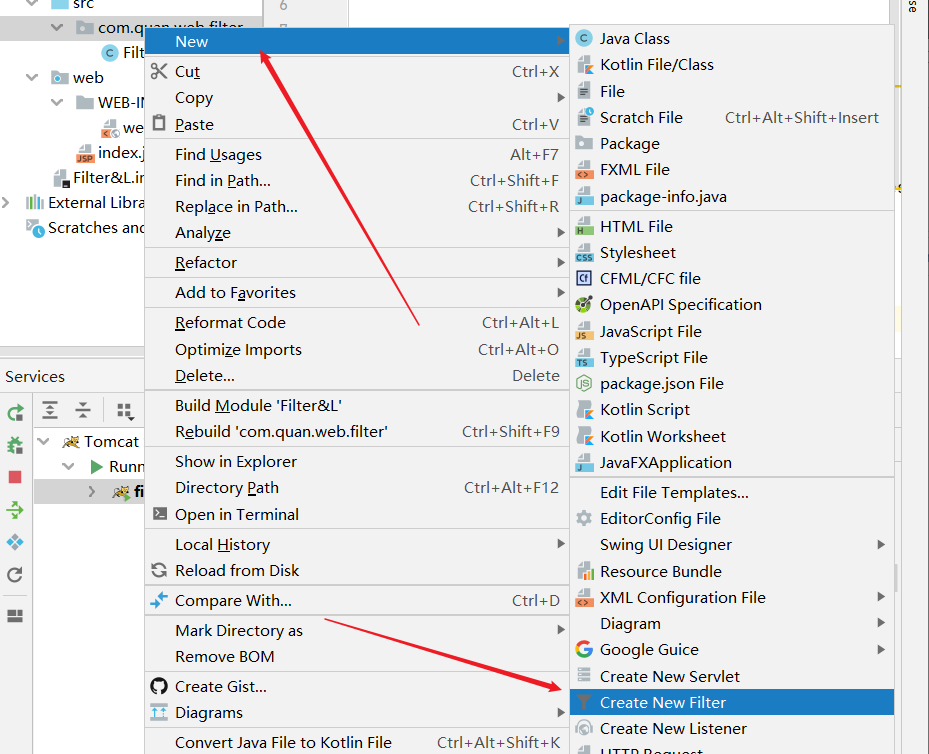
2222
package com.quan.web.filter;

import javax.servlet.*;

import javax.servlet.annotation.WebFilter;

import java.io.IOException;

@WebFilter("/*")

public class FilterDemo implements Filter {

    public void destroy() {

    }

   @Override

    public void doFilter(ServletRequest req, ServletResponse resp, FilterChain chain) throws ServletException, IOException {

        System.out.println("FilterDemo被执行了。。。。");

    }

    @Override

    public void init(javax.servlet.FilterConfig config) throws ServletException {

    }

}
333注解:
@WebFilter("/*") 拦截所有请求:
测试
自行加入sevlet容器管理 Tomcat ;
运行
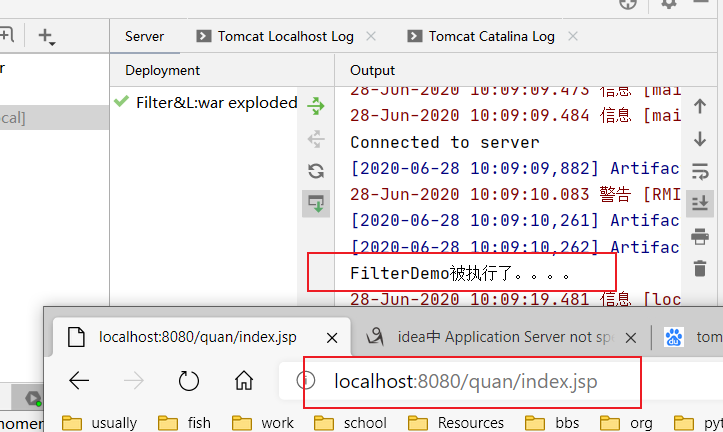
拦截器进行放行操作
再上面的doFilter方法中加入
chain.doFilter(req,resp);

测试
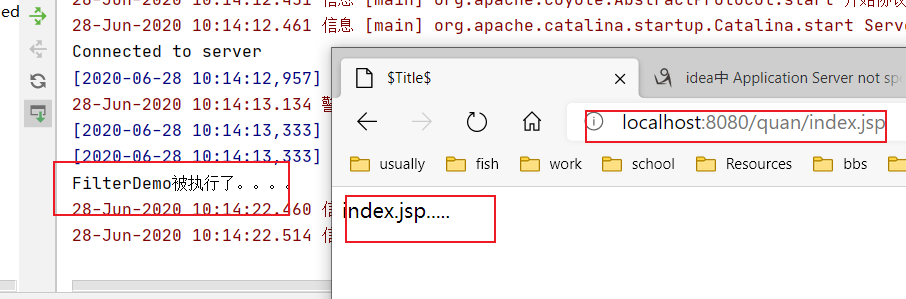
filter的web.xml配置
和sevlet的配置差不多,只是这个是拦截的路径
   <filter>

        <filter-name>FilterDemo</filter-name>

        <filter-class>com.quan.web.filter.FilterDemo</filter-class>

    </filter>

    <filter-mapping>

        <filter-name>FilterDemo</filter-name>

        <url-pattern>/*</url-pattern>

    </filter-mapping>
过滤器的执行流程
我们可以新建一个filter
@WebFilter("/*")

public class FilterDemo2 implements Filter {

    public void destroy() {

    }

    public void doFilter(ServletRequest req, ServletResponse resp, FilterChain chain) throws ServletException, IOException {

        //对request对象请求消息增强

        System.out.println("filterDemo2 doing.....");

        chain.doFilter(req, resp);

        //对response对象的响应消息增强

        System.out.println("filterDemo2 ending....");

    }

    public void init(FilterConfig config) throws ServletException {

    }

}
修改一下index.jsp
<html>

  <head>

    <title>$Title$</title>

  </head>

  <body>

     index.jsp.....

  <%

    System.out.println("index.jsp....");

  %>

  </body>

</html>
备注:两个百分号之间,用于输出到控制台
运行结果;
filterDemo2 doing.....

index.jsp....

filterDemo2 ending....
由上面的测试可以知道
filter执行的过程是,到达filter,
11进行一些请求增强操作,
22然后通过放行到后端的servlet 或者资源,
33再回到filer中放行之后的操作
filter的生命周期
11再服务器启动后,创建Filter对象,然后调用init方法,用于加载资源
22每一次请求拦截资源时候,会执行
33服务器关闭后,Filter对象被销毁,,释放资源
过程理解
@WebFilter("/*")

public class FilterDemo3 implements Filter {

    /**

     * 服务器关闭后,Filter对象被销毁,,释放资源

     * 如果服务器是正常关闭,则会执行destroy方法

     * 只执行一次

     */

    public void destroy() {

        System.out.println("destroy.....");

    }

    /**

     * 每一次请求拦截资源时候,会执行

     * @param req

     * @param resp

     * @param chain

     * @throws ServletException

     * @throws IOException

     */

    public void doFilter(ServletRequest req, ServletResponse resp, FilterChain chain) throws ServletException, IOException {

        System.out.println("doFilter....");

        chain.doFilter(req, resp);

    }

    /**

     * 再服务器启动后,创建Filter对象,然后调用init方法,用于加载资源

     * 只执行一次

     * @param config

     * @throws ServletException

     */

    public void init(FilterConfig config) throws ServletException {

        System.out.println("init....");

    }

}
查看日志

过滤器配置----拦截路径配置
1具体路径配置
/index.jsp 只有访问index.jsp资源时,过滤器才会被执行
2目录拦截配置
/user/* 访问/user下的所有资源时,过滤器都会被执行
3后缀名拦截:
*.jsp 访问所有后缀名为jsp资源时,过滤器都会被执
4拦截所有资源:
/* 访问所有资源时,过滤器都会被执行
//@WebFilter("/index.jsp")   只有访问index.jsp资源时,过滤器才会被执行

//@WebFilter("/user/*")   访问/user下的所有资源时,过滤器都会被执行

@WebFilter("*.jsp")   //访问所有后缀名为jsp资源时,过滤器都会被执行

public class FilterDemo4 implements Filter {

    public void destroy() {

    }

    public void doFilter(ServletRequest req, ServletResponse resp, FilterChain chain) throws ServletException, IOException {

        System.out.println("filterDemo4");

        chain.doFilter(req, resp);

    }

    public void init(FilterConfig config) throws ServletException {

    }

}
过滤器配置----拦截方式配置
资源被访问的方式
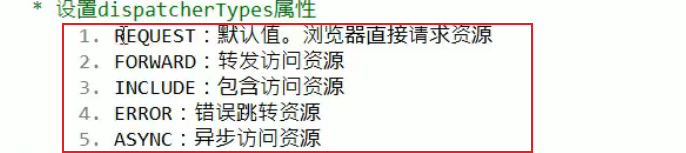
注解配置:
dispatcherTypes = DispatcherType.REQUEST
@WebServlet("/user/updateServlet")

public class ServletDemo2 extends HttpServlet {

    protected void doPost(HttpServletRequest request, HttpServletResponse response) throws ServletException, IOException {

        System.out.println("updateServlet");

        //转发到index.jsp

        request.getRequestDispatcher("/index.jsp").forward(request,response);

    }

    protected void doGet(HttpServletRequest request, HttpServletResponse response) throws ServletException, IOException {

        this.doPost(request,response);

    }

}
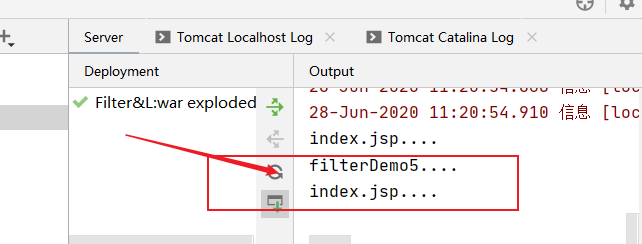
//浏览器直接请求index.jsp资源时,该过滤器才会被执行

@WebFilter(value = "/index.jsp",dispatcherTypes = DispatcherType.REQUEST)

public class FilterDemo5 implements Filter {

    public void destroy() {

    }

    public void doFilter(ServletRequest req, ServletResponse resp, FilterChain chain) throws ServletException, IOException {

        System.out.println("filterDemo5....");

        chain.doFilter(req, resp);

    }

    public void init(FilterConfig config) throws ServletException {

    }

}
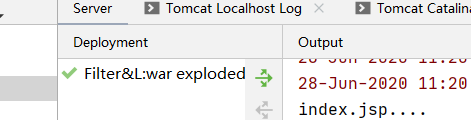
直接访问时:
http://localhost:8080/quan/index.jsp
结果:
通过间接转发访问时:
http://localhost:8080/quan/user/updateServlet
dispatcherTypes = DispatcherType.FORWARD
只有转发访问index.jsp时,该过滤器才会被执行
@WebFilter(value = "/index.jsp",dispatcherTypes = DispatcherType.FORWARD)
dispatcherTypes可以配置多个值
@WebFilter(value = "/index.jsp",dispatcherTypes = {DispatcherType.FORWARD,DispatcherType.REQUEST})
web.xml配置
  <filter>

        <filter-name>FilterDemo</filter-name>

        <filter-class>com.quan.web.filter.FilterDemo</filter-class>

    </filter>

    <filter-mapping>

        <filter-name>FilterDemo</filter-name>

        <url-pattern>/*</url-pattern>

        <dispatcher>FORWARD</dispatcher>

        <dispatcher>REQUEST</dispatcher>

    </filter-mapping>
<dispatcher> 标签也是有五个值得。
过滤器链(配置多个过滤器)
执行顺序
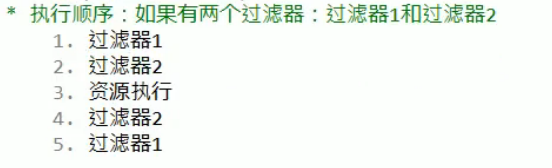
编写第一个过滤器:
package com.quan.web.filter;

import javax.servlet.*;

import javax.servlet.annotation.WebFilter;

import java.io.IOException;

@WebFilter("/*")

public class FilterDemo6 implements Filter {

    public void destroy() {

    }

    public void doFilter(ServletRequest req, ServletResponse resp, FilterChain chain) throws ServletException, IOException {

        System.out.println("FilterDemo6执行!!!!!!!!!!!");

        chain.doFilter(req, resp);

        System.out.println("FilterDemo6回来执行!!!!!!!!!!!");

    }

    public void init(FilterConfig config) throws ServletException {

    }

}
编写第二个过滤器:
package com.quan.web.filter;

import javax.servlet.*;

import javax.servlet.annotation.WebFilter;

import java.io.IOException;

@WebFilter("/*")

public class FilterDemo7 implements Filter {

    public void destroy() {

    }

    public void doFilter(ServletRequest req, ServletResponse resp, FilterChain chain) throws ServletException, IOException {

        System.out.println("FilterDemo7执行!!!!!!!!!!!");

        chain.doFilter(req, resp);

        System.out.println("FilterDemo7回来执行!!!!!!!!!!!");

    }

    public void init(FilterConfig config) throws ServletException {

    }

}
测试访问路径:
http://localhost:8080/quan/index.jsp
日志输出:
FilterDemo6执行!!!!!!!!!!!

FilterDemo7执行!!!!!!!!!!!

index.jsp....

FilterDemo7回来执行!!!!!!!!!!!

FilterDemo6回来执行!!!!!!!!!!!
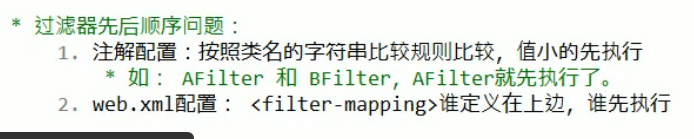
过滤器先后顺序问题:
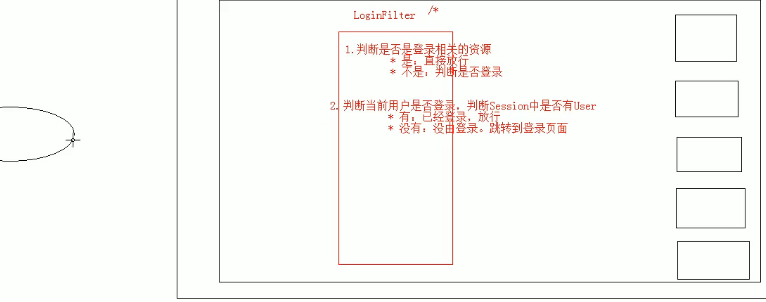
Filter的小案例------登陆验证
Listener
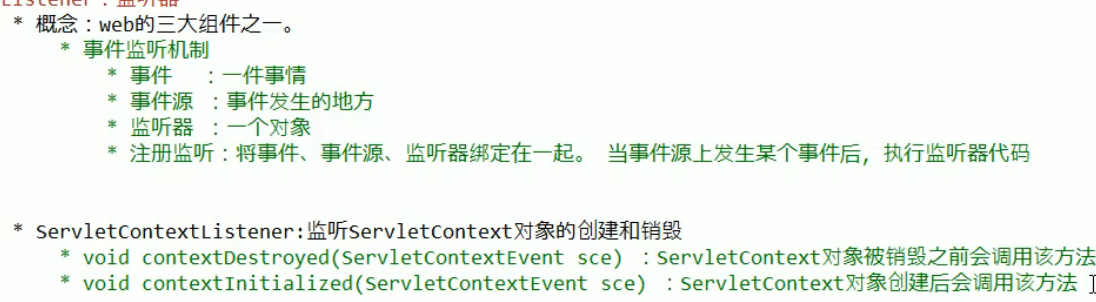
监听器的使用步骤

web.xml配置
<!--    配置监听器-->

    <listener>

        <listener-class>com.quan.web.listener.ListenerDemo1</listener-class>

    </listener>

<!--    资源文件-->

    <context-param>

        <param-name>contextConfigLocation</param-name>

        <param-value>application.xml</param-value>

    </context-param>
监听器内容:
public class ListenerDemo1 implements ServletContextListener {

    // Public constructor is required by servlet spec

    public ListenerDemo1() {

    }

    //

    // -------------------------------------------------------

    // 监听ServletContext对象创建的,ServletContext对象服务器启动后自动创建

    // 服务器启动后自动调用

    // -------------------------------------------------------

    public void contextInitialized(ServletContextEvent sce) {

        System.out.println("ServletContextEvent done.....");

        //一般会进行资源的加载文件

        //1获取ServletContext对象

        ServletContext servletContext = sce.getServletContext();

        //2加载资源文件

        String contextConfigLocation = servletContext.getInitParameter("contextConfigLocation");

        //3获取真实路径

        InputStream fis = servletContext.getResourceAsStream(contextConfigLocation);

        System.out.println(fis);

    }

    /**

     * 再服务器关闭后,ServletContext对象被销毁,

     * 当服务器正常关闭后,该方法被调用

     * @param sce

     */

    public void contextDestroyed(ServletContextEvent sce) {

        System.out.println("ServletContextEvent  out....");

    }

}

java-web中的Filter&Listener的更多相关文章
- Java Web学习总结(29)——Java Web中的Filter和Interceptor比较
1. 背景 在设计web应用的时候,用户登录/注册是必不可少的功能,对用户登录信息进行验证的方法也是多种多样,大致可以认为如下模式:前端验证+后台验证.根据笔者的经验,一般会在前端进行一些例如是否输入 ...
- Java web中常见编码乱码问题(一)
最近在看Java web中中文编码问题,特此记录下. 本文将会介绍常见编码方式和Java web中遇到中文乱码问题的常见解决方法: 一.常见编码方式: 1.ASCII 码 众所周知,这是最简单的编码. ...
- Java Web中解决乱码的方式
Java Web中解决乱码的方式 方式一:添加编码过滤器 package com.itmacy.dev.filter; import javax.servlet.*; import javax.ser ...
- 【java web】过滤器filter
一.过滤器简介 过滤器filter依赖于servlet容器 所谓过滤器顾名思义是用来过滤的,Java的过滤器能够为我们提供系统级别的过滤,也就是说,能过滤所有的web请求, 这一点,是拦截器无法做到的 ...
- Java Web 中 过滤器与拦截器的区别
过滤器,是在java web中,你传入的request,response提前过滤掉一些信息,或者提前设置一些参数,然后再传入servlet或者struts的 action进行业务逻辑,比如过滤掉非法u ...
- JAVA WEB 中的编码分析
JAVA WEB 中的编码分析 */--> pre.src {background-color: #292b2e; color: #b2b2b2;} pre.src {background-co ...
- Java web中常见编码乱码问题(二)
根据上篇记录Java web中常见编码乱码问题(一), 接着记录乱码案例: 案例分析: 2.输出流写入内容或者输入流读取内容时乱码(内容中有中文) 原因分析: a. 如果是按字节写入或读取时乱码, ...
- 深入分析Java Web中的编码问题
编码问题一直困扰着我,每次遇到乱码或者编码问题,网上一查,问题解决了,但是实际的原理并没有搞懂,每次遇到,都是什么头疼. 决定彻彻底底的一次性解决编码问题. 1.为什么要编码 计算机的基本单元是字节, ...
- 解决java web中safari浏览器下载后文件中文乱码问题
解决java web中safari浏览器下载后文件中文乱码问题 String fileName = "测试文件.doc"; String userAgent = request.g ...
- Java Web 中使用ffmpeg实现视频转码、视频截图
Java Web 中使用ffmpeg实现视频转码.视频截图 转载自:[ http://www.cnblogs.com/dennisit/archive/2013/02/16/2913287.html ...
随机推荐
- MySQL让人又爱又恨的多表查询
1. 前言 在SQL开发当中,多表联查是绝对绕不开的一种技能.同样的查询结果不同的写法其运行效率也是千差万别. 在实际开发当中,我见过(好像还写过~)不少又长又臭的查询SQL,数据量一上来查个十几分钟 ...
- .Net Core之选项模式Options使用
一.简要阐述 ASP.NET Core引入了Options模式,使用类来表示相关的设置组.简单的来说,就是用强类型的类来表达配置项,这带来了很多好处.利用了系统的依赖注入,并且还可以利用配置系统.它使 ...
- 【C#线程】 Marshal类基本概念
marshal:直译为"编排", 在计算机中特 指将数据按某种描述格式编排出来,通常来说一般是从非文本格式到文本格式的数据转化.unmarshal是指marshal的逆过程.比如在 ...
- .NET Standard与BCL有什么区别?
Net标准主要是为了改善代码共享,并使每个.Net实现中的API更加一致. .NET Standard 是.NET 平台(.net framework\.net core\.net mono)尚未在实 ...
- 【C#操作符】typeof 和 is 运算符执行的类型检查之间的差异
typeof 运算符也能用于公开的泛型类型.具有不止一个类型参数的类型的规范中必须有适当数量的逗号.不能重载 typeof 运算符. is 可以检测和父类是否兼容,typeof责不能 public c ...
- SpreadJS + GcExcel 一出,谁与争锋!全栈表格技术轻松应对复杂公式计算场景(一)
设计思路篇 Excel是我们日常办公中最常用的电子表格程序,不仅可满足报表数据的计算需求,还可提供绘图.数据透视分析.BI和Visual Basic for Applications (VBA)宏语言 ...
- POJ2663,3420题解
两道非常像的题,放到一起来写 题目大意:用若干2x1的砖去铺一个3xN的空间(POJ3420为4xN),问总共有多少种不同的铺法(POJ3420还要求结果对MOD求模). 思路:找规律.对于3xN的空 ...
- HTML分块
<!DOCTYPE html><html><head> <meta charset="utf-8"> <title>菜鸟 ...
- 资源管理模式:Evictor模式
Evictor模式描述了何时以及如何释放资源以优化资源管理.这个模式让我们可以配置不同的策略来自动决定哪些资源应该释放,以及应该在什么时候释放. 实例 考虑一个网络管理系统--管理多个网络元素.这些网 ...
- vue项目部署到IIS服务器上
前端Vue项目需要部署到IIS服务器上: 准备工作: 1:部署IIS服务器 2:项目npm run build打包生成需要部署的文件(dist文件夹)我的是manage文件夹 开始部署: 1:复制文件 ...