
(一)elasticsearch 编译和启动
1.准备
先从github官网上clone elasticsearch源码到本地,选择合适的分支。笔者这里选用的是7.4.0(与笔者工作环境使用的分支一致),此版本编译需要jdk11。
2.编译
Readme 中说明了编译命令
./gradlew assemble
执行此命令,等待1h左右即可,根据机器性能可能会有差异
> Task :x-pack:plugin:sql:qa:compileJava

注: /Users/xxx/IdeaProjects/elasticsearch-my/x-pack/plugin/sql/qa/src/main/java/org/elasticsearch/xpack/sql/qa/jdbc/CsvTestUtils.java使用或覆盖了已过时的 API。

注: 有关详细信息, 请使用 -Xlint:deprecation 重新编译。

BUILD SUCCESSFUL in 52m 0s

947 actionable tasks: 946 executed, 1 up-to-date
编译过程中可能会遇到的问题:
FAILURE: Build failed with an exception.

* What went wrong:

a problem occurred running Docker from [/usr/local/bin/docker] yet it is required to run the following tasks:

  :distribution:docker:buildDockerImage

  :distribution:docker:buildOssDockerImage

the problem is that Docker exited with exit code [1] with standard error output [Cannot connect to the Docker daemon at unix:///var/run/docker.sock. Is the docker daemon running?]

you can address this by attending to the reported issue, removing the offending tasks from being executed, or by passing -Dbuild.docker=false
新版本 elasticsearch 编译过程依赖docker,启动docker后台或者注释掉以下代码
文件路径:/distribution/docker/build.gradle

void addBuildDockerImage(final boolean oss) {

//  final Task buildDockerImageTask = task(taskName("build", oss, "DockerImage"), type: LoggedExec) {

//    dependsOn taskName("copy", oss, "DockerContext")

//    List<String> tags

//    if (oss) {

//      tags = [

//        "docker.elastic.co/elasticsearch/elasticsearch-oss:${VersionProperties.elasticsearch}",

//        "elasticsearch-oss:test"

//      ]

//    } else {

//      tags = [

//        "elasticsearch:${VersionProperties.elasticsearch}",

//        "docker.elastic.co/elasticsearch/elasticsearch:${VersionProperties.elasticsearch}",

//        "docker.elastic.co/elasticsearch/elasticsearch-full:${VersionProperties.elasticsearch}",

//        "elasticsearch:test",

//      ]

//    }

//    executable 'docker'

//    final List<String> dockerArgs = ['build', files(oss), '--pull', '--no-cache']

//    for (final String tag : tags) {

//      dockerArgs.add('--tag')

//      dockerArgs.add(tag)

//    }

//    args dockerArgs.toArray()

//  }

//  BuildPlugin.requireDocker(buildDockerImageTask)

}

for (final boolean oss : [false, true]) {

  addCopyDockerContextTask(oss)

  addBuildDockerImage(oss)

}

//assemble.dependsOn "buildOssDockerImage"

//assemble.dependsOn "buildDockerImage"
3.启动
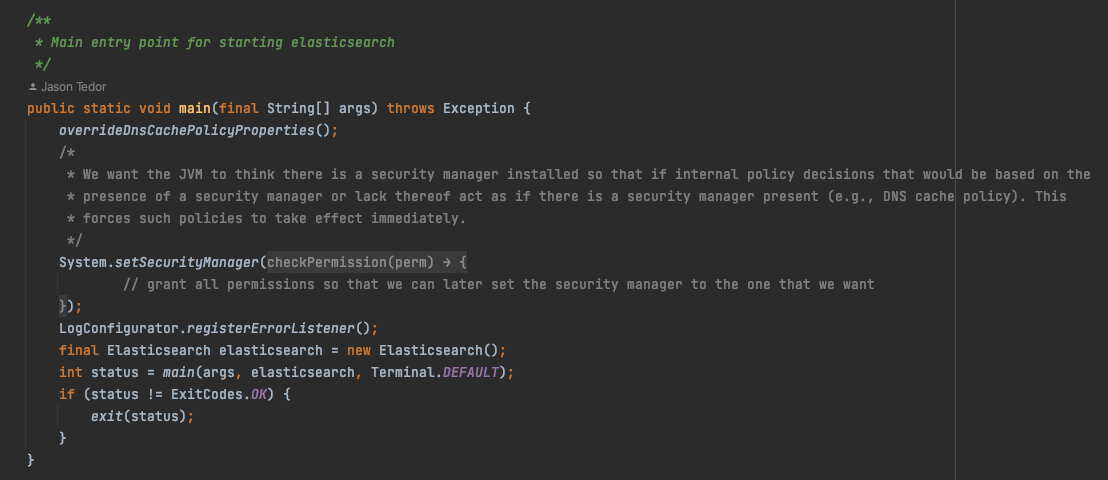
启动elasticsearch 服务,启动类是 org.elasticsearch.bootstrap.Elasticsearch
启动过程中可能会出现的问题:
问题1:
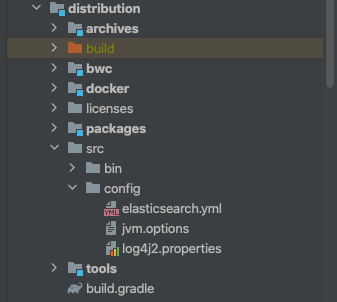
the system property [es.path.conf] must be set在vm启动项加入参数:-Des.path.conf=/Users/xxx/IdeaProjects/elasticsearch-my/config,然后将配置文件elasticsearch.yml ,log4j2.properties, modules 复制到这个目录
项目中有配置文件的例子
笔者是这样配置的
# Use a descriptive name for your cluster:

#

cluster.name: my-application

#

# ------------------------------------ Node ------------------------------------

#

# Use a descriptive name for the node:

#

node.name: tiger

#

# Add custom attributes to the node:

#

#node.attr.rack: r1

#

# ----------------------------------- Paths ------------------------------------

#

# Path to directory where to store the data (separate multiple locations by comma):

#

path.data: /Users/xxx/IdeaProjects/elasticsearch-my/home/data

#

# Path to log files:

#

path.logs: /Users/xxx/IdeaProjects/elasticsearch-my/home/data
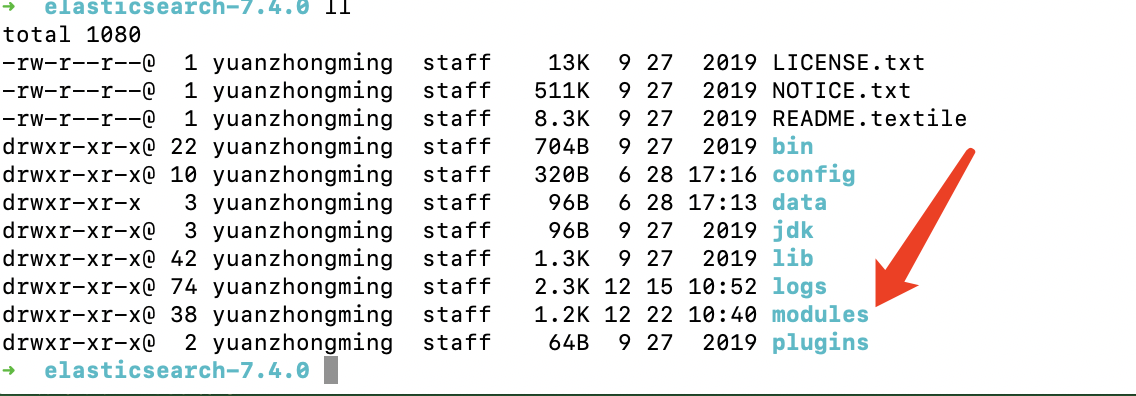
modules 包在发行版elasticsearch中可以找到,这里就不自行编译了
问题2:
Exception in thread "main" java.lang.IllegalStateException: path.home is not configured

	at org.elasticsearch.env.Environment.<init>(Environment.java:104)

	at org.elasticsearch.env.Environment.<init>(Environment.java:95)

	at org.elasticsearch.node.InternalSettingsPreparer.prepareEnvironment(InternalSettingsPreparer.java:69)

	at org.elasticsearch.cli.EnvironmentAwareCommand.createEnv(EnvironmentAwareCommand.java:95)

	at org.elasticsearch.cli.EnvironmentAwareCommand.execute(EnvironmentAwareCommand.java:86)

	at org.elasticsearch.cli.Command.mainWithoutErrorHandling(Command.java:125)

	at org.elasticsearch.cli.Command.main(Command.java:90)

	at org.elasticsearch.bootstrap.Elasticsearch.main(Elasticsearch.java:115)

	at org.elasticsearch.bootstrap.Elasticsearch.main(Elasticsearch.java:92)
同样的,在vm参数中设定home地址即可,-Des.path.home=/Users/xxx/IdeaProjects/elasticsearch-my/home
问题3:
no log4j2.properties found; tried [/Users/xxx/IdeaProjects/elasticsearch-my/config] and its subdirectories同问题1,没有复制log4j2.properties引起的问题
问题4:
java.lang.NoClassDefFoundError: org/elasticsearch/plugins/ExtendedPluginsClassLoader找到
compileOnly project(':libs:elasticsearch-plugin-classloader')修改为
compile project(':libs:elasticsearch-plugin-classloader')问题5:
Caused by: org.elasticsearch.ElasticsearchException: Failure running machine learning native code. This could be due to running on an unsupported OS or distribution, missing OS libraries, or a problem with the temp directory. To bypass this problem by running Elasticsearch without machine learning functionality set [xpack.ml.enabled: false].意思是我的机器不支持机器学习,把modules中的插件 x-pack-ml 去掉就行
最后启动完成如下
[2022-12-22T11:19:36,704][INFO ][o.e.p.PluginsService     ] [tiger] loaded module [x-pack-sql]

[2022-12-22T11:19:36,705][INFO ][o.e.p.PluginsService     ] [tiger] loaded module [x-pack-voting-only-node]

[2022-12-22T11:19:36,705][INFO ][o.e.p.PluginsService     ] [tiger] loaded module [x-pack-watcher]

[2022-12-22T11:19:36,706][INFO ][o.e.p.PluginsService     ] [tiger] no plugins loaded

[2022-12-22T11:19:37,238][INFO ][i.n.u.i.PlatformDependent] [tiger] Your platform does not provide complete low-level API for accessing direct buffers reliably. Unless explicitly requested, heap buffer will always be preferred to avoid potential system instability.

[2022-12-22T11:19:43,453][DEBUG][o.e.a.ActionModule       ] [tiger] Using REST wrapper from plugin org.elasticsearch.xpack.security.Security

[2022-12-22T11:19:43,530][INFO ][i.n.u.i.PlatformDependent] [tiger] Your platform does not provide complete low-level API for accessing direct buffers reliably. Unless explicitly requested, heap buffer will always be preferred to avoid potential system instability.

[2022-12-22T11:19:43,914][INFO ][o.e.d.DiscoveryModule    ] [tiger] using discovery type [zen] and seed hosts providers [settings]

[2022-12-22T11:19:45,141][INFO ][o.e.n.Node               ] [tiger] initialized

[2022-12-22T11:19:45,142][INFO ][o.e.n.Node               ] [tiger] starting ...

[2022-12-22T11:19:45,383][INFO ][o.e.t.TransportService   ] [tiger] publish_address {127.0.0.1:9300}, bound_addresses {[::1]:9300}, {127.0.0.1:9300}

[2022-12-22T11:19:45,417][WARN ][o.e.b.BootstrapChecks    ] [tiger] initial heap size [268435456] not equal to maximum heap size [4294967296]; this can cause resize pauses and prevents mlockall from locking the entire heap

[2022-12-22T11:19:45,418][WARN ][o.e.b.BootstrapChecks    ] [tiger] the default discovery settings are unsuitable for production use; at least one of [discovery.seed_hosts, discovery.seed_providers, cluster.initial_master_nodes] must be configured

[2022-12-22T11:19:45,425][INFO ][o.e.c.c.Coordinator      ] [tiger] cluster UUID [hhUOjQTPTxC11orp9ptAoQ]

[2022-12-22T11:19:45,450][INFO ][o.e.c.c.ClusterBootstrapService] [tiger] no discovery configuration found, will perform best-effort cluster bootstrapping after [3s] unless existing master is discovered

[2022-12-22T11:19:45,588][INFO ][o.e.c.s.MasterService    ] [tiger] elected-as-master ([1] nodes joined)[{tiger}{alQTCfqOStya2j1epxaskQ}{qDAgKIDeTmCbif0-EDJ0FA}{127.0.0.1}{127.0.0.1:9300}{dim}{xpack.installed=true} elect leader, _BECOME_MASTER_TASK_, _FINISH_ELECTION_], term: 2, version: 18, reason: master node changed {previous [], current [{tiger}{alQTCfqOStya2j1epxaskQ}{qDAgKIDeTmCbif0-EDJ0FA}{127.0.0.1}{127.0.0.1:9300}{dim}{xpack.installed=true}]}

[2022-12-22T11:19:45,733][INFO ][o.e.c.s.ClusterApplierService] [tiger] master node changed {previous [], current [{tiger}{alQTCfqOStya2j1epxaskQ}{qDAgKIDeTmCbif0-EDJ0FA}{127.0.0.1}{127.0.0.1:9300}{dim}{xpack.installed=true}]}, term: 2, version: 18, reason: Publication{term=2, version=18}

[2022-12-22T11:19:45,796][INFO ][o.e.h.AbstractHttpServerTransport] [tiger] publish_address {127.0.0.1:9200}, bound_addresses {[::1]:9200}, {127.0.0.1:9200}

[2022-12-22T11:19:45,797][INFO ][o.e.n.Node               ] [tiger] started

[2022-12-22T11:19:46,175][INFO ][o.e.l.LicenseService     ] [tiger] license [003ac67e-0dd0-42ee-8b76-59e2c21c444a] mode [basic] - valid

[2022-12-22T11:19:46,175][INFO ][o.e.x.s.s.SecurityStatusChangeListener] [tiger] Active license is now [BASIC]; Security is disabled

[2022-12-22T11:19:46,184][INFO ][o.e.g.GatewayService     ] [tiger] recovered [0] indices into cluster_state
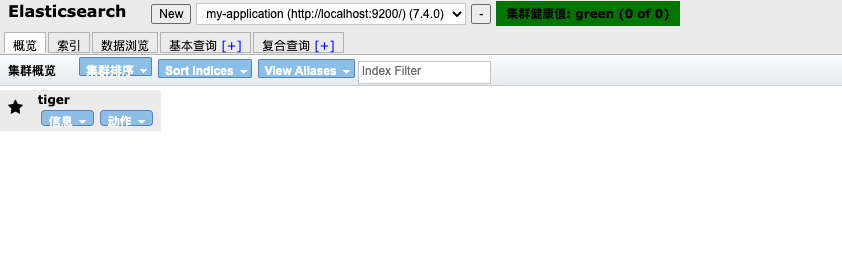
这里推荐一个chrome下的小插件elaticsearch-head,可视化当前集群的状态
4.参考列表
https://www.cnblogs.com/Jackeyzhe/p/13352543.html
(一)elasticsearch 编译和启动的更多相关文章
- (转)redis 学习笔记(1)-编译、启动、停止
redis 学习笔记(1)-编译.启动.停止 一.下载.编译 redis是以源码方式发行的,先下载源码,然后在linux下编译 1.1 http://www.redis.io/download 先 ...
- 【ELK】【docker】6.Elasticsearch 集群启动多节点 + 解决ES节点集群状态为yellow
本章其实是ELK第二章的插入章节. 本章ES集群的多节点是docker启动在同一个虚拟机上 ====================================================== ...
- Elasticsearch在后台启动
Elasticsearch在linux下使用命令sh elasticsearch start,按键ctrl+c的时候程序就会stop掉,如何将程序在后台启动呢? 需要使用:./elasticsearc ...
- 在idea中编写自动拉取、编译、启动springboot项目的shell脚本
idea 开发环境搭建 idea中安装shell开发插件 服务器具备的条件 已经安装 lsof(用于检查端口占用) 已安装 git 安装 maven 有 java 环境 背景 代码提交到仓库后,需要在 ...
- 2019-8-31-dotnet-启动-JIT-多核心编译提升启动性能
title author date CreateTime categories dotnet 启动 JIT 多核心编译提升启动性能 lindexi 2019-08-31 16:55:58 +0800 ...
- dotnet 启动 JIT 多核心编译提升启动性能
用2分钟提升十分之一的启动性能,通过在桌面程序启动 JIT 多核心编译提升启动性能 在 dotnet 可以通过让 JIT 进行多核心编译提升软件的启动性能,在默认托管的 ASP.NET 程序是开启的, ...
- redis 学习笔记(1)-编译、启动、停止
一.下载.编译 redis是以源码方式发行的,先下载源码,然后在linux下编译 1.1 http://www.redis.io/download 先到这里下载Stable稳定版,目前最新版本是2.8 ...
- Unity 编译apk启动出异常
问题:unity 编译出来的apk,在android安装启动,时报以下错误: 07-06 20:52:48.282: E/linker(18229): load_library(linker.cpp: ...
- 一个简单的dos脚本, svn 获取代码 - Tomcat 备份 - Maven 编译 - 停止/启动Tomcat - Tomcat站点 发布
获取最新代码 svn update --username %SVN_USER% --password %SVN_PASSWORD% >> "../%LOG_FILE%" ...
随机推荐
- Python编程之定时任务(crontab)详解
引言 python-crontab是python模块,提供了对cron任务的访问,并使得我们可以通过python对crontab文件进行修改. 安装 pip install python-cronta ...
- selenium4-定位单个页面元素
在操作各项页面元素之前,先介绍下如何通过Python代码来找到这些元素.WebDriver提供了18种元素定位方法,共分为两类(定位当个元素.定位组元素),本节先举例详细介绍下selenium4-定位 ...
- RMarkdown进阶操作
技术背景 Markdown大家都比较熟悉了,特别是在写程序文档和写数学公式时,拥有着无与伦比的便利性.同时在前面的一篇博客中我们介绍了使用RMarkdown去写Latex Beamer演示文档的方法, ...
- springboot项目中使用shiro实现用户登录以及权限的验证
欢迎大家加入我的社区:http://t.csdn.cn/Q52km 社区中不定时发红包 更加高级的验证用户权限:用户表.角色表.权限表.多表联合:https://blog.csdn.net/weixi ...
- GNN 101
GNN 101 姚伟峰 http://www.cnblogs.com/Matrix_Yao/ GNN 101 Why Graph无处不在 Graph Intelligence helps It's t ...
- .Net SemaphoreSlim
看Elsa-core源代码中看到的,Elsa-core中所有保存数据的方法似乎使用同一个Save方法.如下图: 那么为什么要使用这玩意,我还是头一次见这玩意???? 好吧,我承认我自己菜.我自个儿也该 ...
- 嵌入式-C语言基础:快速选择排序实现从大到小排序
#include<stdio.h> int main() { /*简单选择排序:从大到小:一共比较sizeArr-1轮,每一轮的第一个数是arr[i],第一个数依次和它后面的每个数比较*/ ...
- 【网络】博客网站搭建之Typecho(命令版)
目录 前言 个人博客系统筛选 内网穿透 安装nginx 安装PHP 安装mysql Typecho 环境安装 参考 安装typecho Nginx与PHP进行连接配置&指定博客路径 验证 配置 ...
- go语言单元测试:go语言用gomonkey为测试函数或方法打桩
一,安装用到的库1,gomonkey代码的地址: https://github.com/agiledragon/gomonkey 2,从命令行安装gomonkey go get -u github.c ...
- centos7 uwsgi 加入系统服务
生产环境中采用nginx + uwsgi + django 来部署web服务,这里需要实现uwsgi的启动和停止,简单的处理方式可以直接在命令行中启动和kill掉uwsgi服务,但为了更安全.方便的管 ...