
Python numpy数据的保存和读取
在科学计算的过程中,往往需要保存一些数据,也经常需要把保存的这些数据加载到程序中,在 Matlab 中我们可以用 save 和 lood 函数很方便的实现。类似的在 Python 中,我们可以用 numpy.save() 和 numpy.load() 函数达到类似的效果,并且还可以用 scipy.io.savemat() 将数据保存为 .mat 格式,用scipy.io.loadmat() 读取 .mat 格式的数据,达到可以和 Matlab 或者Octave 进行数据互动的效果.
下面分别介绍之:
numpy.save()
    Save an array to a binary file in NumPy ``.npy`` format.

    Parameters

    ----------

    file : file, str, or pathlib.Path

        File or filename to which the data is saved.  If file is a file-object,

        then the filename is unchanged.  If file is a string or Path, a ``.npy``

        extension will be appended to the file name if it does not already

        have one.

    arr : array_like

        Array data to be saved.

    allow_pickle : bool, optional

        Allow saving object arrays using Python pickles. Reasons for disallowing

        pickles include security (loading pickled data can execute arbitrary

        code) and portability (pickled objects may not be loadable on different

        Python installations, for example if the stored objects require libraries

        that are not available, and not all pickled data is compatible between

        Python 2 and Python 3).

        Default: True

    fix_imports : bool, optional

        Only useful in forcing objects in object arrays on Python 3 to be

        pickled in a Python 2 compatible way. If `fix_imports` is True, pickle

        will try to map the new Python 3 names to the old module names used in

        Python 2, so that the pickle data stream is readable with Python 2.

    See Also

    --------

    savez : Save several arrays into a ``.npz`` archive

    savetxt, load

    Notes

    -----

    For a description of the ``.npy`` format, see :py:mod:`numpy.lib.format`.

    Examples

    --------

    >>> from tempfile import TemporaryFile

    >>> outfile = TemporaryFile()

    >>> x = np.arange(10)

    >>> np.save(outfile, x)

    >>> outfile.seek(0) # Only needed here to simulate closing & reopening file

    >>> np.load(outfile)

    array([0, 1, 2, 3, 4, 5, 6, 7, 8, 9])
示例:
import numpy as np

a=np.mat('1,2,3;4,5,6')

b=np.array([[1,2,3],[4,5,6]])

np.save('a.npy',a)

np.save('b.npy',b)
numpy.load()
    Wrapper around cPickle.load which accepts either a file-like object or

    a filename.

    Note that the NumPy binary format is not based on pickle/cPickle anymore.

    For details on the preferred way of loading and saving files, see `load`

    and `save`.

    See Also

    --------

    load, save
示例:
data_a=np.load('a.npy')

data_b=np.load('b.npy')

print ('data_a \n',data_a,'\n the type is',type(data_a))

print ('data_b \n',data_a,'\n the type is',type(data_b))
data_a
[[1 2 3]
[4 5 6]]
the type is <class ‘numpy.ndarray’>
data_b
[[1 2 3]
[4 5 6]]
the type is <class ‘numpy.ndarray’>
我们可以看到这一过程把原本为矩阵的 a 变为数组型了
如果想同时保存 a b 到同一个文件,我们可以用 np.savez() 函数,具体用法如下:
np.savez('ab.npz',k_a=a,k_b=b)

c=np.load('ab.npz')

print (c['k_a'])

print (c['k_b'])
[[1 2 3]
[4 5 6]]
[[1 2 3]
[4 5 6]]
这时的 c 是一个字典,需要通过关键字取出我们需要的数据
下面我们来认识下 scipy.io.savemat() 和 scipy.io.loadmat()
首先我们用 scipy.io.savemat() 创建 .mat 文件,该函数有两个参数,一个文件名和一个包含变量名和取值的字典.
import numpy as np

from scipy import io

a=np.mat('1,2,3;4,5,6')

b=np.array([[1,1,1],[2,2,2]])

io.savemat('a.mat', {'matrix': a})

io.savemat('b.mat', {'array': b})
至此 Python 的当前工作路径下就多了 a.mat 和 b.mat 这两个文件.
下面我们用 Matlab 读取这两个文件
可以看到 Matlab 已成功读取 Python 生成的 .mat 文件.
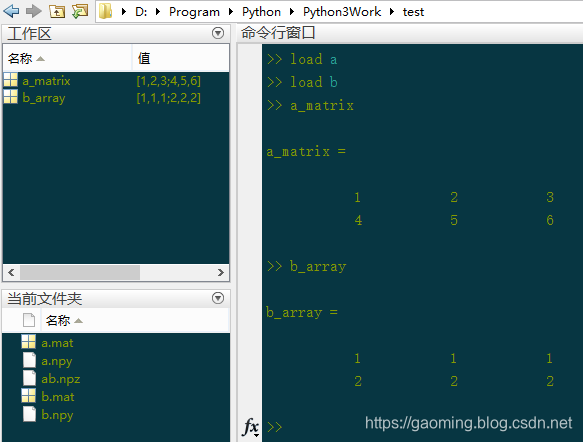
我们在来看看 Python 是怎么读取 .mat 文件的。首先来读取刚才生成的 a.mat
c=io.loadmat('a.mat')

print (type(c))

print (c)
dict {‘version’: ‘1.0’, ‘globals’: [], ‘header’: b’MATLAB
5.0 MAT-file Platform: nt, Created on: Tue Aug 4 16:49:28 2015’, ‘a_matrix’: array([[1, 2, 3],[4, 5, 6]])}
所以 Python 读取.mat 文件后返回的是个字典,如果要访问里面的值,就要用到关键字,如:
print(c['a_matrix'])
[[1 2 3] [4 5 6]]
当然了,Python 也可以读取 Matlab 创建的 .mat 文件,从而可以把他们设置在同一工作路径下,在必要的时候进行数据的共享.
Python numpy数据的保存和读取的更多相关文章
- Python中数据的保存和读取
在科学计算的过程中,往往需要保存一些数据,也经常需要把保存的这些数据加载到程序中,在 Matlab 中我们可以用 save 和 lood 函数很方便的实现.类似的在 Python 中,我们可以用 nu ...
- npy数据的保存与读取
保存 利用这种方法,保存文件的后缀名字一定会被置为.npy x = numpy.save("data_x.npy",x) 读取 data = numpy.load("da ...
- python numpy数据相减
numpy数据相减,a和b两者shape要一样,然后是对应的位置相减.要不然,a的shape可以是(1,m),注意m要等于b的列数. import numpy as np a = [ [0, 1, 2 ...
- python numpy实现多次循环读取文件 等间隔过滤数据
numpy的np.fromfile会出现如下的问题,只能一次性读取文件的内容,不能追加读取,连续两次的np.fromfile读到的东西一样 如果数据文件太大(几个G或以上)不能一次性全读进去,需要追加 ...
- Python——NumPy数据存取与函数
1.数据csv文件存贮 1.1 CSV文件写入 CSV (Comma‐Separated Value, 逗号分隔值)CSV是一种常见的文件格式,用来存储批量数据 np.savetxt(frame, a ...
- python中数据的保存
1.将list中的数据写入到excel文件中 利用python包numpy(实现方式应该有许多种,这里只是记录成功实现的一种)中的savetxt 局限性:要保存的list可以为[1,2,3,4,5]这 ...
- Numpy数组的保存与读取
1. 数组以二进制格式保存 np.save和np.load是读写磁盘数组数据的两个主要函数.默认情况下,数组以未压缩的原始二进制格式保存在扩展名为npy的文件中,以数组a为例 np.save(&quo ...
- Matlab数据处理——数据的保存和读取方法操作
1:dlmwrite()函数保存成txt文件 使用方法: dlmwrite('filename', M) 使用默认分隔符“,”将矩阵M写入文本文件filename中: d ...
- Numpy数组的保存与读取方法
1. 数组以二进制格式保存 np.save和np.load是读写磁盘数组数据的两个主要函数.默认情况下,数组以未压缩的原始二进制格式保存在扩展名为npy的文件中,以数组a为例 np.save(&quo ...
随机推荐
- Android应用系列:仿MIUI的Toast动画效果实现
前言 相信有些人用过MIUI,会发现小米的Toast跟Android传统的Toast特么是不一样的,他会从底部向上飞入,然后渐变消失.看起来效果是挺不错的,但是对于Android原生Toast是不支持 ...
- Linux安装配置redis 、启动redis、redis设置密码
由于间隔时间较长.机器的环境不同等等原因,所以每次安装redis的时候总是不那么顺利,所以这次我要做个笔记 文章大部分内容源于https://blog.csdn.net/gisredevelopmen ...
- Spark 2.1.1 源码编译
Spark 2.1.1 源码编译 标签(空格分隔): Spark Spark 源码编译 环境准备与起因 由于线上Spark On Yarn Spark Streaming程序在消费kafka 写入HD ...
- Oracle dba角色和sysdba的区别
如果用户需要远程sysdba的方式登陆,需要grant sysdba权限,登陆后以sys用户执行命令,需要验证密码文件. 密码文件如果是从12c之前的老版本同步过来,需要重建12c格式的密码文件. d ...
- UNITY ET 框架
GITHUB上近3000星的开源框架,包括了服务器客户端,IL RUNTIME热等特点,对于新项目,值得拥有
- Android传感器【转】
本文转载自:http://blog.csdn.net/ffmxnjm/article/details/52101592?locationNum=3&fps=1 传感器的意义 事实上,目前智能手 ...
- Linux高级调试与优化——gdb调试命令
番外 2019年7月26日至27日,公司邀请<软件调试>和<格蠹汇编——软件调试案例集锦>两本书的作者张银奎老师进行<Linux高级调试与优化>培训,有幸聆听张老师 ...
- selenium报错汇总
selenium报错汇总 报错:[error] Could not connect to Selenium Server. Have you started the Selenium Server y ...
- XML文件解析!!!
在java jdk中解析XMl文件使用 org.w3c.dom.Document工具 一下是写入全程: import java.io.File; import java.io.IOExceptio ...
- RESR API (一)之Requests
Requests 如果您正在做基于REST的Web服务,您应该忽略request.POST. - Malcom Tredinnick,Django开发团队 REST框架的Request类扩展了标准的H ...