
spark streaming 3: Receiver 到 submitJobSet
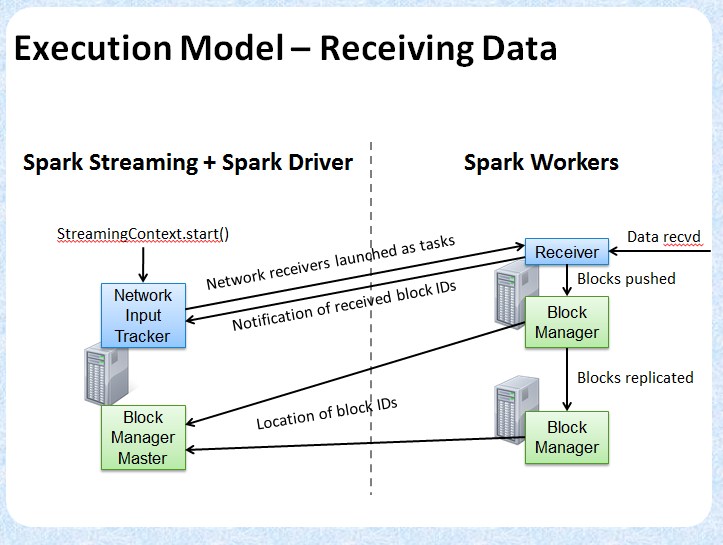
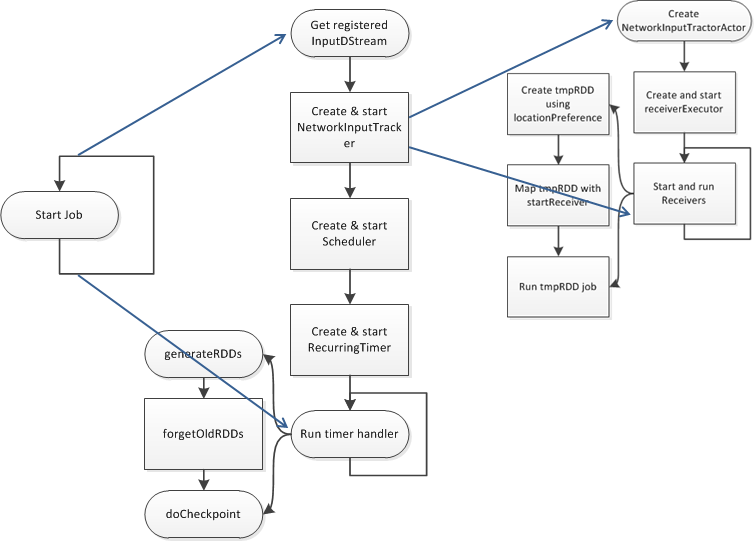
/**
 * :: DeveloperApi ::
 * Abstract class of a receiver that can be run on worker nodes to receive external data. A
 * custom receiver can be defined by defining the functions `onStart()` and `onStop()`. `onStart()`
 * should define the setup steps necessary to start receiving data,
 * and `onStop()` should define the cleanup steps necessary to stop receiving data.
 * Exceptions while receiving can be handled either by restarting the receiver with `restart(...)`
 * or stopped completely by `stop(...)` or
 *
 * A custom receiver in Scala would look like this.
 *
 * {{{
 *  class MyReceiver(storageLevel: StorageLevel) extends NetworkReceiver[String](storageLevel) {
 *      def onStart() {
 *          // Setup stuff (start threads, open sockets, etc.) to start receiving data.
 *          // Must start new thread to receive data, as onStart() must be non-blocking.
 *
 *          // Call store(...) in those threads to store received data into Spark's memory.
 *
 *          // Call stop(...), restart(...) or reportError(...) on any thread based on how
 *          // different errors needs to be handled.
 *
 *          // See corresponding method documentation for more details
 *      }
 *
 *      def onStop() {
 *          // Cleanup stuff (stop threads, close sockets, etc.) to stop receiving data.
 *      }
 *  }
 * }}}
 */
@DeveloperApi
abstract class Receiver[T](val storageLevel: StorageLevel) extends Serializable {
/**
 * This method is called by the system when the receiver is started. This function
 * must initialize all resources (threads, buffers, etc.) necessary for receiving data.
 * This function must be non-blocking, so receiving the data must occur on a different
 * thread. Received data can be stored with Spark by calling `store(data)`.
 *
 * If there are errors in threads started here, then following options can be done
 * (i) `reportError(...)` can be called to report the error to the driver.
 * The receiving of data will continue uninterrupted.
 * (ii) `stop(...)` can be called to stop receiving data. This will call `onStop()` to
 * clear up all resources allocated (threads, buffers, etc.) during `onStart()`.
 * (iii) `restart(...)` can be called to restart the receiver. This will call `onStop()`
 * immediately, and then `onStart()` after a delay.
 */
def onStart()
/**
 * Store an ArrayBuffer of received data as a data block into Spark's memory.
 * The metadata will be associated with this block of data
 * for being used in the corresponding InputDStream.
 */
def store(dataBuffer: ArrayBuffer[T], metadata: Any) {
  executor.pushArrayBuffer(dataBuffer, Some(metadata), None)
}
/**
 * Abstract class that is responsible for supervising a Receiver in the worker.
 * It provides all the necessary interfaces for handling the data received by the receiver.
 */
private[streaming] abstract class ReceiverSupervisor(
    receiver: Receiver[_],
    conf: SparkConf
  ) extends Logging {
/**
 * Concrete implementation of [[org.apache.spark.streaming.receiver.ReceiverSupervisor]]
 * which provides all the necessary functionality for handling the data received by
 * the receiver. Specifically, it creates a [[org.apache.spark.streaming.receiver.BlockGenerator]]
 * object that is used to divide the received data stream into blocks of data.
 */
private[streaming] class ReceiverSupervisorImpl(
    receiver: Receiver[_],
    env: SparkEnv
  ) extends ReceiverSupervisor(receiver, env.conf) with Logging {
private val blockManager = env.blockManager
private val storageLevel = receiver.storageLevel
/** Remote Akka actor for the ReceiverTracker */
private val trackerActor = {
  val ip = env.conf.get("spark.driver.host", "localhost")
  val port = env.conf.getInt("spark.driver.port", 7077)
  val url = "akka.tcp://%s@%s:%s/user/ReceiverTracker".format(
    SparkEnv.driverActorSystemName, ip, port)
  env.actorSystem.actorSelection(url)
}
/** Timeout for Akka actor messages */
private val askTimeout = AkkaUtils.askTimeout(env.conf)
/** Akka actor for receiving messages from the ReceiverTracker in the driver */
private val actor = env.actorSystem.actorOf(
  Props(new Actor {
    override def preStart() {
      logInfo("Registered receiver " + streamId)
      val msg = RegisterReceiver(
        streamId, receiver.getClass.getSimpleName, Utils.localHostName(), self)
      val future = trackerActor.ask(msg)(askTimeout)
      Await.result(future, askTimeout)
    }
    override def receive() = {
      case StopReceiver =>
        logInfo("Received stop signal")
        stop("Stopped by driver", None)
    }
    def ref = self
  }), "Receiver-" + streamId + "-" + System.currentTimeMillis())

/** Unique block ids if one wants to add blocks directly */
private val newBlockId = new AtomicLong(System.currentTimeMillis())

/** Divides received data records into data blocks for pushing in BlockManager. */
private val blockGenerator = new BlockGenerator(new BlockGeneratorListener {
  def onError(message: String, throwable: Throwable) {
    reportError(message, throwable)
  }

  def onPushBlock(blockId: StreamBlockId, arrayBuffer: ArrayBuffer[_]) {
    pushArrayBuffer(arrayBuffer, None, Some(blockId))
  }
}, streamId, env.conf)
/**
 * This class manages the execution of the receivers of NetworkInputDStreams. Instance of
 * this class must be created after all input streams have been added and StreamingContext.start()
 * has been called because it needs the final set of input streams at the time of instantiation.
 */
private[streaming]
class ReceiverTracker(ssc: StreamingContext) extends Logging {
val receiverInputStreams = ssc.graph.getReceiverInputStreams()
val receiverInputStreamMap = Map(receiverInputStreams.map(x => (x.id, x)): _*)
val receiverExecutor = new ReceiverLauncher()
val receiverInfo = new HashMap[Int, ReceiverInfo] with SynchronizedMap[Int, ReceiverInfo]
val receivedBlockInfo = new HashMap[Int, SynchronizedQueue[ReceivedBlockInfo]]
  with SynchronizedMap[Int, SynchronizedQueue[ReceivedBlockInfo]]
val timeout = AkkaUtils.askTimeout(ssc.conf)
val listenerBus = ssc.scheduler.listenerBus

// actor is created when generator starts.
// This not being null means the tracker has been started and not stopped
var actor: ActorRef = null
var currentTime: Time = null
/** Add new blocks for the given stream */
def addBlocks(receivedBlockInfo: ReceivedBlockInfo) {
  getReceivedBlockInfoQueue(receivedBlockInfo.streamId) += receivedBlockInfo
  logDebug("Stream " + receivedBlockInfo.streamId + " received new blocks: " +
    receivedBlockInfo.blockId)
}
/**
 * Get the receivers from the ReceiverInputDStreams, distributes them to the
 * worker nodes as a parallel collection, and runs them.
 */
private def startReceivers() {
/** Event classes for JobGenerator */
private[scheduler] sealed trait JobGeneratorEvent
private[scheduler] case class GenerateJobs(time: Time) extends JobGeneratorEvent
private[scheduler] case class ClearMetadata(time: Time) extends JobGeneratorEvent
private[scheduler] case class DoCheckpoint(time: Time) extends JobGeneratorEvent
private[scheduler] case class ClearCheckpointData(time: Time) extends JobGeneratorEvent

/**
 * This class generates jobs from DStreams as well as drives checkpointing and cleaning
 * up DStream metadata.
 */
private[streaming]
class JobGenerator(jobScheduler: JobScheduler) extends Logging {

  private val ssc = jobScheduler.ssc
  private val conf = ssc.conf
  private val graph = ssc.graph

  val clock = {
    val clockClass = ssc.sc.conf.get(
      "spark.streaming.clock", "org.apache.spark.streaming.util.SystemClock")
    Class.forName(clockClass).newInstance().asInstanceOf[Clock]
  }

  private val timer = new RecurringTimer(clock, ssc.graph.batchDuration.milliseconds,
    longTime => eventActor ! GenerateJobs(new Time(longTime)), "JobGenerator")
/** Generate jobs and perform checkpoint for the given `time`.  */
private def generateJobs(time: Time) {
  SparkEnv.set(ssc.env)
  Try(graph.generateJobs(time)) match {
    case Success(jobs) =>
      val receivedBlockInfo = graph.getReceiverInputStreams.map { stream =>
        val streamId = stream.id
        val receivedBlockInfo = stream.getReceivedBlockInfo(time)
        (streamId, receivedBlockInfo)
      }.toMap
      jobScheduler.submitJobSet(JobSet(time, jobs, receivedBlockInfo))
    case Failure(e) =>
      jobScheduler.reportError("Error generating jobs for time " + time, e)
  }
  eventActor ! DoCheckpoint(time)
}
def generateJobs(time: Time): Seq[Job] = {
  logDebug("Generating jobs for time " + time)
  val jobs = this.synchronized {
    outputStreams.flatMap(outputStream => outputStream.generateJob(time))
  }
  logDebug("Generated " + jobs.length + " jobs for time " + time)
  jobs
}
/**
 * Class representing a Spark computation. It may contain multiple Spark jobs.
 */
private[streaming]
class Job(val time: Time, func: () => _) {
  var id: String = _
  var result: Try[_] = null

  def run() {
    result = Try(func())
  }

  def setId(number: Int) {
    id = "streaming job " + time + "." + number
  }

  override def toString = id
}
/** Class representing a set of Jobs
  * belong to the same batch.
  */
private[streaming]
case class JobSet(
    time: Time,
    jobs: Seq[Job],
    receivedBlockInfo: Map[Int, Array[ReceivedBlockInfo]] = Map.empty
  ) {

  private val incompleteJobs = new HashSet[Job]()
  private val submissionTime = System.currentTimeMillis() // when this jobset was submitted
  private var processingStartTime = -1L // when the first job of this jobset started processing
  private var processingEndTime = -1L // when the last job of this jobset finished processing

  jobs.zipWithIndex.foreach { case (job, i) => job.setId(i) }
  incompleteJobs ++= jobs
/**
 * :: DeveloperApi ::
 * Class having information on completed batches.
 * @param batchTime   Time of the batch
 * @param submissionTime  Clock time of when jobs of this batch was submitted to
 *                        the streaming scheduler queue
 * @param processingStartTime Clock time of when the first job of this batch started processing
 * @param processingEndTime Clock time of when the last job of this batch finished processing
 */
@DeveloperApi
case class BatchInfo(
    batchTime: Time,
    receivedBlockInfo: Map[Int, Array[ReceivedBlockInfo]],
    submissionTime: Long,
    processingStartTime: Option[Long],
    processingEndTime: Option[Long]
  ) {
spark streaming 3: Receiver 到 submitJobSet的更多相关文章
- spark Streaming的Receiver和Direct的优化对比
Direct 1.简化并行读取:如果要读取多个partition,不需要创建多个输入DStream然后对它们进行union操作.Spark会创建跟Kafka partition一样多的RDD part ...
- Spark Streaming自定义Receiver
一 背景 Spark社区为Spark Streaming提供了很多数据源接口,但是有些比较偏的数据源没有覆盖,由于公司技术栈选择,用了阿里云的MQ服务ONS,要做实时需求,要自己编写Receiver ...
- 9. Spark Streaming技术内幕 : Receiver在Driver的精妙实现全生命周期彻底研究和思考
原创文章,转载请注明:转载自 听风居士博客(http://www.cnblogs.com/zhouyf/) Spark streaming 程序需要不断接收新数据,然后进行业务逻辑 ...
- Spark Streaming Backpressure分析
1.为什么引入Backpressure 默认情况下,Spark Streaming通过Receiver以生产者生产数据的速率接收数据,计算过程中会出现batch processing time > ...
- Spark Streaming性能优化: 如何在生产环境下应对流数据峰值巨变
1.为什么引入Backpressure 默认情况下,Spark Streaming通过Receiver以生产者生产数据的速率接收数据,计算过程中会出现batch processing time > ...
- 【Streaming】30分钟概览Spark Streaming 实时计算
本文主要介绍四个问题: 什么是Spark Streaming实时计算? Spark实时计算原理流程是什么? Spark 2.X下一代实时计算框架Structured Streaming Spark S ...
- 第12课:Spark Streaming源码解读之Executor容错安全性
一.Spark Streaming 数据安全性的考虑: Spark Streaming不断的接收数据,并且不断的产生Job,不断的提交Job给集群运行.所以这就涉及到一个非常重要的问题数据安全性. S ...
- 4. Spark Streaming解析
4.1 初始化StreamingContext import org.apache.spark._ import org.apache.spark.streaming._ val conf = new ...
- Spark Streaming高吞吐、高可靠的一些优化
分享一些Spark Streaming在使用中关于高吞吐和高可靠的优化. 目录 1. 高吞吐的优化方式 1.1 更改序列化的方式 1.2 修改Receiver接受到的数据的存储级别 1.3 广播配置变 ...
随机推荐
- O016、搭建实验环境
参考https://www.cnblogs.com/CloudMan6/p/5350536.html 在学习 OpenStack 各服务之前,需要先搭建一个实验环境. 一个看得到摸得着而且能让 ...
- 多线程学习-- part 1 Thread
一.Thread的使用 (1)sleep:进程等一会 (2)join:让并发处理变成串行 (3)start:启动线程的唯一方法,start()首先为线程分配必须的系统资源,调度线程运行并执行线程的ru ...
- 什么是RTTI
参考: http://www.cnblogs.com/vamei/archive/2013/04/14/3013985.html 运行时类型识别(RTTI, Run-Time Type Identi ...
- 搭建私有CA并基于OpenSSL实现双向身份认证
0x00 前言 互联网上的Web应用由于用户数目广泛,都是采用单向身份认证的,只需要客户端验证服务端的身份.但如果是企业内部的应用对接,客户端数量有限,可能就会要求对客户端也做身份验证,这时就需要一个 ...
- NumPy 简介及安装
NumPy(Numerical Python) 是 Python 语言的一个扩展程序库,支持大量的维度数组与矩阵运算,此外也针对数组运算提供大量的数学函数库.NumPy 的前身 Numeric 最早是 ...
- Java缓存要点
1.缓存一般是这样的:先查缓存,查不到就查DB,如果DB查不到就结束,DB查到了就写入缓存. 如果用户一直在大量地查询不存在的数据,则所有的请求都会落到DB,而且没有数据写入缓存. 解决方法:把查不到 ...
- 利用shell脚本做一个用户登录系统
效果图如下: #!/bin/bash# while truedocat << EOF//======================\\\\| 用户登录系统 |-------------- ...
- win10操作系统下oracle11g客户端/服务端的下载安装配置卸载总结
win10操作系统下oracle11g客户端/服务端的下载安装配置卸载总结 一:前提 注意:现在有两种安装的方式 1. oracle11g服务端(64位)+oracle客户端(32位)+plsql(3 ...
- 通过实现接口runnable实现多线程
实现Runnable接口实现多线程的步骤(1)编写类实现Runnable接口(2)实现run(方法(3)通过Thread类的start(方法启动线程 静态代理模式Thread >代理 角色MyR ...
- python 的ConfigParser模块
Python 之ConfigParser模块 一.ConfigParser简介 ConfigParser 是用来读取配置文件的包.配置文件的格式如下:中括号“[ ]”内包含的为section.sect ...