
maven私服的项目使用配置
环境: eclipse 、maven、nexus。
1、配置setting.xml文件
1.1、配置本地仓库位置:文件中,存在节点 “localRepository”,默认是注释,也就是本地仓库使用默认地址“Default: ~/.m2/repository”,一般为系统C盘"C:\Users\Administrator\m2",修改本地仓库位置,<localRepository>你想设置的任意目录</localRepository>
1.2、配置远程服务器连接认证信息,即节点 “server”,一般配置:
    <server>

       <!-- 此处id设置,与pom中distributionManagement中repository元素的id相匹配 -->

        <id>releases</id>
    <!--认证用户名 -->

        <username>admin</username>
    <!--认证密码-->

        <password>admin123</password>

    </server>

    <server>

        <id>snapshots</id>

        <username>admin</username>

        <password>admin123</password>

    </server>
1.3、profile环境配置,此配置可以配置多种信息,如repositories、pluginRepositories、properties等,并可以选择激活的配置信息。
<profile>

    <id>jdk-1.7</id>

    <activation>

        <activeByDefault>true</activeByDefault>

        <jdk>1.7</jdk>

    </activation>

    <properties>
    <maven.compiler.source>1.7</maven.compiler.source>
    <maven.compiler.target>1.7</maven.compiler.target>
    <maven.compiler.compilerVersion>1.7</maven.compiler.compilerVersion>
  </properties>
</profile>
<profile>
<id>repo</id>
<activation>
<activeByDefault>false</activeByDefault>
<jdk>1.7</jdk>
</activation>
<repositories>
<!--私有库配置-->
<repository>
<!--私有库id -->
<id>nexus</id>
<!--私有库地址-->
<url>http://ip:port/nexus/content/groups/public /</url>
<!--私有库是否支持releases版本-->
<releases>
<enabled>true</enabled>
</releases>
<!--私有库是否支持snapshots版本-->
<snapshots>
<enabled>true</enabled>
</snapshots>
</repository>
</repositories>
<pluginRepositories>
<!--插件库配置,具体含义私有库配置-->
<pluginRepository>
<id>nexus</id>
<url>http://ip:port/nexus/content/groups/public /</url>
<releases>
<enabled>true</enabled>
</releases>
<snapshots>
<enabled>true</enabled>
</snapshots>
</pluginRepository>
</pluginRepositories>
</profile>
<!--激活profile -->
<activeProfiles>
<!--根据profile的id标签值激活指定的内容-->
<activeProfile>repo</activeProfile>
</activeProfiles>
1.4、项目中pom文件配置
  <distributionManagement>

        <repository>

            <id>releases</id>

            <name>Internal Releases</name>

            <url>http://ip:port/nexus/content/repositories/releases</url>

        </repository>

        <snapshotRepository>

            <id>snapshots</id>

            <name>Internal Snapshots</name>

            <url>http://ip:port/nexus/content/repositories/snapshots</url>

        </snapshotRepository>

    </distributionManagement>
至此,基本配置完成,在后续的项目deploy过程中,如果项目pom中,version标识类似 “0.0.1-SNAPSHOT”则会部署到私服的snapshots快照版本库,而不带“SNAPSHOT”标识的,则会发布到releases正式库中。
问题:nexus同版本多次deploy到私服的话,默认是 “Disable Redeploy”-不允许重复,此时需要修改为 “Allow Redeploy”,如图
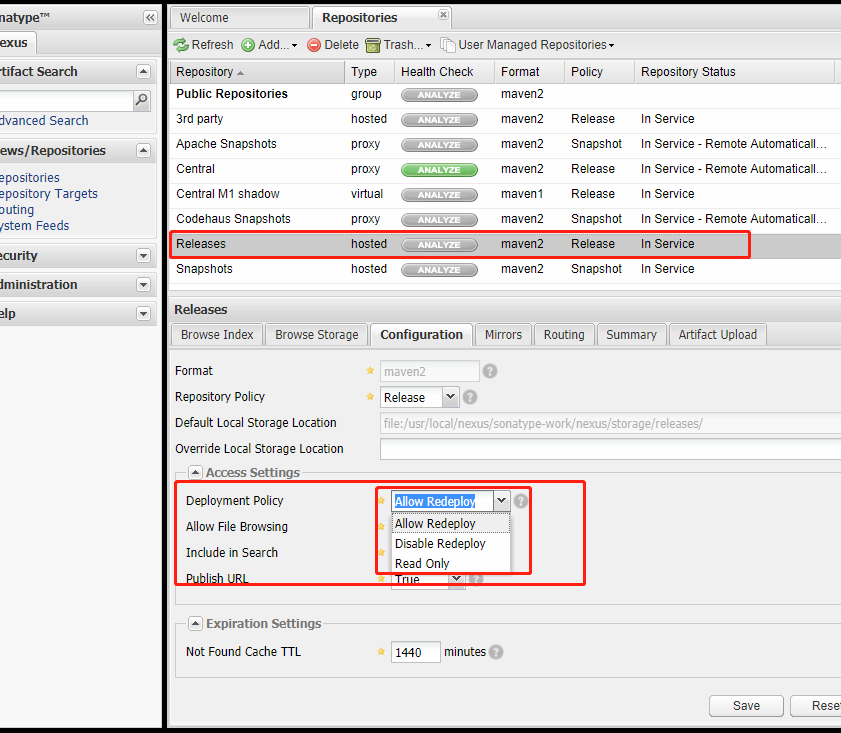
ps:maven插件配置(未完待续。。。)
maven私服的项目使用配置的更多相关文章
- maven私服nexus3.9安装配置
maven私服nexus3.9安装配置 私服介绍 私服是指私有服务器,是架设在局域网的一种特殊的远程仓库,目的是代理远程仓库及部署第三方构建.有了私服之后,当 Maven 需要下载构件时,直接请求私服 ...
- 使用eclipse和maven创建activiti项目基础配置
项目组最近的项目使用到了activiti工作流,到处查找了一些资料后,初步完成任务.但是我所做的事只是在搭好的环境中调用接口和方法操作,因此自己尝试着也从搭建环境入手,以下是成功实现以后的记录. 实现 ...
- IDEA用maven创建springMVC项目和配置
工具准备:IDEA2016.3 Java jdk 1.8 1.DEA创建项目 新建一个maven project,并且选择webapp原型. 然后点击next 这里的GroupId和Artifac ...
- IDEA用maven创建springMVC项目和配置(XML配置和Java配置)
1.DEA创建项目 新建一个maven project,并且选择webapp原型. 然后点击next 这里的GroupId和ArtifactID随意填写,但是ArtifactID最好和你的项目一名一样 ...
- ideal环境maven自动下载项目依赖配置
开篇序言 最近在使用ideal软件对springboot进行开发研究,中间遇到的环境和创建springboot遇到的问题真是玲琅满目,但是遇到问题就要克服这是万年不变的真理. 该文档会后续不断的补充, ...
- maven 私服的setting.xml配置
<?xml version="1.0" encoding="UTF-8"?> 2 <settings xmlns="http://m ...
- 配置maven从自己的私服下载jar包nexus、maven私服仓库(二)
配置maven项目从私服下载jar包 pom文件配置从maven私服下载jar包 settings文件配置从maven私服下载jar包 (方便自己关键字搜索,所以多写了几行o(* ̄︶ ̄*)o) 今天自 ...
- maven私服配置
1.maven私服setting.xml的配置 <?xml version="1.0" encoding="UTF-8"?> <setting ...
- [Gradle系列]Gradle发布module库到jCenter, 并构建自己的企业Maven私服
Tamic 作者: http://blog.csdn.net/sk719887916/article/details/53224544 前言 andorid开发者经常会看到xx公司发布了xx项目,xx ...
随机推荐
- CLR 垃圾回收知识梳理
- 98-基于FPGA Spartan6 的双路光纤PCIe采集卡(2路光纤卡)
基于FPGA Spartan6 的双路光纤PCIe采集卡(2路光纤卡) 1.板卡概述 板卡采用xilinx Spartan6系列芯片,支持 PCI Express Base Specificatio ...
- React(3) --react绑定属性
react绑定属性 /* react绑定属性注意: class要换成className for要换成 htmlFor style: <div style={{"color": ...
- SpringBoot 快速支持国际化i18n
学习目标 快速学会如何在工程中支持国际化语言. 快速查阅 专题阅读:<SpringBoot 布道系列> 源码下载:springboot-locale-i18n — Hey Man,Don' ...
- CSS实现三级菜单[转]
头部导航条布局 html代码: <!DOCTYPE html> <html> <head> <meta charset="utf-8"&g ...
- CentOS 7 LNMP环境搭建 Zabbix3.4
概述:在CentOS 7 64位操作系统环境下搭建LNMP(Linux+Nginx+MySQL+PHP)来运行Zabbix 3.4 监控程序 预先安装: yum install -y autoconf ...
- 如何触发react input change事件
页面用react来进行开发的,想触发react组件里面input的change事件,用Jquery的trigger来触发没有效果,必须使用原生的事件来进行触发. var event = new Eve ...
- AbstractQueuedSynchronizer简单使用
AQS是JUC中很多同步组件的构建基础,简单来讲,它内部实现主要是状态变量state和一个FIFO队列来完成,同步队列的头结点是当前获取到同步状态的结点,获取同步状态state失败的线程,会被构造成一 ...
- ssm科普篇
springMVC执行步骤: 1.用户发送请求到前端控制器,前端控制器根据请求信息来决定选择页面控制器,并将请求委托给它 2.页面控制器收到请求后,进行功能处理,首先需要收集和绑定请求参数到一个对象, ...
- Django前后端分离跨域请求问题
一.问题背景 之前使用django+vue进行前后端分离碰到跨域请求问题,跨域(域名或者端口不同)请求问题的本质是由于浏览器的同源策略导致的,当请求的响应不是处于同一个域名和端口下,浏览器不会接受响应 ...