
maven私服配置
1、maven私服setting.xml的配置
<?xml version="1.0" encoding="UTF-8"?>

<settings xmlns="http://maven.apache.org/SETTINGS/1.0.0"

          xmlns:xsi="http://www.w3.org/2001/XMLSchema-instance"

          xsi:schemaLocation="http://maven.apache.org/SETTINGS/1.0.0 http://maven.apache.org/xsd/settings-1.0.0.xsd">

  <localRepository>d:\repositories</localRepository>

  <pluginGroups></pluginGroups>

  <proxies></proxies>

  <servers>

    <server>

      <id>nexus-releases</id>

      <username>admin</username>

      <password>admin123</password>

    </server>

    <server>

      <id>nexus-snapshots</id>

      <username>admin</username>

      <password>admin123</password>

    </server>

  </servers>

  <mirrors></mirrors>

  <profiles>

    <profile>

       <id>center</id>

      <repositories>

        <repository>

            <id>nexus</id>

            <name>nexus</name>

            <url>http://192.168.1.147:8081/nexus/content/groups/public/</url>

            <releases>

                <enabled>true</enabled>

            </releases>

            <snapshots>

                <enabled>true</enabled>

            </snapshots>

        </repository>

      </repositories>

      <pluginRepositories>

        <pluginRepository>

            <id>nexus</id>

            <name>nexus</name>

            <url>http://192.168.1.147:8081/nexus/content/groups/public/</url>

            <releases>

                <enabled>true</enabled>

            </releases>

            <snapshots>

                <enabled>true</enabled>

            </snapshots>

        </pluginRepository>

    </pluginRepositories>

    </profile>

  </profiles>

  <activeProfiles>

    <activeProfile>center</activeProfile>

  </activeProfiles>

</settings>
2、maven项目的pom.xml配置
    </dependencies>

    <distributionManagement>

        <repository>

            <id>nexus-releases</id>

            <name>Nexus Release Repository</name>

            <url>http://192.168.1.147:8081/nexus/content/repositories/releases/</url>

        </repository>

        <snapshotRepository>

            <id>nexus-snapshots</id>

            <name>Nexus Snapshot Repository</name>

            <url>http://192.168.1.147:8081/nexus/content/repositories/snapshots/</url>

        </snapshotRepository>

    </distributionManagement>

    <build>
注意:id取值来自私服上repositories对应的name列
注意:id取值来自私服上repositories对应的name列
注意:id取值来自私服上repositories对应的name列
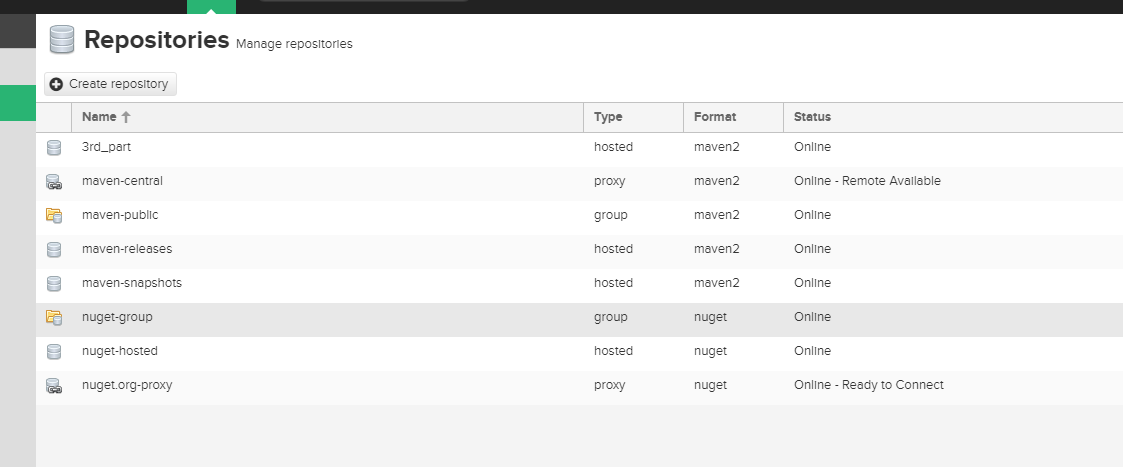
打包发布到私服:deploy
maven私服配置的更多相关文章
- Maven 私服配置 转
1.配置Nexus为maven的私服 第一种方式:在项目的POM中如下配置 <repositories> <repository> <id> ...
- maven 私服 配置 转
3 . Nexus预置的仓库 点击左侧 Repositories 链接,查看 Nexus 内置的仓库: Nexus 的仓库分为这么几类: hosted 宿主仓库:主要用于部署无法从公共仓库获取的构件( ...
- Maven私服配置Setting和Pom文件
上一遍博客已经在linux服务器上,搭建好nexus私服了 现在就需要配置setting.xml和pom.xml来使nexus作为maven的私服.setting.xml文件在conf下面,pom.x ...
- maven私服-配置本地私服环境之jar包下载环境搭建
我们前面已经搭建好环境了,就是maven里没有代码,如何导入jar包管理jar包 maven-public仓库组:已有 maven-central代理仓库:从直接代理maven中央仓库,修改为代理阿里 ...
- 搭建Maven私服
最近从SVN下载的代码,在本地构建时出现了诸多问题,部分依赖下载超时,就想起在局域网搭建Maven私服,废话不说了,在测试服务器上建的已经成功,就随便找台机子再练习一遍顺道写个日志.1.前往http: ...
- 发布本地项目和源码到maven私服中
有时候我们会使用第三方包到我们的项目中,但是想看源码的时候,需要下载源码查看,十分麻烦. 不如把源码上传到maven私服中,这样查看源码的时候就可以直接从mvaen nexus下载直接查看了. 方法如 ...
- Maven 私服你应该不陌生吧,可你会用 Artifactory 搭建吗?
JFrog Artifactory 是一个 Artifacts 仓库管理平台,它支持所有的主流打包格式.构建工具和持续集成(CI)服务器.它将所有二进制内容保存在一个单一位置并提供一个接口,这使得用户 ...
- 【Maven】---Nexus私服配置Setting和Pom
maven---nexus私服配置setting和pom 上一遍博客已经在linux服务器上,搭建好nexus私服了,博客地址:Linux搭建Nexus3.X私服 现在就需要配置setting.xml ...
- Maven中阿里云私服配置
在国内maven仓库连接速度太慢 ,虽然对于很多互联网企业和大中型软件公司,建个镜像是分分钟的事.但对于个人开发者确实是个问题.解决办法可以用阿里云的MAVEN私服.有两种方法: 1.在$MAVEN_ ...
随机推荐
- matlab 生成mat文件
生成MAT文件 假如你的矩阵A.B都已赋值,现在需要将A,B矩阵保存成mat格式文件,执行如下命令:save mydata A B 就会把A B矩阵数据保存在yourdata.dat文件中了 保存指定 ...
- Windows 8/8.1 及 Windows Phone 8 应用神器 - APP Producer
继 App studio 以及 Project Siena 之后 微软再次打造应用生成器 APP Producer,这个版本的应用生成器功能相对比之前两个版本要简单许多,更适合入门并且真正的支持全平 ...
- ReactJS 官网案例分析
案例一.聊天室案例 /** * This file provided by Facebook is for non-commercial testing and evaluation * purpos ...
- [ACM_模拟] UVA 12504 Updating a Dictionary [字符串处理 字典增加、减少、改变问题]
Updating a Dictionary In this problem, a dictionary is collection of key-value pairs, where keys ...
- 探索TFS Git 库文件换行(CRLF)的处理方式
(2018.12.29 更新,增加Git处理方式) 在计算机的技术中,所有文本信息都会涉及换行的问题.例如,你在键盘上敲击一次Enter(回车)键,系统将在文本重增加一行,实际上系统已经在文件中插入了 ...
- ChicagoBoss简介
翻译人:李罗琦 (ChicagoBoss)[http://www.chicagoboss.org] 由 Evan Miller创作,使用erlang/OTP的开发者们可以通过它提供的一个类似于Ruby ...
- Tempdb--关于表变量的一点疑问和测试
在思考表变量与临时表之间区别时,表变量不会受事务回滚的影响,那么是否意味着表变量无需写入日志呢? 测试方式: 分别对tempdb上的用户表/临时表/表变量 进行10000次插入,查看日志写入次数,使用 ...
- KVM NAT网络模式配置
NAT方式原理 NAT方式是kvm安装后的默认方式.它支持主机与虚拟机的互访,同时也支持虚拟机访问互联网,但不支持外界访问虚拟机. 检查当前的网络设置: #virsh net-list --all N ...
- Stm32 ADC学习
stm32 ADC 简介 stm32的ADC是 12位逐次逼近型 模拟数字转换器;它包括18个通道,可以用来测量16个外部通道和2个内部通道.ADC转换的结果存放在16位数据寄存器(ADC规则数据寄存 ...
- sqlserver学习
清空数据表: delete from TableName 清除表中的所有的数据,保留表的结构 truncate table TableName 清除表中所有行,保留表结构 (重置ID) 删除表 Dr ...