
Git-第二篇廖雪峰Git教程学习笔记(1)基本命令,版本回退
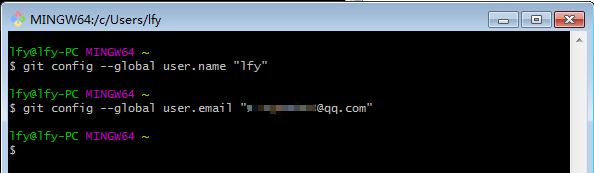
1、安装Git-2.16.2-64-bit.exe后,设置用户名,用户邮箱
#--global参数,表示你这台机器上所有的Git仓库都会使用这个配置,当然也可以对某个仓库指定不同的用户名和Email地址。
$ git config --global user.name "Your Name"

$ git config --global user.email "email@example.com"
2、创建版本库
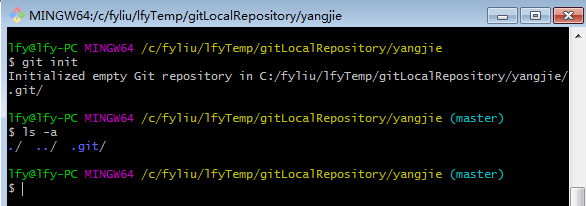
命令:git init
版本库:版本库又名仓库,英文名repository,你可以简单理解成一个目录,这个目录里面的所有文件都可以被Git管理起来,每个文件的修改、删除,Git都能跟踪,以便任何时刻都可以追踪历史,或者在将来某个时刻可以“还原”。
3、把文件添加到版本库
命令:git add 文件
解析:将文件添加到暂存区
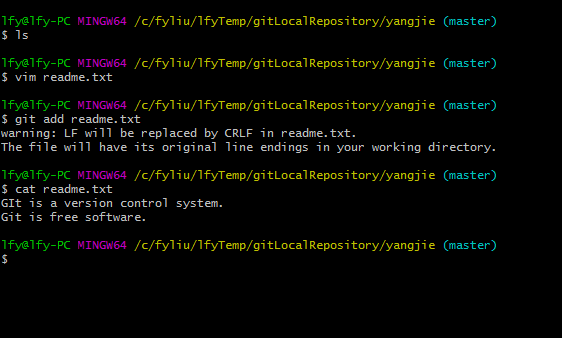
命令:git commit -m "log description"
解析:将文件添加到本地库。-m命令用于添加提交说明日志。
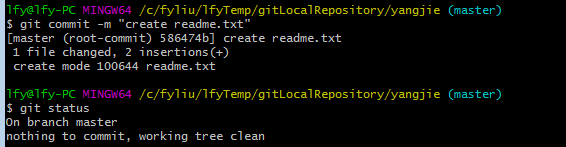
命令:git status
解析:查看当前的文件修改状态。上面截图因为我们已经提交到本地仓库了,所以当前库中没有任何修改。
命令:git diff 文件
解析:查看指定文件差异。
lfy@lfy-PC MINGW64 /c/fyliu/lfyTemp/gitLocalRepository/yangjie (master)

$ git status

On branch master

Changes not staged for commit:

  (use "git add <file>..." to update what will be committed)

  (use "git checkout -- <file>..." to discard changes in working directory)

        modified:   readme.txt

no changes added to commit (use "git add" and/or "git commit -a")

lfy@lfy-PC MINGW64 /c/fyliu/lfyTemp/gitLocalRepository/yangjie (master)

$ git diff readme.txt

warning: LF will be replaced by CRLF in readme.txt.

The file will have its original line endings in your working directory.

diff --git a/readme.txt b/readme.txt

index 9c69c9c..4b1c78e

--- a/readme.txt

+++ b/readme.txt

@@ -, +, @@

-GIt is a version control system.

+GIt is a distributed version control system.

 Git is free software.

lfy@lfy-PC MINGW64 /c/fyliu/lfyTemp/gitLocalRepository/yangjie (master)

$
4、版本回退
命令:git log [--pretty=oneline]
解析:显示从最近到最远的提交日志
lfy@lfy-PC MINGW64 /c/fyliu/lfyTemp/gitLocalRepository/yangjie (master)

$ git log

commit adde96d057448c792343465df3aee108764defbd (HEAD -> master)

Author: lfy <@qq.com>

Date:   Sat Aug  ::  +

    add GPL

commit 31728b8d6ec5a40ed7eca72aca63533d8625b423

Author: lfy <@qq.com>

Date:   Sat Aug  ::  +

    add distributed

commit 586474b5bd16e377df3b657ffc1b35f663a69038

Author: lfy <@qq.com>

Date:   Sat Aug  ::  +

    create readme.txt
在Git中,用HEAD表示当前版本,上一个版本就是HEAD^,上上一个版本就是HEAD^^,当然往上100个版本写100个^比较容易数不过来,所以写成HEAD~100。
现在,我们要把当前版本append GPL回退到上一个版本add distributed,就可以使用git reset命令
命令:git reset --hard commit_id
解析:
lfy@lfy-PC MINGW64 /c/fyliu/lfyTemp/gitLocalRepository/yangjie (master)

$ git reset --hard HEAD^

HEAD is now at 31728b8 add distributed
再次查看log,发现我们最后一次提交的内容已经找不到了。但是,只要当前窗口没有关闭(或者关闭了但你要记得commit id),还是可以再找回的,要输入之前查看的commit id。(即adde96d057...)
lfy@lfy-PC MINGW64 /c/fyliu/lfyTemp/gitLocalRepository/yangjie (master)

$ git log

commit 31728b8d6ec5a40ed7eca72aca63533d8625b423 (HEAD -> master)

Author: lfy <@qq.com>

Date:   Sat Aug  ::  +

    add distributed

commit 586474b5bd16e377df3b657ffc1b35f663a69038

Author: lfy <@qq.com>

Date:   Sat Aug  ::  +

    create readme.txt

lfy@lfy-PC MINGW64 /c/fyliu/lfyTemp/gitLocalRepository/yangjie (master)

$ git reset --hard adde96

HEAD is now at adde96d add GPL

lfy@lfy-PC MINGW64 /c/fyliu/lfyTemp/gitLocalRepository/yangjie (master)

$ cat readme.txt

GIt is a distributed version control system.

Git is free software distributed under the GPL.

lfy@lfy-PC MINGW64 /c/fyliu/lfyTemp/gitLocalRepository/yangjie (master)

$ git log

commit adde96d057448c792343465df3aee108764defbd (HEAD -> master)

Author: lfy <1220429263@qq.com>

Date:   Sat Aug 24 21:08:03 2019 +0800

    add GPL

commit 31728b8d6ec5a40ed7eca72aca63533d8625b423

Author: lfy <@qq.com>

Date:   Sat Aug  ::  +

    add distributed

commit 586474b5bd16e377df3b657ffc1b35f663a69038

Author: lfy <@qq.com>

Date:   Sat Aug  ::  +

    create readme.txt

lfy@lfy-PC MINGW64 /c/fyliu/lfyTemp/gitLocalRepository/yangjie (master)

$
命令:git reflog
解析:记录你的命令
lfy@lfy-PC MINGW64 /c/fyliu/lfyTemp/gitLocalRepository/yangjie (master)

$ git reflog

adde96d (HEAD -> master) HEAD@{}: reset: moving to adde96

31728b8 HEAD@{}: reset: moving to HEAD^

adde96d (HEAD -> master) HEAD@{}: commit: add GPL

31728b8 HEAD@{}: commit: add distributed

586474b HEAD@{}: commit (initial): create readme.txt

lfy@lfy-PC MINGW64 /c/fyliu/lfyTemp/gitLocalRepository/yangjie (master)

$
Git-第二篇廖雪峰Git教程学习笔记(1)基本命令,版本回退的更多相关文章
- Git-第四篇廖雪峰Git教程学习笔记(3)远程仓库,克隆远端库
1.本次连接的是gitHub仓库. 1>创建SSH Key. ssh-keygen -t rsa -C "youremail@example.com" lfy@lfy-PC ...
- Git-第三篇廖雪峰Git教程学习笔记(2)回退修改,恢复文件
1.工作区 C:\fyliu\lfyTemp\gitLocalRepository\yangjie 2.版本库 我们使用git init命令创建的.git就是我们的版本库.Git的版本库里存了很多东西 ...
- Git-第五篇廖雪峰Git教程学习笔记(4)分支
1.一开始,只有一个主分支(master),HEAD指向Master,而Master指向主分支.现在我们创建dev分支. lfy@lfy-PC MINGW64 /c/fyliu/lfyTemp/git ...
- 【python】廖雪峰python教程学习--基础
No1: 目前,Python有两个版本,一个是2.x版,一个是3.x版,这两个版本是不兼容的 No2: 用r''表示''内部的字符串默认不转义 No3: 以'''开头,敲回车可以换行 No4: 布尔 ...
- git-廖雪峰版教程学习笔记
- 【学习总结】Git学习-参考廖雪峰老师教程-总
公元2018-10-21 实验室台式机 win7 64位 参考教程: 廖雪峰Git教程 其他资料:Git-book 北大一只总结的笔记,最终整理的时候可以参考:Git笔记 评论区看到的另一个人,总结在 ...
- 廖雪峰 Git 教程 + Git-Cheat-Sheet 学习总结
廖雪峰 Git 教程 + Git-Cheat-Sheet 学习总结 本教程主要是个人的 Git 学习总结. 主要参考博客: 廖雪峰 Git 教程 Git-Cheat-Sheet 文章目录 廖雪峰 Gi ...
- 廖雪峰Git入门教程
廖雪峰Git入门教程 2018-05-24 23:05:11 0 0 0 https://www.liaoxuefeng.com/wiki/00137395163059296 ...
- 从零开始使用git第二篇:git的日常操作
从零开始使用git 第二篇:git的日常操作 第一篇:从零开始使用git第一篇:下载安装配置 第二篇:从零开始使用git第二篇:git实践操作 第三篇:从零开始使用git第三篇:git撤销操作.分支操 ...
随机推荐
- oracle汇编01
1: / define numeric label "1"one: / define symbolic label "one"/ ... assembler c ...
- java代码实现H5页面
public void getH5(HttpServletResponse response){ StringBuffer res=new StringBuffer(); res.append(&qu ...
- DDD领域驱动设计初探(四):WCF搭建
前言:前面三篇分享了下DDD里面的两个主要特性:聚合和仓储.领域层的搭建基本完成,当然还涉及到领域事件和领域服务的部分,后面再项目搭建的过程中慢慢引入,博主的思路是先将整个架构走通,然后一步一步来添加 ...
- maven 依赖显示红线 pom文件不显示红线的一种可能问题
pom文件引用的是CDH的jar包 而没有配置CDH的仓库 导致maven找不到资源 ,依赖显示红色波浪,并且在仓库内生成了一堆.lastupdate文件 解决: 1. 删除本地仓库内所有的.las ...
- OpenGL立方体
直接画 #include <windows.h> #include <GL/glut.h> #include <stdio.h> #include <stri ...
- 对webpack从零配置
一.新建配置文件,文件名一般为webpack.config.js: 二.配置文件目录,一般为根目录,一般会放在./build文件夹下 三.配置文件格式一般为module.exports={}, 四.结 ...
- phpstudy升级5.7
1:备份当前数据库数据. 最好是导成 SQL 文件 2:备份 PhpStudy 下的 MySQL 文件夹.以防升级失败.还可以使用旧版本的数据库 3:下载MySQL5.7.解压.然后放在 PhpStu ...
- echarts曲线图
drawLeftLine(){ let drawLine = echarts.init(document.getElementById('data-left-middle-table-wrap')); ...
- [CSP-S模拟测试]:大佬(kat)(数学期望)
题目描述 辣鸡$ljh\ NOI$之后就退役了,然后就滚去学文化课了.他发现$katarina$大佬真是太强了,于是就学习了一下$katarina$大佬的做题方法.比如这是一本有$n$道题的练习册,$ ...
- h5表单属性的介绍
表单 type属性对应的属性值 text:代表文本框 案例:<input type="text" /> password:代表密码框 radio:单选框 checkbo ...