
门户系统整合sso cookie共享及显示用户信息
1.1 门户系统整合sso
在门户系统点击登录连接跳转到登录页面。登录成功后,跳转到门户系统的首页,在门户系统中需要从cookie中 把token取出来。所以必须在登录成功后把token写入cookie。并且cookie的值必须在系统之间能共享。
1.1.1 Cookie共享:
1、Domain:必须是相同的。
例如有多个域名:
Sso.taotao.com
Search.taotao.com
需要设置domain为:.taotao.com
2、设置path:/
如果是localhost不要设置domain。直接设置path就可以了。(也就是如果没有域名,全部部署在本机上,则只设置path为/即可)
1.1.2 工具类
上面所说这些共享session的设置,在工具类中都已经写好了,我们无需关注,只要使用即可。
package com.taotao.common.utils;

import java.io.UnsupportedEncodingException;

import java.net.URLDecoder;

import java.net.URLEncoder;

import javax.servlet.http.Cookie;

import javax.servlet.http.HttpServletRequest;

import javax.servlet.http.HttpServletResponse;

/**

 *

 * Cookie 工具类

 *

 */

public final class CookieUtils {

    /**

     * 得到Cookie的值, 不编码

     *

     * @param request

     * @param cookieName

     * @return

     */

    public static String getCookieValue(HttpServletRequest request, String cookieName) {

        return getCookieValue(request, cookieName, false);

    }

    /**

     * 得到Cookie的值,

     *

     * @param request

     * @param cookieName

     * @return

     */

    public static String getCookieValue(HttpServletRequest request, String cookieName, boolean isDecoder) {

        Cookie[] cookieList = request.getCookies();

        if (cookieList == null || cookieName == null) {

            return null;

        }

        String retValue = null;

        try {

            for (int i = 0; i < cookieList.length; i++) {

                if (cookieList[i].getName().equals(cookieName)) {

                    if (isDecoder) {

                        retValue = URLDecoder.decode(cookieList[i].getValue(), "UTF-8");

                    } else {

                        retValue = cookieList[i].getValue();

                    }

                    break;

                }

            }

        } catch (UnsupportedEncodingException e) {

            e.printStackTrace();

        }

        return retValue;

    }

    /**

     * 得到Cookie的值,

     *

     * @param request

     * @param cookieName

     * @return

     */

    public static String getCookieValue(HttpServletRequest request, String cookieName, String encodeString) {

        Cookie[] cookieList = request.getCookies();

        if (cookieList == null || cookieName == null) {

            return null;

        }

        String retValue = null;

        try {

            for (int i = 0; i < cookieList.length; i++) {

                if (cookieList[i].getName().equals(cookieName)) {

                    retValue = URLDecoder.decode(cookieList[i].getValue(), encodeString);

                    break;

                }

            }

        } catch (UnsupportedEncodingException e) {

             e.printStackTrace();

        }

        return retValue;

    }

    /**

     * 设置Cookie的值 不设置生效时间默认浏览器关闭即失效,也不编码

     */

    public static void setCookie(HttpServletRequest request, HttpServletResponse response, String cookieName,

            String cookieValue) {

        setCookie(request, response, cookieName, cookieValue, -1);

    }

    /**

     * 设置Cookie的值 在指定时间内生效,但不编码

     */

    public static void setCookie(HttpServletRequest request, HttpServletResponse response, String cookieName,

            String cookieValue, int cookieMaxage) {

        setCookie(request, response, cookieName, cookieValue, cookieMaxage, false);

    }

    /**

     * 设置Cookie的值 不设置生效时间,但编码

     */

    public static void setCookie(HttpServletRequest request, HttpServletResponse response, String cookieName,

            String cookieValue, boolean isEncode) {

        setCookie(request, response, cookieName, cookieValue, -1, isEncode);

    }

    /**

     * 设置Cookie的值 在指定时间内生效, 编码参数

     */

    public static void setCookie(HttpServletRequest request, HttpServletResponse response, String cookieName,

            String cookieValue, int cookieMaxage, boolean isEncode) {

        doSetCookie(request, response, cookieName, cookieValue, cookieMaxage, isEncode);

    }

    /**

     * 设置Cookie的值 在指定时间内生效, 编码参数(指定编码)

     */

    public static void setCookie(HttpServletRequest request, HttpServletResponse response, String cookieName,

            String cookieValue, int cookieMaxage, String encodeString) {

        doSetCookie(request, response, cookieName, cookieValue, cookieMaxage, encodeString);

    }

    /**

     * 删除Cookie带cookie域名

     */

    public static void deleteCookie(HttpServletRequest request, HttpServletResponse response,

            String cookieName) {

        doSetCookie(request, response, cookieName, "", -1, false);

    }

    /**

     * 设置Cookie的值,并使其在指定时间内生效

     *

     * @param cookieMaxage cookie生效的最大秒数

     */

    private static final void doSetCookie(HttpServletRequest request, HttpServletResponse response,

            String cookieName, String cookieValue, int cookieMaxage, boolean isEncode) {

        try {

            if (cookieValue == null) {

                cookieValue = "";

            } else if (isEncode) {

                cookieValue = URLEncoder.encode(cookieValue, "utf-8");

            }

            Cookie cookie = new Cookie(cookieName, cookieValue);

            if (cookieMaxage > 0)

                cookie.setMaxAge(cookieMaxage);

            if (null != request) {// 设置域名的cookie

                String domainName = getDomainName(request);

                System.out.println(domainName);

                if (!"localhost".equals(domainName)) {

                    cookie.setDomain(domainName);

                }

            }

            cookie.setPath("/");

            response.addCookie(cookie);

        } catch (Exception e) {

             e.printStackTrace();

        }

    }

    /**

     * 设置Cookie的值,并使其在指定时间内生效

     *

     * @param cookieMaxage cookie生效的最大秒数

     */

    private static final void doSetCookie(HttpServletRequest request, HttpServletResponse response,

            String cookieName, String cookieValue, int cookieMaxage, String encodeString) {

        try {

            if (cookieValue == null) {

                cookieValue = "";

            } else {

                cookieValue = URLEncoder.encode(cookieValue, encodeString);

            }

            Cookie cookie = new Cookie(cookieName, cookieValue);

            if (cookieMaxage > 0)

                cookie.setMaxAge(cookieMaxage);

            if (null != request) {// 设置域名的cookie

                String domainName = getDomainName(request);

                System.out.println(domainName);

                if (!"localhost".equals(domainName)) {

                    cookie.setDomain(domainName);

                }

            }

            cookie.setPath("/");

            response.addCookie(cookie);

        } catch (Exception e) {

             e.printStackTrace();

        }

    }

    /**

     * 得到cookie的域名

     */

    private static final String getDomainName(HttpServletRequest request) {

        String domainName = null;

        String serverName = request.getRequestURL().toString();

        if (serverName == null || serverName.equals("")) {

            domainName = "";

        } else {

            serverName = serverName.toLowerCase();

            serverName = serverName.substring(7);

            final int end = serverName.indexOf("/");

            serverName = serverName.substring(0, end);

            final String[] domains = serverName.split("\\.");

            int len = domains.length;

            if (len > 3) {

                // www.xxx.com.cn

                domainName = "." + domains[len - 3] + "." + domains[len - 2] + "." + domains[len - 1];

            } else if (len <= 3 && len > 1) {

                // xxx.com or xxx.cn

                domainName = "." + domains[len - 2] + "." + domains[len - 1];

            } else {

                domainName = serverName;

            }

        }

        if (domainName != null && domainName.indexOf(":") > 0) {

            String[] ary = domainName.split("\\:");

            domainName = ary[0];

        }

        return domainName;

    }

}
注意,这个工具类中需要 用到 jsp 相关的jar包,可以在 pom文件中加入如下依赖:
    <!-- jsp相关(cookieUtils工具类中需要) -->

        <dependency>

            <groupId>javax.servlet</groupId>

            <artifactId>servlet-api</artifactId>

            <scope>provided</scope>

        </dependency>

        <dependency>

            <groupId>javax.servlet</groupId>

            <artifactId>jsp-api</artifactId>

            <scope>provided</scope>

        </dependency>
工具类可以放到taotao-common中。
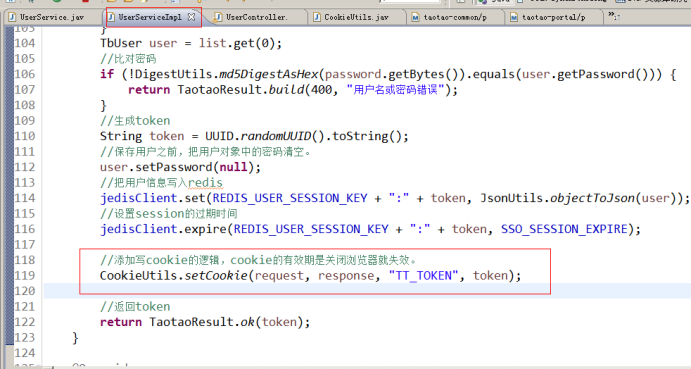
1.1.3 在登录接口中添加写cookie的逻辑
1.1.4 首页取cookie信息
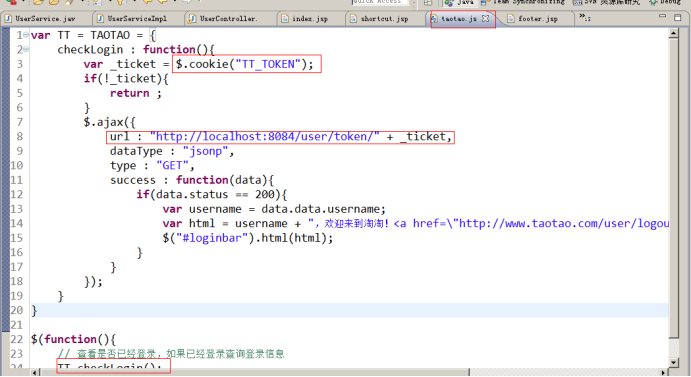
从cookie中取token,在页面中根据token取用户信息,调用sso系统的服务来完成。需要使用jsonp调用。
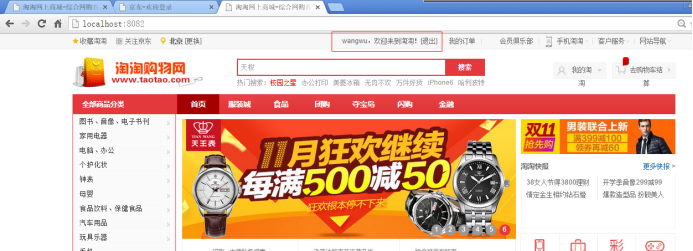
登录成功:
1.2 模拟拦截url
需求:当访问商品详情页面时强制用户登录。(当有订单系统后就改为订单系统的url。)
1.2.1 创建拦截器
1、需要实现HandlerInterceptor接口。
2、实现拦截逻辑
3、需要在springmvc.xml中配置。
门户系统整合sso cookie共享及显示用户信息的更多相关文章
- finger---用于查找并显示用户信息
finger finger命令用于查找并显示用户信息.包括本地与远端主机的用户皆可,帐号名称没有大小写的差别.单独执行finger指令,它会显示本地主机现在所有的用户的登陆信息,包括帐号名称,真实姓名 ...
- CAS 单点登录4.24版本 登录调用其它系统并且返回客户端用其它的用户信息改造
1.登录调用其它系统.修改deployerConfigContext.xml <?xml version="1.0" encoding="UTF-8"?& ...
- ajax文本空输入显示用户信息
一般文件代码 public void ProcessRequest (HttpContext context) { //获取主见值 string s = context.Request["u ...
- Jquery 类似新浪微博,鼠标移到头像,用浮动窗口显示用户信息,已做成一个jquery插件
请注意!!!!! 该插件demo PHP 的 demo下载 C#.NET的demo下载 需要如下图, 1.鼠标移动到头像DIV时,Ajax获取数据,并让浮动DIV显示出来. 2.鼠标可以移动到上面浮 ...
- struts2使用拦截器完成登陆显示用户信息操作和Struts2的国际化
其实学习框架,就是为了可以很好的很快的完成我们的需求,而学习struts2只是为了替代之前用的servlet这一层,框架使开发更加简单,所以作为一个小菜鸟,特别感谢那些超级无敌变态开发的框架供我们使用 ...
- JSP中显示用户信息
<%@ page language= "java" contentType="text/html;charset=UTF-8" %><%@ p ...
- asp.net显示用户信息
web.config <?xml version="1.0" encoding="utf-8"?> <!-- 有关如何配置 ASP.NET 应 ...
- 作用域通信对象:session用户在登录时通过`void setAttribute(String name,Object value)`方法设置用户名和密码。点击登录按钮后,跳转到另外一个页面显示用户
作用域通信对象:session session对象基于会话,不同用户拥有不同的会话.同一个用户共享session对象的所有属性.作用域开始客户连接到应用程序的某个页面,结束与服务器断开连接.sessi ...
- wordpress教程之the_author_meta()显示用户的信息
描述 模板标签函数the_author_meta可以显示用户数据.如果该函数在文章主循环(Loop)中,则不必指定作者的ID值,标签所显示的就是当前文章作者的内容.如果在主循环(Loop)外,则需要指 ...
随机推荐
- Hadoop(9)-HDFS的NameNode和SecondaryNameNode详解
1.NN和2NN工作机制 首先,我们做个假设,如果存储在NameNode节点的磁盘中,因为经常需要进行随机访问,还有响应客户请求,必然是效率过低.因此,元数据需要存放在内存中.但如果只存在内存中,一旦 ...
- CentOS下禁止防火墙
CentOS下禁止防火墙 1.使用如下命令安装iptables-services. yum install -y iptables-services 2.关闭防火墙. service iptables ...
- Andrew Ng Machine Learning Coursera学习笔记
课程记录笔记如下: 1.目前ML的应用 包括:数据挖掘database mining.邮件过滤email anti-spam.机器人autonomous robotics.计算生物学computati ...
- 转:python教程专题资源免费下载整理合集收藏
python教程专题资源免费下载整理合集收藏 < Python学习手册(第4版)>(Learning Python, 4th Edition)[PDF] 94MB 简体中文 <Pyt ...
- Go web表单验证
开发Web的一个原则就是,不能信任用户输入的任何信息,所以验证和过滤用户的输入信息就变得非常重要 必填字段 if len(r.Form["username"][0])==0{ // ...
- (译)JavaScript 中的正则表达式(RegEx)实操——快速掌握正则表达式,伴有随手可练的例子————(翻译未完待续)
(原文:https://blog.bitsrc.io/a-beginners-guide-to-regular-expressions-regex-in-javascript-9c58feb27eb4 ...
- 什么是OSS/BSS(电信业务)
电信业务运营支持系统(BOSS),面对客户是统一的:面对电信运营商,它融合了业务支撑系统(BSS)与运营支撑系统(OSS),是一个综合的业务运营和管理平台,同时也是真正融合了传统IP数据业务与移动增值 ...
- NSOperation那点事儿
1. NSOperation.NSOperationQueue 简介 NSOperation.NSOperationQueue 是苹果提供给我们的一套多线程解决方案.实际上 NSOperation.N ...
- 【数据库】 SQL 使用注意点
[数据库] SQL 使用注意点 一. 索引 1. 常用的搜索条件,都建议加上索引,但状态列除外(该列只有0,1或几个值,不需要加索引,因为没效果) 2. 查询时, 索引列不能做函数处理,会不走索引 3 ...
- python 字典(dict)按键和值排序
python 字典(dict)的特点就是无序的,按照键(key)来提取相应值(value),如果我们需要字典按值排序的话,那可以用下面的方法来进行: 1 下面的是按照value的值从大到小的顺序来排序 ...