
Win10 UI入门 导航滑动条 求UWP工作
借鉴了 段博琼 大哥写的导航滑动,自己实现了一个类似安卓 IOS 导航滑动条
支持等比例 分割 tabView 支持动画滑动
效果如下图
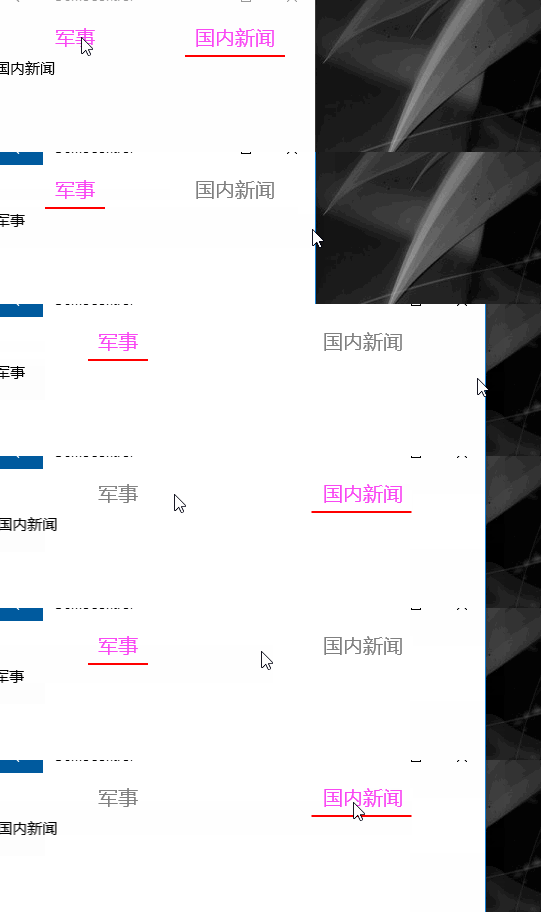
WYGrid 你可以想象一个GridView  itemsWrapGridPanel.Orientation = Orientation.Vertical; 垂直方向的控件

自定义一个项高 ItemHeight 并绑定到最高属性
                var itemsWrapGridPanel = ItemsPanelRoot as ItemsWrapGrid;

                var b = new Binding()

                {

                    Source = this,

                    Path = new PropertyPath("ItemHeight")

                };

                if (itemsWrapGridPanel != null)

                {

                    itemsWrapGridPanel.Orientation = Orientation.Vertical;

                }

                this.SetBinding(MaxHeightProperty, b);
容器样式来自于 GridViewItem styles and templates
xaml实现
<Grid>
<Grid.RowDefinitions>
<RowDefinition Height="Auto" />
<RowDefinition Height="*" />
</Grid.RowDefinitions>
<ctl:WYGrid x:Name="PART_ListViewStateName" Background="RoyalBlue" Padding="" Margin="" BorderThickness=""
ScrollViewer.HorizontalScrollBarVisibility="Hidden"
ScrollViewer.HorizontalScrollMode="Enabled"
ScrollViewer.VerticalScrollBarVisibility="Disabled"
ScrollViewer.VerticalScrollMode="Disabled" ItemHeight=""
ItemTemplate="{StaticResource DT_Pivot}"
ItemsSource="{Binding MyItemSources}">
<ctl:WYGrid.ItemContainerStyle>
<Style TargetType="GridViewItem">
<Setter Property="FontFamily" Value="{ThemeResource ContentControlThemeFontFamily}" />
<Setter Property="FontSize" Value="{ThemeResource ControlContentThemeFontSize}" />
<Setter Property="Background" Value="Transparent" />
<Setter Property="Foreground" Value="{ThemeResource SystemControlForegroundBaseHighBrush}" />
<Setter Property="TabNavigation" Value="Local" />
<Setter Property="IsHoldingEnabled" Value="True" />
<Setter Property="HorizontalContentAlignment" Value="Center" />
<Setter Property="VerticalContentAlignment" Value="Center" />
<Setter Property="Margin" Value="" />
<Setter Property="MinWidth" Value="{ThemeResource GridViewItemMinWidth}" />
<Setter Property="MinHeight" Value="{ThemeResource GridViewItemMinHeight}" />
<Setter Property="AllowDrop" Value="False" />
<Setter Property="UseSystemFocusVisuals" Value="True" />
<Setter Property="FocusVisualMargin" Value="-2" />
<Setter Property="FocusVisualPrimaryBrush" Value="{ThemeResource SystemControlFocusVisualPrimaryBrush}" />
<Setter Property="FocusVisualPrimaryThickness" Value="" />
<Setter Property="FocusVisualSecondaryBrush" Value="{ThemeResource SystemControlFocusVisualSecondaryBrush}" />
<Setter Property="FocusVisualSecondaryThickness" Value="" />
<Setter Property="Template">
<Setter.Value>
<ControlTemplate TargetType="GridViewItem">
<Grid x:Name="ContentBorder"
Control.IsTemplateFocusTarget="True"
BorderThickness=""
RenderTransformOrigin="0.5,0.5">
<Grid.RenderTransform>
<ScaleTransform x:Name="ContentBorderScale" />
</Grid.RenderTransform>
<VisualStateManager.VisualStateGroups>
<VisualStateGroup x:Name="FocusStates">
<VisualState x:Name="Focused"/>
<VisualState x:Name="Unfocused"/>
</VisualStateGroup>
<VisualStateGroup x:Name="CommonStates">
<VisualState x:Name="Normal"/>
<VisualState x:Name="PointerOver">
<Storyboard>
<ObjectAnimationUsingKeyFrames Storyboard.TargetName="ContentPresenter" Storyboard.TargetProperty="Foreground">
<DiscreteObjectKeyFrame KeyTime="" Value="{ThemeResource SystemControlForegroundBaseHighBrush}" />
</ObjectAnimationUsingKeyFrames>
<ObjectAnimationUsingKeyFrames Storyboard.TargetName="ContentBorder" Storyboard.TargetProperty="FocusVisualSecondaryBrush">
<DiscreteObjectKeyFrame KeyTime="" Value="{ThemeResource SystemControlHighlightListLowBrush}" />
</ObjectAnimationUsingKeyFrames>
<ObjectAnimationUsingKeyFrames Storyboard.TargetName="ContentBorder" Storyboard.TargetProperty="FocusVisualSecondaryThickness">
<DiscreteObjectKeyFrame KeyTime="" Value="" />
</ObjectAnimationUsingKeyFrames>
<PointerUpThemeAnimation Storyboard.TargetName="ContentPresenter" />
</Storyboard>
</VisualState>
<VisualState x:Name="Pressed">
<Storyboard>
<ObjectAnimationUsingKeyFrames Storyboard.TargetName="ContentPresenter" Storyboard.TargetProperty="Foreground">
<DiscreteObjectKeyFrame KeyTime="" Value="{ThemeResource SystemControlForegroundBaseHighBrush}" />
</ObjectAnimationUsingKeyFrames>
<ObjectAnimationUsingKeyFrames Storyboard.TargetName="ContentBorder" Storyboard.TargetProperty="FocusVisualSecondaryBrush">
<DiscreteObjectKeyFrame KeyTime="" Value="{ThemeResource SystemControlHighlightListMediumBrush}" />
</ObjectAnimationUsingKeyFrames>
<ObjectAnimationUsingKeyFrames Storyboard.TargetName="ContentBorder" Storyboard.TargetProperty="FocusVisualSecondaryThickness">
<DiscreteObjectKeyFrame KeyTime="" Value="" />
</ObjectAnimationUsingKeyFrames>
<PointerDownThemeAnimation TargetName="ContentPresenter" />
</Storyboard>
</VisualState>
<VisualState x:Name="Selected">
<Storyboard>
<ObjectAnimationUsingKeyFrames Storyboard.TargetName="ContentPresenter" Storyboard.TargetProperty="Foreground">
<DiscreteObjectKeyFrame KeyTime="" Value="{ThemeResource SystemControlForegroundBaseHighBrush}" />
</ObjectAnimationUsingKeyFrames>
<ObjectAnimationUsingKeyFrames Storyboard.TargetName="ContentBorder" Storyboard.TargetProperty="FocusVisualSecondaryBrush">
<DiscreteObjectKeyFrame KeyTime="" Value="{ThemeResource SystemControlHighlightAccentBrush}" />
</ObjectAnimationUsingKeyFrames>
<ObjectAnimationUsingKeyFrames Storyboard.TargetName="ContentBorder" Storyboard.TargetProperty="FocusVisualSecondaryThickness">
<DiscreteObjectKeyFrame KeyTime="" Value="" />
</ObjectAnimationUsingKeyFrames> <PointerUpThemeAnimation Storyboard.TargetName="ContentPresenter" />
</Storyboard>
</VisualState>
<VisualState x:Name="PointerOverSelected">
<Storyboard>
<ObjectAnimationUsingKeyFrames Storyboard.TargetName="ContentPresenter" Storyboard.TargetProperty="Foreground">
<DiscreteObjectKeyFrame KeyTime="" Value="{ThemeResource SystemControlForegroundBaseHighBrush}" />
</ObjectAnimationUsingKeyFrames>
<ObjectAnimationUsingKeyFrames Storyboard.TargetName="ContentBorder" Storyboard.TargetProperty="FocusVisualSecondaryBrush">
<DiscreteObjectKeyFrame KeyTime="" Value="{ThemeResource SystemControlHighlightListAccentMediumBrush}" />
</ObjectAnimationUsingKeyFrames>
<ObjectAnimationUsingKeyFrames Storyboard.TargetName="ContentBorder" Storyboard.TargetProperty="FocusVisualSecondaryThickness">
<DiscreteObjectKeyFrame KeyTime="" Value="" />
</ObjectAnimationUsingKeyFrames> <PointerUpThemeAnimation Storyboard.TargetName="ContentPresenter" />
</Storyboard>
</VisualState>
<VisualState x:Name="PressedSelected">
<Storyboard>
<ObjectAnimationUsingKeyFrames Storyboard.TargetName="ContentPresenter" Storyboard.TargetProperty="Foreground">
<DiscreteObjectKeyFrame KeyTime="" Value="{ThemeResource SystemControlForegroundBaseHighBrush}" />
</ObjectAnimationUsingKeyFrames>
<ObjectAnimationUsingKeyFrames Storyboard.TargetName="ContentBorder" Storyboard.TargetProperty="FocusVisualSecondaryBrush">
<DiscreteObjectKeyFrame KeyTime="" Value="{ThemeResource SystemControlHighlightListAccentHighBrush}" />
</ObjectAnimationUsingKeyFrames>
<ObjectAnimationUsingKeyFrames Storyboard.TargetName="ContentBorder" Storyboard.TargetProperty="FocusVisualSecondaryThickness">
<DiscreteObjectKeyFrame KeyTime="" Value="" />
</ObjectAnimationUsingKeyFrames> <PointerDownThemeAnimation TargetName="ContentPresenter" />
</Storyboard>
</VisualState>
</VisualStateGroup>
<VisualStateGroup x:Name="DisabledStates">
<VisualState x:Name="Enabled" />
<VisualState x:Name="Disabled">
<Storyboard>
<DoubleAnimation Storyboard.TargetName="ContentBorder"
Storyboard.TargetProperty="Opacity"
Duration=""
To="{ThemeResource ListViewItemDisabledThemeOpacity}" />
</Storyboard>
</VisualState>
</VisualStateGroup>
</VisualStateManager.VisualStateGroups>
<ContentPresenter x:Name="ContentPresenter" VerticalAlignment="Center" HorizontalAlignment="Stretch" HorizontalContentAlignment="Center"
Background="SkyBlue" FontSize="" Margin="0,10,0,10"/>
<Rectangle x:Name="PlaceholderRect" Visibility="Visible" Fill="Red" Height="" Width="" VerticalAlignment="Bottom"/>
</Grid>
</ControlTemplate>
</Setter.Value>
</Setter>
</Style>
</ctl:WYGrid.ItemContainerStyle>
</ctl:WYGrid>
<Rectangle x:Name="PART_RectStateName" Fill="Red" Height="" Width="" Grid.Row="" Opacity="" Margin="0,-2,0,0" HorizontalAlignment="Left" >
<Rectangle.RenderTransform>
<TranslateTransform/>
</Rectangle.RenderTransform>
</Rectangle>
</Grid>
基本实现思路是
初始化的时候 PivotItemLoading 来初始化导航条的位置
PART_RectStateName 显示动画 透明为1, gridview 里面的 PlaceholderRect 透明 为0

当点击的时候 SelectionChanged 被call 查找ContentPresenter 和 Rectangle 来确定位置和宽度,启动动画,之后让
PART_RectStateName 显示动画 透明为0, gridview 里面的 PlaceholderRect 透明 为1

下面是动画的代码,思路清楚了接下来很快就做好了。
        private Storyboard StoryBordTemp(double formW, double toW, Point newPoint, Point oldPoint)

        {

            var storyBoard = new Storyboard();

            var extendAnimation = new DoubleAnimation { Duration = new Duration(TimeSpan.FromSeconds(0.5)), From = formW, To = toW, EnableDependentAnimation = true };

            QuarticEase easing = new QuarticEase();

            easing.EasingMode = EasingMode.EaseOut;

            easing.Ease(0.3);

            extendAnimation.EasingFunction = easing;

            Storyboard.SetTarget(extendAnimation, _rectangle);

            Storyboard.SetTargetProperty(extendAnimation, "Width");

            var xAnimation = new DoubleAnimation { Duration = new Duration(TimeSpan.FromSeconds(0.5)), From = newPoint.X, To = oldPoint.X, EnableDependentAnimation = true };

            QuarticEase xEasing = new QuarticEase();

            xEasing.EasingMode = EasingMode.EaseOut;

            xEasing.Ease(0.3);

            xAnimation.EasingFunction = xEasing;

            Storyboard.SetTarget(xAnimation, _rectangle);

            Storyboard.SetTargetProperty(xAnimation, "(UIElement.RenderTransform).(TranslateTransform.X)");

            storyBoard.Children.Add(extendAnimation);

            storyBoard.Children.Add(xAnimation);

            storyBoard.Begin();

            return storyBoard;

        }
详情请查看 https://github.com/androllen/CCUWPToolkit
Win10 UI入门 导航滑动条 求UWP工作的更多相关文章
- Win10 UI入门 SliderRectangle
看了@段博琼大哥导航滑动的思路,自己又做了一个类似与黄油相机里面的一个功能 <Grid x:Name="> <Grid.ColumnDefinitions> < ...
- Win10 UI入门窗口由默认500px to 320px
https://code.msdn.microsoft.com/Layout-for-windows-that-ba648e1c/ https://msdn.microsoft.com/library ...
- Win10 UI入门 pivot multiable DataTemplate
this is a dynamic pivot with sliderable navigation and multiableDatatemplate Control 看了 alexis 大哥的pi ...
- Win10 UI入门 圆形控件
动态模版绑定 http://blog.csdn.net/XXChen2/article/details/4552554
- Win10 UI入门RelativePanel(2)
自适应 1) Gif: 添加动画 2)
- Win10 UI入门 RenderTransform属性分析之Translate 平移变形
对齐方式是中心底部对齐: HorizontalAlignment="Center" VerticalAlignment="Bottom" 以底部边为起始线,向上 ...
- Win10 UI入门RelativePanel
<RelativePanel Background="Black" > <Rectangle x:Name=" RelativePanel.AlignH ...
- UWP Control Toolkit Collections 求UWP工作
1. it is like wechat wait-sliderdeleteitem in iOS 看起来比较像微信删掉项 now support listview and gridview in C ...
- IOS开发-UI学习-UISlider(滑动条)的使用
滑动条即UISlider,是我们常见的软件中设置音量,亮度等的滑条,初始化及基本设置如下: // 新建滑动条 UISlider *slider = [[UISlider alloc]initWithF ...
随机推荐
- mysql 各项操作流程
启动mysql:进入命令行输入:net start mysql 如果失败则显示:服务名无效,需跳转到指定Bin目录下进行启动mysql, 成功则进行下一步:登陆 :mysql -uroot -proo ...
- APICloud开发小技巧(一)
apicloud开发文档中,前端开发框架指的就是,类似jq\js的语法: https://docs.apicloud.com/Front-end-Framework/framework-dev-gui ...
- React从安装到实战
建议:初学者看之前请先看一遍菜鸟教程 可以安装一个ATOM编辑器,本人觉得很好用 一.安装并启动项目:网址 搭建好的项目目录为: 二.开始写项目: 1.组件到界面流程: 定义一个组件app.js导出 ...
- 如何避免命令 rm -rf 的悲剧
一.root高管用户为例,其他用户类同. https://www.cnblogs.com/eos666/articles/10389179.html [root@jenkins /]# vim /ro ...
- 【BZOJ3065】带插入区间k小值
题意: 带插入,修改的区间k小值在线查询 原序列长度<=35000,插入个数<=35000,修改个数<=70000,0<=权值<=70000 题解: Orz vfleak ...
- 【CF666E】Forensic Examination - 广义后缀自动机+线段树合并
广义SAM专题的最后一题了……呼 题意: 给出一个长度为$n$的串$S$和$m$个串$T_{1\cdots m}$,给出$q$个询问$l,r,pl,pr$,询问$S[pl\cdots pr]$在$T_ ...
- URL编码及解码
为什么要对URL进行编码? 一般来说,网页URL只能使用英文.数字.还有一些特定的字符.根据网络标准RFC 1738做了硬性规定: 只有字母和数字[0-9a-zA-Z].一些特殊符号"$-_ ...
- Project Euler 14 Longest Collatz sequence
题意:对于任意一个数 N ,寻找在 100,0000 之内按照规则( N 为奇数 N = N * 3 + 1 ,N 为偶数 N = N / 2 ,直到 N = 1 时的步数 )步数的最大值 思路:记忆 ...
- nyoj48-小明的调查作业
48-小明的调查作业 内存限制:64MB时间限制:1000msSpecial Judge: No accepted:3submit:4 题目描述: 小明的老师布置了一份调查作业,小明想在学校中请一些同 ...
- [Noi2002]Savage
[Noi2002]Savage 数学题. 题解回去写(有个坑点) flag++ #include <cstdio> int n,m,c[25],p[29],l[29]; int exgcd ...